Error codes
QuickBooks errors, explained
Most codes are a quick fix. A few mean real damage — here's how to tell.
QuickBooks errors are the program telling you it cannot do something right now — usually reach a company file, a server, or a network drive. Most are local connection, hosting, or permission problems you can fix yourself. A few signal real file damage that needs repair.
Last reviewed October 2026 by a Certified QuickBooks ProAdvisor
What this page is based on: Intuit’s QuickBooks Desktop Tool Hub article (checked October 2026) and our error pages’ own diagnostics
- Most errors are a quick fix
- We escalate only real damage
- One specialist — never a rotating pool
Find your code
QuickBooks error codes by family
The number tells you which part of QuickBooks failed. The family is the fastest way to know where to start — and the table gives the first step and the Tool Hub tab for each code we cover in full.
| What it means | First step | Tool Hub tab | |
|---|---|---|---|
| H202 (multi-user) | A workstation cannot reach the computer hosting the company file | Check hosting and the Database Server Manager on the server | Network Issues, run on the server |
| 6000-77 (company file) | Opening a file from a place QuickBooks can't use — an external or mapped drive, or a damaged folder | Open QuickBooks as administrator; copy the file to the local drive | Company File Issues |
| 6000-83 (company file) | Opening, backing up or restoring a file fails — often a server's hosting settings | Check the backup's file name; turn hosting off on every workstation | Company File Issues |
| 6123 (company file) | The connection to the file was lost, often while opening or restoring | Open it from inside QuickBooks; for a restore, move the backup to the local drive | Program Problems, then Company File Issues |
| 6189, 816 (company file) | A multi-user network problem, not damage to the data file | Run Quick Fix my Program; restart the server, then the workstations | Program Problems, then Network Issues on the server |
| 3371 (license) | QuickBooks cannot read its license data | Run the 3371 Error Fix; then delete the entitlement file | Installation Issues |
| 1603 (installer) | QuickBooks Desktop failed to install, or to open after the install | Run the Install Diagnostic Tool; then update Windows | Installation Issues |
| 15271 (update) | A QuickBooks Desktop or payroll update would not download or install | Run the update as administrator; repair QuickBooks | Program Problems |
| PS038 (payroll) | Paychecks stuck as Online to Send block payroll and tax-table downloads | Send payroll data; find the stuck paychecks; verify and rebuild | Not a Tool Hub fix |
| OL-301, OLSU-1013 (bank feeds) | The online-banking link did not connect or activate | Clear bank alerts; test in a new company file; refresh the connection | Not a Tool Hub fix |
| Unrecoverable error (crash) | QuickBooks closes unexpectedly while opening, saving, updating or running a file utility | Update and back up; open the file holding Alt | Program Problems, as Intuit's last step |
Who this affects
Most QuickBooks errors are local, not your books
If QuickBooks threw a code at you, start here. These are the errors we are asked about most. Each one is usually a connection, hosting, or permission problem on your side — not damage to your data. Open the one you are seeing for the plain fix, and the signs that mean it is time to call someone.
The QuickBooks Tool Hub, tab by tab
The Tool Hub is Intuit's free repair kit for QuickBooks Desktop on Windows. Intuit's Tool Hub article (updated 8/4/2026, checked November 2026) says it fixes common errors such as Error 6123 and Error H202, installation errors, company file issues, networking errors, and PDF or printing problems, and recommends Windows 11 (64-bit). Close QuickBooks, download the latest version from that article, run QuickBooksToolHub.exe, and open it from the desktop icon. Then pick the tab for your problem:
- Company File Issues — Quick Fix my File, or QuickBooks File Doctor, for common data issues.
- Network Issues — network problems such as H202. Intuit says you must be on your server computer to use these tools.
- Program Problems — problems opening or working in the app, including PDF and printing errors.
- Installation Issues — installing or uninstalling QuickBooks Desktop, such as error 3371.
- Password Reset — Intuit's automated reset tool for the admin password.
Download it only from Intuit. Windows may warn that the file "can harm your device"; Intuit's article covers that warning and what to do about it.
First steps that apply to almost every code
- Make a copy first. Before any repair, back up the company file and keep that copy unchanged.
- Update QuickBooks Desktop to the latest release (Help → Update QuickBooks Desktop).
- Run the matching Tool Hub tab from the table above, on the right computer — the server for network errors.
- Check the data with File → Utilities → Verify Data, and run Rebuild Data only on a backed-up file.
- Stop when it comes back. A code that returns after these steps, or a file that will not open at all, is the signal for file repair rather than another restart.
These are QuickBooks Desktop codes, and the Tool Hub is a Desktop tool. QuickBooks Online runs in your browser; when it misbehaves the cause is usually sign-in, the browser, or a bank connection — see bank feed issues.
When to escalate
Which errors actually need a specialist
Most of the time the answer is none — you work the steps on the error's page and QuickBooks opens again. A specialist earns their fee only when the same code keeps coming back after the basics, or when it arrives alongside signs of a damaged file.
Start here
Your QuickBooks error — is it a quick fix or a real problem?
A CONNECTION MESSAGE
Usually a DIY fix
Network, hosting, firewall, or permission settings clear most codes — the steps are on each error's page.
See error H202IT KEEPS COMING BACK
Could be a damaged file
A code that returns after the basics, or a file that will not open, points to real corruption.
See file repairREPORTS ARE WRONG TOO
That's a cleanup
If the numbers are off as well as the error, the books need correcting, not the file.
See QuickBooks cleanup
Read this as text
- A CONNECTION MESSAGE: Usually a DIY fix — Network, hosting, firewall, or permission settings clear most codes — the steps are on each error's page.
- IT KEEPS COMING BACK: Could be a damaged file — A code that returns after the basics, or a file that will not open, points to real corruption.
- REPORTS ARE WRONG TOO: That's a cleanup — If the numbers are off as well as the error, the books need correcting, not the file.
Who fixes what
Read this as text
Three lanes, left to right. Connection and access codes are settings work — hosting, firewall, permissions — for you or your IT support. A code that survives those steps points to file damage, which needs file repair or rescue. Wrong numbers alongside the error mean a books problem, which needs cleanup. An illustrative triage.
How an error fix is written up
Who’s responsible for your file
A Certified QuickBooks ProAdvisor handles your file from the review through the corrections to the hand-back — the same person throughout, never a rotating pool.
About QBSpecialist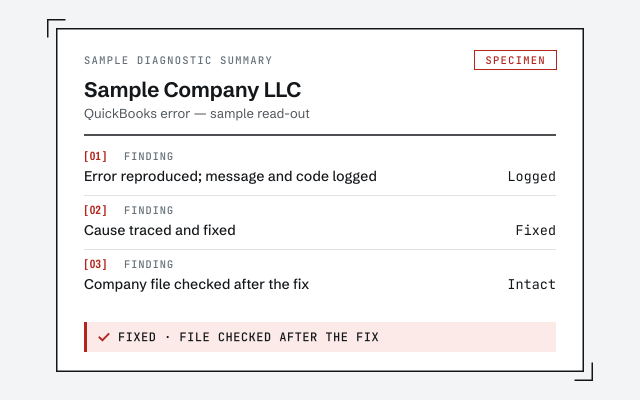 Illustrative example — not a client file.
Sample diagnostic summary
The written read-out you get when we diagnose an error, in plain language.
How we work
We rule out the simple causes before touching your file. See what repair involves.
See QuickBooks file repairResponse commitment
A written reply within one business day.
Questions about QuickBooks errors
Do QuickBooks errors mean my books are broken?
Usually not. Most error codes are about reaching your company file — a network, hosting, or permission problem — not the numbers inside it. Your data is typically fine; QuickBooks just can't open or share the file at that moment.
Can I fix a QuickBooks error myself?
Often, yes. The common codes have well-known steps: restart in the right order, check hosting and firewall settings, or move the file to a local drive. Each error page here lists the plain fix. If the code returns after that, the cause is usually deeper.
When is a QuickBooks error actually serious?
When the same code keeps returning after the basic steps, when the file will not open at all, or when QuickBooks reports the file is damaged. Those signal real corruption, and repairing the company file is the job — not another restart.
What is the difference between an error and a corrupt file?
An error is a message; corruption is the cause behind some of them. Many errors clear once the connection or permission is fixed. Corruption means the file's data structure is damaged, which needs file repair or a rescue to recover.
What is the QuickBooks Tool Hub?
A free diagnostic toolkit Intuit publishes for QuickBooks Desktop — it bundles File Doctor, program repairs, and network checks in one window. Download it only from Intuit's official site. We are independent of Intuit; we point you to the Tool Hub where it genuinely helps, and step in only when an error turns out to be file damage or a books problem.
Which Tool Hub tab fixes which QuickBooks error?
Intuit's own Tool Hub article maps them: Company File Issues runs Quick Fix my File or QuickBooks File Doctor for company-file errors such as 6123; Network Issues fixes network problems such as H202 and must be run on the server computer; Program Problems covers opening, working, PDF and printing errors; Installation Issues covers installing and uninstalling, such as error 3371; Password Reset resets the admin password.
Do these error codes appear in QuickBooks Online?
Mostly no. The numbered codes on this page — H202, the 6000 series, 6123, 6189, 3371, 15271, 1603, PS038, OL-301 and OLSU-1013 — are QuickBooks Desktop errors, and the Tool Hub is a Windows tool for Desktop. QuickBooks Online runs in the browser; its problems are usually sign-in, browser or bank-connection issues, which our bank feed issues page covers.
Do you charge to look at an error?
No. The free review includes a view-only look at the error and the file. We tell you whether it is a quick fix you can do yourself or genuine damage that needs repair, and we quote a fixed scope only if there is real work.
More QuickBooks error codes
- DocQuickBooks error 6000-83Company file cannot be opened. Damage or permissions.
- DocQuickBooks error 6189-816File and transaction log out of sync.
- DocQuickBooks error 3371License data could not be initialized. A reset.
- DocQuickBooks error 15271A payroll or program update failed to complete.
- DocQuickBooks error PS038A paycheck stuck online holds up payroll updates.
- DocQuickBooks error OL-301Online banking cannot connect to your bank.
- DocQuickBooks error OLSU-1013Bank feed setup or connection has failed.
- DocQuickBooks error 1603The installer failed partway through. A repair.
- DocQuickBooks unrecoverable errorA crash that points to real file damage.
- Not reconciling— the common problem that has no error code at all
- Balance sheet out of balance— when the error is in the numbers, not the software
- Behind on bookkeeping— when the trouble is months not entered rather than a message on screen
Not sure how bad it is?
Talk to a QuickBooks specialist.
Describe the file and a specialist will tell you what it needs — including when the answer is that you don't need us.