QuickBooks unrecoverable error
QuickBooks unrecoverable error
The crash with the five-digit code pair, decoded.
QuickBooks Desktop crashed and printed “unrecoverable error” with a pair of five-digit codes — the program's general crash message. A QuickBooks unrecoverable error is a category, not a single fault: it can stem from a damaged company file, a damaged installation, or one corrupt transaction or list entry. The work is narrowing which of those it is, then fixing that.
Last reviewed October 2026 by a Certified QuickBooks ProAdvisor
What this page is based on: Intuit’s own help article for this error (checked October 2026)
- A general crash, not one fixed cause
- Program fixes first, then the file
- This is the error that most often means real damage
What it is
One message, several possible causes
Unlike a targeted code such as -6000, -77, an unrecoverable error does not name its own cause. It is what QuickBooks Desktop shows whenever it hits a fault it cannot continue past, and it prints two five-digit numbers so a support agent can group similar reports. The honest reading is a category: the crash can come from a damaged company file, from a damaged QuickBooks installation on that computer, or from a single corrupt transaction or list entry the program chokes on. Because the same code pair can appear for different reasons — and the same reason can surface different pairs — the pair is something to record and report, not a diagnosis. The point of the steps below is to narrow which category you are in.
One message, three suspects
Read this as text
The unrecoverable error message shows a five-digit code pair, but the same pair can come from any of three causes: a damaged company file, a damaged QuickBooks installation, or a single corrupt transaction or list entry. The pair groups cases for support — it does not name the cause. Illustrative.
Start here
Unrecoverable error — program, or the file?
IT HAPPENS ACROSS FILES OR AT STARTUP
Suspect the program
If it crashes on a sample file too, or before any file opens, the QuickBooks installation or Windows environment is the more likely cause — start with the program fixes.
IT FOLLOWS ONE COMPANY FILE
Suspect file damage
If a sample file opens fine but yours crashes, or it fails at the same action every time, the company file is the likely suspect.
See file repair
Read this as text
- IT HAPPENS ACROSS FILES OR AT STARTUP: Suspect the program — If it crashes on a sample file too, or before any file opens, the QuickBooks installation or Windows environment is the more likely cause — start with the program fixes.
- IT FOLLOWS ONE COMPANY FILE: Suspect file damage — If a sample file opens fine but yours crashes, or it fails at the same action every time, the company file is the likely suspect.
Fix it yourself
The DIY fix, step by step
An unrecoverable error narrows fastest when you work from the quickest, safest program-level fixes toward the file. Before you change anything, write down the exact code pair from the message — you will want it if you contact support.
Note the exact code pair
Record both five-digit numbers exactly as shown, plus what you were doing when it crashed. This is the single most useful thing to have on hand, and it costs nothing.
Run Quick Fix my Program
Install the QuickBooks Tool Hub, open Program Problems, and run Quick Fix my Program, then reopen QuickBooks and your file. If it persists, run the QuickBooks Program Diagnostic Tool there (up to 20 minutes), then restart and relaunch.
Update QuickBooks
Update QuickBooks Desktop to the latest release and back up the company file, as Intuit asks before you start. Then open the file holding Alt, so QuickBooks doesn't reopen a window left open last time.
Try a different user
Sign in as a new QuickBooks user; if that works, delete and re-create the user that fails. If the error comes only with the admin user, run QuickBooks File Doctor. A new Windows administrator account tests whether your Windows user is the problem.
Restore a recent backup
Open a sample company (hold Ctrl while starting QuickBooks). If the sample opens without the error, Intuit says your file or its folder might be damaged: move the file to a new folder, or use a recent backup or Auto Data Recovery to restore it.
"QuickBooks" is used here descriptively to name the software we work in. For official product support, billing, or account access, use Intuit's official channels.
Intuit's own steps for an unrecoverable error, in Intuit's order
Intuit's unrecoverable error article (updated 10/6/2026, checked November 2026) says the error can appear when you open or close a file, save a backup or portable copy, choose a menu option, update QuickBooks, or run Verify, Rebuild or Condense, and gives one route for all of them. Before anything, update QuickBooks Desktop and back up the file. Then:
- Open with all windows closed: hold Alt while opening the file from the No Company Open screen, so QuickBooks doesn't reopen a window that triggers the error.
- Try a different user: create a new QuickBooks user and sign in with it; if the error follows the admin user, run File Doctor. A new Windows administrator account tells you whether the Windows user is damaged.
- Open a sample company file: hold Ctrl while launching QuickBooks. If the sample opens without the error, Intuit says your company file or its folder might be damaged, and you can use a recent backup or Auto Data Recovery (ADR) to restore it.
- Move the company file to a new folder and open it there; if it opens, the original folder is damaged or its path too long.
- Run Quick Fix my Program and the Program Diagnostic Tool from the Tool Hub's Program Problems tab (Intuit says the diagnostic can take up to 20 minutes), restart, and relaunch.
- Reinstall QuickBooks if the error persists.
If the steps point at the file rather than the program, the next stop is QuickBooks file repair.
When it means more
When an unrecoverable error means real file damage
A QuickBooks unrecoverable error that survives the program fixes and stays tied to one company file — a sample file opens, yours does not, or it fails at the same report or transaction every time — means the file itself is damaged. Of all the common QuickBooks messages, the unrecoverable error is the one that most credibly signals possible corruption, so this is often where a real file repair, rather than another program tweak, is warranted. If instead the crash traces to Windows, a specific user profile, memory, or a failing disk, it is an OS-level or hardware problem that belongs with your IT support, not with the books. We diagnose from a copy, so the original file is never put at further risk while we work out which of these it is. Two related guides may fit your symptom better: error -6000, -83 if the file refuses to open with a code instead of crashing, and the 1603 install-error guide if the trouble began with a failed install or update.
The narrowing test
Read this as text
The narrowing test for an unrecoverable error: when a sample file crashes too, the crash comes before any file opens, or a program repair clears it, the installation is the suspect. When a sample file opens but yours does not, it fails at the same action every time, or it survives every program fix, the company file is the suspect — the pattern that most credibly means real damage. Illustrative.
How the unrecoverable-error fix is written up
Who’s responsible for your file
A Certified QuickBooks ProAdvisor handles your file from the review through the corrections to the hand-back — the same person throughout, never a rotating pool.
About QBSpecialist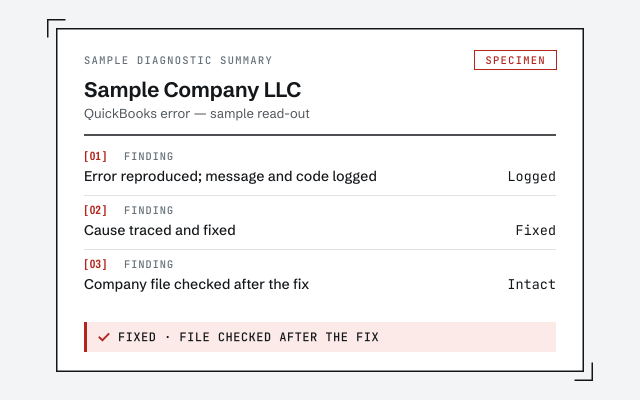 Illustrative example — not a client file.
Sample diagnostic summary
The written read-out that tells you whether it is the program, the environment, or genuine file damage.
How we work
We confirm the cause on a copy before touching your file. See what repair involves.
See QuickBooks file repairResponse commitment
A written reply within one business day.
Questions about the unrecoverable error
What does a QuickBooks unrecoverable error mean?
It is QuickBooks Desktop's general crash message, shown with a pair of five-digit codes such as 'unrecoverable error XXXXX XXXXX'. It signals that the program hit a fault it could not continue past. The cause is not fixed to the code pair — it can be a damaged company file, a damaged QuickBooks installation, or one corrupt transaction or list entry.
Does the code pair tell you the exact cause?
Not reliably. The two numbers help Intuit's support team group cases, but the same pair can appear for different underlying reasons, and the same reason can show different pairs. Treat the code pair as something to record and report, not as a diagnosis on its own.
How do I fix an unrecoverable error quickly?
Start with QuickBooks Tool Hub and run the Quick Fix my Program tool, make sure QuickBooks is fully updated, and open the program as an administrator. If the crash only happens on one company file, restoring a recent clean backup often clears it. Note the exact code pair before you change anything.
When does an unrecoverable error mean my file is actually damaged?
When the crash follows one specific company file — it opens a sample file fine but fails on yours, or fails at the same action every time — the file itself is the most likely suspect. Of the common error messages, this one most credibly points to possible corruption, and that is where a file repair is warranted.
Is this error a bookkeeping problem I can fix in the books?
Usually not. An unrecoverable error is a program or file fault, not a wrong balance or miscategorized transaction. If it traces to Windows, user profiles, or hardware it belongs with IT; if it traces to the company file it belongs with file repair — neither is fixed by adjusting the books.
Did the unrecoverable error lose my data?
Usually only the work since your last save. The crash closes the program mid-task, so the entry you were making may be gone, but the company file on disk is normally intact — reopen and check your most recent transactions. Repeated crashes are exactly when a current backup matters most, so confirm yours before you keep working.
Where to go next
- QuickBooks rescue for a broken file— Diagnose a file whose reliability is in question.
- Error H202— the multi-user error that often appears beside it
- Error 6123— a file that won't open after a restore
- Error 6000 77— a file that won't open from where it is stored
Not sure how bad it is?
Talk to a QuickBooks specialist.
Describe the file and a specialist will tell you which of these you are dealing with — including when the answer is that you don't need us.