Skip to content
QB Specialist

QuickBooks 1099 cleanup

QuickBooks 1099 cleanup, before the deadline.

A QuickBooks 1099 cleanup flags the vendors that should receive a 1099, fixes payment-account and threshold mapping, and reconciles the totals so your filings match what QuickBooks actually paid. We sort out excluded card payments and missing W-9s before the January deadline, not after it.

Last reviewed July 2026

  • Filings that reconcile
  • Fixed scope, fixed fee
  • A senior specialist, not a pool

What a QuickBooks 1099 cleanup is

A QuickBooks 1099 cleanup is the work of deciding which vendors should receive a 1099, excluding the payments that don't belong on one, correcting the account and threshold mapping, and reconciling every vendor total back to what QuickBooks actually paid — so your filings match your books.

The 1099 report is built from your vendor records and the accounts your payments are coded to. When a vendor is missing its 1099 flag, a card payment is miscoded as a check, or the wrong expense accounts are mapped, the totals QuickBooks produces stop matching reality — and the forms go out wrong. A cleanup fixes the vendor setup and the mapping, not the underlying payments. It is one piece of a full QuickBooks cleanup, and it is separate from actually transmitting the forms to the IRS.

Who needs a 1099 cleanup

You need a 1099 cleanup when you can't trust the totals QuickBooks produces at year-end — vendors missing their flag, card payments counted, or amounts that don't match what you know you paid.

The usual signs:

  • A contractor you paid all year who isn't marked for a 1099.
  • Card or third-party-network payments showing up in your 1099 totals.
  • Vendors with no current W-9 on file, so you can't confirm entity type or tax ID.
  • 1099 amounts that don't tie to the checks and bill payments you actually sent.
  • Last year's filing went out and a vendor said their amount was wrong.
  • A new bookkeeper or CPA who can't tell which vendors are reportable.

If your vendor list is short and every contractor already has a W-9 and a correct flag, you may not need this at all — a point we return to below. Not sure? A free bookkeeping health score flags 1099 mapping gaps in a few minutes.

How a 1099 cleanup works: flag, exclude, map, reconcile

Four moves do most of the work: flagging the vendors that are reportable, excluding the payments a third party already reports, correcting the account and threshold mapping, and reconciling every total. Each step is documented, so you can see exactly why a vendor is in or out.

1099 cleanup

How vendor payments become a filing-ready 1099 Vendor payments flow left to right through a 1099-eligible check — which drops card payments and incorporated vendors out to an excluded lane — then through a totals reconcile, ending at a filing-ready set of amounts marked verified. Illustrative flow, not a measured result. VENDOR PAYMENTS → FILING-READY Vendors 1099-eligible? Reconcile Filing-ready TOTALS TIE Card & incorporated — excluded DROPS OUT
A 1099 cleanup runs each vendor payment through an eligibility check that drops card and incorporated payments out, then reconciles the survivors to a filing-ready total. The flow is illustrative, not a measured result.

Flagging is a per-vendor decision, not a guess from the name: an LLC can be taxed as a corporation (excluded) or a sole proprietor (reportable), and only the W-9 says which. Excluding card payments matters because amounts paid by credit card, debit card, or a third-party network are reported by the processor, so reporting them again on your 1099 double-counts them. Mapping decides which expense accounts feed the 1099 and in which box — if rent lands in the wrong box, or a contractor's account isn't mapped at all, real payments vanish or show up in the wrong place. Then we reconcile each vendor total back to the checks and bill payments behind it, so the number you file is the number you paid.

Mapping

What correct vendor mapping looks like

Correct mapping means every reportable vendor is flagged, on the right form and box, with card payments removed — and every excluded vendor is excluded for a documented reason.

Vendor mapping

Vendor 1099 mapping, before and after cleanup Three vendors as mapped before cleanup — a contractor with no 1099 flag, a landlord in the wrong box, and a card-paid vendor wrongly counted — then after cleanup: the contractor flagged for 1099-NEC, the landlord moved to 1099-MISC, and the card-paid vendor excluded. Illustrative example, not real vendors. BEFORE · AS MAPPED AFTER · FILING-READY Ace Contracting NO 1099 City Landlord WRONG BOX Card-Paid Co COUNTED FLAG IT RETYPE EXCLUDE CARD Ace Contracting 1099-NEC City Landlord 1099-MISC Card-Paid Co EXCLUDED
Cleanup flags the unmarked contractor for a 1099-NEC, moves the landlord's rent to the right form, and excludes the card-paid vendor a processor already reports. Vendor names are illustrative.

The two errors that skew a 1099 in opposite directions live in this picture: a reportable vendor with no flag makes the filing too small, and a card-paid or incorporated vendor left counted makes it too large. Fixing both is what makes the totals defensible — and the change log shows you every decision, so you or your CPA can audit it.

How it goes

How long a 1099 cleanup takes

Most 1099 cleanups run three to five days: a day-0 review, a day or two flagging vendors and excluding card payments, a day or two reconciling totals, and a handback before you file. Multi-entity files or high vendor counts run one to two weeks.

  1. Free review

    Day 0

    Read-only look at your vendors and payments; we scope the work and quote a fixed fee.

  2. Vendor and payment review

    Days 1–2

    We flag who needs a 1099, exclude card payments, and check thresholds and mappings.

  3. Reconcile totals

    Days 3–4

    Each vendor total tied back to what QuickBooks actually paid, W-9 gaps listed.

  4. Hand back

    Day 5

    Filing-ready 1099 data, a summary of every fix, and a call before you file.

What you get when the cleanup is finished

You get a filing-ready 1099 dataset — the right vendors, the right amounts, mapped to the right boxes — plus a written summary of every vendor decision, a list of any missing W-9s, and a call before you file.

Nothing is a black box: the summary lists each vendor, whether they are reportable, on which form, and why any payment was excluded, so the numbers can be audited before they go out. Because contractor pay and employee pay are easy to confuse, a 1099 cleanup pairs naturally with a payroll cleanup when both W-2 and 1099 workers run through the same file.

Scope check

1099 cleanup vs. filing vs. DIY

A cleanup fixes the data behind your 1099s; a filing service transmits whatever data you hand it; DIY works when the file is already small and tidy. Here is how the three compare.

1099 cleanup vs. a filing service vs. doing it yourself
1099 cleanup Filing service DIY in QuickBooks
Decides who needs a 1099 It depends
Excludes card payments
Corrects form and box mapping It depends
Flags missing W-9s
Reconciles totals to payments
Submits to the IRS
Typical timeline 3–5 days Minutes Hours
Best when Mapping is wrong Data is already clean Few, simple vendors
Verdict Fix the data Just transmit Small and tidy

What it costs

What a 1099 cleanup costs

Every 1099 cleanup is a fixed scope with a fixed fee, quoted after a free read-only review. The figures below are published starting floors; the review sets the real range for your file.

1099 cleanup pricing
Engagement Typical range Timeline What's included
From $1,500 3–5 days Vendor review, threshold and account mapping, totals reconciled for filing.
From $1,500 1–2 weeks Several entities or high vendor counts, with W-9 tracking.
From $400/mo Ongoing 1099 mapping kept current all year, so January is a non-event.
Estimate your range

Standard 1099 cleanup

Typical range
From $1,500
Timeline
3–5 days
Included
Vendor review, threshold and account mapping, totals reconciled for filing.

Multi-entity 1099

Typical range
From $1,500
Timeline
1–2 weeks
Included
Several entities or high vendor counts, with W-9 tracking.

Cleanup + monthly

Typical range
From $400/mo
Timeline
Ongoing
Included
1099 mapping kept current all year, so January is a non-event.
Estimate your range

Edge cases: card payments, missing W-9s, thresholds, forms, and prior years

The details that make or break a 1099 cleanup: keeping card payments off the form, chasing the W-9s that decide reportability, reading the threshold correctly, putting each payment on the right form, and reconciling a prior year cleanly.

Are card payments really excluded?

Yes. Payments made by credit card, debit card, or a third-party payment network are reported by the processor, not by you, so they belong off your 1099. The trap is a card payment entered in QuickBooks as a check or bill payment — it then counts toward the 1099 total unless the payment method is corrected. We check how each payment was actually made, not just how it was recorded.

What if a vendor's W-9 is missing?

We list every vendor without a current W-9 so you can request one before filing. The W-9 supplies the tax ID and the entity type, and both decide whether and how a vendor is reported. Missing forms are the single most common reason a file isn't filing-ready, which is why we surface them early rather than at the deadline.

How is the reporting threshold decided?

A vendor is reportable when the total of the qualifying payments to them meets the reporting threshold for the year — after card and other excluded payments are removed. Because exclusions change the total, a vendor can sit just over the line before cleanup and legitimately fall under it after, or the reverse. We reconcile the qualifying total first, then apply the threshold.

1099-NEC or 1099-MISC — which form?

Most contractor and freelancer payments for services go on a 1099-NEC for nonemployee compensation; rent, prizes, and certain other payments go on a 1099-MISC. A single vendor can even land on both if you paid them for services and rent. Part of the cleanup is making sure each reportable payment sits on the right form and box, not just that the vendor is flagged.

Can you fix a prior year's 1099s?

Yes. We reconcile the prior year the same way and identify what a corrected filing would need to show, with a summary of what changed and why. Corrections are filed through the same channel as the originals; we supply the accurate figures so the correction is right the first time.

How QBSpecialist's 1099 cleanup is different

One senior specialist does the work, from a vendor-by-vendor review you can watch — not an offshore pool guessing which vendors are reportable. Every decision is documented, and every total is tied back to the payments behind it before you file.

Our method is verification, not assertion: we reconcile each vendor's qualifying total to the checks and bill payments in the file, so we can show — not just claim — that the number on the 1099 is the number you paid. Access stays minimal: read-only access to your file or a screen-share you control, never your banking logins. If a vendor's status is genuinely ambiguous, we flag it and ask rather than quietly guessing — a 1099 should never go out on an assumption you never saw.

When NOT to hire us for a 1099 cleanup

Skip us when your 1099s are already simple and clean. If you pay two or three contractors, each has a current W-9, none were paid by card, and last year's forms went out without a correction, you can run 1099s yourself without a paid engagement.

Our QuickBooks cleanup checklist walks through the vendor and mapping checks for free, and a filing service can transmit the forms once the data is right. If your file is brand-new, the better move is setting vendor defaults and 1099 mapping up correctly from the start, not paying to untangle a mess that doesn't exist yet. We'll tell you which case you're in during the free review, even when the answer is "you don't need us."

How to verify our 1099 cleanup

You don't have to take our word for it. Here is the evidence you can check — the deliverable you receive, the method we use to prove totals tie, and our response commitment.

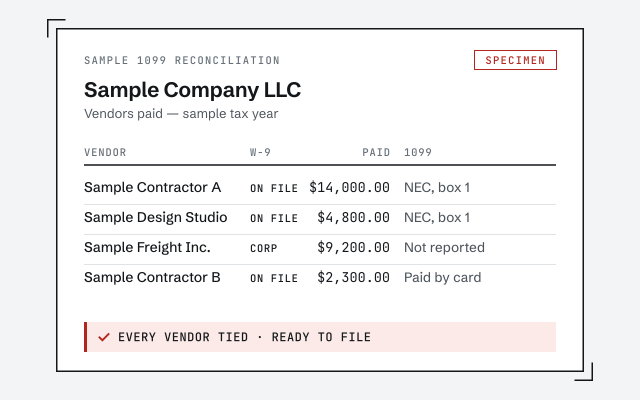
A real 1099 reconciliation

The exact vendor-by-vendor 1099 reconciliation you receive before filing.

Response commitment

A real specialist replies within one business day, in writing.

Remote-first, nationwide

Mon–Sat · 8am–6pm CT

We work entirely remote — read-only access to your QuickBooks file, screen-share whenever you want, and every vendor decision and total documented in writing.

  • Texas
  • Florida
  • California
  • New York

Questions about QuickBooks 1099 cleanup

Which vendors need a 1099?

Broadly, unincorporated vendors you paid at or above the reporting threshold for services, rent, or similar — not for goods. The details turn on entity type and payment type, so we review each vendor's setup and W-9 rather than guessing from the name.

Are payments made by card excluded from 1099s?

Yes. Amounts paid by credit card, debit card, or a third-party network are reported by the processor, not by you, so they must be excluded from your 1099 totals. Card payments miscoded as checks are a common reason 1099 amounts come out too high.

What is threshold and account mapping?

It is how QuickBooks decides which payments count toward a 1099 and in which box. If the wrong expense accounts are mapped, or the threshold is set wrong, real payments get missed or the wrong ones get counted. We check the mapping against how you actually pay.

What if I am missing W-9s?

We list every vendor without a current W-9 so you can request one before filing. The W-9 is where the tax ID and entity type come from, and both drive whether and how a vendor is reported. Missing forms are the most common thing that holds up a clean file.

Do you file the 1099s for me?

We prepare and reconcile the 1099 data — the right vendors, the right amounts, mapped correctly — and tell you exactly what is filing-ready. Submission to the IRS and recipients is done by you or your filing service; we make sure the numbers they send are correct.

Can you fix a prior year's 1099s?

Yes. We can reconcile a prior year and identify what a corrected filing would need to show. Corrections are filed through the same channel as the originals; we give you the accurate figures and a summary of what changed and why.

When are 1099s due?

1099-NEC forms are due to recipients and to the IRS by January 31, with no automatic extension, so the mapping needs to be correct well before then. A cleanup finished in the fall or early January turns filing into a checklist instead of a scramble.

What is the difference between a 1099-NEC and a 1099-MISC?

A 1099-NEC reports nonemployee compensation — most contractor and freelancer payments for services. A 1099-MISC reports other payments such as rent, prizes, and some legal payments. Part of a cleanup is making sure each reportable payment lands on the right form and box.

What do you need from me to start?

Read-only access to your QuickBooks file and your vendor W-9s are enough to begin. From the file we can see who was paid, how, and how it was coded; the W-9s tell us entity type and tax ID. We list anything else we need after the free review.