QuickBooks Payroll
QuickBooks Payroll, from a specialist's view.
QuickBooks Payroll, now sold as QuickBooks Workforce, is Intuit's payroll add-on: it calculates pay, moves the money and files payroll taxes, posting entries into your books. We are not Intuit and don't run the product. We do the bookkeeping around it — reconciling the wage and tax liabilities in QuickBooks to the returns actually filed.
Last reviewed October 2026 by a Certified QuickBooks ProAdvisor
What this page is based on: Intuit’s own payroll and payroll pricing pages and Desktop 2023 policy (checked October 2026)
Key takeaways
- 01QuickBooks Payroll is Intuit's product — it runs pay and files payroll taxes; we are an independent practice that works in your books alongside it.
- 02The product posts entries back into your accounting file, and that is where they drift: wrong accounts, wrong periods, duplicates against a bank feed.
- 03Our job is to reconcile payroll in QuickBooks to what was actually filed and paid; we do not run payroll, file returns, or move your money.
- Independent — not Intuit
- Payroll reconciled to filed returns
- We reconcile, we don't file
What QuickBooks Payroll is
QuickBooks Payroll is Intuit's payroll add-on that attaches to a QuickBooks accounting file. It calculates each employee's pay, withholds and remits the payroll taxes, moves the net pay, and — depending on the plan you buy from Intuit — files the payroll tax returns on your behalf. Every run posts accounting entries back into your QuickBooks file.
It is a separate subscription from QuickBooks itself, which Intuit now sells as QuickBooks Workforce (Intuit's payroll page, checked October 2026). Intuit says the service calculates, files and pays federal and state payroll taxes, offers same-day direct deposit, and pays up to $25,000 if you receive a penalty under its tax penalty protection; the Premium tier adds a setup review and time tracking, and Elite adds full setup. On Intuit's payroll pricing page it is sold bundled with an Online plan — for example Workforce Payroll with Essentials at $125 a month plus $6.50 per employee. QuickBooks Desktop Payroll is separate, and for Desktop 2023 it stopped after May 31, 2026 (Intuit). What we can speak to is the bookkeeping side: what happens to those posted entries once they land in the books.
What we do around QuickBooks Payroll
A pay run, from product to proven books
Read this as text
Four stages: Intuit's product runs the pay, entries post back into QuickBooks — where drift starts — liability balances build and should clear to zero, and the books are proven when payroll reconciles to the returns actually filed, the verified end state.
We don't run QuickBooks Payroll and we don't file with it. Our work is the bookkeeping that sits around the product: reconciling the wage and tax liabilities in your QuickBooks file to the returns that were actually filed, and correcting the payroll entries that landed in the wrong place.
Payroll touches more accounts than almost anything else in a file — gross wages, each tax the employer withholds and matches, the liability accounts those taxes sit in until they're deposited, and any provider fees. When the product posts a summary entry that lands in the wrong account, doubles up against a bank-feed transaction, or records against the wrong period, the balance sheet and the profit and loss both stop tying out. We reconcile those postings against the filed returns and the payroll records, then hand you a written log of every entry we touched. It's the same discipline as a bank reconciliation, applied to payroll. When the drift spans quarters, that's a payroll cleanup; when you just need a specialist's hand with the books alongside the product, that's payroll support or day-to-day payroll help.
Where the product ends and our work begins
The clean line is this: Intuit's product runs and files payroll; we make sure your books reflect what it did. Product problems — a subscription issue, a filing the service ran, a software error, your account or billing — are Intuit's to resolve, and we'll send you to their official support rather than pretend otherwise.
Bookkeeping problems are ours. If the QuickBooks Payroll service filed a correct 941 but your "Payroll Liabilities" balance never clears to zero, no product-support queue can fix that — the return is right and the books are wrong, and reconciling the two is exactly what we do. Even a perfectly run payroll product leaves accounting work behind it: deposits to match to liabilities, wages and fees to separate into readable accounts, duplicates to collapse. That work is invisible to the product and central to us.
The bright line at filing
Read this as text
Two columns: Intuit's QuickBooks Payroll calculates the pay, moves the money, and files payroll taxes; our work is the books — liabilities tied to the filed returns, deposits matched without doubling, and every change documented. We reconcile; we don't file.
Who QuickBooks Payroll suits
QuickBooks Payroll suits a business that already keeps its books in QuickBooks and wants payroll to run in the same system rather than a separate one. The appeal is a single file: pay runs post straight into the accounting records instead of arriving as a monthly import from an outside provider.
Whether it's the right choice against a provider like Gusto or ADP is a product-and-price decision, and an honest one to make on features and cost — not on our say-so. We don't sell any provider, and we don't earn anything on your subscription. Compare the current plans on Intuit's payroll page and each provider's own terms; whatever you choose, keep the bundled price separate from the bookkeeping cost. From where we sit, the accounting outcome is the same regardless: whatever system runs payroll, its output has to reconcile in QuickBooks, and that reconciliation is our job, not the product's.
Why we're not Intuit — and why that helps
QBSpecialist is an independent QuickBooks practice. We are not Intuit, not Intuit's payroll service, and not affiliated with or endorsed by Intuit — we use the name "QuickBooks" descriptively to name the software we work in. Our independence is the point: because we don't run or file your payroll, we have no stake in how it was run, only in whether your books tie out.
That means the same specialist reconciles your payroll against the returns you actually filed, working from a change log you can audit — one specialist, never a rotating queue. We hold a bright line at filing: we reconcile and correct inside QuickBooks, but we do not run payroll, file payroll tax returns, or move your money — and we say so on every engagement so there's never confusion about where our work ends and Intuit's or your provider's begins. Read exactly how we work in our methodology.
When you don't need us
If QuickBooks Payroll is posting cleanly and your liability balances clear to zero each period, your books are doing their job — leave them alone. There's no prize for paying to reconcile payroll that already ties to your returns.
And if what you actually need is help with the product — a run that won't process, a subscription or filing question — that's Intuit's official support, not us. We'll tell you which case you're in during a free, view-only review, even when the honest answer is that you don't need a specialist at all. When you do — because the liabilities have drifted, or the entries never reconciled to what was filed — that's precisely the work we take on.
How to verify our payroll work
You don't have to take our word for it. Here's the evidence you can check — the deliverable you receive, the method we use to prove your liabilities tie to your returns, and our response commitment.
Who’s responsible for your file
A Certified QuickBooks ProAdvisor handles your file from the review through the corrections to the hand-back — the same person throughout, never a rotating pool.
About QBSpecialist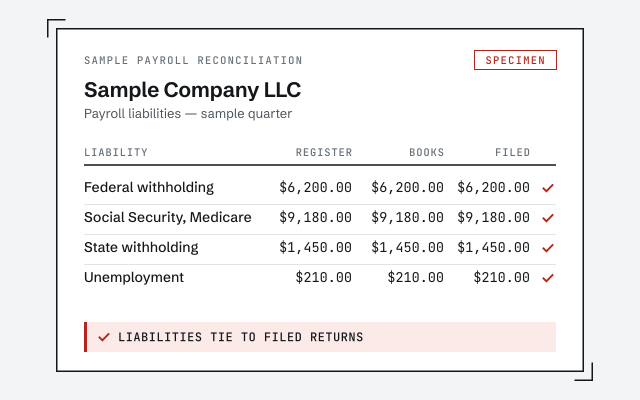 Illustrative example — not a client file.
Sample payroll reconciliation
The liability reconciliation and change log you receive once payroll is reconciled to your filed returns.
Our methodology
How we tie liabilities to filed returns. Read exactly how.
Read the full methodResponse commitment
A written reply within one business day.
Remote-first, nationwide
Mon–Sat · 8am–6pm CT
We work entirely remote — view-only access for the free review, then QuickBooks' accountant access to make and log every payroll correction, and every change documented in writing.
- All 50 states
- Remote-first
- View-only review
Questions about QuickBooks Payroll
Does QBSpecialist run QuickBooks Payroll for me?
No. We are an independent QuickBooks practice — not Intuit. QuickBooks Payroll is Intuit's product: it calculates pay, moves money, and files payroll taxes. We work in your books alongside it, reconciling the wage and tax liabilities in QuickBooks to the returns your payroll actually filed. We reconcile; we don't run or file payroll.
Is QuickBooks Payroll the same as the QuickBooks accounting file?
They're connected but not the same. QuickBooks Online or Desktop is your accounting file; QuickBooks Payroll is an add-on subscription that runs payroll and posts entries back into that file. When those posted entries land in the wrong accounts or double up against a bank feed, the accounting side stops tying out — and that's the part we fix.
Where do I get support for the QuickBooks Payroll product itself?
From Intuit. Product questions — a subscription problem, a filing the service ran, a software error, or your account and billing — belong to Intuit's official support, and we'll point you there rather than invent a number. What we support is the bookkeeping: how payroll is recorded in QuickBooks and whether it reconciles to what was filed.
My QuickBooks Payroll liabilities don't match my filed returns. Can you help?
Yes — that's exactly our lane. Even when Intuit's service filed the returns correctly, the liability balances in your books can drift if deposits post to the wrong period or as plain expenses. We compare each balance to what was actually filed and paid, then correct the entries so the two agree. When it's more than a stray entry, that's a payroll cleanup.
Should I use QuickBooks Payroll or a provider like Gusto or ADP?
That's a product-and-price decision only you can make, and we don't sell you on one. For reference, Intuit's payroll pricing page listed Workforce Payroll with Essentials at $125 a month plus $6.50 per employee, and Workforce Premium with Plus at $203 plus $10 per employee (checked October 2026); check each provider's own terms. Whichever you choose, our work is the same: we reconcile whatever the provider processed and filed back into QuickBooks so your books stay accurate.
Not sure how bad it is?
Talk to a QuickBooks specialist.
Describe the file and a specialist will tell you which of these you are dealing with — including when the answer is that you don't need us.