QuickBooks cleanup
QuickBooks cleanup services
Clean up QuickBooks once, correctly.
A QuickBooks cleanup reconciles every account to the statement, corrects miscategorized and duplicate transactions, and resolves the opening-balance and undeposited-funds messes that make reports wrong. You get books you can file — usually planned at two to four weeks, remote, for a fixed fee quoted before work starts.
File won't open, or a deadline is days away? That is a QuickBooks rescue.
Last reviewed October 2026 by a Certified QuickBooks ProAdvisor
What this page is based on: our reconciliation-first methodology and our published pricing floor, with Intuit’s own Condense Data help (checked October 2026)
The cleanup pipeline
- Messy fileUNRECONCILED
- ReconcileTIE TO STATEMENT
- RecategorizeFIX & DE-DUPE
- FilableREADY TO FILE
Read this as text
Four stages: an unreconciled file is reconciled to its statements, recategorized and de-duplicated, and handed back as filable books marked with a verified tick.
- Every account reconciled
- Fixed scope, fixed fee
- One specialist — never a rotating pool
The work
What a QuickBooks cleanup is
A QuickBooks cleanup is the one-time work of fixing books that already exist but can't be trusted: reconciling every account to its statement, correcting miscategorized and duplicate transactions, and clearing the opening-balance and undeposited-funds errors that distort your reports.
It differs from two engagements people confuse it with: cleanup corrects entries already in the file, catch-up bookkeeping enters months never recorded, and a QuickBooks rescue repairs a broken file before bookkeeping can start. Many files need a mix, which the free review scopes. The end state is filable books — the balance sheet ties to statements, the P&L reads right, and nothing hides under equity or undeposited funds. And if you're wondering whether your file is even worth saving, the honest answer is that almost every QuickBooks file can be fixed without starting over.
Every cleanup engagement
What a QuickBooks cleanup covers
Cleanup is the hub for every corrective engagement we run — below are the specific fixes it most often includes.
- Catch-up bookkeepingEnter and reconcile missing months, back to current.
- Year-end cleanupClose the year to numbers you can file and defend.
- Bank reconciliationEvery bank and card account tied to the statement.
- Chart of accounts cleanupMerge duplicates and fix account types, safely.
- Payroll cleanupReconcile wage and tax liabilities to your returns.
- Opening Balance Equity fixTrace and clear a lingering OBE balance to zero.
- A/R cleanupClear stale invoices and unapplied payments.
- A/P cleanupClear bills that were paid outside QuickBooks and never closed.
- Uncategorized expense cleanupEmpty the Ask My Accountant pile into real accounts.
- Trust account cleanupBring bank, book and client ledgers back into agreement.
- Multi-currency cleanupSeparate realized from unrealized and rebuild revaluation.
- Sales-tax cleanupTie the sales-tax liability to what you filed.
- Inventory cleanupCorrect quantities, cost, and the inventory asset.
- Negative inventory fixRe-sequence receipts and sales to correct COGS.
The checklist every cleanup works through
Whatever the file, the work runs in the same order, so each step stands on a proven one:
- Snapshot the reports — profit and loss, balance sheet and prior-year totals — before anything is touched.
- Reconcile every bank, card and loan account to its statement, oldest month first, until each difference is zero.
- Remove duplicates and reclassify what was miscategorized, including the Uncategorized and Ask My Accountant balances.
- Clear Undeposited Funds by matching each customer payment to the bank deposit it actually landed in.
- Apply unapplied payments and credits, and write off invoices that will never be collected — only with your approval.
- True up payroll liability balances to what the payroll returns show was filed and paid.
- Trace Opening Balance Equity to its source and clear it to the right equity account.
- Tie sales-tax payable to the returns already filed.
- Re-run the reports against the snapshot, document every change, and set the closing date so the corrected months stay put.
Two other things share the word "cleanup". QuickBooks Desktop's Condense Data utility (File → Utilities → Condense Data) removes closed transactions on or before a date you choose and summarizes them, after saving an archived copy of the file — Intuit's condense help (updated August 2026, checked October 2026) covers it, and advises a month-end condense date if you track inventory. It shrinks a file; it corrects nothing. And a damaged Desktop file — Verify Data errors, crashes, a file that slows to a crawl — needs QuickBooks file repair before the bookkeeping cleanup can start.
Related setup & problems that often ride along with a cleanup: 1099 cleanup, job costing setup, class tracking setup, and audit-ready books when the file has to stand up to outside review.
Start here
Who needs a cleanup — and who doesn't
You need a cleanup when the books exist but the numbers are wrong — the bank balance won't match the statement, Opening Balance Equity still shows a figure, or undeposited funds keeps growing. If whole months are missing instead, that's catch-up.
Any one of these is enough to book a free review:
- The cash balance in QuickBooks doesn't match your latest bank statement.
- Opening Balance Equity still carries a balance instead of sitting at zero.
- Undeposited Funds has grown into deposits that never cleared.
- The P&L shows categories that make no sense, or expenses in the wrong accounts.
- A tax deadline looms and you no longer trust the file — the classic behind-on-bookkeeping corner.
You don't need one for everything — a file that already reconciles, a single tidy month, or a return that just needs filing. See when not to hire us below.
Start here
Your books need work. Which engagement is it?
BOOKS EXIST, BUT WRONG
Cleanup
Reconcile and correct the entries already there — the work on this page.
Start with a free reviewMONTHS ARE MISSING
Catch-up
Enter and reconcile the periods never recorded, back to current.
Catch-up bookkeepingFILE IS BROKEN
Rescue
Diagnose and repair the company file before any bookkeeping.
QuickBooks rescue
Read this as text
- BOOKS EXIST, BUT WRONG: Cleanup — Reconcile and correct the entries already there — the work on this page.
- MONTHS ARE MISSING: Catch-up — Enter and reconcile the periods never recorded, back to current.
- FILE IS BROKEN: Rescue — Diagnose and repair the company file before any bookkeeping.
| Cleanup | Catch-up | Rescue | |
|---|---|---|---|
| The books exist, but the numbers are wrong | |||
| Whole months were never recorded | |||
| The company file won't open or is corrupt | |||
| Core task | Reconcile & correct | Enter & reconcile missing months | Repair the file, then bookkeep |
| Planned timeline | 2–4 weeks | Scoped by months behind | Diagnose first |
| Start with | A free review | Catch-up bookkeeping | QuickBooks rescue |
Our method
How a cleanup works
Every cleanup follows the same method: a view-only review to scope the work, then reconcile every account to its statement, correct the categorization, and resolve the structural errors — before a final review and hand-back.
Reconciliation is the spine of the work: each account is tied to the statement, month by month, so cash is proven before anything is built on it — the full logic is in our bank reconciliation reference. Only then do we recategorize: fixing miscategorized transactions, removing duplicate transactions, and emptying Undeposited Funds by matching deposits to the bank. Finally we trace Opening Balance Equity — where mis-set opening balances collect — back to zero.
How your access works. The free review runs on view-only access; if you hire us, the cleanup uses QuickBooks' accountant access to make and log every correction — never your bank logins. Access is yours to revoke at any time, and every change is recorded in a written change log, so nothing moves without a line explaining what and why.
Timeline
How long a cleanup takes
A cleanup is usually planned at two to four weeks; your written scope sets the finish date. It is driven by the number of months in scope, the number of accounts to reconcile, and the state of your source statements, and the date is in the quote before you start.
Free review
Day 0
View-only look at your file; we scope the work and quote a fixed fee.
Reconcile
Days 1–8
Every bank and card account tied back to the statement, month by month.
Recategorize
Days 9–14
Fix miscategorized, duplicated, and undeposited-funds transactions.
Hand back
Day 15
Clean books, a summary of every change, and a written note of how to keep it that way.
Illustrative day numbers. Your written scope sets the schedule.
See how it worksWhere the time goes
Read this as text
Illustrative: reconciliation is the largest phase of a cleanup, then recategorization, then resolving Opening Balance Equity and undeposited funds, then review. Relative shares, not measured percentages.
If your mess is lighter or heavier than the two-to-four-week norm, we've written up how fast QuickBooks can be cleaned up at each scope, from a few drifted months to years of backlog.
Deliverables
What you get at the end
Free review findings — sample
| Check | Found | Clean threshold |
|---|---|---|
| Accounts reconciled to the statement Reports › Reconciliation reports · screen-share | 2 of 5 | 5 of 5, each through its last statement |
| Unreconciled difference, operating account Reconcile › the account's difference · screen-share | $3,412.18 | $0.00 unexplained |
| Opening Balance Equity Balance Sheet › Opening Balance Equity | $18,940.00 | $0.00, or each amount explained in writing |
| Undeposited Funds (oldest item March 2025) Balance Sheet › Undeposited Funds | $6,215.40 | Only receipts still awaiting deposit |
| Uncategorized and Ask My Accountant lines Profit and Loss › Uncategorized, Ask My Accountant | 214 | 0 |
| Likely duplicate bank-feed pairs (unconfirmed) Banking › the account register · screen-share | 37 | 0 confirmed duplicates |
- F1Observation: checking was last reconciled in April, and a $3,412.18 difference opens in May. Likely cause: a reconciled deposit edited in May. Evidence needed: the Reconcile Discrepancy report and the May statement. Proposed action: reconcile checking January to December, then savings and the card account.
- F2Observation: $18,940.00 in Opening Balance Equity. Likely cause: the opening bank balance entered twice. Evidence needed: the opening entries and the first bank statement. Proposed action: move each amount to the account it belongs in, with that evidence.
- F3Observation: $6,215.40 in Undeposited Funds, the oldest from March. Likely cause: payments never grouped into the deposits that cleared. Evidence needed: the bank's deposit lines and the receipts behind them. Proposed action: group them into the matching deposits, leaving only receipts still awaiting deposit.
- F4Observation: 214 lines in Uncategorized and Ask My Accountant. Likely cause: no bank rules for recurring charges. Evidence needed: the statements and receipts. Proposed action: recode the lines and set bank rules so they stop landing there.
- F5Observation: 37 likely duplicate pairs — unconfirmed. Likely cause: a bank feed reconnected and downloaded again. Evidence needed: the statement line for each pair. Proposed action: delete only the copies the statement shows once.
- F6Scope that follows: a cleanup of 12 months across 5 accounts, as a fixed fee in writing.
At hand-back you get books reconciled to every statement, a written summary of every change we made and why. Specifically:
- Every in-scope account reconciled to its statement, month by month, ending at a zero difference.
- Corrected transactions — miscategorized entries fixed, duplicates removed, undeposited funds matched to real deposits.
- Opening Balance Equity traced and cleared, or a written explanation of what remains and why.
- A written change log listing each account and entry that moved, what happened to it, and the reason — the document your CPA or a lender can audit.
- Any exception we could not resolve, named rather than buried, with what it would take to settle it.
- Your reports re-run against the snapshot taken before we started, so prior periods still tie.
The report that starts it all is the written findings of the free review — here is what one looks like:
Your file should not simply look better — the affected accounts should reconcile, and every correction should be explainable. The change summary matters as much as the numbers. Cleanups don't stay clean on their own, so the natural next step is a documented month-end close or full monthly bookkeeping — a choice, not a requirement. The clean file is yours either way. If you want to see the hand-back before committing, what results look like walks through each deliverable.
Scope and acceptance
What a cleanup covers, and what done means
QuickBooks cleanup: From $1,500. This is the written scope in short: what is in, what is not, what moves the quote, your part, and the test the work has to pass.
- Included
- Every account in scope reconciled to its statement; miscategorized and duplicate transactions corrected; Opening Balance Equity investigated and corrected with supporting evidence; Undeposited Funds reconciled to actual deposits and valid receipts still awaiting deposit; a written change log.
- Not included
- Preparing or filing tax returns, tax advice, running payroll, filing sales-tax returns, and the QuickBooks subscription. Months never entered are a catch-up; a damaged file is a rescue.
- What changes the quote
- Months in scope, number of accounts, transaction volume, payroll or inventory in the books, and corrections that touch a return already filed.
- Your part
- Statements for every account and month in scope, answers to the questions the review lists, and the access agreed for the work.
- Done means
- Each bank, card and loan account in the agreed scope is reconciled for each agreed period, with zero unexplained reconciliation difference. Opening Balance Equity, Undeposited Funds and Uncategorized are corrected or each remaining amount is explained in writing. Remaining timing items and unresolved exceptions are documented, and the change log is delivered.
What it costs
What a QuickBooks cleanup costs
A cleanup is a fixed scope with a fixed fee, quoted after a free view-only review of your file. There's nothing hourly and nothing open-ended — the quote states exactly what's included, the timeline, and the price before you commit.
| Engagement | Starting price | Planned timeline | What's included |
|---|---|---|---|
| Standard cleanup | From $1,500 | 2–4 weeks, planned | Up to 12 months, all accounts reconciled, categorization corrected. |
| Extended cleanup | Custom fixed quote | 3–6 weeks, planned | 12–24 months, multi-entity, or high transaction volume. |
| Cleanup + monthly | From $400/mo | Ongoing | Cleanup, then we keep the books current every month. |
What moves the price
- How many months are in scope — and whether an earlier year has to be proven before the ones you care about.
- How many bank, card and loan accounts have to be reconciled, since each ties to its own statement.
- Transaction volume. A busy file six months out can outweigh a quiet one two years out.
- What the reconciliation exposes — duplicates, an Opening Balance Equity balance, or undeposited funds that never cleared.
- Whether statements are already to hand, or have to be gathered before a month can be tied.
- Complications that carry their own method — inventory, payroll, multi-currency, or more than one entity.
The floors above are published starting points; your review sets the real number. Each driver is broken down on our cleanup cost page. The cleanup cost calculator sizes your file as a light, standard or complex cleanup; the free review turns that into an exact, fixed quote. We do not publish a rate per transaction, because the thing that actually sets the fee is what the file turns out to contain.
Why this costs more than the cheapest quote
A cheaper quote usually buys a different thing, not the same thing for less. The low end of this market is priced for volume — a pool of bookkeepers, a set number of hours, a hand-back when the hours run out — and that model works when a file only needs tidying. What the difference buys here is a file that reconciles rather than one that looks tidy, a written change log your CPA can audit, prior periods that still tie to what you filed, and one accountable person: your file is handled by a Certified QuickBooks ProAdvisor, from review to hand-back, with no rotation.
The risk of the cheap route is rarely bad work on the day. It is a file that comes back unreconciled with undocumented changes, so nobody can say which figures moved — and the work gets done again at tax time, when it is urgent and someone else is billing for the untangling. The full argument, including who actually does the work, is on the cleanup cost page.
Complications
Edge cases: multi-entity, multi-year, inventory, payroll
Some files carry complications a standard cleanup has to plan around: multiple entities, several years at once, foreign-currency accounts, inventory that's gone negative, or payroll that never tied to the tax returns. Each changes the scope, never the method.
- Multi-entity. Two or more companies, sometimes with transactions in the wrong file or intercompany transfers that never cleared — we reconcile each entity to its own statements.
- Multi-year. We reconcile forward one year at a time, proving each opening balance before the next — the same discipline as a year-end cleanup.
- Multi-currency. Foreign accounts bring exchange-rate gains and losses that must post correctly before base-currency balances reconcile.
- Inventory. Wrong quantities or drifted cost quietly warp COGS — see inventory cleanup and the negative inventory fix.
- Payroll. Wages and tax liabilities that don't agree with the returns you filed; payroll cleanup reconciles the two.
None of these change how we work — only the timeline and the quote. We flag every complication in the free review, before quoting.
Why us
How we're different
Three things set us apart: the same hands stay on your file start to finish — one specialist, never a rotating pool; the scope and fee are fixed before we start; and every change is documented so you can see what moved and why. The same three commitments hold across everything we do in QuickBooks, not just cleanup.
How the cleanup is documented
Who’s responsible for your file
A Certified QuickBooks ProAdvisor handles your file from the review through the corrections to the hand-back — the same person throughout, never a rotating pool.
About QBSpecialist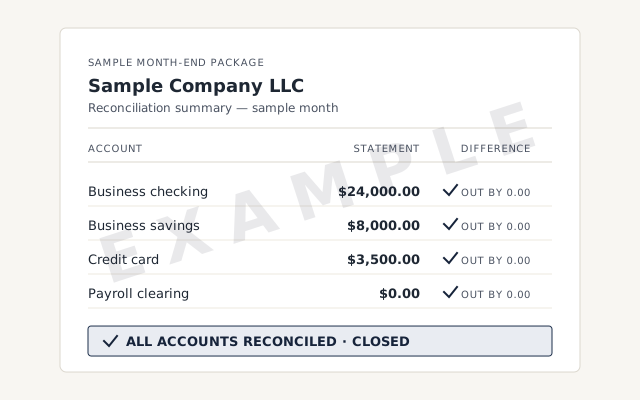 Illustrative example — not a client file.
See a sample month-end package
The reconciliation summary and statement pack format every engagement hands back.
Our methodology
Every account tied to the statement. Read exactly how.
Read the full methodResponse commitment
A written reply within one business day.
Remote-first, nationwide
Mon–Sat · 8am–6pm CT
We work entirely remote — view-only access for the free review, QuickBooks' accountant access for the cleanup itself, every change visible to you in the audit log and documented in writing.
- All 50 states
- Remote-first
- View-only review
The honest part
When not to hire us
Sometimes a cleanup isn't the right call. If you have one clean month to reconcile, a file that's already tied out, or you only need a tax return filed, hiring us would be overkill — here's the honest alternative in each case.
- A single, DIY-able month. If only the latest month drifted, you can likely fix it yourself — our how-to guide and cleanup checklist walk the steps, free.
- A file that already reconciles. If every account ties out and OBE sits at zero, you may not need a cleanup — the bookkeeping health score or a free review confirms it, and if it's clean we'll say so.
- You need taxes filed, not books fixed. We're a bookkeeping practice, not a tax firm. If the books are right and you just need a return, a CPA is the call — we hand over reconciled books, but we don't file.
We'd rather point you to a free tool than sell an engagement you don't need. An honest "you're fine" beats a wrong invoice.
Questions about QuickBooks cleanup
What's the difference between cleanup and catch-up bookkeeping?
Cleanup corrects books that exist but are wrong — miscategorized, unreconciled, or duplicated. Catch-up enters periods that were never recorded. Many engagements need some of both, which we scope up front.
Do you work in QuickBooks Online and Desktop?
Both. The free review runs on view-only access; the cleanup itself uses QuickBooks Online's accountant access, or Desktop by screen-share or a hosted file — fully remote either way.
Do you need access to my bank accounts?
No. The free review runs on view-only access; if you hire us, the cleanup uses QuickBooks' accountant access to make and log every correction — never your bank logins. We work from the bank and credit-card statements you provide.
Can you clean up more than one year at once?
Yes. We reconcile forward one year at a time, so each year's opening balance is proven before the next begins. More years means more scope, which the fixed quote reflects up front.
Do you file my taxes after the cleanup?
No. We are a bookkeeping practice, not a tax firm. We hand your CPA or tax preparer reconciled books and a summary of every change — if all you need is a return filed, a CPA is the right call, not us.
What if you find bigger problems partway through?
We tell you before doing the work, not after. If the file turns out to be broken or a period was never recorded, that's a rescue or a catch-up. We re-scope in writing and you decide — nothing outside the agreed scope is billed by surprise.
Can I clean up QuickBooks myself?
Sometimes. If only the latest month drifted, our free how-to guide and cleanup checklist walk you through it step by step. Books that haven't reconciled for months — with Opening Balance Equity or Undeposited Funds errors underneath — are where a specialist earns the fee. The free review tells you honestly which case you're in.
Template
Not sure how bad it is? Get a bookkeeping health score.
Answer five quick questions and get an honest read on your books — and what a cleanup would take.
- QuickBooks migration — when the cleanup is the step before a move to QuickBooks Online
- Virtual QuickBooks bookkeeping — what keeps the file right once the cleanup is finished
Not sure how bad it is?
Talk to a QuickBooks specialist.
Describe the file and a specialist will tell you which of these you are dealing with — including when the answer is that you don't need us.