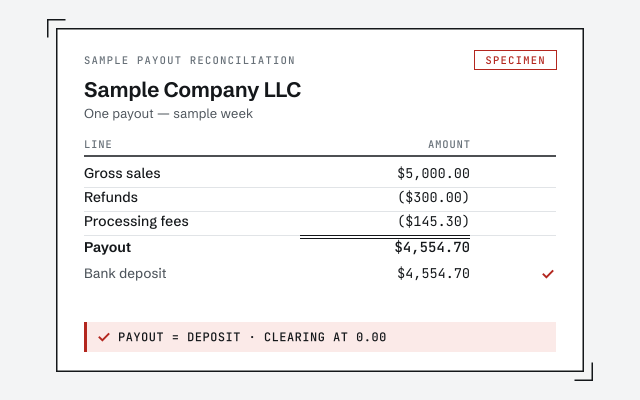
A real payout reconciliation
The exact gross-to-net reconciliation your file produces once it's wired and tested.
QuickBooks for ecommerce
QuickBooks works for ecommerce when it is built for how online sellers actually get paid: orders from every channel in one ledger, payouts reconciled gross-to-net against fees and refunds, inventory and COGS carried correctly, and marketplace-collected sales tax kept out of your income. One senior specialist wires and keeps the file. We keep the books — your CPA and sales-tax advisor own the filings.
QuickBooks for ecommerce means wiring the file so it answers the question an online seller actually lives on — what did I really make after fees, refunds, and cost of goods — rather than mistaking the money that hit the bank for revenue. That takes multi-channel sales brought into one ledger, payout reconciliation that ties gross sales to net deposits, correct inventory and cost-of-goods-sold treatment, and clean handling of the sales tax marketplaces collect on your behalf.
Ecommerce is different from most small businesses QuickBooks is sold to. You sell across several channels at once, a processor or marketplace takes its cut before you ever see the money, refunds and chargebacks claw back sales after the fact, and the deposit in your bank almost never equals what your customers paid. A local service business can more or less trust that a deposit is revenue; an online seller cannot. Get the structure right and QuickBooks tells you your true margin by channel. Get it wrong and you have confident-looking sales numbers that are really just payouts — understated by every fee, distorted by inventory bought but not yet sold, and polluted by tax that was never yours to keep. The sections below cover how each piece works, honestly, including where the software stops and your CPA or sales-tax advisor begins.
Multi-channel bookkeeping means bringing orders from every place you sell — your own storefront, Amazon, other marketplaces, wholesale — into a single QuickBooks ledger in a form you can actually reconcile. The right unit of entry is a periodic summary per channel, not thousands of individual order invoices.
QuickBooks does not reach into your sales channels on its own; the channels have to feed it. That happens one of two ways: a connector app that syncs sales, fees, refunds, and tax automatically, or a summary journal entry per channel per payout period that records the same components by hand. Importing every single order as its own invoice is the classic mistake — it bloats the file, slows it to a crawl, and makes reconciliation harder rather than easier, because you end up matching a bank payout against hundreds of tiny transactions instead of one clean summary. We record channel activity at the summary level so each channel produces one tidy set of numbers per period that rolls into your total, and so profitability by channel is something you can actually read. For the two channels most sellers run, we go deep on the mechanics in our Shopify reconciliation and Amazon reconciliation guides.
The single most important habit in ecommerce bookkeeping is reconciling gross sales to the net payout that lands in your bank. A processor or marketplace collects what your customer pays, subtracts its fees, subtracts refunds and chargebacks, holds back the sales tax it collected, and deposits only what is left — frequently days after the sale, and sometimes split across a month-end. Book that deposit as revenue and your income is understated by every fee and refund, while your sales-tax and COGS figures are wrong too.
The correct treatment runs everything through a clearing account. You record full gross sales, then each deduction — processor and marketplace fees, refunds, chargebacks, and marketplace-collected tax — as its own line, and the account nets to the exact amount of the payout. When the payout hits the bank, it clears against that account and the balance returns to zero. If it does not, something is missing, and the gap tells you where to look. This gross-to-net reconciliation is the whole game, and it is exactly why a deposit and a sales report never agree on their own.
Gross sales to bank payout
Sales tax is where ecommerce bookkeeping meets the law, and it is where we are most careful about our limits. Two structural facts drive it. First, since the 2018 South Dakota v. Wayfair Supreme Court decision, a state can require an out-of-state seller to collect its sales tax once the seller crosses an economic-nexus threshold there — a level of sales or transactions that varies from state to state. Second, marketplace-facilitator rules now mean the states that levy sales tax generally require large marketplaces to collect and remit that tax on the seller's behalf for orders placed through the platform.
What that means in practice is a split you have to record correctly. Tax on your marketplace orders is often collected and remitted by the marketplace, so it should never appear as your income or be remitted a second time by you. Tax on your own direct storefront may be yours to collect and file, depending on where you have nexus. Whether you have a filing obligation in a given state — and where you have crossed a threshold — is a legal and tax judgment for your CPA or a dedicated sales-tax service, and we do not assert current thresholds, rates, or where you owe from memory; those change and belong with the authority that files. For the structure of economic nexus and how thresholds differ by state, see the Sales Tax Institute's economic-nexus state guide. What we own is the bookkeeping: recording marketplace-collected tax as a liability the platform settles, keeping self-collected tax in its own liability account, and making sure neither one contaminates your revenue.
Inventory is an asset while you hold it, and it becomes cost of goods sold only at the moment an item sells. Getting that timing right is what makes gross margin real; getting it wrong — expensing stock the day you pay for it — is the most common reason an ecommerce profit and loss lies.
QuickBooks Online Plus and Advanced and QuickBooks Desktop can track inventory quantities and move each item's cost into COGS as it sells. Many higher-volume sellers, though, manage units in a dedicated inventory or order-management system and bring cost of goods sold into QuickBooks as a periodic entry, keeping the QuickBooks file lean while the specialized tool does the unit-level work. Both are legitimate; what matters is that the accounting obeys the same rule either way — carry purchases as inventory, recognize COGS in the period the sale happens, and land freight-in and other landed costs where they belong. The inventory valuation method itself is a decision to confirm with your CPA, and the IRS sets out the basic small-business treatment of inventories and cost of goods sold in Publication 334, Tax Guide for Small Business. We build whichever inventory-to-COGS flow fits your operation and make sure the cost of goods lands in the right month so margin means something.
Refunds, chargebacks, and gift cards each break naive bookkeeping in their own way, and each has a correct home in the ledger. A refund reverses a sale and its tax and often carries its own fee treatment; a chargeback pulls funds back after the fact, sometimes with an added dispute fee; a gift card is not revenue when sold — it is a liability you owe until it is redeemed.
Handled loosely, these quietly corrupt the numbers. Refunds netted silently against sales hide both your true gross and your true return rate. Chargebacks dropped into a miscellaneous expense obscure a real cost of doing business online. Gift cards booked as income overstate revenue today and understate it when the card is actually redeemed. We record each one where it belongs — refunds against sales with their tax reversed, chargebacks and their fees tracked so you can see them, gift cards carried as a liability until redemption — so the payout reconciliation still ties and your margin is not flattered by money you had to give back or have not yet earned.
Cash versus accrual is a decision to set with your CPA, and it bites harder in ecommerce than in most businesses because inventory and payout timing pull the two methods apart. That choice is not ours to make, but it shapes how the file is kept and why the monthly close is worth doing properly.
On a pure cash basis, buying a large slug of inventory looks like an enormous expense the day you pay for it, and a payout that clears in the next month drags income across the period boundary — both of which distort margin badly for a seller carrying stock. Accrual, with inventory held as an asset and COGS matched to the sales that consumed it, usually gives a truer read of ecommerce profitability. Whichever basis your CPA elects, a real month-end close is what keeps the picture honest: every channel's payouts reconciled, inventory and COGS trued up, fees and refunds recorded, sales-tax liabilities separated. We keep those underlying records clean so your chosen basis sits on reconciled data, and we do not choose or change your accounting method — that stays with your accountant.
Ecommerce files drift in a handful of predictable ways, and nearly all of them trace back to treating a payout as revenue or never reconciling gross-to-net. These are the recurring ones, and how we fix them.
Where the file has already drifted, the fix is a scoped, fixed-fee QuickBooks cleanup: we rebuild the gross-to-net reconciliation through a clearing account, separate marketplace tax from your income, correct how inventory and COGS are carried, and tie every account back to its statement. You get a documented, reconciled baseline, and from there the monthly work only has to keep pace with new payouts instead of unwinding old ones.
What it costs
Every engagement is a fixed scope at a fixed fee, quoted after a free read-only review of your file. The figures below are published starting floors; the review sets the real range for your store.
| Engagement | Typical range | Timeline | What's included |
|---|---|---|---|
| Ecommerce file setup | From $1,500 | 1–3 weeks | Multi-channel summary entries, payout clearing accounts, and inventory-to-COGS structure. |
| Cleanup + reconcile | From $1,500 | 2–6 weeks | Rebuild gross-to-net, separate marketplace tax, fix inventory and COGS, reconcile to bank. |
| Monthly bookkeeping | From $400/mo | Ongoing | Payouts reconciled, COGS trued up, sales-tax liabilities separated, reports that tie. |
| Get your exact quote | |||
Ecommerce file setup
Cleanup + reconcile
Monthly bookkeeping
One senior specialist wires your file for ecommerce and keeps it that way — channels feeding one ledger, payouts reconciled gross-to-net every period, marketplace tax kept out of your income, inventory and COGS landing in the right month — not an offshore pool applying a generic template and hoping the deposit was your revenue.
Our method is verification, not assertion: we do not hand back a structure and call it done, we run a real payout through the clearing account and confirm it clears to zero before you rely on the reports. Access stays minimal — read-only access to your file or a screen-share you control, never your banking or marketplace logins — and every structural choice is documented in writing so the setup outlives the engagement. Read exactly how we work on our methodology page. And we hold a bright line at what we are: bookkeeping specialists. We keep the books accurate and reconciled; your CPA sets the accounting method and inventory valuation, and your CPA or a sales-tax service determines where you have nexus and files the returns. When something can only be settled by your accountant or your sales-tax advisor, we name it in the handoff rather than guessing.
You don't have to take our word for it. Here is the evidence you can check — the deliverable you receive, the reconciliation the reports depend on, and our response commitment.
The exact gross-to-net reconciliation your file produces once it's wired and tested.
Ecommerce books live or die on payout reconciliation. See how we tie a Shopify payout to the bank.
See Shopify reconciliationA real specialist replies within one business day, in writing.
Remote-first, nationwide
Mon–Sat · 8am–6pm CT
We work entirely remote — read-only access to your QuickBooks file, screen-share to review the payout reconciliation with you, and every structural choice documented in writing.
Yes, when the file is set up for it. QuickBooks itself does not pull orders from Shopify, Amazon, or a marketplace on its own — it needs the channels to feed it, either through a connector app or through a periodic summary journal entry that records each channel's sales, fees, refunds, and tax by payout period. The trap is importing every individual order as its own invoice, which bloats the file and makes reconciliation harder, not easier. We set up whichever method fits your volume and record channel activity at the summary level, so one clean set of numbers per channel per period ties back to the money that actually landed in your bank.
Because the deposit is a payout, not your sales. A processor or marketplace takes your gross sales, subtracts its fees, subtracts refunds and chargebacks, holds back sales tax it collected, and deposits only the net — often days after the sale, and sometimes spanning two months. If you record the deposit as revenue, your income is understated by every fee and every refund, and your sales-tax and COGS numbers are wrong too. The fix is to reconcile gross-to-net through a clearing account: record full gross sales and each deduction, then confirm the net equals the payout that hit the bank. That gross-to-net reconciliation is the core of ecommerce bookkeeping and the heart of our Shopify and Amazon reconciliation work.
This is where structure matters and we stay in our lane. Under marketplace-facilitator rules, the states that levy sales tax generally require large marketplaces to collect and remit sales tax on the seller's behalf for sales made through the platform — so tax on those orders is often handled by the marketplace, while tax on your own direct storefront may not be. Whether you have a filing obligation in a given state depends on your nexus there, which is a legal and tax question for your CPA or a sales-tax specialist, not for us to assert. What we do is record marketplace-collected tax correctly so it is never counted as your income or double-remitted, and keep the books clean for whoever files. For the structure, see the Sales Tax Institute's economic-nexus guide.
Inventory is an asset while you hold it and becomes cost of goods sold only when the item sells. QuickBooks Online Plus and Advanced and QuickBooks Desktop can track inventory quantities and move cost into COGS as items sell, but many high-volume sellers manage units in a dedicated inventory or order-management system and bring cost of goods sold into QuickBooks as a periodic entry instead. Either way, the accounting rule is the same: do not expense a purchase the moment you buy stock — carry it as inventory and recognize COGS as it sells, so gross margin is real. We set up whichever approach fits your operation and make sure COGS lands in the right period. The inventory valuation method itself is a decision to confirm with your CPA.
That is a decision to set with your CPA, and it matters more for ecommerce than most businesses because inventory and payout timing pull cash and accrual apart. On pure cash basis, buying a large slug of inventory looks like a huge expense the day you pay for it, and a payout that lands in the next month shifts income across the period boundary — both of which distort margin. Accrual, with inventory carried as an asset and COGS matched to sales, usually gives a truer picture of ecommerce profitability. We keep the underlying records — gross sales, fees, refunds, inventory, and COGS by period — so whichever basis your CPA elects has clean data underneath. We do not choose or change your accounting method.
No. We are bookkeeping specialists, not your CPA, tax preparer, or sales-tax advisor. Determining where you have economic or physical nexus, registering in a state, and filing sales-tax returns are legal and tax decisions that sit with your accountant or a dedicated sales-tax service. What we own is the bookkeeping underneath: recording gross sales, marketplace-collected versus self-collected tax, fees, and refunds accurately so the numbers your filer relies on are correct. Clean books make the filing straightforward; the filing itself and the nexus judgment are not ours to make.
It depends on your volume and your other tools. QuickBooks Online connects cleanly to most ecommerce and payout connector apps and is where most online sellers land; its Plus and Advanced tiers add inventory tracking. QuickBooks Desktop has capable inventory but fewer native ecommerce integrations. If your unit tracking already lives in a dedicated inventory or order-management platform, the QuickBooks edition matters less than getting the summary-level sales, fee, and COGS entries right. We set up whichever you run, tell you honestly where it is strong and where it needs a connector or a workaround, and scope any move as a separate migration rather than a surprise.
Yes — that is often where we start. Ecommerce files drift in predictable ways: payouts booked as revenue so income and fees are understated, marketplace-collected sales tax counted as sales, inventory expensed at purchase so margin is fiction, months of unreconciled connector entries piling up. We scope a fixed-fee cleanup, rebuild the gross-to-net reconciliation through a clearing account, separate marketplace tax from your income, fix how inventory and COGS are carried, and hand you a documented, reconciled baseline. From there the monthly work only has to keep pace with new payouts, not unwind old ones.
Ecommerce books stand on payout reconciliation: go deep on Shopify reconciliation and Amazon reconciliation, and if the file has already drifted, reset it with a QuickBooks cleanup first. Ready when you are — get a free QuickBooks review.