Skip to content
QB Specialist

QuickBooks chart of accounts cleanup

Chart of accounts cleanup, without breaking history.

Chart-of-accounts cleanup merges duplicate accounts, corrects the account types that put entries in the wrong place, and rebuilds a chart that makes your profit and loss and balance sheet readable again — without breaking your historical reports. We map every change first, so nothing on old statements shifts unexpectedly.

Last reviewed July 2026

  • Duplicates merged
  • Account types corrected
  • Reports still tie

What a QuickBooks chart of accounts cleanup is

A chart of accounts cleanup is the work of merging duplicate accounts, correcting the account types that misfile entries, and pruning dead accounts — so your chart of accounts becomes a short, readable index of the business again.

The chart of accounts is the list every transaction is filed under, and what your profit and loss and balance sheet are built from. When it grows two accounts for the same thing, or files an owner's draw as an expense, the reports built on it stop telling the truth. A cleanup fixes the list, not the transactions — entries land under the right, single account. It is a structural fix, and one piece of a full QuickBooks cleanup, not a substitute for reconciling or re-entering data.

Who needs a chart of accounts cleanup

You need a chart cleanup when your account list has grown faster than your business — duplicate accounts, entries under the wrong type, and a profit and loss that runs for pages and no longer reads at a glance.

The usual signs:

  • Two or three accounts that mean the same thing — "Bank Fees," "Bank Charges," "Service Fees."
  • Balances in accounts you don't recognize, or an Opening Balance Equity line that never cleared.
  • Owner contributions or draws booked as income or expense.
  • A profit and loss so long you scroll to find a number.
  • A new bookkeeper or CPA who can't follow the file.

If none of these sound familiar and your statements already read cleanly, you may not need this at all — a point we return to below. Not sure? A free bookkeeping health score flags a bloated or mis-typed chart in a few minutes.

How a chart of accounts cleanup works: merge, retype, renumber safely

Three operations do most of the work: merging duplicates into one account, retyping accounts set to the wrong category, and, optionally, renumbering so the chart sorts logically. Each change is mapped and approved before we touch the file.

Chart of accounts cleanup

A chart of accounts, before and after cleanup Before: four accounts, including two duplicate bank accounts (Checking and Bank Checking) and an owner draw mis-typed as an expense. After: three accounts — the duplicates merged into one Checking, the owner draw retyped to equity. Illustrative example. BEFORE · 4 ACCOUNTS AFTER · 3 ACCOUNTS Checking BANK Bank Checking BANK Office Supplies EXPENSE Owner Draw EXPENSE DUPLICATE WRONG TYPE Checking BANK MERGED Office Supplies EXPENSE Owner's Draw EQUITY RETYPED
A chart cleanup merges duplicate accounts and corrects mis-typed ones: two bank duplicates collapse into one Checking account, and an owner draw booked as an expense is retyped to equity. Names are illustrative.

Merging is permanent in QuickBooks, so we do it deliberately: a merge combines two accounts' entire history under one name, and done from a map you've approved, the history follows and the totals hold. Retyping moves an account to its correct category — an owner's draw from Expense to Equity (where an uncleared Opening Balance Equity balance also sits), a loan from Expense to Liability — which is where most reporting errors live. Renumbering only changes the order accounts sort in, never the transactions beneath them, so it is the safest of the three. We stage the plan, run it, then check the reports against a saved "before" snapshot.

Timeline

How long a chart of accounts cleanup takes

Most chart cleanups take about a week: a day-0 review, two to three days mapping every change, three to four days merging and correcting, and a handback on day eight. Larger or multi-entity files run one to two weeks.

Timeline

Where a chart of accounts cleanup's week goes A single week split across four phases: a day-0 review, days 1 to 3 mapping, days 4 to 7 merging and correcting accounts — the heaviest phase — and a day-8 handback. Illustrative timing, not a measured split. HEAVIEST PHASE DAY 0 DAYS 1–3 DAYS 4–7 DAY 8 Review Map Merge & correct Hand back FREE REVIEW READABLE CHART
A chart cleanup front-loads a written map, then spends most of the week merging duplicates and correcting types before the handback. Timings show the typical shape of the work and are illustrative.
  1. Free review

    Day 0

    Read-only look at your chart; we scope the merges and type fixes and quote a fixed fee.

  2. Map the chart

    Days 1–3

    Every duplicate, mis-typed, and unused account mapped to where it should live.

  3. Merge and correct

    Days 4–7

    Duplicates merged, account types corrected, sub-accounts organized — checked against the reports.

  4. Hand back

    Day 8

    A readable chart, a written map of every change, and a call to walk it through.

What you get when the cleanup is finished

You get a shorter, correctly typed chart of accounts, a written map of every merge and type change we made, a before-and-after set of reports that tie, and a call to walk the whole thing through.

Nothing is a black box: the change map lists each account that existed, what happened to it, and where its history went, so you — or your CPA — can audit the work. A clean chart is also the natural first step before class tracking setup or job costing setup — both need a coherent chart underneath them to be worth turning on.

Which do you need?

Chart cleanup vs. full cleanup vs. leaving it

A chart cleanup fixes the account list; a full cleanup also reconciles and corrects the transactions filed under it; leaving it is the right call only when your reports already read clearly. Here is how the three compare.

Chart cleanup vs. full cleanup vs. leave it
Chart cleanup Full cleanup Leave it
Merges duplicate accounts
Corrects account types
Reconciles transactions
Typical timeline About a week 2–4 weeks No change
Best when Chart is messy, entries are fine Chart and entries are wrong Reports already read clearly
Verdict Readable, fast Everything at once Leave it be

What it costs

What a chart of accounts cleanup costs

Every chart cleanup is a fixed scope with a fixed fee, quoted after a free read-only review. The figures below are published starting floors; the review sets the real range for your file.

Chart of accounts engagement pricing
Engagement Typical range Timeline What's included
From $1,500 About a week Merge duplicates, correct account types, and organize sub-accounts for one company.
From $1,500 1–2 weeks Large charts, multiple entities, or account numbering and industry restructuring.
From $1,500 2–4 weeks Rebuild the chart, then reconcile and correct the transactions behind it.
Estimate your cost with the calculator

Standard chart cleanup

Typical range
From $1,500
Timeline
About a week
Included
Merge duplicates, correct account types, and organize sub-accounts for one company.

Complex or multi-entity

Typical range
From $1,500
Timeline
1–2 weeks
Included
Large charts, multiple entities, or account numbering and industry restructuring.

Chart + full cleanup

Typical range
From $1,500
Timeline
2–4 weeks
Included
Rebuild the chart, then reconcile and correct the transactions behind it.
Estimate your cost with the calculator

Edge cases: history, sub-accounts, industry templates, QBO vs. Desktop, and tax lines

The details that make or break a chart cleanup: keeping historical reports intact, deciding which sub-accounts earn their place, fitting an industry without a generic template, respecting Online and Desktop limits, and mapping accounts to the right tax lines.

Won't it break my historical reports?

No, when the merges are planned. A merge folds one account's history into another, so past transactions still appear, just under one account. We snapshot the reports first and compare after, so prior-period totals tie to the penny.

Which sub-accounts should stay?

Sub-accounts earn their place when they roll up to a subtotal you actually read — several utilities under one Utilities parent. When every small cost gets its own, they add depth without insight, and we flatten them.

Can you match my industry without a generic template?

Yes. We shape the chart around how your industry reports and what your preparer needs, rather than importing a one-size template. A contractor's chart and a law firm's chart should not look the same.

QuickBooks Online vs. Desktop account limits

Both products have ceilings: Online's lower-tier plans cap how many accounts you can create, and Desktop's lists are large but not unlimited. A bloated chart is one way businesses hit those limits, and merging duplicates usually recovers headroom. We work in both, remote.

Mapping accounts to tax lines

Each account can carry a tax-line mapping (Desktop) or detail type (Online) that tells your return where its balance belongs. A cleanup is the moment to set these correctly, so an owner's draw doesn't land on an expense line. It reorganizes reporting, not your tax liability — totals don't change, only where they show.
How QBSpecialist's chart cleanup is different

One senior specialist does the work, from a written map you approve before anything merges — not an offshore pool guessing at your accounts. Every change is documented, planned before it becomes permanent, and checked against your reports.

Our methodology is verification, not assertion: we save your key reports before touching the file and re-run them after, so we can show — not just claim — that historical totals still tie. Access stays minimal: read-only access to your file or a screen-share you control, never your banking logins. If a merge would move a number on a filed period, we flag it and ask first — a chart cleanup should never be why a prior return no longer matches your books.

When NOT to hire us for a chart of accounts cleanup

Skip us when the fix is small or premature. A handful of obvious duplicates you can merge yourself in an afternoon doesn't need a paid engagement, and a brand-new QuickBooks file needs thoughtful setup, not cleanup.

If you can name the two or three duplicated accounts and you're comfortable merging them, our QuickBooks cleanup checklist walks you through it for free. If your file is brand-new, the right move is setting the chart up well from the start, not paying to untangle a mess that doesn't exist yet. And if your reports already read clearly and your types are right, leave the chart alone — there is no prize for the fewest accounts. We'll tell you which case you're in during the free review, even when the answer is "you don't need us."

How to verify our chart cleanup

You don't have to take our word for it. Here is the evidence you can check — the deliverable you receive, the method we use to prove reports still tie, and our response commitment.

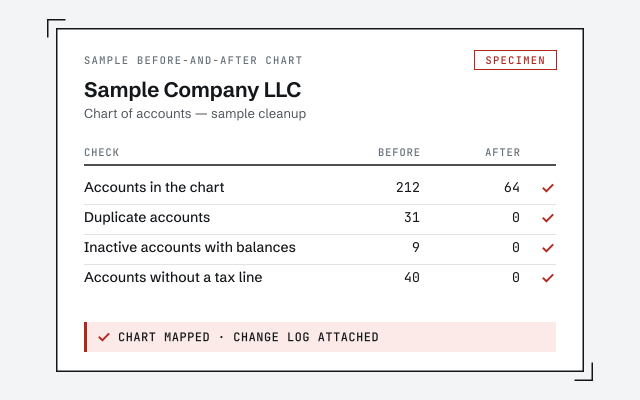
A real before-and-after chart

The account map and change log you receive when a chart cleanup closes.

Response commitment

A real specialist replies within one business day, in writing.

Remote-first, nationwide

Mon–Sat · 8am–6pm CT

We work entirely remote — secure read-only access to your file, screen-share whenever you want to watch, and every account change documented in writing.

  • Texas
  • Florida
  • California
  • New York

Questions about chart of accounts cleanup

Will merging accounts break my old reports?

Handled carefully, no. Merging combines two accounts' history into one, so past transactions still appear — just under a single, correctly named account. We map every merge before we make it and check the reports afterward, so historical totals still tie.

How many accounts is too many?

There is no magic number; readability is the real test. If you cannot find the right account quickly or your profit and loss runs for pages, the chart is working against you. We aim for the fewest accounts that still give you the detail you actually use.

Should I use sub-accounts?

Sub-accounts are useful when you genuinely need a subtotal — several utilities rolling up to one line, for example. They become clutter when every small thing gets its own. We keep the sub-accounts that earn their place and flatten the ones that only add noise.

Do I need account numbering?

It is optional. Account numbers help larger or multi-entity files keep a consistent order and make handoffs to a CPA cleaner. Smaller files often read fine without them. We set numbering up if it helps you and leave it off if it does not.

Can you match my industry's chart?

We can shape the chart around how your industry actually reports, without forcing a generic template that does not fit. The goal is a chart that mirrors how you run the business and what your preparer needs — not a copy of someone else's.

Does cleaning up the chart change my taxes?

Reorganizing the chart does not change what you earned or spent, so it does not change your tax liability by itself. What it changes is clarity: correctly typed accounts mean income, expenses, and equity land where they belong, which makes the return easier to prepare and defend.

Do you clean up the chart in QuickBooks Online or Desktop?

Both. We merge, retype, and reorder accounts in QuickBooks Online with read-only-based access, and in Desktop by screen-share or a hosted file. The operations are the same; only the account limits and menus differ between the two products.

Can you renumber accounts without breaking transactions?

Yes. Account numbers are a display layer that controls the order accounts sort in — they sit on top of the ledger, not inside it. Turning numbering on, off, or changing a number never moves a transaction or a balance.

How do you decide which accounts are duplicates?

We map the whole chart first and flag accounts that serve the same purpose, then send you that map to approve before anything merges. You see and sign off on the plan; nothing is combined on a guess.

What if accounts were already deleted or made inactive?

Inactive accounts still hold their history and can be reactivated, merged, or left hidden. Truly deleted accounts are rarer than people think — usually an account was made inactive, which means its history is recoverable.