A real payroll reconciliation
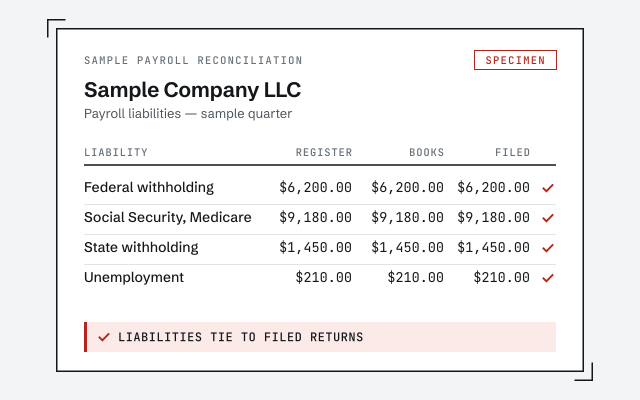
The liability reconciliation and change log you receive when payroll cleanup closes.
QuickBooks payroll cleanup
Payroll cleanup reconciles wage and tax liabilities, fixes the miscategorized payroll transactions that distort your expenses, and ties payroll in QuickBooks to your filed returns — so the balance sheet stops carrying phantom liabilities. We reconcile against what you actually filed; we do not file payroll taxes ourselves.
A QuickBooks payroll cleanup reconciles your wage and tax liability balances to the returns you actually filed, corrects payroll posted to the wrong accounts, and clears amounts you have already paid — so the balance sheet stops carrying liabilities that no longer exist.
Payroll touches more accounts than almost anything else in the file: gross wages, each tax the employer withholds and matches, the liability accounts those taxes sit in until they are deposited, and the fees your provider charges. When any of those postings drift — a deposit booked as an expense, a liability entered twice, a run recorded in the wrong month — the balance sheet and the profit and loss both stop telling the truth. A cleanup reconciles the postings; it does not re-run payroll. It is one piece of a full QuickBooks cleanup, and it is deliberately separate from filing: we reconcile against what you filed, we do not file for you.
You need a payroll cleanup when the liability balances in QuickBooks no longer match the returns you filed, or when wages and taxes are landing in accounts that make your expenses unreadable.
The usual signs:
If your liabilities already clear cleanly each period and your payroll totals tie to your filings, you may not need this — a point we return to below. Not sure? A free bookkeeping health score flags drifting liabilities and miscategorized payroll in a few minutes.
Three operations do most of the work: reconciling each liability balance to what was filed and paid, recategorizing payroll that landed in the wrong accounts, and clearing the deposits that never cleared their liability. Every change is documented so you can trace it.
Payroll cleanup
Reconciling comes first: we take each wage and tax liability and compare it, period by period, to the return that was filed and the deposit that was made — the same discipline as a bank reconciliation, applied to liabilities. Where a deposit was booked straight to an expense, the liability it should have cleared is still sitting open, so we move the deposit to clear it. Recategorizing comes next: wages, employer taxes, and provider fees are separated back into the accounts that let your profit and loss read correctly, instead of one blurred "payroll" line. Duplicates — the run that came in from the bank feed and again from a journal entry — are found and collapsed. Nothing is guessed: we work from the filed returns and the provider's own records, and we hand you a log of every entry we touched.
A phantom payroll liability is a tax you have already deposited that still shows as owed in QuickBooks, because the deposit was recorded somewhere other than against the liability it was meant to clear.
Before and after
Phantom liabilities are the reason a payroll cleanup so often pays for itself in clarity. Left alone, they overstate what the business owes, throw off the current-ratio numbers a lender or a buyer looks at, and quietly complicate every year end. They also compound: each quarter a deposit is mis-booked, another open balance stacks on top of the last, until the "Payroll Liabilities" line reads like a debt the company does not actually carry. Cleanup walks each open balance back to the deposit that should have settled it, clears the ones that are genuinely paid, and leaves standing only what you truly still owe. If that clearing exposes a balance sheet that no longer foots, the fix belongs with a balance sheet that won't balance, and we tell you so plainly.
When payroll runs outside QuickBooks — in Gusto, ADP, Paychex, or QuickBooks Payroll — the books only stay right if every run is mirrored back into the file with wages, taxes, and fees split into the correct accounts. Reconciling that mirror is where most third-party drift hides.
An integration usually posts a summary entry for each pay run, but summaries can land in the wrong accounts, double up against a bank-feed transaction, or skip a run entirely when a sync fails. Manual journal entries drift the same way when they are copied from a stale template. We reconcile against the provider's own reports — the payroll register and the tax-filing summaries the system produces — because those are the record of what actually happened, not what QuickBooks assumed. The employer taxes the provider paid on your behalf, the fees it charged, and the net pay that left your bank all get matched to real accounts. Whether payroll flows in through a connector or by hand, the test is the same: does QuickBooks agree with what the provider processed and filed?
Employees and contractors are recorded, taxed, and reported in completely different places, so a payment filed under the wrong one distorts both your payroll accounts and your year-end forms.
An employee's pay runs through wages and payroll-tax liabilities and reports on a W-2; a contractor's pay is a straight expense that reports on a 1099. When the two are mixed — a contractor run through payroll, or an employee paid as a "subcontractor" expense — the wage totals, the tax liabilities, and the forms all come out wrong. Cleanup makes sure each payment is categorized consistently with how the person was actually paid and reported, so the books and the forms agree. Where a classification itself looks questionable, we do not quietly decide it: we flag it for you and your preparer, because worker classification is a tax-and-legal judgment, not a bookkeeping one. Getting the contractor side ready to report is its own step — a 1099 cleanup — that a payroll cleanup naturally sets up.
Timeline
Most single-entity payroll cleanups take one to two weeks: a day-0 review, several days reconciling each liability to the filed returns, a few more correcting and clearing, and a handback with a written change log. Multi-quarter or multi-entity work runs two to four weeks.
Day 0
Read-only look at payroll liabilities and history; we scope the cleanup and quote a fixed fee.
Days 1–5
Every wage and tax liability balance compared to your filed returns and payments.
Days 6–9
Miscategorized payroll moved to the right accounts; paid liabilities cleared.
Day 10
Payroll that ties to your returns, a written summary of every change, and a call to walk it through.
You get payroll that ties out: liability balances reconciled to your filed returns, miscategorized wages and taxes moved to the right accounts, phantom liabilities cleared, and a written log of every change we made.
Nothing is a black box. The change log lists each entry we touched, why we touched it, and what it now ties to, so you — or your CPA — can audit the work against the returns. If you continue with month-end close or monthly bookkeeping, we keep the liabilities reconciled every period so they never drift back out; a clean payroll month is the backbone of a close that actually ties. And if the cleanup surfaced anything only your preparer can settle — a return that looks wrong, a worker whose classification is unclear — it is named plainly in the handback, not buried.
Which route?
A specialist reconciles QuickBooks to your filed returns and clears what you have already paid; DIY works if you know payroll accounting and have the time; your payroll provider files and pays, but does not clean up your books. Here is how the three compare.
| Specialist cleanup | DIY | Payroll provider | |
|---|---|---|---|
| Reconciles QuickBooks to filed returns | It depends | — | |
| Fixes miscategorized payroll | It depends | — | |
| Clears paid liabilities from the balance sheet | It depends | — | |
| Reconciles third-party payroll (Gusto, ADP) | It depends | — | |
| Files payroll taxes | — | — | |
| Best when | QuickBooks doesn't match your filings | You know payroll accounting | You need filing, not cleanup |
| Verdict | Ties books to reality | If you have the time | Filing, not books |
What it costs
Every payroll cleanup is a fixed scope with a fixed fee, quoted after a free read-only review. The figures below are published starting floors; the review sets the real range for your file.
| Engagement | Typical range | Timeline | What's included |
|---|---|---|---|
| Standard payroll cleanup | From $1,500 | 1–2 weeks | One entity: liabilities reconciled to filed returns, miscategorized payroll corrected. |
| Multi-quarter or multi-entity | From $1,500 | 2–4 weeks | Several quarters, prior-year corrections, or multiple entities reconciled together. |
| Payroll + monthly | From $400/mo | Ongoing | Clean up payroll, then we keep liabilities reconciled every month. |
| Estimate your cost with the calculator | |||
Standard payroll cleanup
Multi-quarter or multi-entity
Payroll + monthly
One senior specialist reconciles your payroll against the returns you actually filed, working from a change log you can audit — not an offshore pool guessing at your liabilities. Every correction is documented and tied to a real filing.
Our method is verification, not assertion: we reconcile each liability to the filed 941, the state returns, and the deposits made, so we can show — not just claim — that the books agree with what you filed. We hold a bright line at filing. We reconcile and correct inside QuickBooks; we do not file your payroll tax returns or move your money, and we say so on every engagement so there is never confusion about where our work ends and your provider's begins. Access stays minimal — read-only access to your file or a screen-share you control, never your banking or payroll logins. And when something can only be settled by your preparer, we flag it rather than paper over it.
Skip us when your payroll already ties out, or when the real problem is filing rather than bookkeeping. There is no prize for paying to reconcile books that already agree with your returns.
If your liability balances clear to zero each period and your payroll totals match your 941s and W-2s, your books are doing their job — leave them alone. If a single deposit landed in the wrong account and you can move it yourself, our QuickBooks cleanup checklist walks the fix for free. And if what you actually need is someone to file or pay payroll taxes, that is your payroll provider or preparer, not us — we reconcile the books to what they file, we do not file. We will tell you which case you are in during the free review, even when the honest answer is "you don't need us."
You don't have to take our word for it. Here is the evidence you can check — the deliverable you receive, the method we use to prove your liabilities tie to your returns, and our response commitment.
The liability reconciliation and change log you receive when payroll cleanup closes.
A real specialist replies within one business day, in writing.
Remote-first, nationwide
Mon–Sat · 8am–6pm CT
We work entirely remote — secure read-only access to your file, screen-share whenever you want to watch, and every payroll correction documented in writing.
It is common, and usually fixable. Liabilities drift when payments are recorded against the wrong period, entered twice, or booked as plain expenses instead of clearing the liability. Cleanup compares each balance to what you actually filed and paid, then corrects the entries so the two agree.
Yes. When payroll runs in a third-party system, QuickBooks needs matching entries so wages, taxes, and fees land in the right accounts. We reconcile what the provider actually processed against what is recorded in QuickBooks, whether it arrives through an integration or manual journal entries.
In QuickBooks, yes — we can correct how prior quarters were recorded so the books match your filings. If a filed return itself was wrong, that is an amendment your payroll provider or preparer handles; we reconcile the books to the corrected figures and tell you clearly which is which.
No, and we are direct about that line. We reconcile and correct payroll inside QuickBooks so your books are right; we do not file payroll tax returns or make tax payments. Your payroll provider or preparer files, and we make sure QuickBooks reflects what they filed.
It matters a lot, because the two are recorded and taxed differently. Cleanup makes sure each is categorized consistently with how they were actually paid and reported. Where we see a classification that looks off, we flag it for you and your preparer rather than deciding it ourselves.
Payroll that ties out: liability balances reconciled to your filed returns, miscategorized payroll moved to the right accounts, and a written summary of every change. If you continue monthly, we keep liabilities reconciled each period so they never drift back out.
A phantom liability appears when a tax deposit is booked as a plain expense, or against the wrong period, so the original liability never clears. QuickBooks keeps showing an amount you already paid. Cleanup matches each deposit to the liability it settled and clears the ones that are genuinely paid.
Yes, and a mid-year switch is a common source of drift. Wages and taxes recorded under two systems often double up or leave a gap at the changeover. We reconcile each provider's actual runs to QuickBooks across the whole year, so the totals stay continuous and tie to every return filed.
No. Reconciling how payroll is recorded in QuickBooks does not change your wages, your deposits, or what you filed — it corrects where those amounts sit so the balance sheet stops overstating liabilities. If cleanup surfaces a filing that was actually wrong, we flag it for your preparer rather than change your liability ourselves.
Payroll drift rarely travels alone: it often shows up alongside a balance sheet that won't balance, contractor payments that aren't 1099-ready, and books that have fallen behind. A clean payroll month is also the backbone of monthly bookkeeping.