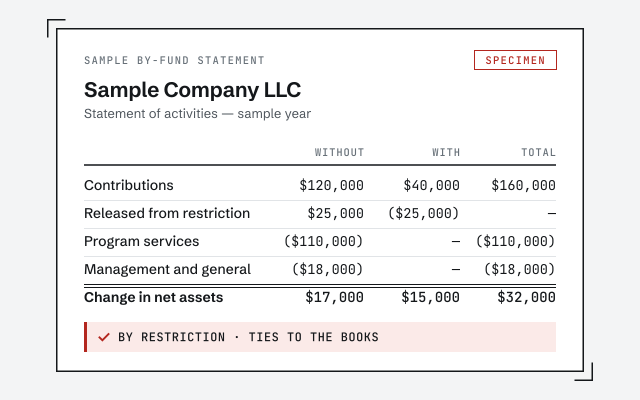
A real by-fund statement
The exact statement of activities by restriction your file produces once it's wired and tested.
QuickBooks for nonprofits
QuickBooks works for a nonprofit when it is built for how mission money moves: restricted and unrestricted funds kept separate, expenses allocated across program, management, and fundraising, and donations and grants tracked by fund. One senior specialist wires and keeps the file Form 990-ready. We keep the books — your organization and its CPA file the 990 and set the accounting policies.
QuickBooks for nonprofits means wiring the file so it answers the questions a mission-driven organization actually lives on — was restricted money spent on its restricted purpose, and how much of every dollar reached the program rather than overhead? — instead of only reporting one bottom line the way it would for a business. That takes fund accounting, functional-expense allocation, donation and grant tracking, and a chart of accounts and class structure that keep restricted money, unrestricted money, and each function cleanly apart.
A nonprofit is not a business with a nicer mission statement; it accounts differently. You do not report profit — you report the change in net assets, split by whether donors placed restrictions on the money. Your expenses are not just categorized by type, they are allocated by function so a donor can see how much went to the mission. Your revenue arrives as contributions, grants, and in-kind gifts, each of which may carry strings. And once a year, that structure has to hold up to a Form 990 and, for many organizations, an audit. Get the setup right and QuickBooks shows your board, your grantors, and your 990 preparer exactly what they need. Get it wrong and restricted grants blur into general revenue, functional reporting becomes a year-end guess, and the audit turns into an archaeology project. The sections below cover how each piece works, honestly, including where the software stops and your CPA begins.
Fund accounting is tracking money by the restrictions attached to it rather than as one undivided pool, so a nonprofit can prove that a donor's or grantor's gift was used only for the purpose it was given. It is the core of nonprofit bookkeeping, and QuickBooks handles it through class tracking — each fund, grant, or program becomes a class that every income and expense line is tagged to.
The distinction the whole structure rests on is restricted versus unrestricted. Unrestricted net assets are money the organization can spend at its discretion on its mission; restricted net assets are contributions a donor limited to a specific purpose or time. Under current U.S. nonprofit accounting standards, net assets are reported in two classes — without donor restrictions and with donor restrictions — though many boards still use the older language of unrestricted, temporarily restricted, and permanently restricted, and QuickBooks can report either way. As a restricted gift is spent on its intended purpose, it is released from restriction and recognized in the unrestricted class. We build the class and account structure so each fund is visible on its own and the release of restriction is recorded as money is spent — the same discipline behind a coherent chart of accounts, which fund accounting has to sit on top of, not before. The classification policy itself, and any audit treatment of net asset classes, stays with your CPA or auditor; we keep the bookkeeping that makes it provable.
Restricted gift to functional expense
Nonprofit revenue arrives as contributions, grants, and in-kind gifts, and each has to be captured so you can report it by fund, by donor or grantor, and — where restrictions apply — against the purpose it was given for. QuickBooks does this through customers or donors, classes for funds, and, in QuickBooks Online, Projects for grant-by-grant budgets.
A restricted grant is the sharpest case. Set up as its own class and optionally a Project, it gives you a running ledger of the award: how much was granted, how much has been spent, on what, and how much remains — the exact picture a grantor and an auditor ask for, and the picture that lets you draw down or report on the grant without reconstructing it from receipts. Unrestricted donations flow to a general fund and still get tracked by donor for acknowledgment and year-end statements. In-kind gifts — donated goods, services, or space — are recorded at fair value with an offsetting entry so the organization's real activity is shown rather than understated. We configure the donor, class, and Project structure, tag transactions as they post, and reconcile the grant and donation reports to the general ledger so the numbers tie. The grant budgets, restriction terms, and the fair-value basis for in-kind gifts come from your award documents and your CPA — we record them faithfully, we do not invent them.
Functional-expense allocation is splitting every expense across the functions a nonprofit reports on — program services, management and general (administration), and fundraising — so a donor, board, or grantor can see how much of each dollar reached the mission. It is a requirement of nonprofit reporting, and in QuickBooks it is built with classes, one per function, layered alongside the fund classes.
Two kinds of cost behave differently. Direct costs belong to a single function and are simply tagged to it — a program manager's salary to program, a gala's catering to fundraising. Shared costs — rent, utilities, general payroll, software, insurance — serve more than one function and have to be allocated across them on a documented, reasonable basis, such as staff time or square footage. Done consistently, this produces a functional view of the profit and loss that maps directly onto the statement of functional expenses your 990 preparer and auditor work from. The honest boundary: the allocation basis is an accounting-policy decision, and we set it up and apply it consistently with you, but we confirm the method with your CPA and we do not fabricate the percentages. A functional split built on made-up ratios is worse than none, because it looks precise and misleads the reader.
Form 990 is the annual information return most tax-exempt organizations file with the IRS, and it draws directly on the structure of your books — net assets by restriction, expenses by function, contributions and grants by source. Keeping the file 990-ready means the preparer works from organized, reconciled numbers instead of reconstructing the year from a shoebox.
Here is the line we hold. We keep the books so the 990 is easy to prepare: net assets split into restricted and unrestricted, functional-expense allocation in place, contributions and grants tracked by fund, in-kind gifts recorded, and every account reconciled to its statement. We do not prepare or file the return — that is done by your organization and its CPA or tax preparer, who own the tax positions, the schedules, and the filing itself. For the form and its instructions, see the IRS page on Form 990, Return of Organization Exempt From Income Tax. We deliberately do not assert filing thresholds, deadlines, or which 990 variant applies to you — those depend on your organization's size and facts and live with the IRS and your preparer. What we guarantee is that when 990 season arrives, the books underneath are clean, and when an audit or review follows, the ledger holds up.
Once the fund and functional structure is in place, QuickBooks produces the reports a nonprofit's board and grantors actually ask for — a statement of activities that shows the change in net assets by restriction, a statement of financial position, a budget-versus-actual by fund, and a class-based view that stands in for the statement of functional expenses. The reporting is only as good as the tagging underneath it, which is why the setup comes first.
For a board, the useful monthly package is a plain-language read on where the organization stands: cash on hand, restricted balances that cannot be touched for general operations, program spending against budget, and how fundraising is tracking. For grantors, it is the specific grant report — awarded, spent, remaining, by allowable category — that satisfies a reporting requirement without a scramble. We build these as saved reports so they run the same way every period, and we reconcile the numbers before they go out so the board is not shown figures that later move. Where your organization also runs classes for multiple locations or programs, the same account and class structure carries both the fund view and the program view without double-entry.
Nonprofit files drift in a handful of predictable ways, and almost all of them trace back to money that was never tracked by fund or a structure that was never built for nonprofit reporting in the first place. These are the recurring ones, and how we fix them.
Where the file has already drifted, the fix is a scoped, fixed-fee QuickBooks cleanup: we tie every account back to its statement, then a chart-of-accounts cleanup rebuilds the accounts and class structure so fund accounting and functional reporting can actually work. You get a documented, reconciled baseline, and from there the monthly work only has to keep pace instead of chasing a year of errors before your auditor arrives.
What it costs
Every engagement is a fixed scope at a fixed fee, quoted after a free read-only review of your file. The figures below are published starting floors; the review sets the real range for your organization.
| Engagement | Typical range | Timeline | What's included |
|---|---|---|---|
| Nonprofit file setup | From $1,500 | 1–3 weeks | Fund classes, functional-expense structure, and a chart of accounts built for nonprofit reporting. |
| Cleanup + restructure | From $1,500 | 2–6 weeks | Reconcile the file, separate restricted funds, rebuild the class and account structure for 990 readiness. |
| Monthly bookkeeping | From $400/mo | Ongoing | Fund-tracked monthly close: gifts coded, funds reconciled, board and grantor reports that tie. |
| Get your exact quote | |||
Nonprofit file setup
Cleanup + restructure
Monthly bookkeeping
One senior specialist wires your file for nonprofit accounting and keeps it that way — fund classes tested against a real grant, functional-expense allocation applied consistently, in-kind gifts recorded, and the books kept Form 990-ready — not an offshore pool applying a generic business template and hoping the reports satisfy your board and your auditor.
Our method is verification, not assertion: we do not hand back a structure and call it done, we run a real grant and a real month through it and check that the by-fund and functional reports tie before your board relies on them. Access stays minimal — read-only access to your file or a screen-share you control, never your banking logins — and every structural choice is documented in writing so the setup outlives the engagement and survives staff turnover, which nonprofits see more of than most. Read exactly how we work on our methodology page. We work entirely remotely, so where your organization is based has no bearing on whether we can help. And we hold a bright line at what we are: bookkeeping specialists. We keep the books accurate, fund-tracked, and 990-ready; your organization and its CPA file the 990, set the accounting policies, and own the audit. When something can only be settled by your accountant or auditor, we name it in the handoff rather than guessing.
You don't have to take our word for it. Here is the evidence you can check — the deliverable you receive, the structure the fund reports depend on, and our response commitment.
The exact statement of activities by restriction your file produces once it's wired and tested.
Fund accounting lives or dies on the account and class structure. See how we build it.
See chart of accounts cleanupA real specialist replies within one business day, in writing.
Remote-first, nationwide
Mon–Sat · 8am–6pm CT
We work entirely remote — read-only access to your QuickBooks file, screen-share to review the fund and functional setup with you, and every structural choice documented in writing.
Yes, when the file is wired for it. QuickBooks is not a dedicated fund-accounting system, but it tracks funds well using classes — in QuickBooks Online and Desktop alike — so each grant, program, or restriction becomes a class that every income and expense line is tagged to. In QuickBooks Online you can also use Projects for grant-by-grant budgets and reporting. The result is reporting by fund alongside the whole-organization view: you can show a class-based profit and loss per fund and prove that restricted money was spent on its restricted purpose. We set up the class and account structure and test it against a real grant before your board relies on the reports.
Restricted net assets are contributions a donor or grantor limited to a specific purpose or time; unrestricted net assets are money the organization can use at its discretion for its mission. Under current U.S. nonprofit accounting standards, net assets are reported in two classes — without donor restrictions and with donor restrictions — though many boards still use the older language of unrestricted, temporarily restricted, and permanently restricted. As a restricted gift is spent on its intended purpose, it is released from restriction into the unrestricted class. We keep the bookkeeping that makes this visible — every gift coded to the right fund and release recorded as it is spent — but the classification policy and any audit treatment stay with your CPA or auditor, not with us.
A restricted grant is set up as its own class (and, in QuickBooks Online, optionally a Project), so every dollar received and every expense charged against it carries that grant's tag. That gives you a running view of the grant: how much was awarded, how much has been spent, on what, and how much remains — the exact picture a grantor and an auditor ask for. When the grant's purpose is met, the spending releases the restriction. We configure the grant tracking, tag the transactions as they post, and reconcile them so the grant report ties to the general ledger; the grant budget and any compliance reporting requirements come from your award documents and your CPA.
It can produce the underlying allocation, which is the hard part. Nonprofits report expenses by function — program services, management and general, and fundraising — and QuickBooks handles this through classes: each expense is tagged to the function it belongs to, and shared costs like rent, payroll, and utilities are split across functions on a documented, reasonable basis. From that you get a functional view of the P&L that maps directly onto the statement of functional expenses. We build the class structure and the allocation method with you; the allocation basis itself is a policy decision to confirm with your CPA, and we do not invent percentages.
No. We are bookkeeping specialists, not tax preparers or your CPA. What we do is keep the books Form 990-ready — net assets split into restricted and unrestricted, expenses allocated across program, management, and fundraising, contributions and grants tracked by fund, and every account reconciled — so the person who prepares your 990 works from clean, organized, audit-friendly numbers instead of reconstructing the year. The return itself is filed by your organization and its CPA or tax preparer. For the form and its instructions, see the IRS page on Form 990. We do not assert filing thresholds or deadlines from memory — those live with the IRS and your preparer.
In-kind donations — donated goods, services, or use of space — are recorded as contribution revenue at fair value with an offsetting expense or asset, so the organization's activity is shown completely rather than understated. QuickBooks records these through journal entries or zero-dollar-net sales receipts that book both sides. We set up a consistent way to capture in-kind gifts and code them to the right fund and function, and we flag that the fair-value measurement of donated services in particular has specific recognition rules — the valuation basis is something to confirm with your CPA or auditor, not a number we make up.
It depends on how your organization runs. QuickBooks Online uses classes and Projects and gives your treasurer, staff, and bookkeeper shared remote access, which suits many small and mid-size nonprofits. QuickBooks Desktop — including the Premier Nonprofit edition — has long-standing class tracking and some nonprofit-oriented reports and templates. Neither is a true fund-accounting package, so in both the fund structure is built with classes. We set up whichever you run, tell you honestly where your edition is strong and where it needs a workaround, and if a move genuinely makes sense we scope it as a separate migration rather than a surprise.
Yes — that is often where nonprofits start with us. Nonprofit files drift in predictable ways: restricted grants mixed into general revenue, no class structure so funds cannot be separated, expenses that were never allocated to a function, in-kind gifts missing entirely, and reconciliations that fell behind before an audit or 990 deadline. We scope a fixed-fee cleanup, tie every account back to its statement, rebuild the chart of accounts and class structure so fund accounting and functional reporting actually work, and hand you a documented, reconciled baseline. From there the monthly work only has to keep pace, not chase a year of errors before your auditor arrives.
Nonprofit books stand on fund accounting: it belongs on a coherent chart of accounts, and if the file has already drifted, reset it with a QuickBooks cleanup first. See exactly how we work on our methodology page. Ready when you are — get a free QuickBooks review.