QuickBooks file repair
QuickBooks file repair
Corrupt company file? Here's the honest path.
QuickBooks file repair addresses a company file that won't open or throws verify and rebuild errors, usually from data damage rather than a bug. Minor damage often clears with the built-in Verify and Rebuild tools or a recent backup. Real corruption — where those tools fail — is where our rescue service takes over.
Last reviewed October 2026 by a Certified QuickBooks ProAdvisor
- Free, view-only review first
- We repair copies, never your original
- One specialist — never a rotating pool
Which do you need?
Start with how bad the damage is
Start here
How bad is the damage?
MINOR VERIFY ERRORS
Verify and rebuild yourself
The built-in Verify and Rebuild Data tools clear most small inconsistencies — a do-it-yourself fix.
See QuickBooks errorsWON'T OPEN, HAVE A BACKUP
Restore the backup
A recent, working backup is the fastest route back — restore it and re-enter only what came after.
REBUILD FAILS OR LOOPS
Rescue
When rebuild can't complete, the file needs specialist recovery before more data is lost.
See QuickBooks rescue
Read this as text
- MINOR VERIFY ERRORS: Verify and rebuild yourself — The built-in Verify and Rebuild Data tools clear most small inconsistencies — a do-it-yourself fix.
- WON'T OPEN, HAVE A BACKUP: Restore the backup — A recent, working backup is the fastest route back — restore it and re-enter only what came after.
- REBUILD FAILS OR LOOPS: Rescue — When rebuild can't complete, the file needs specialist recovery before more data is lost.
Honest answer
Who this affects
Not every QuickBooks error means a corrupt file, and not every corrupt file needs a specialist. QuickBooks flags verify warnings for small, self-healing inconsistencies all the time, and a rebuild clears most of them. If your file opens, runs, and only reports the occasional data issue on verify, you almost certainly don't need a repair service — you need a rebuild and a fresh backup.
The businesses that genuinely need help are the ones where the file won't open at all, where rebuild starts and never finishes, or where opening a specific list or report reliably crashes the program. That's structural damage, and pushing more transactions into a file in that state — or repeatedly force-closing it — tends to make the damage spread. At that point the priority is recovering clean data, not limping along, and that's a different job from routine cleanup.
Intuit's own repair sequence for a Desktop file
- Separate the file from the network. If the message is a network error such as H202, Intuit's Tool Hub article sends it to the Network Issues tab, which must be run on the server computer; damage inside the file goes to the next step.
- Quick Fix my File, then File Doctor, from the Tool Hub's Company File Issues tab (Intuit, updated 8/4/2026, checked November 2026).
- Verify, then Rebuild. Window → Close All; File → Utilities → Verify Data. If QuickBooks says the data "has lost integrity", run Rebuild Data — Intuit requires a backup first, saved under a new name — then verify again (Intuit, updated 8/5/2026, checked November 2026). Intuit's UK version of the article adds that in rare cases a rebuild may delete transactions or list entries to fix the file, which is why the backup comes first (Intuit UK, checked November 2026).
- If damage remains, search for the error from the qbwin.log on Intuit's QuickBooks Desktop support site; if there is no fix, restore a recent backup without replacing the current file, and re-enter what came after it.
- No usable backup? Auto Data Recovery, in Pro, Premier and Enterprise for Windows, can recover all but roughly the last 12 hours (Intuit, updated 8/5/2026, checked November 2026) — worked on copies, verified before anything is replaced.
A repaired file is a sound file, not a correct one: after a rebuild or a recovery, the books still need reconciling against the statements, which is where a cleanup begins.
Do-it-yourself
When you can fix it yourself
The repair ladder
Read this as text
Four rungs in order. First, Verify Data detects damage. Second, Rebuild Data repairs what verify found, after a forced backup. Third, if the file won't open, restore the most recent working backup and re-enter what came after. Fourth, when rebuild fails or loops and no clean backup exists, specialist rescue recovers the data from a copy. A callout warns that force-opening a damaged file spreads the damage. An order-of-attempts diagram, not measured durations.
For minor damage the repair tools are built into QuickBooks Desktop, and this is a do-it-yourself fix. Run Verify Data (File, Utilities, Verify Data) to detect problems, then Rebuild Data to fix what it finds; QuickBooks forces a backup before a rebuild, which is exactly what you want. If verify reports nothing after a rebuild, the file is healthy again. Still failing? Intuit's free QuickBooks Tool Hub includes File Doctor, which clears some network and moderate file damage — try it before paying anyone.
If the file won't open, restoring your most recent working backup is usually faster than any repair — you re-enter only the transactions dated after the backup. Keep the damaged file; don't overwrite it. Where do-it-yourself ends is when rebuild fails, loops, or reports errors it can't fix, when you have no clean backup, or when the only backup is as damaged as the live file. Forcing the file open again and again from there risks losing more than you save, and that's when rescue — specialist recovery of the data — is the right call.
One honest note on access: the free review is view-only, but repairing a file is not view-only work. We diagnose and repair on copies, never on your original, and where a Desktop repair needs admin-level access to the file, it runs over a screen-share or a hosted copy you control — every step documented, and never your bank logins.
How the repair is documented
Who’s responsible for your file
A Certified QuickBooks ProAdvisor handles your file from the review through the corrections to the hand-back — the same person throughout, never a rotating pool.
About QBSpecialist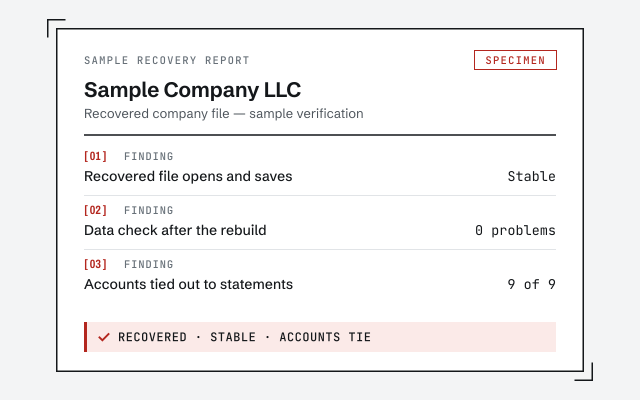 Illustrative example — not a client file.
Sample recovery report
The verification and reconciliation summary you receive once a recovered file is stable and its accounts tie out.
How we work
A recovered file isn't done until every account reconciles to the statement. Read the method.
Read the reconciliation referenceResponse commitment
A written reply within one business day.
Remote-first, nationwide
Mon–Sat · 8am–6pm CT
We work entirely remote — a view-only free review first, then repair on copies over screen-share or a hosted file, with admin-level Desktop access only where the repair itself requires it, and every step of the recovery documented in writing.
- All 50 states
- Remote-first
- View-only review
Questions about file repair
Will I lose data in a file repair?
Not if it's handled carefully. Minor damage is repaired in place with Rebuild Data, which backs the file up first. For deeper corruption, the goal of rescue is to recover clean data into a stable file — we work on a copy and keep your original untouched.
What do Verify and Rebuild actually do?
Verify Data scans the company file for internal inconsistencies and reports them; Rebuild Data attempts to fix what verify found. They resolve most minor damage. When rebuild can't complete or the same errors return, the damage is beyond the built-in tools.
Can QuickBooks File Doctor fix a corrupt file?
Sometimes. File Doctor, part of Intuit's free QuickBooks Tool Hub, resolves certain network problems and some moderate file damage, and it's worth running after Verify and Rebuild — it costs nothing to try. When File Doctor also fails, or the same damage keeps returning, the free tools are exhausted and specialist recovery is the honest next step.
Should I keep force-closing a file that won't open?
No. Repeatedly forcing a damaged file open, or killing it mid-operation, tends to spread the damage. Stop, preserve the file and any backups exactly as they are, and get the data recovered before adding anything new.
Is file repair the same as cleanup?
No. File repair fixes the file's structure so it opens and runs; cleanup corrects the bookkeeping inside it. A recovered file can still hold wrong or missing entries, so a serious rescue is often followed by a cleanup to get the numbers right.
Is a damaged file the same as a QuickBooks error code?
Not always. Some error codes are network or hosting problems, not file damage — H202 and 6000-series errors often point to multi-user setup rather than corruption. We diagnose which it is first, so you're not rebuilding a file that was never broken.
How do I run Verify and Rebuild safely?
Intuit's steps: Window, Close All; then File, Utilities, Verify Data. 'QuickBooks detected no problems' means stop there; 'Your data has lost integrity' means run File, Utilities, Rebuild Data, which requires a backup first — save it under a new name, never over an existing backup. Then verify again. If damage remains, search the error in qbwin.log on Intuit's support site, or restore a recent backup without replacing the current file. Assisted Payroll users should call Intuit before rebuilding.
What if there's no good backup?
Desktop's Auto Data Recovery may help. Intuit says it works in Pro, Premier and Enterprise for Windows, not the Accountant editions, and can recover all or nearly all data — everything except roughly the last 12 hours when both recovery files are used. You copy the recovery files to a new folder, remove the .adr extension, open the copy and verify it before replacing anything.
Where to go next
- QuickBooks rescue for a broken file— Diagnose a file whose reliability is in question.
- Second opinion— an outside read before deciding whether the file is worth repairing
- Not reconciling— a file that opens fine but won't reconcile is a different problem
Not sure how bad it is?
Talk to a QuickBooks specialist.
Describe the file and a specialist will tell you which of these you are dealing with — including when the answer is that you don't need us.