QuickBooks rescue
QuickBooks rescue for a broken company file
The file gets repaired before anyone bookkeeps.
QuickBooks rescue is emergency recovery: a company file that won't open, won't balance, or has gone corrupt is diagnosed and repaired first — data recovered and the file rebuilt — so a cleanup or catch-up has something sound to work on. We diagnose on a copy of your file, tell you honestly what is recoverable, and quote a fixed repair before touching your books.
Books wrong but the file opens fine? That is a QuickBooks cleanup.
Last reviewed October 2026 by a Certified QuickBooks ProAdvisor
What this page is based on: our reconciliation-first methodology and our published pricing floor
- File diagnosed first
- Scoped before repair
- One specialist — never a rotating pool
The short answer
What a QuickBooks rescue is
A QuickBooks rescue diagnoses and repairs a company file that won't open, won't balance, or has gone corrupt — recovering the data, rebuilding the file, and verifying it holds before any bookkeeping begins. It is a repair job, not a bookkeeping one: a rescue makes the file sound, it does not make the numbers right.
- Planned timeline
- The diagnosis is scheduled after the free review; the repair carries a fixed timeline set before it starts
- Starts at
- Diagnosis quoted first; repairs from $1,500, fixed after the diagnosis on a copy
- Access
- View-only for the review; repair runs on copies by screen-share or a hosted file — never your bank logins
- You receive
- A file that opens and holds, a written record of what was repaired, and an honest account of anything unrecoverable
- Works in
- QuickBooks Desktop (the company file and its indexes) and Online (server-side data and access)
- Not included
- Cleanup or catch-up bookkeeping — scoped separately once the file is sound, never bundled to pad a bill
A rescue is a repair job, not a bookkeeping one
The rescue path
Read this as text
A left-to-right rescue flow: a broken company file that won't open is diagnosed on a copy, rebuilt with its data recovered, then verified until it opens and holds. The final state carries the accountant's tick. Illustrative.
QuickBooks rescue is the diagnosis and repair of a company file that won't open, won't balance, or has gone corrupt — recovering the data, rebuilding the file, and verifying it holds before any bookkeeping begins.
It is a repair job, not a bookkeeping one — a rescue makes the file sound, but it does not make the numbers right. Once the file opens and holds, we tell you honestly whether it also needs a QuickBooks cleanup or catch-up bookkeeping, and scope that separately. Many files need a rescue first and bookkeeping after — priced as separate stages, never bundled to pad a bill. And if you're wondering whether the file is even worth saving, the short answer to whether QuickBooks can be fixed without starting over is almost always yes — a fresh file is rarely the right call. When the break has landed at the worst possible moment — payroll due, a filing deadline in sight — urgent QuickBooks help is where we cover the emergency version of this work.
Who actually needs a file rescue
You need a rescue when the file itself is broken — it won't open at all, throws a fatal error the moment it loads, or reports internal data damage that QuickBooks' own Verify and Rebuild utilities can't clear.
Most of what looks like a broken file is not. A great many QuickBooks error codes are network, permissions, or hosting problems rather than corruption: error H202 is a multi-user connection failure, and many 6000-series messages are simply the program unable to reach the file. Those are usually a quick fix — often one you can do yourself — and they are covered on our file-repair walkthrough.
- Genuine corruption (a rescue): the file won't open or crashes on load; Verify Data keeps reporting damage and Rebuild won't clear it; a fatal "C=" error; or balances that shift each time the file reopens.
- Probably not a rescue: a lone H202 or 6000-series error in multi-user mode, or a file that opens and holds but shows a wrong number — that last one is a cleanup, not a repair.
How a QuickBooks rescue works
A rescue runs in four stages — diagnose, recover, rebuild, verify. We open a copy of the file to see what is damaged, recover every record we can, rebuild the file structure, then verify it opens, holds, and balances.
- Diagnose. On a copy of the file we establish whether it opens, what is damaged, and what is recoverable — then quote a fixed repair before touching anything.
- Recover. We extract and preserve every intact record — transactions, lists, history — and document anything that cannot be saved rather than dropping it silently.
- Rebuild. We rebuild the file's structure and indexes so it opens and operates normally, always working on copies, never your original.
- Verify. We confirm the file opens, holds its data across reopenings, and that key accounts reconcile — proven, not assumed.
On security: we diagnose and repair on copies, never on your original file — if a repair path fails, the original is untouched and we try another. Where a Desktop repair needs admin-level access to the file, it runs over a screen-share or a hosted copy you control. Every step is documented, and we never touch your bank logins.
What you get when a rescue closes
You get a sound company file that opens and holds, a written record of exactly what was repaired and what — if anything — could not be recovered, and a plain plan for whatever bookkeeping the file still needs.
- A working file that opens cleanly, holds its data, and passes QuickBooks' own verification.
- A repair record — a before-and-after account of what was damaged, what was recovered, and what was not, with nothing quietly dropped.
- A next step — an honest read on whether the books also need a cleanup or catch-up, each scoped on its own.
Edge cases: where corruption actually lives
Where a file breaks depends on where its data lives. QuickBooks Desktop keeps a company file on your machine or server, so damage sits in that file and its indexes; QuickBooks Online keeps data on Intuit's servers, so a "rescue" there is a different job.
Desktop vs Online
Read this as text
A comparison of where a QuickBooks file's data lives and what a rescue means. Desktop keeps the company file on your PC or server, so a rescue repairs the file and its indexes; Online keeps data on Intuit's servers, so a rescue untangles data and access. Both are diagnosed on a copy before any change. Illustrative.
- Hosted files. If your Desktop file lives on a hosting provider or a shared server, corruption often traces to how the file is accessed — interrupted sessions, two people in single-user mode, a connection dropped mid-save. We diagnose the access pattern, not just the file.
- Ransomware and hardware failure. Honesty matters most here: if a drive died or ransomware encrypted the file, recovery depends entirely on your backups. We can rebuild from a damaged or partial file and QuickBooks' transaction logs, but no one can conjure data that was never saved — we say what's recoverable before you pay to try.
- Data loss. Where records are damaged beyond repair, we document exactly what was affected rather than silently dropping it — so you always know what the recovered file does and does not contain.
How QBSpecialist is different
Three things: the same firm does both the diagnosis and the repair — one set of hands, not a support queue; we scope and quote the repair before touching the file; and we tell you plainly when you don't need us at all.
- One specialist, start to finish — the same hands on the file, never a ticket passed around a pool.
- Scoped before repair — a fixed quote after the diagnosis on a copy, never an open-ended hourly meter.
- Honest about scope — if a free utility or a network fix solves it, we say so and point you there.
- Repair, then books — we hand back a sound file and a clear plan, and only continue into a cleanup if you want us to. Start with a free review or book a call.
When not to hire us for a rescue
Plainly: if your file still opens and your only problem is an error code or a wrong number, you probably don't need a paid rescue. Many QuickBooks errors are network issues, and minor file damage clears on its own.
QuickBooks ships its own repair tools — Verify Data and Rebuild Data — plus the free QuickBooks File Doctor, and between them they clear a lot of minor damage with nobody hired. If the file opens but a report is wrong, that's a cleanup, not a rescue. If you're staring at an H202 or a 6000-series error in multi-user mode, start with our error-code guide and file-repair walkthrough — you may fix it in minutes for nothing.
Come to us when the DIY path runs out: the file won't open, Rebuild won't clear the damage, or you can't afford to guess with data you can't lose. Not sure? Run the bookkeeping health score or send the file over for a free, view-only review — we'll say honestly whether it's a five-minute fix or a real rescue.
Timeline
Four steps, broken file to sound
A rescue moves through four stages, and the timeline is fixed before it starts. The diagnosis is scheduled after the free review; the repair is scoped and quoted before it begins, never left open-ended.
Free review
Day 0
View-only look at the file; we confirm whether it opens and what the damage is.
Diagnose
Scoped first
We identify corruption, data loss, and what is recoverable, then quote the repair.
Repair and recover
Once approved
Rebuild the file, recover what can be recovered, and verify it opens and holds.
Hand back
On completion
A sound file, a written record of what was repaired, and a plan for cleanup or catch-up if the books need it.
Illustrative day numbers. Your written scope sets the schedule.
Which do you need?
Rescue vs. cleanup vs. catch-up
These three solve different problems. Rescue is the only one that repairs a broken file; cleanup corrects books that are wrong; catch-up enters months never recorded. Many files need one now and another next — in sequence, scoped apart.
| Rescue | Cleanup | Catch-up | |
|---|---|---|---|
| Repairs a broken file | |||
| Corrects existing errors | It depends | ||
| Enters missing periods | It depends | ||
| Planned timeline | Scoped first | 2–4 weeks | 1–3 weeks |
| Best when | File won't open or is corrupt | Books exist but wrong | Months are missing |
| Verdict | File is broken | Wrong, not behind | Behind, not wrong |
The recovery routes, in order — and one warning
Before a paid rescue, Intuit's own tools are tried in order: the Tool Hub's Company File Issues fixes, Verify and Rebuild, a restore from the most recent good backup, and Desktop's Auto Data Recovery, which Intuit says works in Pro, Premier and Enterprise for Windows (not the Accountant editions) and can recover everything except roughly the last 12 hours when both recovery files are used (Intuit, checked October 2026). Intuit also runs its own data-recovery service for files the tools can't open, which can take several days without access to QuickBooks. We work on copies throughout, verify every recovered file before anything is replaced, and then reconcile the books inside it.
The warning. "Rescue" is also the word scammers use. Intuit's community moderators say QuickBooks support doesn't cold-call (Intuit Community); anyone who phones offering to rescue your file and asks you to install remote-access software should be refused and reported to security@intuit.com.
What it costs
What a QuickBooks rescue costs
The diagnosis is quoted first; the repair itself starts from a floor set only after we've seen the file. Figures below are starting floors until the diagnosis on a copy of your file fixes a real, fixed quote — there is no hourly meter.
| Engagement | Starting price | Planned timeline | What's included |
|---|---|---|---|
| Diagnosis | Quoted | Scoped first | Diagnosis on a copy of the file: what is damaged, what is recoverable, and a fixed repair quote. |
| File repair | From $1,500 | Once scoped | Rebuild and data recovery until the file opens, holds, and balances. |
| Rescue + cleanup | Custom fixed quote | Scoped first | Repair the file, then reconcile and correct the books so you can file. |
What moves the price
- What the diagnosis finds — this is the largest driver, and it is why the diagnosis is quoted before the repair rather than guessed at.
- How the file broke. A dropped connection mid-save is a different repair from ransomware or a failed drive.
- Whether usable backups exist. A recent backup can make restoring faster and cheaper than repairing — and we will say so.
- How much history the file holds, since every recovered year has to be verified rather than assumed.
- Desktop or Online. Desktop repairs the company file and its indexes; Online untangles server-side data and access.
- Whether the books need work afterwards — a cleanup or catch-up is scoped separately, never folded in silently.
The figures above are published floors, not a quote for your file. The diagnosis on a copy is what turns them into a real number, and if a free utility or a network fix solves your problem, we will tell you that instead of selling you a repair.
How the rescue is documented
Who’s responsible for your file
A Certified QuickBooks ProAdvisor handles your file from the review through the corrections to the hand-back — the same person throughout, never a rotating pool.
About QBSpecialist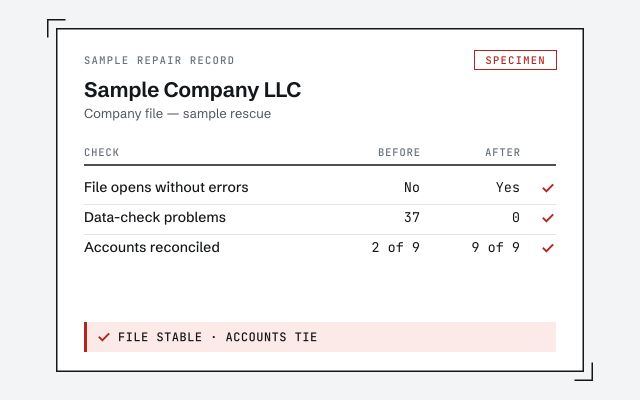 Illustrative example — not a client file.
Sample repair record
The before-and-after file report you receive when a rescue closes.
Our methodology
How we prove a repaired file balances. Read exactly how.
Read the full methodResponse commitment
A written reply within one business day.
Remote-first, nationwide
Mon–Sat · 8am–6pm CT
We work entirely remote — a view-only free review first, then repair on copies over screen-share or a hosted file, with admin-level Desktop access only where the repair itself requires it, and every step documented in writing.
- All 50 states
- Remote-first
- View-only review
Questions about QuickBooks rescue
My QuickBooks company file won't open. Can you help?
Usually, yes. A file that won't open is the most common reason people come to us for a rescue. We start on a copy of the file, confirm whether it can be opened at all, and tell you honestly what state the data is in before proposing any repair.
QuickBooks is showing an error code. What does that mean?
Error codes point to where the file is unhappy — a damaged record, a network path, or a corrupted index — but the code alone rarely tells the whole story. We diagnose the underlying cause rather than guessing from the number, and we explain what we find before repairing anything.
What causes a QuickBooks company file to become corrupted?
Usually how the file was handled, not QuickBooks itself: a connection dropped mid-save, a forced shutdown, two people working in single-user mode, or a large file strained over a network. The diagnosis names the cause as well as the damage — a repaired file breaks again if the cause stays.
Is my data recoverable?
Often a great deal of it is, but honesty matters here: we can't promise full recovery until we have looked. The diagnosis step exists precisely to answer this. We tell you what is recoverable, what is not, and what a repair would involve before you decide to proceed.
Will I lose my history?
The goal of a rescue is to preserve as much history as the file allows. Where records are damaged beyond repair, we document exactly what was affected rather than quietly dropping it, so you always know what the recovered file does and does not contain.
Does corruption work the same in QuickBooks Desktop and Online?
No. Desktop stores a company file on your machine or server, so corruption usually lives in that file and its indexes. Online keeps data on Intuit's servers, so a rescue there is more about untangling bad data and access than repairing a file. We work with both.
What happens after a rescue?
A rescue makes the file sound; it does not, by itself, make the books correct. Once the file opens and holds, we tell you whether it also needs cleanup or catch-up, scope that separately, and let you decide. Many files need a rescue first and bookkeeping after.
How much does a QuickBooks rescue cost?
The diagnosis is quoted first. Repairs start from $1,500 — a floor, not a final price — and the exact fixed quote is set after the diagnosis on a copy of your file, once we know what is recoverable. There is no hourly meter, and nothing is charged before you approve the quote.
How long does a rescue take?
The diagnosis is scheduled after the free review, and the repair carries a fixed timeline set before it begins. A file that won't open is not an open-ended project — you know the schedule before you approve it.
Can you recover a file after ransomware or a hard-drive failure?
Sometimes, but honestly it depends on your backups. We can rebuild from a damaged or partial file and from QuickBooks' automatic transaction logs, but no one can recover data that was never saved anywhere. We tell you what is recoverable before you pay to try.
Should I just run Verify and Rebuild myself first?
Often, yes. QuickBooks' built-in Verify Data and Rebuild Data, and the free File Doctor, clear a lot of minor damage — and if they fix it, you don't need us. Come to us when they can't, or when the file won't open at all.
Can I just restore a backup instead of repairing the file?
If you have a recent backup and can accept losing everything entered since, restoring is often the fastest and cheapest path — and we will say so. A rescue earns its keep when the backup is old, missing, or damaged too, or when the gap holds work you can't afford to re-enter.
Someone called offering to rescue my QuickBooks file — is that you or Intuit?
Not us, and very likely not Intuit. Intuit's community moderators say QuickBooks support only calls when you have requested a callback. A caller who asks you to install remote-access software to rescue your file is a common scam: hang up, don't install anything, and report it to security@intuit.com. Start any real repair from inside QuickBooks or with someone you contacted yourself.
- Opening Balance Equity fix— one of the balances a rescue usually has to clear
- Negative inventory fix— negative stock is often part of a broken file
- Sales tax cleanup— sales-tax liabilities have to be rebuilt to the filed returns after a rescue
Not sure how bad it is?
Talk to a QuickBooks specialist.
Describe the file and a specialist will tell you which of these you are dealing with — including when the answer is that you don't need us.