QuickBooks problems
QuickBooks problems, diagnosed
Most QuickBooks problems are a software, network, or data-entry issue you can fix yourself — a stuck bank feed, a duplicate, an error code — not a reason to hire anyone. The ones that need a specialist are the numbers that stay wrong: a balance that won't tie, or a file that won't open. Here's how to tell them apart.
Last reviewed October 2026 by a Certified QuickBooks ProAdvisor
- Most fixes are DIY
- We escalate only real problems
- One specialist — never a rotating pool
Start here
What usually goes wrong in QuickBooks
Most QuickBooks trouble falls into four buckets: the program won't open or connect, the bank feed misbehaves, transactions are entered wrong, or the numbers won't reconcile. Only the last two are bookkeeping problems.
When people say QuickBooks is "broken," they usually mean one of a few things, and they aren't equally serious. An error code, a bank feed that stopped syncing, or a crash are software and connection problems — annoying, usually quick to fix, and no reflection on your books. Duplicates, miscategorized entries, and an account that won't reconcile are bookkeeping and data problems: the numbers are wrong, and that's what needs attention. A file that won't open at all is the rare serious case. The first move isn't to panic or to hire anyone — it's to work out which of these you have.
Start here
What's actually wrong with your QuickBooks?
WON'T RECONCILE / WON'T BALANCE
A bookkeeping problem
The program is fine; the numbers are wrong. Reconcile the account or find what's throwing the balance.
See won't-reconcileDUPLICATES / BAD BANK FEED
A data problem
Bad entries from the feed or manual keying. Clean the data in place — the file is healthy.
See duplicate transactionsERROR CODE / WON'T OPEN
A software problem — often DIY
Network, hosting, or permission trouble clears most codes yourself. Only a file that stays broken needs repair.
See QuickBooks errors
Read this as text
- WON'T RECONCILE / WON'T BALANCE: A bookkeeping problem — The program is fine; the numbers are wrong. Reconcile the account or find what's throwing the balance.
- DUPLICATES / BAD BANK FEED: A data problem — Bad entries from the feed or manual keying. Clean the data in place — the file is healthy.
- ERROR CODE / WON'T OPEN: A software problem — often DIY — Network, hosting, or permission trouble clears most codes yourself. Only a file that stays broken needs repair.
The key distinction
Software problem vs. bookkeeping problem
The single most useful question you can ask is whether QuickBooks is failing to work, or working fine but showing wrong numbers. The first is a software problem; the second is a bookkeeping problem.
A software problem is mechanical. QuickBooks won't open, won't sync the feed, throws an error code, or runs slowly — the data inside is untouched. These are network, hosting, permission, or version issues, and the fixes are things like restarting in the right order or checking hosting settings. You rarely need an accountant.
A bookkeeping problem is the reverse. QuickBooks runs perfectly, but the balance sheet won't balance or the bank won't reconcile. Nothing is broken in the software — the entries are wrong, and no amount of restarting fixes a number that was recorded incorrectly. That takes correcting the books. The distinction tells you who to call, if anyone.
| Software | Bookkeeping | Data | |
|---|---|---|---|
| QuickBooks won't open, sync, or connect | |||
| The program runs, but the numbers are wrong | |||
| Bad or duplicate entries, healthy file | |||
| Typical cause | Network, hosting, version | Miscategorized or missing entries | Bank feed or manual keying |
| Usual fix | A DIY step or IT | Correct the books | Clean the data in place |
| Start with | Error codes | Cleanup | Duplicate transactions |
By symptom
Find your QuickBooks problem
Every common problem below has its own page with the plain fix and the signs it's time to call someone. Start with the symptom you're seeing.
- Won't reconcileYour bank balance won't match the statement — usually duplicates or a wrong opening balance.See the fix
- Balance sheet out of balanceAssets don't equal liabilities plus equity. A data-entry or damage issue to trace.See the fix
- Duplicate transactionsThe same entry twice, usually from the bank feed. Find and merge — don't just delete.See the fix
- Undeposited fundsPayments stuck in a holding account that never cleared to the bank. Match and clear.See the fix
- Bank feed issuesFeed disconnected, missing, or importing double. A reconnect or a rules fix.See the fix
- File repairA company file that's damaged or won't open. Diagnose before any bookkeeping.See the fix
- Second opinionNot sure your books are right? A view-only review tells you honestly.See the fix
- Error codesH202, 6123, and the 6000-series. Mostly local network or hosting fixes.See the fix
- Behind on bookkeepingMonths piled up and unreconciled. Catch-up brings the file back to current.See the fix
Some of the problems on this page are a quick software or data fix, not an engagement — and the free review tells you which yours is before we quote a dollar. We would rather send you away fixed than sell you a cleanup you do not need.
Bookkeeping problems
Reconciliation and balance problems
How problems compound
Read this as text
Left unfixed, one bad entry — a duplicate or a typo — becomes a month that won't reconcile; unreconciled months pile up; and the drift spreads until the fix is a scoped cleanup rather than a single correction. Illustrative — the stages, not measured data.
When an account won't reconcile or the balance sheet won't balance, QuickBooks is working fine — the numbers are wrong. These are bookkeeping problems, and no software fix touches them; the entries have to be corrected.
A reconciliation problem means the cash balance in QuickBooks doesn't agree with your bank statement — usually duplicates, entries never recorded, a wrong date, or an opening balance set wrong at the start. The fix is to find the discrepancy and correct it, account by account, as our won't-reconcile page walks through.
A balance sheet that's out of balance looks worse but is usually just as fixable: assets no longer equal liabilities plus equity, pointing to a damaged transaction or a one-sided entry — traced on our balance-sheet page. If one account is off, you can often fix it yourself. If several accounts or months are wrong, that's a QuickBooks cleanup.
Data problems
Duplicate and bank-feed problems
Duplicate transactions and a misbehaving bank feed are data problems: the file is healthy, but the entries are wrong. They're among the most common QuickBooks complaints, and most are genuinely DIY.
Duplicates usually come from the bank feed — a transaction imported automatically and then entered by hand, or a batch downloaded twice. They inflate income or expenses and quietly break reconciliation. The fix is to find and merge or delete the extras carefully, never in bulk without checking, as our duplicate transactions page shows.
Bank feed trouble is the other big one: the feed disconnects, stops importing, or double-posts because of a rule — almost always a reconnect or a rules cleanup (bank feed issues). A related mess is undeposited funds piling up. None of these mean the file is broken; the data just needs tidying.
Software problems
QuickBooks error codes
A QuickBooks error code is the program telling you it can't do something right now — usually reach a company file, a server, or a network drive. Most are local, and most are DIY.
Error codes look alarming but rarely touch your data. H202 and 6123 are connection problems — QuickBooks can't reach the file in multi-user mode. The 6000-series usually means a permission or network-drive issue. The common thread is reaching the file, not the numbers inside it, and the fixes are documented: restart in the right order, check hosting and firewall settings, or move the file to a local drive.
Our error codes hub lists each common code with its plain fix. One exception: a code that keeps returning after the basics, or a file that won't open, can signal genuine damage — that's file repair, next.
The rare serious case
File corruption and a broken company file
File corruption is the one genuinely serious QuickBooks problem — structural damage to the company file itself, where the program can't open or read your data. It's rare, and it's the one case where DIY usually ends.
Most "broken QuickBooks" turns out to be a connection or data problem, not real corruption. True file damage shows up as a file that won't open, a verify-data check that reports errors, a code that returns no matter what, or numbers that change on their own — signs the file's structure, not just its contents, is damaged.
When that happens, order matters: you repair or rebuild the file first, then fix the bookkeeping, never the reverse. Our file repair page covers the diagnostics, and a full QuickBooks rescue is for the worst cases. This is the one area we'd steer you away from DIY — rebuild tools can make a damaged file worse, so get it diagnosed first.
Intuit's own first-line fixes, by kind of problem
- Desktop errors, crashes, install and printing problems: Intuit's QuickBooks Tool Hub, by tab — Company File Issues (Quick Fix my File, then File Doctor), Network Issues (run on the server), Program Problems (opening, PDF and printing), Installation Issues (installs and updates), Password Reset (Intuit, checked October 2026). Our QuickBooks errors hub maps each code family to its tab.
- A slow Desktop file: close other windows, run it locally rather than over the network to compare, and only then consider Intuit's Condense Data utility — which, Intuit says, can't be undone.
- Login and access to QuickBooks Online: Intuit's account recovery from the sign-in screen; billing and subscription problems belong to Intuit's support from inside the product.
- Numbers that don't tie — reconciliations, the balance sheet, Undeposited Funds, duplicates — are bookkeeping, not software, and they are what the problem pages below and a cleanup fix.
The honest part
Who actually needs a specialist — most don't
Who fixes what
Read this as text
The four problem classes mapped to who fixes them: software problems — you, with a restart, a hosting setting, or a firewall rule; data problems — you, by merging duplicates and re-linking the feed; bookkeeping problems — a specialist, correcting the entries; file damage — a repair specialist, because DIY rebuild tools can make it worse. Illustrative.
Most QuickBooks problems don't need us. If a restart, a duplicate delete, or a bank-feed reconnect fixes it, you're done — hiring anyone would be overkill. A specialist earns their fee only when the numbers stay wrong.
Here's the honest version, because it saves you money. You probably don't need a specialist when:
- It's a software or network error. Most codes are a restart, a hosting setting, or a firewall fix — our error pages list the steps, free.
- It's a few duplicates or a stuck feed. Cleaning up duplicates or reconnecting the bank feed is genuinely DIY.
- One recent month drifted. If the rest reconciles and only the latest month is off, you can likely fix it yourself.
You probably do need one when:
- The numbers are wrong across months. Several accounts or periods that won't reconcile is a cleanup, not a quick fix.
- The balance sheet won't balance and you can't find why after checking the obvious causes.
- The file itself is damaged — that's repair or rescue, where DIY tools can do harm.
Not sure which side you're on? A second opinion or a free review tells you honestly — and if you're fine, we say so.
How we help
How we help when it's real work
When a problem does need us, the path is the same: a free, view-only review to diagnose it, an honest verdict on whether it's DIY or real work, and a fixed scope and fee if there's work to do.
The free review is exactly that — free, and view-only. We look at your file and the problem and tell you plainly which it is: a software or data fix you can do yourself, a bookkeeping problem worth correcting, or a damaged file that needs repair. If you then hire us, the work runs on QuickBooks' accountant access to make and log every correction — never your bank logins — and you can revoke access in a click.
If it's DIY, we point you to the steps and you're on your way — no charge, no pitch. If it's real work, you get a fixed scope and fee before anything starts, with the timeline in writing. And you get a written reply within one business day — not a ticket queue.
What our diagnostic summary shows
Who’s responsible for your file
A Certified QuickBooks ProAdvisor handles your file from the review through the corrections to the hand-back — the same person throughout, never a rotating pool.
About QBSpecialist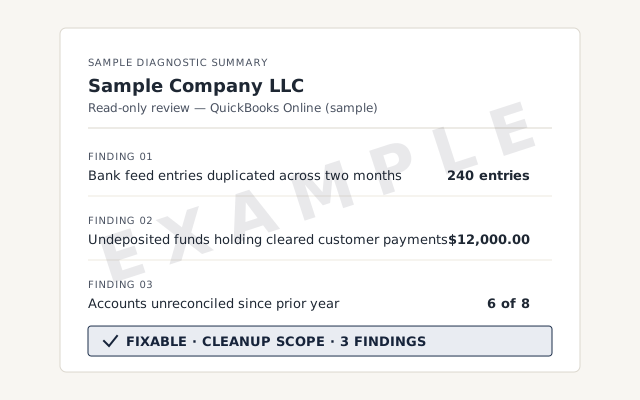 Illustrative example — not a client file.
Sample diagnostic summary
The written read-out you get when we diagnose a problem, in plain language.
Our methodology
Every account tied to the statement. Read exactly how we reconcile.
Read the full methodResponse commitment
A written reply within one business day.
Remote-first, nationwide
Mon–Sat · 8am–6pm CT
We work entirely remote — view-only access for the free review, QuickBooks' accountant access if a fix needs hands in the file, every change visible to you in the audit log and documented in writing.
- All 50 states
- Remote-first
- View-only review
Questions about QuickBooks problems
Are most QuickBooks problems serious?
No. Most are a software, network, or data-entry issue you can fix yourself — a stuck bank feed, a duplicate, an error code that clears on a restart. Only a minority signal a real bookkeeping problem or a damaged file.
How do I tell a software problem from a bookkeeping problem?
A software problem stops QuickBooks opening, syncing, or connecting; the numbers are fine, the program isn't. A bookkeeping problem is the reverse — it runs perfectly but the numbers are wrong. Errors are usually software; a balance that won't tie is bookkeeping.
Can I fix QuickBooks problems myself?
Often, yes. Duplicate transactions, a disconnected bank feed, undeposited funds, and most error codes have well-known DIY steps, and each problem page here lists them. You'd hire someone when the numbers are wrong across months, or the file itself is damaged.
My bank balance won't match QuickBooks — what's wrong?
That's a reconciliation problem: a bookkeeping issue, not a software one. It's usually duplicates, missing transactions, or a wrong opening balance. Start with the not-reconciling page; if a whole account or year is off, that's cleanup.
Does a QuickBooks error code mean my data is broken?
Usually not. Most error codes are about reaching the company file — network, hosting, or permission problems — not the numbers inside. Your data is typically fine. A code that keeps returning after the basics is the one that can signal real damage.
When do I actually need a QuickBooks specialist?
When the numbers are wrong and stay wrong — a balance sheet that won't balance, months that won't reconcile, a file that won't open. If a restart, a duplicate delete, or a bank-feed refresh fixes it, you don't need us.
What's the difference between a data problem and a file problem?
A data problem is bad entries — duplicates, a messy feed, transactions in the wrong place — while the file is healthy. A file problem is structural damage to the company file itself. Data problems are fixable in place; file damage needs repair.
Do you charge to look at a QuickBooks problem?
No. The free review is a view-only look at your file. We tell you whether it's a fix you can do yourself, a bookkeeping problem worth scoping, or a damaged file that needs repair — and only quote if there's real work.
Which QuickBooks problems are most common?
The ones we hear about most: accounts that won't reconcile, duplicate transactions from the bank feed, undeposited funds piling up, a balance sheet out of balance, and error codes on opening. Most have a DIY fix; a few point to deeper cleanup.
What should I try before calling anyone about a QuickBooks Desktop problem?
Intuit's free QuickBooks Tool Hub, downloaded only from Intuit. Its tabs map to the problem: Company File Issues runs Quick Fix my File or File Doctor; Network Issues handles multi-user errors such as H202 and is run on the server computer; Program Problems covers opening, PDF and printing errors; Installation Issues covers install and update failures; Password Reset resets the admin password.
Why is my QuickBooks Desktop file so slow?
Usually size and age: years of transactions, a long audit trail, a file shared over a slow network. Intuit's Condense Data utility can shrink a file by removing transactions you select or the audit trail, but Intuit says a condense can't be undone, so reconcile every account and save the reports first, and run it on a backup copy.
Not sure how bad it is?
Talk to a QuickBooks specialist.
Describe the file and a specialist will tell you what it needs — including when the answer is that you don't need us.