Error -6189, -816
QuickBooks error 6189 816
File locked, or its helper files out of sync? Here's how it clears.
QuickBooks error -6189, -816 means the program could not get clean access to your company file — usually because the .ND and .TLG helper files no longer match the file, or the file is already open by another user or a background process. Restarting, renaming those helper files, and running QuickBooks File Doctor clears most cases. Occasionally it signals real damage.
Last reviewed October 2026 by a Certified QuickBooks ProAdvisor
What this page is based on: Intuit’s own help article for this error (checked October 2026)
- An access fix, not a data fix
- Restart, then reopen single-user
- We escalate only real damage
Who this affects
This is about access to the file, not the books inside it
You will usually see -6189, -816 when QuickBooks reaches the company file but cannot open it cleanly. Two everyday situations cause it. First, the small helper files that sit beside your company file — the network descriptor (.ND) and the transaction log (.TLG) — have fallen out of sync with the file, often because the company file was copied or moved without them. Second, the file is already open: another user is in it, or a background QuickBooks process from a crash or an interrupted session is still holding it. In both cases the accounting data is generally fine. QuickBooks simply cannot get the exclusive, matched access it needs to open the file.
Start here
-6189, -816 — an access fix, or a damaged file?
IT OPENS AFTER A REBOOT OR RENAME
An access fix
Restarting, renaming the .ND and .TLG files, or closing another session clears most -6189, -816 messages.
IT FAILS AFTER FILE DOCTOR TOO
Continue diagnosis
A file that will not open after a reboot, renamed helper files and File Doctor has not been shown to be damaged. Finish Intuit's steps before deciding whether company-file repair is needed.
See file repair
Read this as text
- IT OPENS AFTER A REBOOT OR RENAME: An access fix — Restarting, renaming the .ND and .TLG files, or closing another session clears most -6189, -816 messages.
- IT FAILS AFTER FILE DOCTOR TOO: Continue diagnosis — A file that will not open after a reboot, renamed helper files and File Doctor has not been shown to be damaged. Finish Intuit's steps before deciding whether company-file repair is needed.
Fix it yourself
The DIY fix for error -6189, -816, step by step
Work through these in Intuit's order. Intuit treats -6189, -816 as a multi-user network problem and does not split the fix by what you were doing, so the steps move from the program to the server to where the file is kept. If any step opens the file, you are done.
Run Quick Fix my Program
Close QuickBooks, install the QuickBooks Tool Hub, and run Quick Fix my Program from Program Problems. Then open your company file.
Restart every computer, in order
Restart the server that hosts the file, then each workstation, and open QuickBooks on the server before the workstations. On QuickBooks Enterprise Hosting, Intuit says to contact it through chat; with another host, contact that provider.
Run the Database Server Manager
On the server, open the Tool Hub's Network Issues section and run the QuickBooks Database Server Manager to scan for the company file. Intuit says it repairs the firewall permissions itself. Then reopen QuickBooks on the server and the workstations.
Move the company file
Keep the file on the server's own hard drive, not on an external drive, a USB flash drive, a NAS device or an online file host, and don't encrypt the file or the drive it sits on.
Reopen the file
Open the company file again from its proper location. If the network was the issue, -6189, -816 clears and the file opens normally.
The access fix, in order
Read this as text
Four stages, left to right: restart every computer to release a held file, reopen in single-user mode for exclusive access, rename the .ND and .TLG helper files so QuickBooks rebuilds matched copies, then the file opens — the verified end state, marked with a tick. An illustrative sequence.
Intuit's own fix for -6189, -816, in Intuit's order
Intuit's own article (updated 8/5/2026, checked November 2026), in its order. Intuit treats it as a multi-user network problem, not damage to the data file, and does not split the fix by what you were doing.
- Run Quick Fix my Program from the Tool Hub's Program Problems tab, then reopen QuickBooks and the file.
- Restart in order: the server that hosts the file, then each workstation, then open QuickBooks on the server before the workstations. On QuickBooks Enterprise Hosting, Intuit says to contact it through chat to restart the service; with another hosting provider, contact that provider.
- Run the Database Server Manager on the server, from the Tool Hub's Network Issues tab; it also repairs the firewall permissions.
- Move the company file off removable, external or online-sync drives, and don't encrypt the file or the drive it sits on.
Intuit lists the places not to keep the file: external hard drives, USB flash drives and network-attached storage (NAS) devices. It also warns that online file hosting services such as Dropbox, Google Drive and Box can cause issues.
When to call us
When error -6189, -816 means real damage
If the file still throws -6189, -816 after you have rebooted, renamed the .ND and .TLG files, and run File Doctor, the cause is still not established: work through the rest of Intuit's steps first. When they are exhausted and the file still won't open, it is a file repair, and if data is already missing, a rescue. We diagnose on a copy, so your original file is never put at further risk while we find out whether it is access or genuine damage — and where a Desktop repair needs admin-level access to the file, it runs over a screen-share or a hosted copy you control. Its close cousins behave differently: error -6000, -83 blocks the open at the folder-and-hosting level, while error 6123 tends to surface around restores and version mismatches.
Access ruled out, or not
Read this as text
On the left, a file that opens after a reboot, renamed helper files, or File Doctor was locked, not damaged — access was the whole problem, resolved in minutes. On the right, a file that still fails after all three: the cause is not yet established, so Intuit's remaining steps come before any decision about repair — or a rescue if data is missing — worked from a copy, never the original. A comparison of the two outcomes.
When it is not QuickBooks
When the fix belongs to IT or your network
Some -6189, -816 cases are really operating-system or network problems wearing a QuickBooks error number. If the file lives on a server or a shared folder and the error follows a permissions change, a new antivirus rule, or a network reconfiguration, the fix is at the OS or network level — folder rights, firewall exceptions, or hosting settings — not inside QuickBooks. That work belongs with your IT support or network administrator. For the official product-support channel and Intuit's own guidance on this error, use Intuit's official support.
How the -6189, -816 fix is written up
Who’s responsible for your file
A Certified QuickBooks ProAdvisor handles your file from the review through the corrections to the hand-back — the same person throughout, never a rotating pool.
About QBSpecialist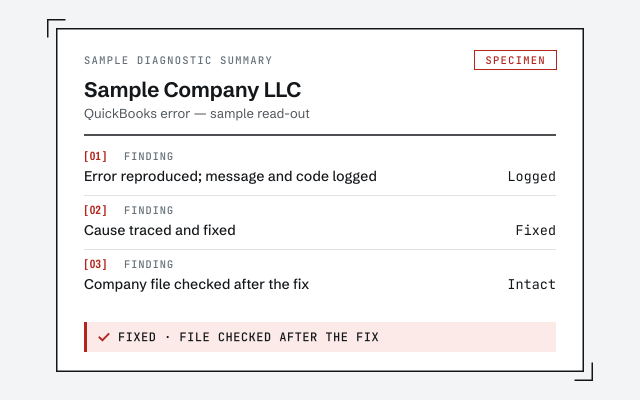 Illustrative example — not a client file.
Sample diagnostic summary
The written read-out that tells you whether it is access or genuine file damage.
How we work
We confirm the cause on a copy before changing your file. See what repair involves.
See QuickBooks file repairResponse commitment
A written reply within one business day.
Questions about error -6189, -816
What does error -6189, -816 actually mean?
It means QuickBooks could not get clean access to the company file. Most often the small helper files that manage access — the .ND and .TLG files — no longer match the company file, or the file is already open by another user or a background process. It is an access problem, not usually a problem with the numbers inside the file.
How do I fix -6189, -816 quickly?
Restart every computer that touches the file, then reopen it in single-user mode from the machine that stores it. Restarting clears a file that another process was still holding. If it opens, the file was simply locked, not damaged, and you are done in minutes.
Why do the .ND and .TLG files matter?
The .ND and .TLG files sit beside your company file and coordinate access to it. If they were copied from a different location, or fell out of sync with the file, QuickBooks can throw -6189, -816. Renaming them is safe — QuickBooks rebuilds fresh ones the next time the file opens correctly.
Can -6189, -816 mean my file is corrupt?
Sometimes, but a failed fix alone does not prove it. If the error survives a reboot, renamed .ND and .TLG files, and QuickBooks File Doctor, the cause is not yet established: continue Intuit's remaining steps before deciding whether company-file repair is needed. When those are exhausted, it is a file repair, or a rescue if data is already missing.
Is renaming the .ND and .TLG files safe?
Yes. Those two files hold no accounting data — they only manage access — so renaming them cannot harm your books. QuickBooks generates new ones automatically. Keep a backup of the company file first as a habit, then rename the helpers and reopen.
- Error 3371— a license problem, not a locked file
- Error 15271— an update that fails to validate
- Error PS038— a payroll send that won't complete
Not sure how bad it is?
Talk to a QuickBooks specialist.
Describe the file and a specialist will tell you which of these you are dealing with — including when the answer is that you don't need us.