QuickBooks Online Advanced
QuickBooks Online Advanced, from a specialist's chair.
QuickBooks Online Advanced is Intuit's top QuickBooks Online plan: $340 a month on Intuit's list (checked October 2026), 25 users, and no cap on accounts, classes or locations — against Plus's 5 users, 250 accounts and 40 classes and locations. We're an independent practice who reconcile and run the books inside it, not Intuit.
Last reviewed October 2026 by a Certified QuickBooks ProAdvisor
What this page is based on: Intuit’s own usage limits, pricing and Advanced pages (checked October 2026)
Key takeaways
- 01QuickBooks Online Advanced is the top QuickBooks Online plan — for businesses that have outgrown the standard plans but want to stay in the browser rather than move to desktop Enterprise.
- 02The walls that force the move from Plus are Intuit's own limits: 5 users, 250 active accounts, 40 classes and locations combined. Advanced lifts all three (Intuit, checked October 2026).
- 03We are an independent practice, not Intuit: we work the bookkeeping inside your Advanced file, while the subscription, billing, and plan changes stay with Intuit.
- 04Upgrading to Advanced does not reconcile a file that has already drifted — the plan tier and the state of the books are two separate questions, and we tell you which one you're actually facing.
- Independent, not Intuit
- Accountant access or screen-share
- We reconcile, you keep the subscription
What QuickBooks Online Advanced is, from a specialist's chair
QuickBooks Online Advanced is Intuit's highest-tier QuickBooks Online plan, aimed at larger or more complex small businesses that have pushed past what the standard Online plans comfortably handle — but still want the browser-based product rather than a desktop install.
What Advanced includes, and what it costs, changes over time, so every figure on this page carries the date we checked it and a link to Intuit's own page — Intuit's QuickBooks Online Advanced page is the authority. What we can add is how the plan behaves once real transaction volume, real users, and real reporting demands are running through it, and where an independent specialist fits. It sits at the top of the same product family we cover on our QuickBooks Online overview — a bigger version of the tool you already know, not a different one.
Plus vs. Advanced: Intuit's limits and what Advanced adds
Two kinds of difference separate the plans. The first is hard limits from Intuit's usage-limits article (updated August 2026); the second is the features Intuit's Advanced page marks "Exclusive to Advanced". Prices are from Intuit's US pricing page. All checked October 2026.
| Plus | Advanced | |
|---|---|---|
| Regular price a month (Intuit list) | $140 | $340 |
| Billed users | 5 | 25 |
| Accountant users | 2 | 3 |
| Chart of accounts | Up to 250 active accounts | Unlimited |
| Classes and locations | 40, combined | Unlimited |
| Customize user permissions and access | ||
| Batch invoices and expenses | ||
| Automate workflows | ||
| Sync data with Excel | ||
| Priority support and training (Priority Circle) |
Only active or invited users, accounts, classes and locations count toward a limit, so making unused accounts inactive frees space on Plus; an admin can see current usage under Settings → Account and settings → Usage. When a file hits a wall, Intuit says you can't add more until you upgrade or reduce usage — which is the moment to ask whether the plan is the constraint or the chart of accounts is. A chart that has grown past 250 accounts is often a chart of accounts cleanup before it is an upgrade.
Who QuickBooks Online Advanced actually suits
Advanced suits businesses whose transaction volume, user count, or reporting needs have outgrown the standard QuickBooks Online plans, but who want to stay in the browser rather than move to desktop Enterprise.
The usual signs are practical, not dramatic: more people posting to the file each day, more classes or locations to track separately, and reporting questions the standard plan starts to strain under. But fit is about the books as much as the tier. Sometimes the honest answer is that a lower plan is doing the job fine; sometimes Advanced removes a real constraint. Which one you're looking at is a question about your actual file, and it's exactly what a free, view-only review is for.
What we do inside a QuickBooks Online Advanced file
Inside an Advanced file, we do the bookkeeping work: reconcile the accounts, clean up the chart of accounts and the classes and locations, sort out how custom reports are built, and make the numbers actually tie — the contents of the file, not the subscription around it.
What we don't touch is Intuit's side of the line. Your subscription, your billing, your account access, and any plan change are yours to run through Intuit directly — we never act on your Intuit account or imply we can. We work through QuickBooks' accountant access, or a screen-share you control, and every change we make is documented so you (or your CPA) can trace it. The scale Advanced allows is precisely why files drift: the more users and moving parts, the more places a small misconfiguration quietly compounds. Straightening that out is specialist work, and it's the work we take on.
Why files drift at Advanced's scale
Read this as text
Four stages: as more users post, small misconfigurations creep in and drift compounds quietly across the file, until a specialist reconciles it and documents every change — the verified end state.
Advanced or Enterprise: which way are you moving?
Advanced keeps you in the browser; QuickBooks Enterprise is the desktop path, with its own strengths around inventory and heavy local processing. The right choice depends on how you actually work — where your team is, how you run inventory, what your reporting demands — not on which product has the longer feature sheet.
We don't sell you either one, and we don't earn on the subscription, so the recommendation is only ever about what your file needs. If a move to desktop is genuinely the better fit, that's a QuickBooks Enterprise migration, and we'll say so plainly rather than talk you into staying. For the current capabilities and pricing of each product, Intuit's own pages are the authority; what we add is an honest read of your real file against them.
Two hard numbers frame the choice. Advanced allows 25 billed users in the browser; Enterprise is an installed Desktop product sold by edition — Gold, Platinum and Diamond — in user tiers of 1 to 10 or up to 30, with Diamond up to 40 (Intuit's Enterprise pricing page, checked October 2026). If more than 25 people need to post at once, or the file depends on Enterprise's inventory features, that tips toward Enterprise; if your team is remote and the work fits inside Advanced's limits, the browser product usually wins.
Straight talk
When QuickBooks Online Advanced isn't the answer
Two separate questions
Read this as text
Two paths from the same drifted file: upgrading the plan leaves the same untied numbers with more room to grow; reconciling the books is what makes the numbers tie — a cleanup that is the same job on any plan.
Sometimes the plan isn't the problem. Upgrading to Advanced won't reconcile a file that has already drifted — you'd simply be paying more for the same untied numbers, now with more room to make them worse.
Don't move up a tier hoping it fixes bookkeeping that's behind, unreconciled, or miscategorized; that's a cleanup, and a cleanup is the same job on any plan. And if your current QuickBooks Online plan is keeping up with your volume and your reporting, there's no prize for paying for capacity you aren't using. When the free review shows that the tier you're on is fine and the books are what need attention, we'll tell you that — even when it means we're pointing you at a cleanup instead of a plan change.
How we work in your Advanced file
The same specialist works your file start to finish — one specialist, never a rotating pool — with QuickBooks' accountant access or a screen-share you control, and a written record of every change. Our method is verification, not assertion: we show that the numbers tie, we don't just claim it.
That discipline is documented in full in our methodology, so you can see exactly how we reconcile, correct, and hand a file back before you engage us. When you're ready, the honest first step is a free, view-only review of your Advanced file — no subscription changes, no obligation, just a clear read on whether the plan or the bookkeeping is what actually needs attention.
How an Advanced setup is documented
Who’s responsible for your file
A Certified QuickBooks ProAdvisor handles your file from the review through the corrections to the hand-back — the same person throughout, never a rotating pool.
About QBSpecialist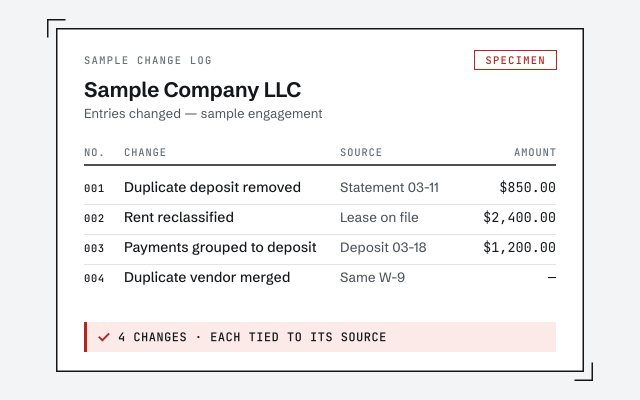 Illustrative example — not a client file.
A documented change log
The reconciled register and written record of every change you receive when we work inside your file.
How we work
Verification, not assertion — every number shown to tie. Read the method.
Read our methodologyResponse commitment
A written reply within one business day.
Remote-first, nationwide
Mon–Sat · 8am–6pm CT
We work entirely remote — view-only access for the free review, QuickBooks' accountant access for the work itself, every change visible to you in the audit log and documented in writing.
- All 50 states
- Remote-first
- View-only review
Questions about QuickBooks Online Advanced
What is QuickBooks Online Advanced?
It's Intuit's highest-tier QuickBooks Online plan, built for larger or more complex small businesses that have outgrown the standard Online plans but want to stay in the browser rather than move to desktop Enterprise. On Intuit's US pages (checked October 2026) it lists at $340 a month — half that for the first three months as an intro offer — with 25 users and 3 accountant users, and no cap on accounts, classes or locations. Intuit changes prices and limits, so we date every figure and link Intuit's page.
Are you Intuit, or part of QuickBooks Online Advanced?
No. QBSpecialist is an independent QuickBooks practice — not Intuit, and not affiliated with or endorsed by Intuit. We work inside the QuickBooks Online Advanced file you already subscribe to. For the subscription itself, billing, account access, or plan changes, you deal with Intuit directly.
Do I need Advanced, or is a lower QuickBooks Online plan enough?
Check Intuit's hard limits first. Plus allows 5 billed users and 2 accountant users, up to 250 active accounts in the chart of accounts, and 40 classes and locations combined; Advanced allows 25 users, 3 accountants, and no cap on accounts, classes or locations (Intuit's usage limits, checked October 2026). If you are at one of those walls, Advanced removes it. If not, the deciding features are custom user permissions, batch transactions, workflow automation and Excel sync — and a bigger plan never reconciles a file that has already drifted.
Should I be on Advanced or move to QuickBooks Enterprise instead?
Advanced keeps you in the browser; Enterprise is the desktop path with its own strengths. The right choice depends on how you actually work — where your team is, how you run inventory, what your reporting demands — not on which product has the longer feature sheet. We help you weigh it against your real file, and we don't sell you either one.
What can you actually do inside an Advanced file?
The bookkeeping work: reconcile accounts, clean up the chart of accounts and classes, sort out how custom reports are built, and make the numbers tie. We work through QuickBooks' accountant access or a screen-share you control, and we document every change. We don't touch your Intuit account, billing, or subscription — that stays yours.
Not sure how bad it is?
Talk to a QuickBooks specialist.
Describe the file and a specialist will tell you which of these you are dealing with — including when the answer is that you don't need us.