- There is no restaurant edition of QuickBooks, and no recipe costing. Menu costing and inventory by recipe live in the point-of-sale or a restaurant back-office tool; QuickBooks receives a daily sales summary and the purchases.
- A chart of accounts on the industry's model. The Uniform System of Accounts for Restaurants, the industry's standard layout, splits food and beverage sales and their costs, which is what makes prime cost readable each month.
- Delivery apps — DoorDash, Uber Eats and the like — pay net of their commissions; record each platform's gross sales, fees and refunds from its payout statement, and match the deposit.
- Tips and the FICA tip credit. Card tips owed to staff are a liability until paid through payroll. Food and beverage employers can claim a credit for the employer's Social Security and Medicare taxes paid on certain employee tips on Form 8846 (IRS, checked October 2026); the IRS's FICA tip credit page explains which tips count. Large food or beverage establishments also file Form 8027. Your CPA claims the credit; the books have to make the tip wages visible.
QuickBooks for restaurants
QuickBooks for restaurants, kept the way a restaurant actually runs.
Restaurant bookkeeping in QuickBooks is its own discipline: a day's POS sales split into net sales, tax, and tips; card tips owed back out to staff; food purchases tracked as cost of goods sold; and a chart of accounts built to read prime cost. We set that up, reconcile it daily, and keep it current — you and your CPA get a file that ties.
Last reviewed October 2026 by a Certified QuickBooks ProAdvisor
Daily sales reconciliation
Read this as text
Left: a single day's POS Z-read broken into net sales, sales tax collected, and card tips, plus the settlement total. Right: each piece routed to its account in QuickBooks — net sales to income, sales tax to the sales-tax liability, tips to a payroll liability — and the deposit reconciled to the bank, marked with a verified tick. Amounts are illustrative, not a measured statistic.
- Daily sales reconciled to the deposit
- Tips handled as a liability, not income
- One specialist — never a rotating pool
What QuickBooks for restaurants really means
QuickBooks for restaurants means running the file around three things a normal business never deals with: high-volume daily sales that arrive through a point-of-sale system, tips that pass through the business on their way to staff, and food that has to be tracked as cost of goods sold. Get those three right and the rest of the books behave; get them wrong and nothing reconciles.
A restaurant file goes wrong when generic bookkeeping habits meet a restaurant's deposits, tips and costs. A single lump "sales" deposit that never matches the bank. Tips booked as income so the profit-and-loss lies. Food, paper goods, and equipment all landing in one "supplies" account so cost of goods sold is unreadable. Each of those is fixable, and each is a specific piece of restaurant bookkeeping rather than a matter of opinion. This page walks through the mechanics we actually apply. It is one industry lens on a full QuickBooks cleanup — the same discipline, pointed at a restaurant's books.
How restaurant tip reporting works in QuickBooks
Tips are the first thing that separates restaurant bookkeeping from everything else, because a tip is money that belongs to an employee even when it briefly sits in the restaurant's bank. That single fact — a tip is a liability, not revenue — drives how it has to be set up in QuickBooks Payroll.
The split that matters is card tips versus cash tips. When a guest adds a tip to a card, that money settles into the restaurant's account with the day's deposit and then has to be paid back out to staff — as a line on a paycheck or a separate disbursement. Until it is paid out, it is a liability the restaurant owes. Cash tips a server pockets at the table never touch the restaurant's bank at all, but they still have to be reported for tax withholding. Tip pooling adds another layer: pooled tips are collected, then redistributed by a formula, and QuickBooks has to reflect who ended up with what. Setting up the right pay types — keeping paycheck tips, cash tips, and pooled tips distinct — is most of what makes restaurant payroll reconcile at the end of a period.
There is also a reporting obligation that sits on top of all this. The IRS treats a restaurant that meets its size test as a large food or beverage establishment, which must file Form 8027, the Employer's Annual Information Return of Tip Income and Allocated Tips, reporting the establishment's receipts and reported tips each year. The definitions, the thresholds, and any question of allocated tips are the IRS's and your CPA's territory — we do not fabricate a number or decide a position. What we do is structure QuickBooks so the figures that feed that return — charged sales, charged tips, reported tips — are recorded consistently and readable in one place, so your CPA is not reconstructing a year of tips from receipts. We keep the books; the tax return is set with your CPA.
How your POS reconciles into QuickBooks every day
The core of restaurant bookkeeping is daily-sales reconciliation: taking one day's point-of-sale summary and splitting it into net sales, sales tax, tips, comps, and voids so the resulting deposit ties to the bank. A restaurant's POS — Square, Toast, or Clover are the common categories — rings up far more than a single "sales" number, and if you post only the lump total, the deposit will never match the statement.
The mechanics vary with the POS. Some systems sync to QuickBooks through an integration that posts a daily journal automatically; others export a sales summary you enter as a sales receipt or journal entry. Post the POS total as one lump line instead of splitting it and you book your staff's tip money and the state's sales tax as restaurant revenue — income is overstated, the tip and sales-tax liabilities never appear, and the deposit will not tie to the statement. We do not assert which features any given POS has — those change, and naming a category is not the same as promising a feature. What is constant is the target: comps and voids are backed out of net sales rather than hidden, sales tax collected posts to the liability that will be remitted, card tips post to the liability owed back to staff, processing fees are recognized as an expense, and the settlement that remains matches the deposit on the bank statement. When one day is built that way, every day after it reconciles the same way. This is the restaurant-specific case of the same work we describe in QuickBooks Square reconciliation.
How sales tax on restaurant food works in QuickBooks
Sales tax on food is genuinely complicated because taxability depends on your state and often on whether an item is prepared food or a grocery item — the same ingredient can be taxable served hot at the counter and untaxed sold cold off the shelf. That means there is no universal rate or rule we can state for your restaurant, and any page that quotes one is guessing.
What we can do is make QuickBooks apply whatever is correct for your location, consistently. Prepared meals, packaged retail items, catering, delivery, and gift cards can each carry a different tax treatment, and the failure mode is almost always inconsistency: the same menu item taxed one way at the register and another way in QuickBooks, so the liability drifts from what actually gets filed. We keep item tax coding consistent, make sure the tax the POS collected is the tax QuickBooks records, and reconcile the sales-tax liability to the returns filed. Where the taxability itself is in question, that is a position for you and your CPA to set — we implement it, we do not decide it. When the sales-tax side has already drifted, the fix is a focused QuickBooks sales tax cleanup.
How to track food cost, COGS, and shrinkage
Food cost is tracked by posting food and beverage purchases to cost-of-goods-sold accounts rather than burying them in a general "supplies" or "expenses" bucket, so COGS can be read directly against sales for the period. A restaurant that cannot see its food cost cannot see its margin, and a chart of accounts that lumps ingredients in with paper goods, cleaning supplies, and small equipment hides the one number that decides whether a menu works.
How precise the number gets depends on the operation. Restaurants that take periodic inventory counts can layer those counts on top of purchases to calculate a true cost of goods sold for the period — beginning inventory, plus purchases, minus ending inventory. Restaurants that do not count can still track purchases as a working COGS that trends reliably month to month. Either way, waste and shrinkage surface as the gap between what was bought and what the sales say was sold: spoilage, over-portioning, comped meals, and theft all live in that gap. QuickBooks does not stop shrinkage, but structured correctly it makes shrinkage visible instead of silently eroding the margin — and visibility is the whole point. Getting the accounts themselves right is the foundation, which is why a chart of accounts cleanup is so often the first restaurant fix.
How the chart of accounts should be built to see prime cost
Prime cost, read from the P&L
Read this as text
Prime cost is food and beverage cost of goods sold plus total labor — wages, payroll taxes, and the tips paid back out. When both groups are structured to subtotal cleanly on the chart of accounts, prime cost reads straight from a standard profit-and-loss report instead of a monthly spreadsheet rebuild. Illustrative structure; no target percentage is asserted.
Prime cost — a restaurant's cost of goods sold plus its total labor — is the number restaurant operators watch, and QuickBooks will only show it if the chart of accounts is deliberately built for it. Prime cost combines the two largest controllable costs into one figure, and when it drifts, a restaurant's profit goes with it. Leave food, paper goods, and cleaning supplies pooled in one expense account and prime cost cannot be read at all — cost of goods sold is overstated by everything that was never an ingredient, and the one number that decides whether a menu works is unavailable in any report.
Structuring for prime cost means two groupings done cleanly. On the cost-of-goods side, food and beverage purchases are grouped so they subtotal on their own rather than mixing with operating expenses. On the labor side, wages, payroll taxes, benefits, and the tips paid back out are grouped the same way, so total labor is a single readable subtotal rather than a hunt across a dozen lines. When both are structured, prime cost falls out of a standard profit-and-loss report — you read it, you do not rebuild it in a spreadsheet every month. We do not assert a target percentage as if it were your restaurant's benchmark; what a healthy prime cost is depends on your format and is a conversation for you, your operator's eye, and your CPA. Our job is to make the number appear honestly and consistently so the conversation can happen at all.
How it goes
How a restaurant engagement starts
Whether you need a one-time catch-up or ongoing monthly work, the shape is the same: a free review, a pass to set up or correct the restaurant mechanics, reconciliation to the bank, and a handback. Restaurants that are months behind start with a catch-up; restaurants that are current move straight to a clean monthly rhythm.
Free review
Day 0
View-only look at the file: how sales, tips, and tax are posting today, and how far behind the books are.
Set the mechanics
Week 1
Chart of accounts structured for COGS and prime cost; tips set up as liabilities; POS mapping fixed.
Reconcile
Weeks 1–2
Daily sales tied to deposits, sales-tax liability reconciled, tips reconciled to what was paid out.
Hand back or run it
Ongoing
A file that ties, a written summary of what changed, and either a handback or ongoing monthly bookkeeping.
Illustrative day numbers. Your written scope sets the schedule.
What changes
Restaurant books built right vs. left generic
A file built for a restaurant ties to the bank, tells the truth about tips, and shows prime cost; a generic file hides all three. Here is the difference line by line.
| Built for a restaurant | Left generic | |
|---|---|---|
| Daily sales reconcile to the deposit | ||
| Tips booked as a liability, not income | ||
| Sales tax coded consistently and reconciled | ||
| Food and beverage tracked as COGS | ||
| Labor grouped so it subtotals | ||
| Prime cost readable from the P&L | ||
| Shrinkage visible, not hidden | ||
| Verdict | A file you and your CPA can trust | Numbers nobody can act on |
What it costs
What restaurant bookkeeping costs
Real ranges depend on volume, locations, and how far behind the books are. The floors shown are published starting points; a free review sets your scope.
| Engagement | Starting price | Planned timeline | What's included |
|---|---|---|---|
| Restaurant cleanup / catch-up | From $1,500 | 2–4 weeks | Rebuild the chart of accounts, reconcile back deposits, sort tips and sales tax, restore COGS. |
| Monthly bookkeeping | From $400/mo | Ongoing | Daily sales reconciled, tips and sales tax kept current, monthly prime-cost P&L, one location. |
| Multi-location | Custom fixed quote | Scoped | Several locations consolidated, class or location tracking, one reconciled file. |
What QuickBooks doesn't do for a restaurant, and how to fill the gaps
How QBSpecialist's restaurant bookkeeping is different
One specialist sets up and reconciles your file from a documented plan — not an outsourced pool learning what a Z-read is on your books. Every restaurant we take on gets the same mechanics applied deliberately: daily sales split and tied, tips as liabilities, COGS structured, prime cost readable.
Our discipline is verification, not assertion. We reconcile each day's sales to the deposit and show you the tie, rather than telling you it balances. Access stays minimal — view-only for the free review, then QuickBooks' accountant access to make and log every change (or a screen-share you drive on Desktop), never your bank logins or your POS admin credentials. And we stay in our lane: we keep the books accurately and consistently, and we hand your CPA a file that already ties, but we do not file returns, set tax positions on tips or food tax, or give tax advice. That line is deliberate. A restaurant is best served by a bookkeeper and a CPA who each do their own job well, and the honesty about where our job ends is part of doing it well. You can read the full method behind that on our methodology page.
When not to hire us for restaurant bookkeeping
Skip us when your file already works. If your daily sales already reconcile to the deposit, your tips already sit as a liability and pay out cleanly, and your profit-and-loss already shows a readable prime cost, there is nothing here for us to fix — and no reason to pay someone to reconcile a file that already ties.
Skip us, too, when what you actually need is a different professional. If you need last year's return prepared, a tax position on allocated tips, or advice on whether an item is taxable, that is your CPA's work, not ours — we would only hand you back to them. If a single mapping error in your POS integration is the whole problem and you are comfortable in QuickBooks, you may fix it yourself in an afternoon with a cleanup checklist and no invoice from anyone. We will tell you which case you are in during the free review, even when the honest answer is that you do not need us.
How to verify our restaurant bookkeeping
You don't have to take our word for it. Here is the evidence you can check — the deliverable you receive, the method we use to prove a day ties, and our response commitment.
Who’s responsible for your file
A Certified QuickBooks ProAdvisor handles your file from the review through the corrections to the hand-back — the same person throughout, never a rotating pool.
About QBSpecialist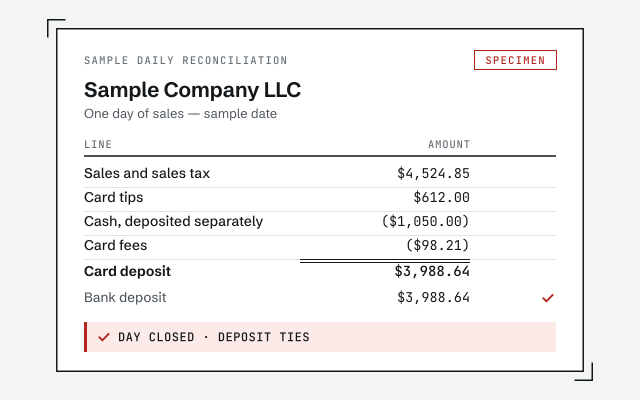 Illustrative example — not a client file.
Sample daily reconciliation
The exact worksheet tying a day's POS sales, tax, and tips to the deposit on the bank.
Our methodology
Each day reconciled to the deposit, each tip tied to what was paid out. Read the discipline we apply.
Read the full methodResponse commitment
A written reply within one business day.
Remote-first, nationwide
Mon–Sat · 8am–6pm CT
We work entirely remote — view-only access for the free review, QuickBooks' accountant access to make and log every change, each one visible to you in the audit log, and every reconciliation documented in writing.
- All 50 states
- Remote-first
- View-only review
Questions about QuickBooks for restaurants
Do you file our tip reporting or Form 8027?
No. We are a bookkeeping practice, not your tax preparer. We structure QuickBooks so tips are recorded correctly and the numbers a large food-or-beverage establishment needs for its annual tip reporting are readable in one place — but the return itself, and any position on allocated tips, is set with your CPA. We hand off clean figures; we do not file.
How do tips flow through QuickBooks payroll?
It depends on how the tip is paid. Card tips come in with the deposit and are owed back to staff, so they sit as a liability until paid out on a paycheck or a separate disbursement. Cash tips kept by the employee are reported for tax but never move through the restaurant's bank. Setting these up as the right pay types — card tips, cash tips, and pooled tips kept distinct — is most of what makes restaurant payroll reconcile.
How does our POS — Toast, Square, or Clover — connect to QuickBooks?
Most restaurant POS systems either sync to QuickBooks through an integration or export a daily sales summary you post as a journal or sales receipt. Either way the goal is the same: one day's sales, tax, tips, comps, and voids land in QuickBooks and the settlement ties to the deposit. We set the mapping so each line goes to the right account, rather than dumping a lump sum that never matches the statement.
Why doesn't my bank deposit match the day's sales in QuickBooks?
Because a deposit is never the same number as gross sales. Card processing fees, tips owed back to staff, sales tax collected for the state, and comps or voids all sit between what the POS rang up and what actually landed in the bank. When those pieces are not broken out, the deposit and the sales never tie. Daily-sales reconciliation splits the Z-read into its parts so the deposit matches the bank to the penny.
Is restaurant food taxable, and do you set the rates?
Whether prepared food is taxable, and at what rate, varies by state and often differs from grocery items — so there is no single answer we can assert for your location. What we do is set QuickBooks up to apply whatever your state and your CPA determine is correct, keep taxable and non-taxable items coded consistently, and reconcile the sales-tax liability to what you file. The tax position is set with your CPA; we make QuickBooks reflect it accurately.
How do you track food cost and COGS?
We structure the chart of accounts so food and beverage purchases post to cost-of-goods-sold accounts rather than being buried in general expenses, so COGS can be read against sales. Restaurants that count inventory can layer periodic counts on top to sharpen the number; those that do not can still track purchases as a working COGS. Either way, waste and shrinkage show up as the gap between what was bought and what was sold.
What is prime cost, and can QuickBooks show it?
Prime cost is a restaurant's cost of goods sold plus its total labor — the two biggest controllable costs, read together. QuickBooks can show it, but only if the chart of accounts is built for it: food and beverage COGS grouped so they subtotal cleanly, and labor — wages, payroll taxes, and the tips owed back out — grouped the same way. When the accounts are structured that way, prime cost falls out of a standard profit-and-loss report instead of a spreadsheet you rebuild every month.
Do you replace our CPA or accountant?
No, and we are clear about that line. We keep the books — the daily reconciling, the tip and sales-tax mechanics, the food-cost tracking — so the file is accurate and current. Your CPA sets tax positions, files returns, and gives tax advice. Good bookkeeping makes their work faster and cheaper; it does not replace it. We work alongside your CPA, not instead of them.
Do you work in QuickBooks Online or Desktop for restaurants?
Both. Most newer restaurants run QuickBooks Online because it connects cleanly to modern POS systems and payroll; some established operations are still on Desktop or Enterprise. The restaurant mechanics — daily sales reconciliation, tips as a liability, COGS structure, prime-cost grouping — are the same in either. Only the menus and the integration path differ.
We're behind — can you catch up a restaurant's books first?
Yes. Restaurants fall behind faster than most businesses because the daily volume is relentless, so a catch-up often comes first: reconciling months of deposits, sorting tips and sales tax that were lumped together, and rebuilding COGS. Once the file is current and the chart of accounts is right, keeping it current each month is far lighter work. The free review tells you how far behind you actually are.
How much does restaurant bookkeeping cost?
The fee depends on your sales volume, how many locations you run, how far behind the books are, and whether you need a one-time cleanup or ongoing monthly work. We set a fixed scope and a fixed fee after a free review rather than quoting a number that has to change later. The floors on this page are published starting points; the review sets your real range.
- QuickBooks for nonprofits— a different file that also tracks money by purpose
- QuickBooks for trucking— fuel and per-unit costs, the way food cost is per plate
- QuickBooks for medical practices— another business reconciled daily to its own system
Not sure how bad it is?
Talk to a QuickBooks specialist.
Describe the file and a specialist will tell you which of these you are dealing with — including when the answer is that you don't need us.