QuickBooks error OL-301 / OL-302
QuickBooks error OL-301
The bank feed stopped connecting? Here's the fix.
A bank feed that suddenly will not connect or update — QuickBooks error OL-301, or its sibling OL-302 — means the online-banking exchange did not complete. The problem lives in the link: a connection setting, a change on the bank's side, or the aggregator that carries the data. Your company file is fine; refreshing or re-linking the connection clears most cases.
Last reviewed October 2026 by a Certified QuickBooks ProAdvisor
What this page is based on: Intuit’s own help article for this error (checked October 2026)
- A connection fix, not a file fix
- Refresh, then re-link the feed
- We reconcile what the feed missed
Who this affects
This is about the bank connection, not what is in your books
You will see OL-301 or OL-302 when QuickBooks tries to talk to your bank and the exchange does not complete. The company file is fine — the transactions already posted are still there, and nothing in the data has been damaged. What failed is the online-banking handshake: a login that needs re-authorizing, an agreement waiting on the bank's website, a security change the bank rolled out, or a hiccup in the aggregator service that shuttles the data. Because the cause sits on the bank or aggregator side, the same error can appear even when nothing changed in your QuickBooks.
Where the error lives
Read this as text
Bank-feed data travels from the bank through an aggregator into QuickBooks and only then reaches your books. Error OL-301 occurs in the first three links — the connection — while the company file at the end of the chain stays intact. Illustrative.
Start here
OL-301 — a connection fix, or a deeper books problem?
THE FEED WILL NOT CONNECT OR UPDATE
A connection fix
Sign in at the bank, then refresh or re-link the account — this clears most OL-301 and OL-302 messages.
TRANSACTIONS ARE NOW DOUBLED OR MISSING
Now it is reconciliation
A feed that dropped and resumed can leave duplicates or gaps the books must be reconciled to.
See bank-feed issues
Read this as text
- THE FEED WILL NOT CONNECT OR UPDATE: A connection fix — Sign in at the bank, then refresh or re-link the account — this clears most OL-301 and OL-302 messages.
- TRANSACTIONS ARE NOW DOUBLED OR MISSING: Now it is reconciliation — A feed that dropped and resumed can leave duplicates or gaps the books must be reconciled to.
Fix it yourself
The DIY fix for OL-301, step by step
Intuit's article covers OL-301 with OL-332, OL-334, OL-392 and OL-393 in one sequence and does not split the fix by what you were doing. Work from the bank inward, in this order.
Sign in at your bank first
Log in to your bank's own website, outside QuickBooks, and clear any pending alerts. Intuit lists alerts you need to acknowledge among the bank-side causes.
Refresh or update the account
Back in QuickBooks, turn off online banking on any inactive account still showing a lightning bolt, then refresh the connection on the affected account, holding Ctrl each time you select a button during setup.
Deactivate and reconnect
If it still fails, turn off online banking and set it up again for each connected account; Intuit says one account that can't connect can affect the others.
Import manually as a fallback
While the feed is down, download your transactions as a .qbo file from your bank's website and import it. QuickBooks only opens downloaded transactions in a .qbo file; if the bank's file won't import, Intuit says to contact the bank.
Reconcile once the feed returns
When the connection is back, reconcile the account against the real bank statement. A feed that lapsed can overlap or skip dates, so confirm every transaction is present once and only once.
Intuit's own fix for OL-301, in Intuit's order
Intuit's Fix OL and OLSU Bank Feeds errors in QuickBooks Desktop (updated 8/5/2026, checked November 2026) covers OL-301 and its siblings in one sequence; it does not split the fix by what you were doing or by error code:
- Back up the company file, and match any pending downloaded transactions; sign in to the bank's own website and clear any pending alerts; check whether the error also appears in Bank Feeds Classic Mode; and make sure Windows firewall isn't blocking QuickBooks.
- Check your QuickBooks version. Intuit lists a QuickBooks version it doesn't support among the causes, and Desktop 2023 lost online bank feeds after May 31, 2026 (Intuit, updated 8/5/2026, checked November 2026).
- Test in a new company file: set up bank feeds in a test company and download; if the error appears there too, Intuit says the bank is the likely cause. Next, download a .qbo file from the bank's website and import it; if that fails, contact the bank.
- Clear stale connections: find inactive accounts still set up for online banking (marked with a lightning bolt), deactivate their online services, then refresh the connection on the affected account, holding Ctrl each time you select a button during setup.
- Create and merge: make a copy of the affected account with an asterisk at the end of its name, merge the two, set up bank feeds again and test a download. If that fails, turn off and set up online banking again on each connected account, and send your bank's support a copy of your Bank Feeds log.
If you can't edit or merge the account, Intuit says the company file may be damaged.
When it is more than the feed
When OL-301 leaves a mess in the books
QuickBooks error OL-301 is not itself a books problem — but the outage it causes can become one. When a feed stops and later resumes, it can pull the same days twice or skip the days it was down, so the register quietly drifts out of step with the bank. If you have had OL-301 or OL-302 for a while, the risk is not the error message; it is the duplicate and missing transactions hiding behind it. That is reconciliation and cleanup work: matching the register back to the bank statement, clearing the doubles, and adding what never came through, so the balance you report is the balance you actually have. Two neighbors are worth knowing: if the failure hits while you are connecting or reconnecting the account rather than during a download, that is usually error OLSU-1013, and if QuickBooks closes outright instead of returning a bank-feed code, start with the unrecoverable error guide.
What an outage leaves behind
Read this as text
A timeline of a bank-feed outage: while the feed is connected each day posts once; while it is down, days go missing; when it resumes, it can pull the same days twice. Both the gap and the overlap are caught by reconciling the account to the real bank statement. Illustrative — not a measured statistic.
How the OL-301 fix is written up
Who’s responsible for your file
A Certified QuickBooks ProAdvisor handles your file from the review through the corrections to the hand-back — the same person throughout, never a rotating pool.
About QBSpecialist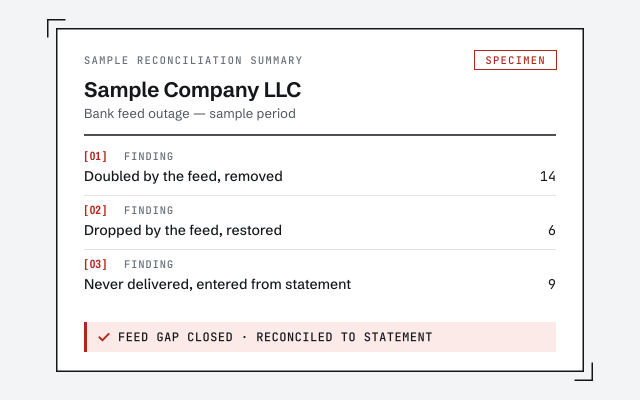 Illustrative example — not a client file.
Sample reconciliation summary
The written read-out showing which transactions the feed doubled, dropped, or never delivered while it was down.
How we work
We reconcile the account to the real statement before we call it clean. See what cleanup involves.
See QuickBooks cleanupResponse commitment
A written reply within one business day.
Questions about error OL-301
What does QuickBooks error OL-301 mean?
OL-301, and its close relative OL-302, means QuickBooks could not complete an online-banking connection to your bank. The trouble is in the link between the bank and QuickBooks — a connection setting, a bank-side change, or the aggregator that moves the data — not in your company file. Your books are intact; the feed simply did not come through.
How do I fix OL-301 quickly?
Sign in to your bank's website first to clear any alert or agreement waiting there, then in QuickBooks refresh the account or update the bank feed. If it still fails, deactivate online banking for that account and reconnect it fresh. That refresh-or-relink sequence resolves most OL-301 and OL-302 messages.
Is OL-301 a sign my company file is damaged?
No. OL-301 is a banking-connection error, not a file-integrity error. It does not point to corruption the way file-open errors do. If a bank feed is down, the fix is on the connection or the bank side — not a file repair — though the missed transactions still need to be reconciled once the feed returns.
Why did my bank feed suddenly stop with OL-301?
Banks change how they publish data, update their security or login flow, or require a new agreement, and any of those can break an existing connection until you re-authorize it. Because the cause sits on the bank or aggregator side, the error can appear even though nothing changed in your QuickBooks.
Can I still get my transactions in while OL-301 persists?
Yes. While the feed is down you can download a Web Connect (.QBO) file from your bank's website and import it into QuickBooks manually, so posting continues. Watch for duplicates where the feed later resumes over the same dates — a downtime like this is exactly when a bank feed can hide double or missing entries that reconciliation has to catch.
How is OL-301 different from OLSU-1013?
Timing. OLSU-1013 appears while you are setting up or activating a bank feed — the connection never gets established. OL-301 appears after the account is connected, when a download or refresh fails. If your feed used to work and stopped, you are in OL-301 territory; if it never connected at all, start with OLSU-1013.
- File repair— when the bank feed error comes from damage in the file itself
- Error 1603— an install error, if reinstalling QuickBooks was part of the attempted fix
Not sure how bad it is?
Talk to a QuickBooks specialist.
Describe the file and a specialist will tell you which of these you are dealing with — including when the answer is that you don't need us.