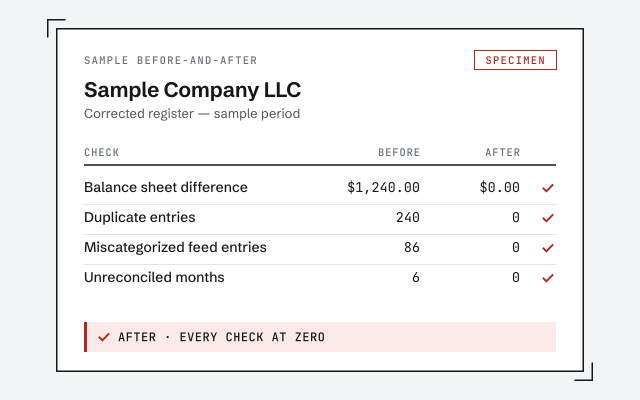
A real before-and-after
The corrected register and reconciliation report you receive once the duplicate deposits and expenses are cleared.
QuickBooks duplicate transactions
QuickBooks duplicate transactions are the same payment recorded twice — usually a bank feed added on top of a manual entry, a statement imported twice, or a memorized transaction posting alongside the real one. A few recent duplicates you can dedupe yourself; months of them overstate your income and need a cleanup so your reports and reconciliation can be trusted.
QuickBooks duplicate transactions means the same real-world payment appears in your books twice — two register lines for one deposit or one expense. It's not that QuickBooks invented a transaction; it's that the same one reached your books through two different paths and never got merged.
The reason it's more than cosmetic is that every duplicate moves a number that matters. A doubled deposit overstates income; a doubled bill overstates expenses. Reconciliation is where duplicates usually surface, because a register carrying two of something the bank only shows once simply won't tie out to the statement.
Duplicates come from a handful of predictable paths: a bank feed adding a transaction you'd already entered by hand, a statement or QBO file imported twice with overlapping dates, a memorized or recurring transaction posting next to the real one, or re-adding an account that re-downloads its history.
The bank-feed case is by far the most common. The feed tries to match each downloaded item to something already in your books, but if the amount, date, or payee don't line up closely enough, it can't be sure — so it offers the item as new, and clicking “Add” instead of “Match” creates the second copy. Do that across a busy month, or import an overlapping statement on top of it, and the duplicates multiply quietly until reconciliation refuses to balance.
How one transaction becomes two
It becomes our kind of problem when the duplicates span months, distort your income, or have already been reconciled — because at that point you can't just delete them without breaking the reconciliations behind them, and the numbers have to be restated period by period.
The distinction is the same one that governs any feed mess: the feed is only the source, the fix lives in the transactions it created. A handful of recent, unreconciled copies is a quick dedupe. Months of doubled deposits sitting inside reconciled periods is a cleanup, often paired with fixing the bank feed behavior that produced them so they don't come straight back.
Matched vs. duplicated
We identify every duplicate, decide which copy is the keeper, and remove or correct the other — then re-reconcile each affected month to the statement so the register ties to the bank again. Reconciled duplicates are corrected in place, never bulk-deleted.
Access stays read-only until you approve a scope, and nothing in your file changes without your sign-off; you can screen-share and watch. Where the duplicates came from a feed or a recurring transaction, we also tune what produced them — matching rules, overlapping imports, a redundant memorized entry — so the cleanup holds instead of refilling the moment the next feed downloads. Every corrected month comes back with a written summary you could hand a preparer.
Clearing duplicates is quoted as a fixed scope after a free, read-only review — never by the hour, and never before we've seen how deep they run. A few recent, unreconciled copies is small; months of doubled transactions sitting inside reconciled periods is a larger scope.
What drives the number is how many periods are affected, whether the duplicates were reconciled around, and how much your income has to be restated as a result — not the raw count of copies. We tell you which scope you're in, in writing, before any work begins, and we don't invent a figure before the review.
A senior specialist clears your duplicates start to finish — not a rotating pool — and every corrected month is re-reconciled to the statement, so you can prove the register matches the bank rather than just trusting that it does.
We also refuse the shortcut. The tempting move with a duplicated account is to delete everything and re-import a clean feed, and it almost always makes things worse — lost reconciliations, re-downloaded overlaps, a fresh set of duplicates. We correct transaction by transaction, fix the behavior that caused the duplication, and leave the account genuinely clean instead of superficially reset.
Which do you need?
A few recent, unreconciled duplicates you can dedupe yourself in an afternoon. Months of doubled transactions — or any that are already reconciled — is where a specialist keeps a delete from breaking your reconciliation.
| Do it yourself | Specialist cleanup | |
|---|---|---|
| Best when | A few recent duplicates | Months of doubling |
| Match or exclude in For Review | ||
| Batch-delete unreconciled copies | ||
| Duplicates already reconciled | It depends | |
| Income restated across months | — | |
| Bank rules re-tuned to stop recurrence | It depends | |
| Verdict | Recent and few | Months and material |
Honest answer
Not every duplicate needs a specialist. If a handful of copies slipped in this month or last, aren't reconciled yet, and you can see which entry is the real one, deduping them yourself is quick and completely reasonable — you don't need us for that.
The businesses that do need help are the ones where duplicates ran unnoticed for months: doubled deposits inflating revenue, expenses counted twice, and reconciliations quietly built on top of the mess. Once duplicates are reconciled around, or income has been overstated across several periods, the fix is no longer a delete key — it's a restatement, and that's where a cleanup earns its keep.
Do-it-yourself
For a few recent duplicates, the do-it-yourself fix is three moves: dedupe the downloaded items before you accept them, batch-delete the extra copies that already posted, and exclude the feed items whose real transaction is already entered.
Start in the For Review tab, before anything is accepted. For each downloaded item that matches something already in your books, click Match instead of Add — that ties the feed to your existing entry and creates nothing new. For a feed item whose real transaction is already recorded and doesn't need the download at all, use Exclude to drop it from the list without posting it.
For duplicates that already posted, open the account register or the banking list, confirm which copy is correct, verify none of them are reconciled, and delete the extras — batch-deleting a clearly duplicated, unreconciled set is fine and faster. Do this before your next reconciliation and check the register against the statement as you go. Where it stops being a do-it-yourself job is when the duplicates stretch back months, have already been reconciled, or have overstated your income — that's a cleanup, and the cleanup checklist lays out every step in order.
Straight talk
Don't hire us to remove a few recent duplicates you can already see and that haven't been reconciled — matching them in the feed or deleting the extra copy is minutes of your own time, not a cleanup.
Don't hire us to reconnect a feed that's merely importing the occasional double; that's a bank feed tune-up you can do yourself. We're worth it when the duplicates have a history — months of them, income overstated, or copies buried inside reconciled periods where a plain delete would break the reconciliation. If a free review shows it's the small kind, we'll tell you exactly how to clear it and leave you to it.
The corrected register and reconciliation report you receive once the duplicate deposits and expenses are cleared.
Every corrected month re-reconciled to the statement, not bulk-deleted. Read the method.
Read the reconciliation referenceA real specialist replies within one business day, in writing.
Remote-first, nationwide
Mon–Sat · 8am–6pm CT
We work entirely remote — secure read-only access to your file, screen-share whenever you want to watch, and every corrected month documented in writing.
Because the same transaction reached your books through two paths — most often a bank feed adding an item you'd already entered by hand, a statement imported twice with overlapping dates, or a memorized transaction posting alongside the real one. QuickBooks doesn't always catch that they're the same.
Matching relies on the amount, date, and payee lining up closely enough. When a manual entry differs even slightly — a rounded amount, a different date, a blank payee — the feed can't confidently match it, so it offers the downloaded copy as a new transaction, and accepting it creates the duplicate.
Recent, unreconciled duplicates, yes — delete the extra copy and keep the correct one. What you can't safely do is delete a duplicate that's already been reconciled, because that breaks the reconciliation behind it. Those have to be corrected and re-reconciled, not simply removed.
For a clearly duplicated, unreconciled batch, batch-delete is fine and much faster than one at a time. The risk is deleting the wrong copy or a reconciled one, so the safe order is: confirm which copy is right, check nothing in the batch is reconciled, then delete.
Excluding removes a downloaded transaction from the For Review list without adding it to your books — useful when the real transaction is already entered. It doesn't delete anything that already posted; it just stops the feed copy from becoming a second entry.
They can be. A memorized or recurring transaction posts automatically on schedule, and if the same activity also arrives through the bank feed or gets entered by hand, you get two. Pausing the recurring entry and matching to the feed instead usually stops it.
Yes — that's why they matter. A duplicated deposit overstates income; a duplicated expense overstates deductions. Left across months, they distort your profit and loss and the numbers a preparer would file, which is exactly why months of duplicates are worth cleaning up properly.
Match feed transactions instead of adding them, avoid importing overlapping date ranges, and don't enter by hand what the feed already brings in. Tightening or removing an over-broad bank rule and pausing a redundant recurring transaction close off the last common paths.
Not once you've reconciled. Wiping the account and re-importing feels clean but destroys your reconciliation history and often re-downloads the same overlaps, making it worse. Corrections belong transaction by transaction, then re-reconciled to the statement.
Related problems: a balance sheet out of balance, a stuck undeposited funds balance, or wanting a second opinion on books you don't trust.