A real reconciliation summary
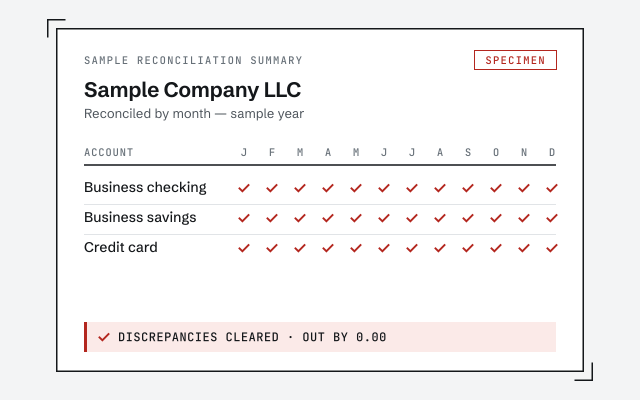
The corrected register and month-by-month reconciliation report you receive once the discrepancies are cleared.
QuickBooks not reconciling
QuickBooks not reconciling means the reconciliation won't finish at a difference of zero — a beginning balance that no longer matches, a cleared transaction that was changed or deleted, or a missing statement month. One recent period is usually a do-it-yourself fix; months of compounding drift need a cleanup so your cash ties back to the bank.
QuickBooks not reconciling means the reconcile window won't close at a difference of zero: the transactions you've marked cleared don't add up to the statement's ending balance, and QuickBooks won't let you finish while that gap exists. The gap is the whole problem.
That is different from a bank feed that stopped importing or a report that looks wrong. Reconciliation is the deliberate month-end check that your recorded cash matches the bank line for line. When it won't complete, it's telling you that the recorded history and the statement have quietly diverged — and it's refusing to certify a month it can't prove.
A reconciliation discrepancy is almost always one of three things: a beginning balance that no longer matches last period's reconciled ending, a previously cleared transaction that was later changed or deleted, or a statement month that was skipped entirely.
The beginning balance is the quiet one. QuickBooks calculates it from every transaction you've ever cleared, so editing, voiding, or deleting a transaction inside a month you already closed silently shifts it — and the next reconciliation starts out of balance by exactly that amount. Skipped months compound the same way: reconcile January and March but not February, and March inherits February's unresolved difference. Missing or misread statement figures do the rest.
Reconciliation discrepancy
It becomes our kind of problem when the discrepancy has compounded across months — beginning balances drifting period after period, cleared transactions edited inside closed months — so no single re-entry can pull it straight. At that point it's a reconciliation cleanup, not a quick correction.
The tell is direction. A single outstanding check that hasn't cleared yet is a timing difference, and it resolves itself next month; you don't touch it. A cleared transaction that was changed after the fact is a discrepancy, and it will sit there until someone finds and fixes it. When months of those pile up, the right move is a structured cleanup that re-ties each period to its statement — the same work behind our bank reconciliation service.
Timing difference vs. discrepancy
We work backward from the last period that reconciled cleanly. Using the Reconciliation Discrepancy report, we find every cleared transaction changed or deleted since then, restore the correct beginning balance, and re-tie each month to its statement until the difference is zero again.
Access stays read-only until you approve a scope, and we change nothing in your file without telling you first — you can screen-share and watch the whole thing. We don't reach for the “enter an adjustment” button, because that plug just relabels the problem as an opening-balance discrepancy. Each corrected month is re-reconciled and handed back with a written summary you could give a tax preparer without a caveat.
Reconciliation cleanup is quoted as a fixed scope after a free, read-only review — never by the hour, and never before we've actually seen the file. What drives the number is how many periods have drifted and how many accounts are involved, not the calendar.
A single account off by one recent month is small. Several accounts drifting across a year, with cleared transactions edited along the way, is a larger scope — and we tell you which one you're looking at, in writing, before any work starts. No number is invented before the review, because the file decides it.
A senior specialist does your reconciliation from start to finish — not a rotating pool passing your file around — and every corrected month is re-reconciled to the statement, then handed back with a written month-by-month summary.
We also draw the line honestly. If your problem is one recent period you could fix in an afternoon, we'll tell you that and point you at the steps rather than quote you a cleanup. The work we take on is the work that genuinely needs a specialist: compounded drift, changed cleared history, and reconciliations that have to be rebuilt without throwing away the months that are already right.
Which do you need?
One recent period that won't reconcile is usually a do-it-yourself fix. Months of compounding drift — or cleared transactions changed in closed periods — is where a specialist keeps you from making it worse.
| Do it yourself | Specialist cleanup | |
|---|---|---|
| Best when | One recent period is off | Months of drift compounding |
| Re-enter the correct beginning balance | ||
| Trace changed or deleted cleared items | It depends | |
| Bisect with the Discrepancy report | It depends | |
| Re-tie every prior period to its statement | — | |
| Typical effort | An afternoon | Days, fixed scope |
| Verdict | Recent and isolated | Compounded and tangled |
Honest answer
Not every reconciliation that won't zero out needs a specialist. If your books reconciled cleanly through last month and a single account is off this month by an amount you can point to, you can very likely fix it yourself — and you should.
The businesses that do need help are the ones where the drift has been running quietly for a while: several accounts, several months, and a beginning balance nobody trusts anymore because transactions were edited in periods that were supposedly closed. If you open the reconcile window and can't say when it last balanced, that's the signal you're past a quick fix — the history has to be reconstructed in order, not patched at the end.
Do-it-yourself
For a single recent period, the do-it-yourself fix is three moves: run the Reconciliation Discrepancy report, restore the correct beginning balance, and mini-reconcile the affected month. Most people can do it in an afternoon.
Start with the report. In QuickBooks, open the Reconciliation Discrepancy report for the account (Reports → Banking in Desktop; the reconciliation history in Online) — it lists every cleared transaction changed or deleted since the last reconcile, and the date it happened. That list is usually your whole problem. Restore or re-enter each item exactly as it originally cleared, which pulls the beginning balance back to last month's reconciled ending.
Then confirm the beginning balance matches the ending balance on your last good statement; if it doesn't, the gap equals whatever's still changed. Finally, run a mini-reconciliation for just the affected month against that statement and confirm the difference lands at zero. If it won't — or the report shows changes stretching back across several months — stop before you start deleting things, because unwinding reconciled history by hand is exactly what a cleanup is for, and where the reconciliation reference shows the method in full.
Straight talk
Don't hire us if last month reconciled and you simply haven't done this month yet — that's your normal month-end, not a cleanup. Don't hire us if your bank feed just stopped importing; that's a reconnection, and it doesn't stop you reconciling from the statement.
And don't hire us to reconcile a single, obvious, recent difference you can already see — a missed deposit, one duplicated payment, a fat-fingered ending balance. Those are minutes of your own time. We're worth it when the difference has a history: many months, many accounts, or a beginning balance that's been drifting since a period you thought was closed. If you're not sure which you've got, the free review tells you — and if it's the small kind, we'll say so.
The corrected register and month-by-month reconciliation report you receive once the discrepancies are cleared.
Every corrected month re-tied to the statement, difference back to zero. Read the method.
Read the reconciliation referenceA real specialist replies within one business day, in writing.
Remote-first, nationwide
Mon–Sat · 8am–6pm CT
We work entirely remote — secure read-only access to your file, screen-share whenever you want to watch, and every corrected month documented in writing.
Because the difference at the bottom of the reconcile window isn't zero. QuickBooks won't close a reconciliation while the cleared balance and the statement ending balance disagree, so somewhere there's a transaction that's missing, doubled, or changed since you last reconciled.
It's the gap between what your books say cleared and what the statement says cleared. Unlike a timing difference — a check that simply hasn't cleared yet — a discrepancy won't resolve on its own, because a previously reconciled transaction was edited, deleted, or voided.
The beginning balance is calculated from every transaction you've ever cleared. When someone edits, deletes, or voids a transaction from a month you already reconciled, that calculation shifts, and the next reconciliation starts already out of balance by the amount of the change.
You can, and QuickBooks offers to post one — but it only hides the problem. The adjustment lands in an opening-balance or reconciliation-discrepancy account and quietly misstates your books. We'd rather find the real cause, which is usually faster than living with the plug.
It's a built-in report that lists every transaction changed or deleted since an account was reconciled, with the date it was altered. It's the first place we look, because it points straight at what broke the beginning balance instead of making you hunt for it.
No. A bank feed imports transactions; reconciliation proves your books match the statement line by line. A feed can import perfectly and still leave you unreconciled, and a broken feed doesn't stop you reconciling from the statement itself. They're separate problems with separate fixes.
Only as far as the last month that reconciled cleanly. We find that point first, then work forward. If it reconciled through March and drifted after, we start at April — we don't redo work that's already right, and we tell you the starting point after a free review.
It can, and that's the point — a file that won't reconcile is a file whose income and expenses aren't trustworthy yet. Correcting the discrepancies ties your cash back to the bank, so the numbers you hand a preparer are ones the statement actually supports.
Almost never. Un-reconciling is a last resort because it throws away good work. We correct the specific transactions that broke, restore the right beginning balance, and re-verify — leaving every already-clean period untouched wherever we possibly can.
Related problems: balance sheet out of balance, a stuck undeposited funds balance, or wanting an independent second opinion on your books.