QuickBooks error 3371 · Status Code -11118
QuickBooks error 3371
“Could not initialize license properties” — here's the fix.
QuickBooks Desktop stops at startup with “Could not initialize license properties” — that is QuickBooks error 3371, Status Code -11118. The program cannot read its license data, usually because the entitlement file is damaged or missing, or Windows is out of date. It is an activation problem on your computer, not your company file; rebuilding the license data clears most cases.
Last reviewed October 2026 by a Certified QuickBooks ProAdvisor
What this page is based on: Intuit’s own help article for this error (checked October 2026)
- A licensing fix, not a books fix
- Rebuild the entitlement file
- OS-level cases go to your IT
Who this affects
This is a license error, not a books error
Error 3371 appears the moment QuickBooks Desktop tries to validate itself — before it ever opens a company file. When you install or re-register QuickBooks, or move it to a new computer, the program writes your license and product details into a small entitlement file stored on that machine. Every time QuickBooks launches, it reads that file to confirm it is licensed. If the file is damaged, empty, or missing — or if Windows cannot supply a component QuickBooks depends on to read it — the program cannot initialize the license and stops with the 3371 message. None of that involves your accounting data. Your transactions, reconciliations, and reports are all untouched; the software simply cannot prove to itself that it is allowed to run. That distinction matters, because it means the fix is a Windows and activation task, and there is no risk to your books in carrying it out.
Start here
Error 3371 — a quick license rebuild, or a deeper Windows problem?
IT CLEARS AFTER THE TOOL HUB OR ENTITLEMENT FIX
A license rebuild
QuickBooks rebuilt its license data and re-validated — that resolves the great majority of 3371 messages.
IT RETURNS AFTER EVERY FIX
A Windows-level problem
A 3371 that keeps coming back points at out-of-date Windows, a damaged system component, or antivirus removing the license files — an IT job, not a bookkeeping one.
See file repair
Read this as text
- IT CLEARS AFTER THE TOOL HUB OR ENTITLEMENT FIX: A license rebuild — QuickBooks rebuilt its license data and re-validated — that resolves the great majority of 3371 messages.
- IT RETURNS AFTER EVERY FIX: A Windows-level problem — A 3371 that keeps coming back points at out-of-date Windows, a damaged system component, or antivirus removing the license files — an IT job, not a bookkeeping one.
Fix it yourself
The DIY fix for error 3371, step by step
Intuit gives one route whether the error came while activating QuickBooks Desktop or opening it, plus a note for WebConnect imports, and the first two steps don't touch your company file. Work them in order, stop as soon as QuickBooks opens, and take a backup of anything you value on the machine before you start, as a matter of habit.
Run the QuickBooks Tool Hub
Close QuickBooks and open the QuickBooks Tool Hub. Under Installation Issues, run the 3371 Error Fix and select OK, then start QuickBooks Desktop and open your company file.
Delete the entitlement file
If the Tool Hub does not clear it, close QuickBooks, show hidden items in File Explorer, and delete EntitlementDataStore.ecml in the Intuit Entitlement Client folder (v8, or v6). Then open QuickBooks and your company file and follow the on-screen steps to register QuickBooks again.
Reinstall QuickBooks Desktop
If the error remains, reinstall QuickBooks Desktop. This is Intuit's third and last QuickBooks step for 3371.
If it survives a reinstall
Intuit says there may be damage to the Windows operating system: work with a qualified IT professional or contact Microsoft.
Importing a WebConnect file?
If you use WebConnect with QuickBooks Enterprise on Right Networks, Intuit says you'll see 3371 if you open the file before you save it. Save the file first, then import the .QBO file.
The license rebuild, in order
Read this as text
Four stages, left to right: run the Tool Hub's 3371 Error Fix to rebuild the license data, delete the entitlement file so QuickBooks recreates it, update Windows and restart, then QuickBooks validates its license and opens — the verified end state, marked with a tick. An illustrative sequence.
"QuickBooks" is used here descriptively to name the software we work in. For official product support, billing, or account access, use Intuit's official channels.
Intuit's own fix for 3371, in Intuit's order
Intuit's 3371 article and its US license, validation and registration errors article (checked November 2026) describe 3371, status code -11118, as QuickBooks being unable to load its license data, which may be caused by missing or damaged files. Intuit names two moments, activating QuickBooks Desktop and opening it, and gives the same steps for both.
- Run the 3371 Error Fix from the Tool Hub: Installation Issues → 3371 Error Fix → OK.
- Re-create the entitlement file. With hidden items shown, open C:\ProgramData\Intuit\Entitlement Client\v8 (or v6), delete EntitlementDataStore.ecml, then open QuickBooks and your company file and follow the on-screen steps to register QuickBooks again.
- Reinstall QuickBooks Desktop if the error persists.
- If it persists after the reinstall, Intuit says there may be damage to Windows itself: work with a qualified IT professional or contact Microsoft.
One branch depends on what you were doing: if you use WebConnect with QuickBooks Enterprise on Right Networks, Intuit says you'll see this error if you open the file before you save it. Save the file first, then import the .QBO file.
When to call us
When error 3371 is more than a rebuild
If 3371 comes back after every fix, the license rebuild is working and something on the computer is undoing it — an out-of-date Windows install, a damaged Windows component QuickBooks depends on, or security software removing the license files. That is an operating-system problem, and it belongs with your IT support or the person who manages the machine; it sits outside bookkeeping, so we will point you there rather than pretend it is ours to solve. What we can do is confirm the part that is our lane: that your company file and your accounting are entirely unaffected by the error, so you can hand the machine to IT knowing the books are safe. We diagnose from a copy of your file — never the live one — and tell you in writing where the line falls between the Windows fix and anything that touches your data. If the install itself failed before licensing ever ran, that is error 1603 territory; and a crash that closes the program outright is covered in the unrecoverable error guide.
One rebuild vs. a returning error
Read this as text
On the left, a 3371 that clears after the rebuild was a license fix: the entitlement file is recreated, the license validates, and the job is done. On the right, a 3371 that returns after every fix means something on the machine keeps undoing the rebuild — out-of-date Windows, a damaged component, or antivirus — an IT job, not a bookkeeping one. A comparison of the two outcomes.
How the 3371 fix is written up
Who’s responsible for your file
A Certified QuickBooks ProAdvisor handles your file from the review through the corrections to the hand-back — the same person throughout, never a rotating pool.
About QBSpecialist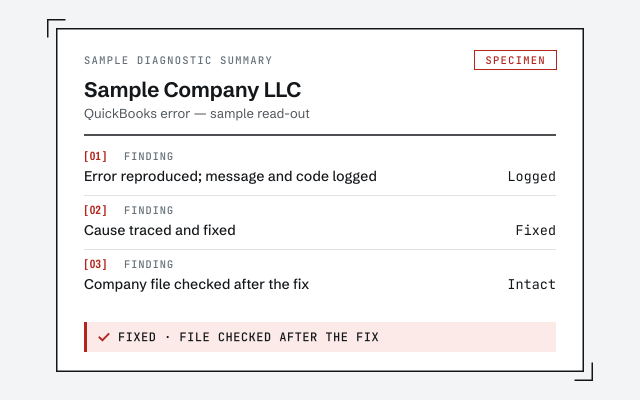 Illustrative example — not a client file.
Sample diagnostic summary
The written read-out that confirms 3371 is a licensing issue and that your company file is untouched.
How we work
We confirm the cause on a copy before touching anything. See what our work involves.
See QuickBooks file repairResponse commitment
A written reply within one business day.
Questions about error 3371
What does QuickBooks error 3371 actually mean?
Error 3371, Status Code -11118 reads 'Could not initialize license properties.' It means QuickBooks Desktop launched but could not read the license and entitlement data it needs to open. The company file is not involved — this is an activation and validation problem on the Windows machine, not a problem with your books.
How do I fix error 3371 quickly?
Run the QuickBooks Tool Hub and use its 3371 Error Fix, which rebuilds the license data. If that does not clear it, delete the entitlement file so QuickBooks recreates it and re-validates your license on the next open. Most 3371 cases resolve at one of those two steps.
Why does deleting the entitlement file fix error 3371?
QuickBooks stores your license state in an entitlement file on the local machine. When that file is damaged, QuickBooks cannot initialize the license and shows 3371. Deleting it forces QuickBooks to build a fresh copy and re-read your license, which clears the error. Your company data is never touched by this.
Does error 3371 mean my company file is damaged?
No. Error 3371 is a licensing and activation error, not a data error. It happens before QuickBooks even opens a company file. If your books were fine before the message appeared, they are still fine — the fix restores the program's ability to validate its license, and your file opens normally afterward.
What if error 3371 keeps coming back after every fix?
A 3371 that returns after each fix usually points at something in Windows itself — an out-of-date system, a damaged Windows component QuickBooks relies on, or antivirus removing the license files as fast as they rebuild. That is an operating-system problem for your IT support, and it is outside bookkeeping. We can confirm the books are unaffected while IT clears the machine.
Will I need my license and product numbers to fix 3371?
Keep them handy. After the license data is rebuilt, QuickBooks may ask you to re-register with your license and product numbers before it opens. They are on your original purchase confirmation or in your Intuit account. If you cannot find them, recovering them is an account matter for Intuit's official support — an independent firm cannot look them up for you.
- Error 15271— an update that fails to validate after the license is fixed
- Error PS038— a payroll paycheck stuck as Online to Send, another sign of a broken entitlement
- Error OL-301— a bank-feed error, if the license fix brings the feeds back wrong
Not sure how bad it is?
Talk to a QuickBooks specialist.
Describe the file and a specialist will tell you which of these you are dealing with — including when the answer is that you don't need us.