Error H202
QuickBooks error H202
Multi-user mode can't reach the host — a connection fix, not data damage.
QuickBooks error H202 means a workstation in multi-user mode cannot reach the computer hosting your company file. It is a network, hosting, or firewall problem between the workstation and the server — almost never damage to your data. Setting up hosting and the Database Server Manager correctly clears it in most cases.
Last reviewed October 2026 by a Certified QuickBooks ProAdvisor
What this page is based on: Intuit’s own help article for this error (checked October 2026)
- A network fix, not a data fix
- Steps you can run yourself
- We escalate only real damage
Who this affects
This is a network problem, not a bookkeeping one
H202 hits multi-user setups — one computer hosts the company file and others open it over the network. If you work in a single-user file on one machine, you will rarely see it. When it appears, your data is almost always intact; QuickBooks simply cannot find the server hosting the file. That makes it a configuration fix, and one you can usually do yourself.
Start here
H202 — is it a quick fix or something deeper?
MULTI-USER WILL NOT CONNECT
Work the network fix
Hosting, the Database Server Manager, firewall, and the .ND file resolve almost every H202 — the steps are below.
THE FILE ITSELF WILL NOT OPEN
Now it could be file damage
If the file also fails to open in single-user mode on the host, or opens with data missing, corruption may be the real cause.
See file repair
Read this as text
- MULTI-USER WILL NOT CONNECT: Work the network fix — Hosting, the Database Server Manager, firewall, and the .ND file resolve almost every H202 — the steps are below.
- THE FILE ITSELF WILL NOT OPEN: Now it could be file damage — If the file also fails to open in single-user mode on the host, or opens with data missing, corruption may be the real cause.
Fix it yourself
The DIY fix for error H202, step by step
Run these on the computer that hosts the company file first, then the workstation showing the error. Intuit's article does not split the fix by what you were doing; every step works on the connection between the workstation and the server.
Confirm hosting
On the server, open File, Utilities, and make sure hosting is on. On each workstation hosting should be off — only the server hosts the file.
Run the Database Server Manager
Install and open QuickBooks Database Server Manager on the server, then scan the folder that holds the company file so it can serve it.
Open the network ports
Make sure the server lets QuickBooks through its firewall, using Intuit's steps for Windows firewall exceptions, then switch each workstation to multi-user mode.
Check the QuickBooks services
On the server, in services.msc, set QuickBooksDBXX (XX is your QuickBooks version plus 10) and QBCFMonitorService to start automatically, confirm both are running, and give both admin permissions.
Reopen in multi-user
From a workstation, open the company file over the network in multi-user mode. If it connects, H202 is resolved.
The connection fix, in order
Read this as text
Four stages, left to right: turn hosting on at the server and off at every workstation; scan the company-file folder with the QuickBooks Database Server Manager; open the network path by allowing QuickBooks through the firewall and rebuilding the .ND file; then a workstation opens the file in multi-user mode and H202 clears — the verified end state, marked with a tick. An illustrative sequence.
Intuit's own fix for H202, in Intuit's order
Intuit's own article (updated 8/10/2026, checked November 2026) covers H202 with H505, H101 and H303, which appear when something blocks the multi-user connection to your server computer. It does not split the fix by what you were doing: it gives the Tool Hub route first, then manual fixes, then one extra step for H101, H303 and H505. In its order:
- On the server, run the Database Server Manager from the Tool Hub. Close QuickBooks, open the QuickBooks Tool Hub, choose Network Issues, then QuickBooks Database Server Manager, and Start Scan on the company-file folder. Intuit says the scan repairs the firewall permissions itself.
- Switch each workstation to multi-user mode from the File menu and reopen the file.
- Check the two Windows services on the server. If the server runs the full QuickBooks program, not the Database Server Manager alone, first turn on multi-user hosting there. In services.msc, QuickBooksDBXX — where XX is the QuickBooks version plus 10, so QuickBooks 2023 is QuickBooksDB33 — and QBCFMonitorService should both be set to start automatically, be running and restart after a failure; then give both admin permissions on the server.
- Test the connection. First make sure the server lets QuickBooks through its firewall. Then turn on network discovery, find the server's host name, and ping it from each affected workstation; Intuit says that if there is packet loss or a very slow reply, stop and get an IT professional to look at the network.
Intuit notes the Database Server Manager doesn't support network-attached storage (NAS) devices. If the code is H101, H303 or H505 instead, Intuit says a workstation is set to host: on each workstation, without opening the company file, choose File, then Utilities, then Stop Hosting Multi-User Access if it is offered. Only the server should host.
When to call us
When error H202 means more than a network fix
If the file also refuses to open on the host machine in single-user mode, opens with transactions missing, or reports itself as damaged, the network is not your only problem. At that point, forcing multi-user access can make things worse. That is when a file repair or a rescue is the right next step — we diagnose on a copy of the file before changing anything, and where a Desktop repair needs admin-level access, it runs over a screen-share or a hosted copy you control. Related reading if the symptom shifts: error 6123 when the failure appears around a restore or version mismatch, and error -6000, -77 when the block is folder permissions rather than the network.
What the single-user test tells you
Read this as text
On the left, the file opens in single-user mode on the hosting computer: the data is intact and the problem is the network path — hosting, the firewall, or the .ND file — a configuration fix you can work yourself. On the right, the file fails even on the host, or opens with data missing: suspect the file itself — a file repair, or a rescue, diagnosed on a copy, never the original. A comparison of the two lanes.
When it is not QuickBooks
When the fix belongs to IT or your network
Some H202 cases are network problems wearing a QuickBooks error number. If the workstations lost sight of the server after a firewall change, a VPN or DNS change, or new network hardware, the fix sits at the network level — firewall exceptions, host records, the path between the machines — and that work belongs with your IT or network support, not a bookkeeping firm. We will say plainly whether yours is a QuickBooks hosting setting or a network job. For Intuit's own guidance on H202 and the Tool Hub, see QuickBooks official help.
How the H202 fix is written up
Who’s responsible for your file
A Certified QuickBooks ProAdvisor handles your file from the review through the corrections to the hand-back — the same person throughout, never a rotating pool.
About QBSpecialist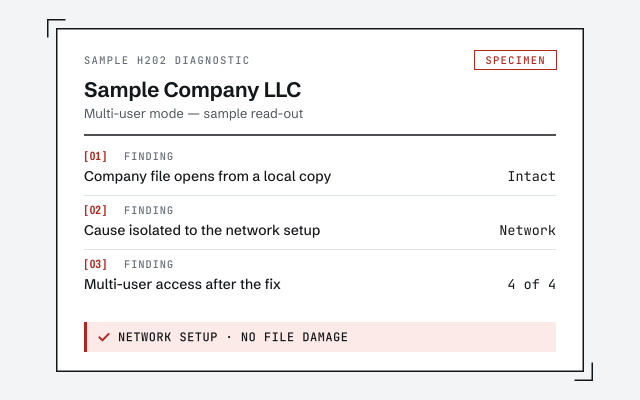 Illustrative example — not a client file.
Sample H202 diagnostic
The written read-out you get when we confirm whether it is network or file damage.
How we work
We confirm the cause over a screen-share before touching hosting or the file. See what repair involves.
See QuickBooks file repairResponse commitment
A written reply within one business day.
Questions about error H202
Does H202 mean my company file is corrupt?
Rarely. H202 is a connection problem — a workstation in multi-user mode cannot reach the server hosting the file. The data is almost always intact. Corruption shows up differently: the file will not open at all, or opens with information missing, even on the host computer.
Can I fix H202 without calling support?
Usually, yes. Turn on hosting on the server only, run the QuickBooks Database Server Manager, allow the program through the firewall, and rebuild the .ND file. Most H202 messages clear once the workstation can reach the host again. The steps are on this page.
What is the .ND file?
The .ND file is a small configuration file that sits beside your company file and tells workstations how to reach it over the network. If it is stale or pointing at the wrong host, you get H202. Deleting it and re-scanning with the Database Server Manager rebuilds it correctly.
Why does H202 happen after a QuickBooks update?
An update can reset hosting, replace the Database Server Manager, or change which firewall rules apply. After updating, re-confirm hosting is on at the server, re-scan the company file folder, and re-add the firewall exceptions. That restores the connection the update disturbed.
Should I switch to single-user mode to avoid H202?
You can open the file in single-user mode on the host as a temporary workaround, but it stops others from working in it. That is a sign the cause is the network path, not the file. Fix hosting properly so multi-user works, rather than living in single-user.
What is the difference between H202 and H505?
They are the same family of multi-user connection errors. H202 means a workstation cannot reach the computer hosting the file; H505 usually means hosting is switched on somewhere it should not be, so machines compete over who serves the file. The fix path is the same: hosting on at the server only, then the Database Server Manager.
- Error 6000 83— the error Intuit lists for a server-hosted file that won't finish opening
Not sure how bad it is?
Talk to a QuickBooks specialist.
Describe the file and a specialist will tell you which of these you are dealing with — including when the answer is that you don't need us.