QBSpecialist

QuickBooks services

QuickBooks services, every one proven to reconcile.

Our QuickBooks services do three things: fix a drifted file, move a file into a new system, or keep it current month after month. Cleanup, migration, setup, integrations, payroll help, and ongoing bookkeeping run one reconciliation-first method — fixed scope, the same hands start to finish, and books you can prove tie out. We are an independent firm, not Intuit.

Last reviewed October 2026 by a Certified QuickBooks ProAdvisor

What this page is based on: our reconciliation-first methodology and published floors, with Intuit’s ProAdvisor directory and pricing (checked October 2026)

Two shapes of engagement

The two shapes of a QuickBooks engagement: a project that ends, a rhythm that repeats ONE-TIME PROJECT Free review The work Handback, proven ENDS ONGOING BOOKKEEPING Month 1 Month 2 Month 3 · · · FIX OR MOVE IT ONCE RECONCILED, EVERY PERIOD
Read this as text

Two engagement shapes compared. A one-time project runs from free review through the work to a proven handback, then ends. Ongoing bookkeeping repeats a reconciled close every month — month one, month two, month three, and on. Illustrative service shapes, not a measured statistic.

A project runs to a proven handback and ends; ongoing bookkeeping repeats the reconciled close every period so the file never drifts — you can do one, then the other. An illustrative map of the two shapes, not a measured statistic.
  • Fixed scope, quoted first
  • One specialist — never a rotating pool
  • Reconciled and documented

What QuickBooks services are

QuickBooks services are the specialist work done inside your accounting file — correcting it, moving it, or maintaining it — as opposed to the software subscription itself, which you buy from Intuit. The software is the tool; the service is the person who makes the numbers in it tell the truth.

That distinction matters because "QuickBooks" names two very different things. One is the product you pay Intuit for and log into. The other is the expertise it takes to keep the books in that product reconciled, readable, and ready for a CPA. We do only the second. We don't sell you the software, touch your Intuit account, or resolve billing — those are Intuit's. What we do is the bookkeeping work the software can't do on its own: reconcile the accounts, fix what's wrong, move the file when it needs a new home, and keep it current. If your problem is really an account or billing issue, our QuickBooks support page explains who to call and why it isn't us.

The three jobs

Three things we do: fix it, move it, keep it current

Nearly every request for QuickBooks services is one of three jobs — fixing a drifted file, moving a file into a new system, or keeping a healthy file current. They start from one free review and fan out to a distinct, provable outcome. The map below is the whole service on one page.

Services · one door, three paths

QuickBooks services: one free review fans out to three engagements, each with its own proven outcome ONE FRONT DOOR Free review VIEW-ONLY CLEANUP MIGRATION SUPPORT Reconciled, readable books Live in QuickBooks, proven to tie Books that stay current START: A FREE REVIEW END: BOOKS THAT TIE
Read this as text

A fan-out from a single front door — a free review — to three engagement types and the outcome each produces. Cleanup produces reconciled, readable books. Migration produces a live file proven to tie to the old system. Ongoing bookkeeping produces books that stay current every month. The first two outcomes are marked with a verified tick. Every path shares one method and ends in books you can trust. Illustrative service map, not a measured statistic.

Every engagement enters through one free review and fans out to a distinct, provable outcome — reconciled books, a migrated file that ties to the old system, or books kept current. One method sits behind all three. An illustrative service map, not a measured statistic.

The three jobs shade into each other in practice. A migration often needs a cleanup first, because moving a messy file just relocates the mess. A cleanup frequently ends with the owner asking us to keep the books going as monthly bookkeeping. And ongoing work sometimes surfaces a setup or integration problem that needs a small project of its own. The free review exists to tell you which job you're actually starting with — and which, if any, comes next.

Which QuickBooks service you need

The right QuickBooks service follows from what's wrong and what you want next. Match your situation to the page below — each one goes deep on that specific work, what it includes, and what it costs.

  • QuickBooks cleanup — the file has drifted: nothing reconciles, balances look wrong, or you're months behind. The core of what we do, and often the first step before anything else.
  • QuickBooks migration — moving a file into a new system: Desktop to Online, Enterprise to Advanced, or from another product into QuickBooks — then proving the converted file reconciles to the old one.
  • QuickBooks support — the software errors, a file won't open, or you're not sure whether your problem is Intuit's, a specialist's, or a bookkeeper's. Start here to find out who to actually call.
  • Monthly bookkeeping — you want the books handled every month, reconciled and reported on a schedule, so the file never drifts again.
  • QuickBooks bookkeeping — the general shape of our bookkeeping work in QuickBooks: what a specialist does inside the file and how we keep it correct.
  • QuickBooks setup — a new company file set up right from the start: chart of accounts, opening balances, and settings that fit how you actually report.
  • QuickBooks payroll help — the bookkeeping side of payroll: making payroll post correctly to the books and untangling it when it hasn't.
  • QuickBooks integration setup — bank feeds and third-party apps connected and reconciled, so the data flowing in doesn't create duplicates or gaps.

If none of these is obviously yours, or two of them are, start with a free QuickBooks review — we read your file and tell you which service fits, and in what order. Prefer to talk it through first? Book a call and we'll point you the right way.

The method

How every engagement runs the same way

Whichever service you need, the shape of the work is the same: a free review to scope it, a written plan you approve, the work itself, then a handback with the proof. The service changes; the discipline doesn't.

  1. Free review

    Step 1

    We read your file on view-only access and tell you which service you need, what it will take, and a fixed fee — even when the honest answer is a smaller step or none at all.

  2. Written plan

    Step 2

    Before we touch the file, you get a plan: what we'll change, in what order, and what stays untouched. Nothing happens on a guess you haven't seen.

  3. The work

    Step 3

    The same hands do the work — reconciling, correcting, moving, or maintaining — from that approved plan, checking against your reports along the way.

  4. Handback with proof

    Step 4

    You get a reconciled file, a written change log of everything we did, and a written note of how to keep it that way — the evidence, not just the assurance.

That order is the same reason our work is verifiable rather than take-it-on-faith: the plan and the proof bracket the work, so you can see what changed and confirm it ties. The full version — how we prove a file reconciles, what access we take, and what we refuse to do — lives in our methodology; for the plain-terms walkthrough of an engagement from first review to handback, see how it works.

What every QuickBooks service has in common

Three things are true of every QuickBooks engagement we run, regardless of which service it is: fixed scope, one specialist start to finish, and proof at the end. Those are the constants that make the difference between hiring us and rolling the dice on an anonymous ticket.

Fixed scope, quoted first. We scope the work during a free review and quote a fixed fee before starting, so you're never billed by the surprise. If the job grows, we tell you and re-quote — we don't let a meter run. One specialist, never a rotating pool. The same hands scope, do, and hand back your file. You're not passed between an onboarding rep, an outsourced data pool, and a rotating reviewer, which is why the work reads as one coherent record. Proof, not assertion. Every engagement ends with a file that reconciles and a written change log you — or your CPA — can audit. We can show that the numbers tie; we don't just claim it. And across all of it, we take the least access a job needs — view-only for the free review, QuickBooks' accountant access to make and log every correction once you hire us — and never your bank logins or your Intuit password.
Which shape of work?

A one-time project vs. ongoing bookkeeping

Our services come in two shapes, and they're priced and run differently. A cleanup, setup, or migration is a project with a defined end. Monthly bookkeeping is an ongoing engagement that keeps the file current after the project work is done. You can do one, then the other.

A one-time project vs. ongoing bookkeeping
One-time projectOngoing bookkeeping
Has a defined end
Keeps the file current going forward
Fixed fee for the scopeMonthly, fixed
Reconciles the books
Typical examplesCleanup, setup, migrationMonthly close & reporting
Best whenThe file needs fixing or moving onceYou want it handled every month
VerdictFix or move it onceNever let it drift again

There's no obligation to do both. You can hire us for a one-time cleanup and take the books back in-house afterward, cleaner than before. Others start with a project and then hand us the monthly bookkeeping so it never drifts again. We'll tell you honestly which makes sense for your situation — including when ongoing help would be money you don't need to spend.

What it costs

What QuickBooks services cost

Every service is a fixed scope with a fixed fee, quoted after a free review. The figures below are published starting floors; the review sets the real range for your file — we never quote blind.

QuickBooks services engagement pricing
EngagementStarting pricePlanned timelineWhat's included
One-time projectFrom $1,500Scoped at reviewA cleanup, setup, or migration with a defined end — reconciled, documented, and handed back with proof.
Ongoing bookkeepingFrom $400/moMonthlyReconciled accounts, categorized activity, and a month-end report pack that ties, every period.
Project + ongoingCustom fixed quoteProject, then monthlyFix or move the file first, then keep it current — so you never inherit the same mess twice.
Get your exact quote

What moves the number is the size and health of the file, the add-ons it carries, and whether it's a one-time job or ongoing work. For the full model — what drives price and why we quote from a review rather than a sticker — see the pricing page. As a rule, a file is cheaper to keep clean than to rescue, which is why the review is free and the quote comes before the work.

How QBSpecialist's services are different

QBSpecialist's QuickBooks services differ in where the effort goes and who does the work. One specialist — never a rotating pool — owns your file from the free review to the handback, working from a plan you approve and access you control, not an anonymous ticket routed through a call center or an outsourced pool that guesses at your accounts.

Our method is verification, not assertion. Anyone can close a ticket or push a file through a tool and call it done; the value is in proving it landed correctly. So every engagement ends with a reconciled file and a written change log that lets you — or your CPA — audit exactly what happened and confirm the numbers tie. We take the least access the job needs, never ask for your banking or Intuit credentials, and say plainly when a job is too small to bill for, belongs to Intuit, or belongs to your accountant. That honesty is the point: a services firm that will talk you out of work you don't need is one you can trust with the work you do. You can read the whole method, and hold us to it, on our methodology page.

Three checks before you buy any QuickBooks service

  • Is it who it says it is? A warning that applies to every QuickBooks search: many results are not Intuit and not specialists, just pages selling a phone number. Intuit's own community moderators say QuickBooks support doesn't cold-call — it calls only when you have requested a callback — and that the real route is Help → Contact us inside QuickBooks (Intuit Community, checked October 2026). Suspected scams go to security@intuit.com.
  • Can you check the person? ProAdvisor certification belongs to an individual and can be looked up in Intuit's Find a ProAdvisor directory; our specialist is a Certified QuickBooks ProAdvisor, and the ProAdvisor page explains what each certification covers.
  • Which bill is which? The QuickBooks subscription is Intuit's, priced on its pricing page and summarized with dates on our QuickBooks cost page; a service fee is a separate bill for the work. We cover QuickBooks Online, Desktop and Enterprise, and every engagement ends with a documented handback you keep.

When a QuickBooks service isn't what you need

Sometimes the honest answer is that you don't need a QuickBooks service — or don't need one yet. We'd rather point you to the right, smaller step than sell an engagement that doesn't fit.

If your problem is an Intuit account, login, billing, or subscription issue, no bookkeeping service can touch it — that's Intuit's, and our support page explains where to go. If your books already reconcile and read clearly, you don't need a cleanup; there's no prize for hiring someone to confirm a healthy file. If a single obvious fix is within your reach and you're comfortable making it, we'll say so rather than wrap it in a project — and if you're running the books yourself, our free QuickBooks for small business guide covers the fundamentals without an engagement. And if what you actually need is tax preparation or advice, that's a CPA's work, not ours — we're a bookkeeping practice, and we hand off cleanly to your accountant rather than pretend otherwise. The free review is where we draw those lines for you, plainly, before any money changes hands.

How to verify our QuickBooks services

You don't have to take our word for it. Here is the evidence you can check — the deliverable you receive, the method we follow, and our response commitment.

  • Who’s responsible for your file

    A Certified QuickBooks ProAdvisor handles your file from the review through the corrections to the hand-back — the same person throughout, never a rotating pool.

    About QBSpecialist
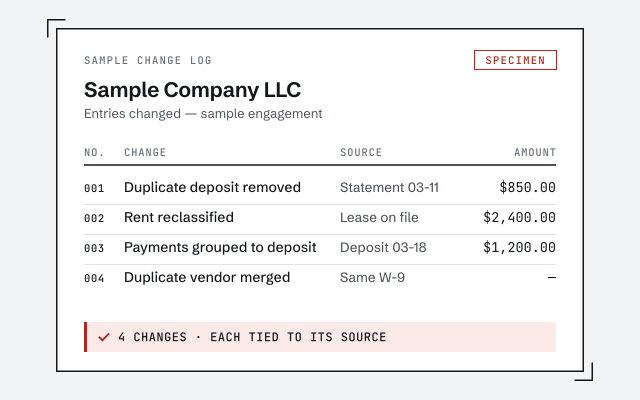
  • Sample change log — an illustrative record of four corrections for Sample Company LLC, each with its reason and source. Marked SPECIMEN, not a real client document. Columns: No., Change, Source, Amount. Rows: 001, Duplicate deposit removed, Statement 03-11, $850.00; 002, Rent reclassified, Lease on file, $2,400.00; 003, Payments grouped to deposit, Deposit 03-18, $1,200.00; 004, Duplicate vendor merged, Same W-9, —. Result: 4 changes, each tied to its source.Illustrative example — not a client file.

    Sample change log

    The written record of every change we make, with the reconciliation that proves the file ties, handed back when an engagement closes.

  • Our methodology

    The written method behind every service — read it before you hire anyone.

    Read the full method
  • Response commitment

    A written reply within one business day.

Remote-first, nationwide

Mon–Sat · 8am–6pm CT

We work entirely remote across all 50 states — view-only access for the free review, QuickBooks' accountant access for the work itself, every change visible to you in the audit log and documented in writing.

Questions about QuickBooks services

What QuickBooks services do you offer?

Three kinds of work, really. We fix files that have drifted — cleanup, catch-up, and reconciliation. We move files between systems — Desktop to Online, or from another product into QuickBooks. And we keep files healthy — monthly bookkeeping, setup, integrations, and payroll help. Every one of those runs the same reconciliation-first method, so the deliverable is books you can prove tie out, not just a closed ticket.

Are you the same as QuickBooks or Intuit?

No. QBSpecialist is an independent QuickBooks practice — not Intuit, not affiliated with Intuit, and not Intuit's support line. Anything to do with your Intuit account, subscription, billing, or product access goes to Intuit's official channels. What we do is independent specialist work inside your file: correcting the books, moving them, and keeping them current.

Which QuickBooks service do I need?

Start from the symptom. If the numbers are wrong — nothing reconciles, you're months behind — that's a cleanup. If you're changing products or files, that's a migration. If the software is fine but you want the books handled every month, that's ongoing bookkeeping. If you're not sure, a free review tells you plainly, in writing, even when the honest answer is a smaller step than you expected.

Do you work in QuickBooks Online and Desktop?

Both. The free review runs on view-only access; the work itself uses QuickBooks Online's accountant access, or Desktop by screen-share or a hosted file. The menus, limits, and some features differ between the two, but the specialist work — reconciling, correcting, moving, and maintaining the books — is the same in each.

How much do your QuickBooks services cost?

Every engagement is a fixed scope with a fixed fee, quoted after a free review — project work from $1,500, ongoing bookkeeping from $400/mo. What moves the number is the size and health of the file, the add-ons it carries, and whether it's a one-time project or ongoing work. We never quote blind or bill by the surprise — the review is how we set a real number for your file. The pricing page lays out the model in full.

Do you offer one-time projects or only ongoing bookkeeping?

Both, and they're priced differently. A cleanup, a setup, or a migration is a one-time project with a defined end. Monthly bookkeeping is an ongoing engagement that keeps the file current after the project work is done. You can start with a one-time fix and only then decide whether you want us to keep the books going forward — there's no obligation to do both.

Can one specialist handle everything, or do I get passed around?

One specialist owns your file end to end — never a rotating pool. You're not handed between an onboarding rep, an outsourced data-entry pool, and a different reviewer each month. The same hands that scope the work do it and hand it back, which is why the change log reads as one coherent record rather than a relay of guesses.

What do I actually get when a service is finished?

A reconciled, documented file and a written record of every change we made — what it was, why, and where the history went — plus a written note of how to keep it that way. Nothing is a black box: you, or your CPA, can audit the work. For ongoing bookkeeping you also get a consistent month-end pack: reconciled accounts and reports that tie, every period.

Do you handle payroll and app integrations too?

We help with the bookkeeping side of both. On payroll, we correct how payroll posts to the books and help you get the setup right — we're not a payroll bureau and we say so. On integrations, we set up and reconcile the bank feeds and third-party apps that flow data into QuickBooks, so the connections don't quietly create duplicates or gaps. Where a job genuinely belongs to your payroll provider or a developer, we tell you.

Do you offer QuickBooks training?

Not as a course. Every project ends with a documented handback — a written record of what changed and why — so whoever keeps the books knows why the setup works the way it does. We don't sell standalone QuickBooks classes.

Which QuickBooks products do you work in?

QuickBooks Online on every plan, QuickBooks Desktop (Pro, Premier and their Plus versions) and QuickBooks Desktop Enterprise. The subscription itself stays yours and is billed by Intuit; our fee covers only the work.

Is a QuickBooks support number in search results Intuit?

Often not. Many results sell a phone number and are neither Intuit nor a specialist. Intuit's community moderators say QuickBooks support only calls when you have requested a callback, and that the safe route is Help, then Contact us, inside QuickBooks. If you are unsure who you are talking to, hang up and start from inside the product.

What if it turns out I don't need you?

We'll say so. Part of an honest review is telling you when the fix is small enough to do yourself, when your books already read cleanly, or when the work belongs to Intuit or your CPA instead. We'd rather point you to the right, smaller step than sell you an engagement you don't need — and we do that during the free review, before any money changes hands.

Start with the service that fits: cleanup, migration, monthly bookkeeping, or a free review if you're not sure which.

Not sure how bad it is?

Talk to a QuickBooks specialist.

Describe the file and a specialist will tell you what it needs — including when the answer is that you don't need us.

Or start with a free, view-only review