Skip to content
QB Specialist

Compare QuickBooks

Compare QuickBooks — software and providers.

Comparing QuickBooks is really two separate questions: which software your books should live in, and who should keep those books correct. Most working files aren't worth switching — the honest answer is often 'stay where you are.' This hub sends you to a plain, neutral comparison for each decision, and we have no stake in which one you land on.

Last reviewed July 2026

  • Honest, neutral comparisons
  • No reseller commission
  • A senior specialist, not a pool

Start here

What “comparing QuickBooks” actually means

Comparing QuickBooks almost always means one of two questions, and they are worth keeping apart: which software should your books live in, and who should keep those books correct. The first is a product comparison; the second is a provider comparison, and the honest answer to each depends entirely on your own situation.

People land here asking “is QuickBooks better than Xero,” or “should I move from Desktop to Online,” or “is QuickBooks Live worth it” — and those are three different kinds of question. Two are about software; one is about who does the bookkeeping. You can run almost any provider on almost any platform, so blurring them together is how people end up switching software when what they really needed was help, or hiring help for a file that just needed the right platform first. This hub separates the two and points you at a plain, neutral comparison for each.

The distinction

Two comparisons people conflate: software vs. provider

The single most useful move before you compare anything is to decide which axis you are actually on: are you choosing a platform, or choosing who keeps the books? They are independent, and mixing them up is the most common mistake we see.

Choosing a platform is about features and fit — access, collaboration, inventory, how the two QuickBooks products differ, or how QuickBooks lines up against Xero or Sage. Choosing a provider is about capacity and trust — whether Intuit's own assisted service, an independent ProAdvisor, a dedicated bookkeeper, or your own time is the right way to keep the file correct. A perfect platform with the wrong provider still produces a mess; the right provider can make almost any capable platform work.

Two independent decisions

Software choice and provider choice are two independent decisions Two columns. The software axis lists QuickBooks Online, QuickBooks Desktop, Xero, and Sage — the question of which platform your books live in. The provider axis lists QuickBooks Live, a ProAdvisor, an independent bookkeeper, and doing it yourself — the question of who keeps those books correct. The two axes are independent: almost any provider can work on almost any platform, so the method is to decide each one separately. An illustrative decision aid, not a scored formula. WHICH SOFTWARE WHO DOES THE WORK QuickBooks Online QuickBooks Desktop Xero Sage QuickBooks Live A ProAdvisor An independent bookkeeper Do it yourself DECIDE EACH AXIS SEPARATELY
Which platform your books live in and who keeps them correct are independent choices — almost any provider works on almost any platform, so decide them one at a time. An illustrative decision aid, not a scored formula.

Route yourself

What are you comparing?

Pick the comparison that matches your actual question. Each one is a plain, neutral write-up — including where the alternative genuinely wins.

Start here

What are you comparing?

WHICH QUICKBOOKS — ONLINE OR DESKTOP

Compare the two QuickBooks products

Same company, two products with different strengths — Online for access and collaboration, Desktop for offline control and inventory depth.

QuickBooks Online vs Desktop
QUICKBOOKS VS ANOTHER PLATFORM

Compare QuickBooks with Xero or Sage

Both rivals are capable and each fits some businesses. The question is fit, not which is best — and a clean, working file is rarely worth uprooting.

QuickBooks vs Xero
WHO SHOULD KEEP THE BOOKS

Compare who does the work — it depends

QuickBooks Live, a ProAdvisor, an independent bookkeeper, or yourself. The right answer depends on how complex your books are and how current you've stayed.

Is QuickBooks Live worth it?
Read this as text

The six comparisons this hub routes to:

Read it honestly

How the two comparisons differ, side by side

The software question and the provider question answer to different things and have different honest defaults. Read the column that matches what you’re actually deciding.

Comparing software vs. comparing a provider — two different decisions
Which software Who does the work
The question Online vs Desktop, or QuickBooks vs Xero or Sage QuickBooks Live, a ProAdvisor, a bookkeeper, or DIY
What it decides The platform your books live in Who keeps those books correct
Honest default A clean, working file is rarely worth switching Depends on complexity and how far behind you are
Where the alternative wins Xero and Sage genuinely fit some businesses DIY is fine for a simple, current file
The real cost to weigh Migration, retraining, proving it reconciles Your time, or a monthly fee, against the risk of errors
They're independent Pick the platform on fit Pick the provider on need

Software

When switching software is worth it — and when it isn’t

Switching platforms is worth it only when a specific need your current software genuinely can’t meet outweighs the real cost of moving. For most businesses with a clean, working file, it isn’t — and we’ll say so rather than sell you a migration.

Leaving a platform that already holds your history is not free. There is the migration itself, the retraining, the reports that need rebuilding, and the risk that the converted file doesn’t tie to the old one — a cost that has to be cleared before any benefit counts. So the honest test isn’t “is the other product good” — Xero and Sage are both good — it’s “does the other product solve a real problem this one can’t, by enough to justify the move.” If your file works and no such problem exists, staying put is the right answer, and the comparisons above will tell you the same.

The switching test

Switching platforms only wins when the benefit clears the cost of moving A threshold diagram. On the left, the cost of moving stacks up: migrating the data, retraining the team, rebuilding reports, and proving the new file reconciles. A dashed threshold line marks the level that cost sets. On the right, the benefit of switching must rise above that threshold line to be worth it. Below the line, the honest answer is to stay. An illustrative decision aid, not a measured comparison. COST OF MOVING Migrate data Retrain, rebuild reports Prove it reconciles THRESHOLD TO CLEAR BENEFIT OF SWITCHING A need this platform can’t meet ABOVE THE LINE · SWITCH Only nice-to-haves BELOW THE LINE · STAY
Switching platforms is only worth it when the benefit rises above the threshold set by the cost of moving; a working file whose only gains are nice-to-haves sits below the line, and the honest call is to stay. An illustrative decision aid, not a measured comparison.

Provider

When QuickBooks Live, a ProAdvisor, a bookkeeper, or DIY is right

The right provider depends on two things: how complex your books are, and how current you’ve kept them. There is no single best option — each of the four fits a different situation honestly.

Doing it yourself is genuinely fine for a simple, current file with a handful of transactions a month — no shame in it, and no reason to pay for help you don’t need. QuickBooks Live, Intuit’s assisted service, suits an owner who wants a hand staying on top of a straightforward file but isn’t chasing a specialist relationship. A ProAdvisor — an independent advisor certified by Intuit — or a dedicated bookkeeper suits a file that’s complex, behind, or important enough that you want one person who owns it and knows it. The trade the provider comparisons keep coming back to is continuity: a pooled service versus a single specialist who carries your file from month to month. When the answer is genuinely “it depends,” our is-QuickBooks-Live-worth-it answer works through the trade-offs in detail.
Every file
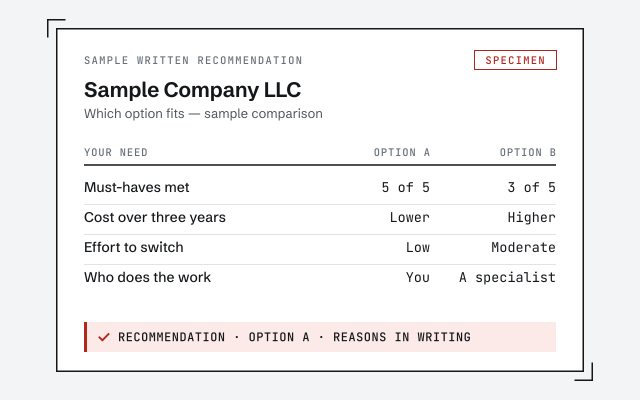
Every comparison we make starts with a free, read-only review of your actual file, and ends in a written, neutral recommendation — which product fits, whether a switch is worth it, and whether you need a provider at all. We have no reseller commission steering the answer.

How we compare

How we run an honest comparison

We compare the way we do everything else: against your real file, in writing, with no stake in the outcome. Because we’re a bookkeeping firm and not a reseller, we earn nothing on which software you choose — so the recommendation is a straight read of your needs, not a nudge toward whatever pays a commission.

A comparison starts with a free, read-only look at how your books are actually set up and where they hurt. We line your genuine must-haves up against each option, name the rows that decide it, and tell you plainly where a rival product or a different provider would serve you better — including when the honest verdict is to change nothing. If a move is worth it, the value we add is the same reconciliation-first discipline behind the rest of our work: proving a converted file ties back to the original before you rely on it, exactly as our methodology spells out. And when QuickBooks and a specialist are the right answer, our QuickBooks services lay out what that engagement looks like.

Straight talk

When the honest answer is “don’t switch” — or “don’t hire us”

Plenty of the time, the honest answer to a comparison is to do nothing. If your file is clean and your platform does what you need, you don’t have to switch — and if your books are simple and current, you don’t have to hire anyone, us included.

Here is the version that saves you money. You probably shouldn’t switch software when your current product still holds your must-haves and the only gains are conveniences you can live without — moving a working file just to chase a feature usually costs more than it returns. You probably don’t need a paid provider when you keep a simple file current in an afternoon a month; that’s a job you can own. And you don’t need us for a single, obvious, recent problem you can already see and fix. We’re worth hiring when the books are wrong across months or accounts, when a migration has to be proven correct, or when the file matters enough that one specialist should own it. If you’re not sure which side you’re on, a free review tells you honestly — and if the answer is “you’re fine,” we say so at no charge.

How we help

How we help you decide

When you do want a second read, the path is simple: a free, read-only review, a neutral recommendation in writing, and a fixed scope only if there’s real work to do. No pressure to switch, and no commission pulling the answer one way.

A senior specialist looks at your file and your must-haves and tells you plainly which product fits, whether a move is worth its cost, and whether you need a provider at all. You keep the written recommendation whether or not you hire us. If it’s a fix you can do yourself, we point you at it and you’re on your way. If it’s real work, you get a fixed scope and fee before anything starts — and a real specialist replies within one business day, not a ticket queue.

How you can verify us

You don't have to take our word for it. Here's what you can check — a neutral recommendation you own, the method we use to prove a switch reconciled, and our response commitment.

A written, neutral recommendation

The plain-language write-up of which option fits your needs and why, yours to keep whether or not you hire us.

Our methodology

How we prove a converted file reconciles to the old one after a switch. Read exactly how.

Read the full method

Response commitment

A real specialist replies within one business day, in writing.

Remote-first, nationwide

Mon–Sat · 8am–6pm CT

We work entirely remote — a neutral read of your file and your needs, screen-share whenever you want to walk through a comparison, and every recommendation documented in writing.

  • Texas
  • Florida
  • California
  • New York

Questions about comparing QuickBooks

Should I switch from QuickBooks to Xero or Sage?

Rarely, if your file is clean and doing the job. Xero and Sage are both capable, and each fits some businesses well — but moving a working file costs you the migration, the retraining, and the work of proving the new file ties to the old. Switch only when a specific need your current platform can't meet outweighs that cost.

What's the difference between comparing QuickBooks products and comparing bookkeeping providers?

They're two independent decisions. Comparing products — QuickBooks Online vs Desktop, or QuickBooks vs Xero or Sage — decides which software your books live in. Comparing providers — QuickBooks Live, a ProAdvisor, an independent bookkeeper, or doing it yourself — decides who keeps those books correct. Almost any provider works on almost any platform, so decide them separately.

Is QuickBooks Online or Desktop better?

Neither is universally better. Online wins on access and collaboration; Desktop wins on offline control and inventory depth. Count which product holds more of your must-haves — our QuickBooks Online vs Desktop comparison walks through the rows that tend to decide it.

Is QuickBooks Live worth it?

That depends on how complex your books are and how current you've kept them. QuickBooks Live is Intuit's assisted-bookkeeping service, and for a simple, current file it can be enough. For a file that's complex or behind, a dedicated bookkeeper who owns it end to end is usually the better fit. Our is-QuickBooks-Live-worth-it answer lays out the trade-offs.

What's the difference between QuickBooks Live and a ProAdvisor?

QuickBooks Live is Intuit's own pooled service, run to Intuit's process. A ProAdvisor is an independent accountant or bookkeeper certified by Intuit, whom you engage directly. The practical difference is continuity — one specialist who carries your file month to month, versus a pooled team. Our QuickBooks Live vs ProAdvisor comparison covers when each makes sense.

Should I clean up QuickBooks myself or hire someone?

If the mess is small and recent — one account, one month, a handful of duplicates — fix it yourself; hiring anyone would be overkill. Hire a professional when the problem spans months or accounts, when balances no longer tie, or when you can't tell what broke. Our DIY vs professional cleanup comparison draws that line, including the cases where DIY is the right call.

Do you get paid to recommend one product over another?

No. We're a bookkeeping firm, not a reseller — we earn nothing on which software you choose, and no commission steers the answer. That's why the recommendation is sometimes 'stay where you are' or 'you don't need to switch.'

How do you help me decide?

With a free, read-only review of your actual file. We look at how your books are set up and where they hurt, then give you a written, neutral recommendation — which product fits, whether a switch is worth its cost, and whether you need a provider at all. If the answer is that you're fine as you are, we say so, at no charge.