QuickBooks Desktop
QuickBooks Desktop, from a specialist's view.
QuickBooks Desktop is Intuit's locally-installed accounting software — the company file lives on your own machine or server. It still suits some businesses, but Intuit is winding it down. We are an independent practice that works inside the Desktop file; we are not Intuit, and we will tell you honestly whether to keep it or move.
Last reviewed October 2026 by a Certified QuickBooks ProAdvisor
What this page is based on: Intuit’s own 2023 policy, Desktop 2024 page and stop-sell article (checked October 2026)
Key takeaways
- 01QuickBooks Desktop is a locally-installed product — the company file sits on your own machine or server, which shapes both how it works and what tends to go wrong.
- 02Intuit discontinued Desktop 2023 after May 31, 2026, stopped new Desktop Plus subscriptions after September 30, 2024, and says Desktop 2024 has no sunset date; Enterprise is still sold (Intuit, checked October 2026).
- 03We are an independent practice that works inside the Desktop file — reconciling and correcting the books — and we give you an honest read on whether to stay or migrate.
- We work the file, not the license
- Independent — not Intuit
- Honest stay-or-migrate advice
What QuickBooks Desktop is
QuickBooks Desktop is Intuit's locally-installed accounting software: the program runs on a Windows machine and the company file — the data itself — lives on that machine or a shared server, not in a browser. That single fact is what makes Desktop feel different from QuickBooks Online, and it is where most of the day-to-day realities come from.
Because the data is local, Desktop has long been favored by businesses that want their file on their own hardware, work with a heavy transaction volume, or rely on a specific desktop workflow. The current line-up, per Intuit (checked October 2026): Desktop Pro Plus and Premier Plus, sold as annual subscriptions to existing subscribers only since new subscriptions ended after September 30, 2024 (Intuit); Premier's industry editions; and Desktop Enterprise, still sold to new customers by edition and user count (Intuit's Enterprise pricing). Pro and Premier cap combined names and list items at 14,500; Enterprise lifts that and supports up to 30 simultaneous users (Intuit). Intuit's QuickBooks Desktop page remains the authority for anything that changes after the date we checked. What we bring is not the sales sheet; it is what actually happens inside these files once real bookkeeping has run through them for a few years.
Who QuickBooks Desktop still suits
Desktop still suits businesses whose workflow genuinely depends on it — a local-file setup, a Desktop-only feature they rely on, or an established process a team knows cold — and whose file is sound. For everyone else, the wind-down usually tips the decision toward Online.
We try to be even-handed about this. If you are on Desktop for a real reason and the books are healthy, there is no urgency to move for the sake of moving, and we will not manufacture one. But "we've always used it" is not the same as "it still fits," and a lot of businesses are on Desktop out of habit rather than need. The honest test is whether anything about your work truly requires the local product — if the answer is no, the wind-down makes Online the forward-looking choice, and we will say so plainly.
What we do inside a QuickBooks Desktop file
Our work in Desktop is the books, not the software license: reconciling accounts to the statements, correcting how transactions were recorded, cleaning up lists and prior periods, and documenting every change so you — or your CPA — can trace it. That is specialist bookkeeping work, and it is the same discipline whatever edition you run.
A Desktop file that has been in daily use for years accumulates the same drift any accounting file does: accounts that stopped reconciling, a balance sheet that no longer ties, transactions posted to the wrong place, months that were never closed. None of that is fixed by a feature or a new version — it is fixed by careful, reviewable bookkeeping. We work through a screen-share you control or a hosted copy of your company file, we change nothing without telling you first, and we hand back a written log of every entry we touched. If what you actually have is a file that will not open or throws an error, that crosses into QuickBooks Desktop support, where the job is the file and the environment rather than the numbers inside it.
Where QuickBooks Desktop stands now — Intuit's own dates
The wind-down, read honestly
Read this as text
Three states in sequence: Desktop today, where your file still works; the wind-down, where Intuit narrows new sales; and QuickBooks Online as the forward path. The exact products, versions, and dates are Intuit's to publish.
Intuit has been steadily narrowing QuickBooks Desktop — ending new-subscription sales for several Desktop products and steering customers toward QuickBooks Online. That does not mean your file stops working tomorrow, but it does change the smart way to spend on a Desktop file over the next few years.
Intuit publishes the dates, so here they are, each with its source (checked October 2026). Desktop 2023 — Pro Plus, Premier Plus, Mac Plus, Enterprise 23.0 and the 2023 accountant editions — was discontinued after May 31, 2026: no live support, Desktop Payroll, Payments, bank feeds or security updates (Intuit's policy). New Desktop Plus subscriptions stopped after September 30, 2024; existing subscribers can keep renewing, and Enterprise isn't affected (Intuit). Desktop 2024 — Pro Plus, Premier Plus and Enterprise — won't be discontinued in May 2027: Intuit says it is moving away from the three-year lifecycle and will keep version 24.0 up to date for years to come (Intuit). So the platform is narrowing — no new Plus customers — but a 2024 file has no deadline. Our QuickBooks Desktop end-of-life page sets out what a discontinued version loses and your options.
Should you fix Desktop or move to Online?
The answer depends on why you are on Desktop and whether the file is sound — but because Intuit sells no new Desktop Plus subscriptions and puts its development into Online, the default direction for most businesses is a planned move to QuickBooks Online — on your timetable, since Desktop 2024 has no sunset date (Intuit's own notices, checked November 2026). We scope both together so you are never repairing a platform you are about to leave.
When you reach us with a Desktop file, we look at two things: what is blocking you now, and what the platform's future means for you. Sometimes the right move is to stabilise and clean the Desktop file for this year, then plan a clean QuickBooks Desktop to Online migration on your timeline. Sometimes the file is genuinely fine on Desktop for now and the honest advice is to wait. We do not push a migration you do not need, and we do not let you keep pouring money into a file with no forward path without at least naming the trade-off.
The honest test
Read this as text
One question splits the decision: if a real Desktop-only reason and a sound file both hold, staying is reasonable for now; if not, the wind-down makes a planned move to QuickBooks Online the default direction.
When you don't need us
You do not need us when your Desktop books already reconcile and tie, and no move is on the table — a file that is genuinely clean does not need a specialist standing over it. There is no prize for paying to fix books that already work.
If your accounts reconcile each month, your balance sheet ties, and you are comfortable on Desktop with a real reason to be there, keep going. And if what you need is a product answer — which edition to buy, what a feature costs, when a specific version reaches its cutoff — that is Intuit's to answer, not ours, and we will send you to their official channels rather than guess. When you are not sure which situation you are in, a free review tells you honestly, even when the answer is that you do not need us at all.
How we work in your Desktop file
You don't have to take our word for it. Here is what you can check — the deliverable you receive, the method behind every change, and our response commitment.
Who’s responsible for your file
A Certified QuickBooks ProAdvisor handles your file from the review through the corrections to the hand-back — the same person throughout, never a rotating pool.
About QBSpecialist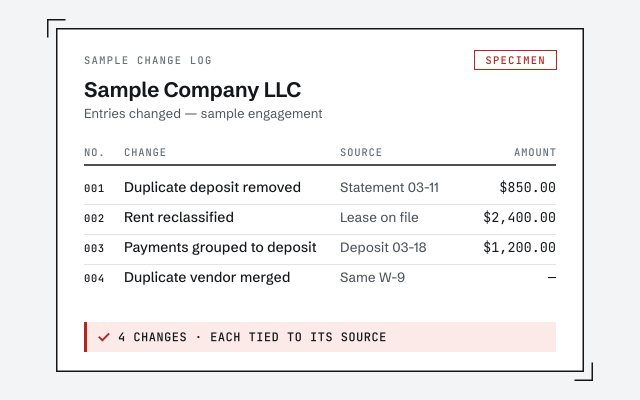 Illustrative example — not a client file.
Sample change log
The written, line-by-line log of every entry we touched that you receive when the work closes.
Our methodology
Verification, not assertion — how we reconcile and document every change. Read exactly how.
Read the full methodResponse commitment
A written reply within one business day.
Remote-first, nationwide
Mon–Sat · 8am–6pm CT
We work entirely remote — view-only access for the free review, then a screen-share you control or a hosted copy of your Desktop file for the work itself, and every change documented in writing.
- All 50 states
- Remote-first
- View-only review
Questions about QuickBooks Desktop
Are you Intuit, or Intuit's QuickBooks Desktop support?
No. QBSpecialist is an independent QuickBooks practice — not Intuit, and not affiliated with or endorsed by Intuit. We work inside your Desktop company file: reconciling, correcting, and cleaning up the books. For licenses, activation, billing, downloads, and account access, Intuit's own support — reached from Help inside QuickBooks — is the right and only place to go.
Is QuickBooks Desktop being discontinued?
Version by version. Intuit discontinued QuickBooks Desktop 2023 after May 31, 2026, and stopped selling new Desktop Plus subscriptions after September 30, 2024 — existing subscribers can renew, and Enterprise is still sold. But Intuit now says Desktop 2024 won't be discontinued in May 2027, has no sunset deadline, and will be kept up to date for years to come (Intuit, checked October 2026). The direction is toward Online; the deadline, for 2024 users, is gone.
Should I stay on QuickBooks Desktop or move to Online?
It depends on your file and your reasons for being on Desktop. If a specific workflow or an industry feature keeps you there and the file is sound, staying can be reasonable for now. On 2024 or Enterprise there is no announced deadline, so the move can be planned for a quiet month; on 2023 or older, the version has already lost payroll, bank feeds and security updates, and the written scope covers an upgrade or a clean move to QuickBooks Online first. If migrating now is not right for you, we will say so.
Do you work in Pro, Premier, and Enterprise?
Yes — we work inside QuickBooks Desktop company files regardless of the edition. The editions are Pro Plus, Premier Plus (with its industry editions), Mac Plus and Enterprise; Intuit's upgrade help puts the Pro and Premier list limit at 14,500 combined names and items, which Enterprise lifts, with up to 30 simultaneous users. Our expertise is the real-world work inside whichever file you have: getting the books to reconcile, correcting how transactions were recorded, and documenting every change.
My Desktop file opens fine but the numbers are wrong. Is that a Desktop problem?
That is usually a bookkeeping problem, not a software one, and no product feature will fix it. A file that opens perfectly but will not reconcile — a balance sheet that is off, accounts that do not tie, months never closed — needs a cleanup, not a repair or a new version. We will tell you honestly which one you are looking at during a free review.
What access do you need to work in my Desktop file?
For the free review, view-only access is enough. For the work itself we use a screen-share you control or a hosted copy of your company file — never your bank logins — and every change goes into a written log. Access is yours to grant and revoke, and we change nothing without telling you first.
Where to go next
- QuickBooks Desktop to Online migration— Move the file and prove the result ties.
Not sure how bad it is?
Talk to a QuickBooks specialist.
Describe the file and a specialist will tell you which of these you are dealing with — including when the answer is that you don't need us.