QuickBooks Online
QuickBooks Online, from an independent specialist's view.
QuickBooks Online is Intuit's cloud accounting software: your books live on Intuit's servers, in a browser or app, on plans from a $0 Free tier and Simple Start at $38 a month to Advanced at $340 (Intuit, checked October 2026). We are an independent QuickBooks practice, not Intuit: we clean up, reconcile and maintain the file you keep in QBO.
Last reviewed October 2026 by a Certified QuickBooks ProAdvisor
What this page is based on: Intuit’s own pricing, usage limits and what-transfers pages (checked October 2026)
Key takeaways
- 01QuickBooks Online is Intuit's cloud accounting product; QBSpecialist is an independent firm that works inside it — not Intuit, and not affiliated with or endorsed by Intuit.
- 02QBO suits businesses that want their books reachable from anywhere, with a bookkeeper or accountant collaborating in the same live file — and that collaboration is exactly where we work.
- 03What we bring is real-world craft in the file: reconciled accounts, a clean chart of accounts, and books that tie — not features or prices, which are Intuit's to build, set, and support.
- Independent, not Intuit
- We work inside your QBO file
- Every change documented
"QuickBooks" is used here descriptively to name the software we work in. For official product support, billing, or account access, use Intuit's official channels.
What QuickBooks Online is — and what we do in it
The instrument and the hands
Read this as text
Two roles side by side: QuickBooks Online hosts the file in the cloud, records what it is told, and its plans and prices are Intuit's to set; the specialist reconciles to the statement, corrects the miscodings, and documents every change — the part the software cannot do.
QuickBooks Online is Intuit's cloud-based accounting software: instead of installing a program on one computer, your company file lives on Intuit's servers and you reach it through a web browser or the mobile app. That's the whole shape of it — a shared, always-on ledger you can open from anywhere, and invite other people into.
We are not that software, and we are not the company that makes it. QBSpecialist is an independent QuickBooks practice; the work we do happens inside the QBO file you already own and subscribe to. Think of QBO as the instrument and us as the people who tune and play it — reconciling the accounts, correcting the miscodings, and keeping the numbers trustworthy. For the software's current plans, features, and prices, the authority is Intuit's QuickBooks Online page; what we quote below is dated and linked to Intuit's own pages.
The plans, and the limits that decide between them
On Intuit's US pricing page (checked October 2026): QuickBooks Free $0 — one user, no accountant access, no mobile app or integrations; Simple Start $38 a month, 1 user; Essentials $85, 3 users, adds bills; Plus $140, 5 users, adds inventory, classes and locations; Advanced $340, 25 users, adding custom user permissions, batch invoices and expenses, workflow automation, Excel sync and priority support (Intuit). Each paid plan includes 2 accountant users (3 on Advanced), and Simple Start, Essentials and Plus cap the chart of accounts at 250 active accounts and Plus caps classes and locations at 40 combined (usage limits). The dated table, with a year of each plan, is on our QuickBooks cost page; Plus against Advanced is set out on QuickBooks Online Advanced.
Coming from Desktop? Intuit's what-transfers article lists what doesn't move — the audit trail, memorized reports, past reconciliation reports, price levels, budgets and users among them — and Online works in the browser rather than on one machine, so multi-user hosting and Desktop-only add-ons go away. What you gain is access from anywhere and an accountant in the file at the same time.
Who QuickBooks Online suits
QBO tends to fit businesses that want their books reachable from more than one place, and want a bookkeeper or accountant working in the same live file rather than trading backups by email. If your team is remote, if you switch between a laptop and a phone, or if you want your numbers visible without someone remoting into a single office PC, the cloud model earns its keep.
In our day-to-day experience, the businesses that get the most from QBO are the ones that lean into that collaboration: bank connections feeding transactions in, an accountant invited to review, and a specialist keeping the file clean underneath it all. It is less obviously the right home for a business that depends on deep desktop-only workflows — heavy inventory assemblies, certain industry-specific features, or a fully offline setup — which is exactly the honest comparison we lay out on QuickBooks Online vs. Desktop. Which product suits you is a judgment about how you actually work, not a verdict that one is better than the other. And at the top of the QBO range sits QuickBooks Online Advanced, Intuit's top-tier plan for larger small businesses — the same file model, and we work inside it the same way.
Where we fit inside your QuickBooks Online file
Because QBO is browser-based, we can work entirely remotely — through a view-only look for the free review, then QuickBooks' accountant access you grant and can revoke to make and log every correction, with every change visible to you in the audit log. You keep ownership of the file and your subscription throughout; we never sit between you and Intuit.
What we actually do in there is craft, not clicks-for-hire. We reconcile every bank, card, and loan account to its statement so the cash ties. We rebuild a chart of accounts that has sprawled into duplicates and vague catch-alls. We trace and clear the balances that don't belong — undeposited funds that never cleared, phantom liabilities, opening-balance plugs — and we hand back a written log of every entry we touched so you or your accountant can audit the work. That is the part QBO can't do for you: the software records what it's told; getting it told correctly, and proving it ties, is the specialist's job.
How books flow through a live QBO file
Read this as text
Four stages: bank feeds bring transactions into QuickBooks Online, the software records them as told — right or wrong — a specialist reconciles and corrects underneath, and the books tie, marked with a verified tick.
Moving to QuickBooks Online — or between products
If you're weighing a move onto QBO from Desktop or another system, the honest question is whether the change fixes a real problem — remote access you don't have, collaboration you can't get — and whether your history can come across intact. Both are answerable before you commit.
A migration is more than exporting and importing a file. Lists, balances, reconciliations, and historical transactions each need to land correctly, and some things convert cleanly while others need rebuilding on the far side. That's the work we scope on our QuickBooks migration page: carrying your data across so the opening balances tie and the history is still there to stand on, not a fresh file that quietly abandons your past. If a move isn't worth it for how you work, we'll say so — the point is the right file, not a bigger invoice.
Straight talk
When we're not who you need
If your question is about the QuickBooks Online software itself — a plan change, a billing charge, a login you can't recover, a feature request — that belongs with Intuit, not with us. We can't reset your subscription or speak for Intuit's roadmap, and we won't pretend to. Their official channels handle the product; we handle the books inside it. The full sort of which QBO problems are Intuit's and which are ours is on our QuickBooks Online support page.
And if your QBO file is already reconciled, your chart of accounts is tidy, and your reports tie to reality, you may simply not need a specialist right now — a conclusion we're glad to reach out loud during a free review rather than talk you out of. We're worth hiring when the file has drifted: accounts that won't reconcile, a history nobody trusts, a move that has to be done without losing the past.
How we work in QuickBooks Online
You don't have to take our word for it. Here's the deliverable you receive, the method behind it, and how quickly a real specialist responds.
Who’s responsible for your file
A Certified QuickBooks ProAdvisor handles your file from the review through the corrections to the hand-back — the same person throughout, never a rotating pool.
About QBSpecialist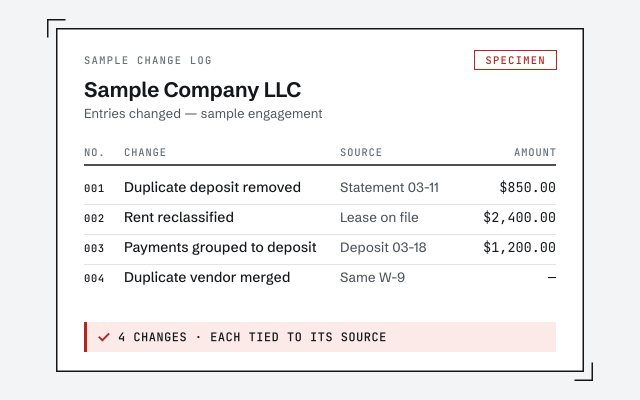 Illustrative example — not a client file.
Sample change log
The documented, entry-by-entry record of everything we touched in your QBO file — auditable against your accounts.
Our methodology
Exactly how we reconcile and correct a QuickBooks Online file, step by step.
Read the full methodResponse commitment
A written reply within one business day.
Remote-first, nationwide
Mon–Sat · 8am–6pm CT
We work entirely remote — view-only access for the free review, QuickBooks' accountant access for the work itself, every change visible to you in the audit log and documented in writing.
- All 50 states
- Remote-first
- View-only review
Questions about QuickBooks Online
Is QBSpecialist part of Intuit or QuickBooks Online?
No. We are an independent QuickBooks practice — not Intuit, and not affiliated with or endorsed by Intuit. We work inside the QuickBooks Online file you own and subscribe to. For product support, billing, or your subscription itself, you deal with Intuit directly; for cleaning up and maintaining the books inside QBO, that's us.
Do you sell QuickBooks Online subscriptions?
No. Your QuickBooks Online subscription is between you and Intuit — we don't resell it, mark it up, or earn a commission on it. You keep ownership and billing of your own file. We're hired for the work inside it: reconciling accounts, cleaning up the history, and keeping the books accurate month to month.
Where do I find QuickBooks Online's features and pricing?
Intuit's US pricing page is the source, and we date what we quote from it. On October 24, 2026 it listed QuickBooks Free at $0 (one user, no accountant access), Simple Start $38 a month (1 user), Essentials $85 (3 users), Plus $140 (5 users) and Advanced $340 (25 users), each shown at half price for the first three months. Our QuickBooks cost page has the full dated table.
Which QuickBooks Online plan do I need?
Intuit's limits decide most of it. Inventory, classes and locations need Plus or Advanced; Plus caps classes and locations at 40 combined; Simple Start, Essentials and Plus cap the chart at 250 active accounts; and custom user permissions, batch invoicing, workflow automation and Excel sync are exclusive to Advanced. QuickBooks Free has no accountant access, mobile app or integrations.
Can you work in my QuickBooks Online file remotely?
Yes. QBO is browser-based, so we work entirely remotely — with view-only access for the free review or QuickBooks' accountant access you control for the work, with every change visible to you in the audit log. Nothing in your file changes without your say-so, and every change is documented in writing.
Should I be on QuickBooks Online or QuickBooks Desktop?
It depends on how you work, not on which is universally 'better.' We wrote an honest comparison on our QuickBooks Online vs. Desktop page. If you're leaning toward moving, our migration page explains how we carry your data across without losing history — and the free review tells you plainly whether a move is worth it for your file.
Start here
See what your QuickBooks Online file actually needs
Read exactly how we work in a QBO file in our methodology, then get a free, view-only review that tells you plainly what's drifted and what it would take to fix — no obligation, and an honest answer if the answer is that you don't need us.
Not sure how bad it is?
Talk to a QuickBooks specialist.
Describe the file and a specialist will tell you which of these you are dealing with — including when the answer is that you don't need us.