Skip to content
QB Specialist

QuickBooks accounts receivable cleanup

Clean up A/R so the aging is real.

Accounts-receivable cleanup clears stale invoices, unapplied payments, and duplicate customers, so your A/R aging shows what customers actually owe. It also stops your revenue from overstating on invoices that were really paid — the payment sat unapplied instead of closing the invoice out.

Last reviewed July 2026

  • Payments applied, duplicates merged
  • Fixed scope, fixed fee
  • A senior specialist, not a pool

What a QuickBooks accounts receivable cleanup is

A QuickBooks accounts receivable cleanup is the work of applying unmatched payments, merging duplicate customers, and clearing paid-but-open invoices — so your A/R aging shows what customers actually owe, not an inflated ghost of it.

The A/R aging report is built from your open invoices: every invoice still marked unpaid shows up as money owed to you. When a payment that settled an invoice never got applied, that invoice stays open on the report even though the cash is already in the bank. When one customer exists under two spellings, their balance splits across both. A cleanup corrects the records the aging is built from, so the total finally matches reality — it is one piece of a full QuickBooks cleanup, not a substitute for reconciling the bank or re-entering missing transactions.

Who needs an accounts receivable cleanup

You need an A/R cleanup when your aging report has stopped matching reality — customers on it who have already paid, a total bigger than anyone actually owes you, and balances you cannot chase because you no longer trust the number.

The usual signs:

  • Customers keep telling you an invoice was already paid, but it still shows open.
  • Your A/R total is larger than you believe anyone owes you.
  • A growing pile of unapplied payments or customer credits you cannot account for.
  • The same customer appears twice under slightly different names.
  • A stubborn balance in Undeposited Funds that never seems to clear.

If your aging already ties out and every payment is applied, you may not need this at all — a point we return to below. Not sure? A free bookkeeping health score flags a bloated or overstated A/R in a few minutes.

How an accounts receivable cleanup works: apply, merge, resolve

Three operations do most of an A/R cleanup: applying each received payment to the invoice it settled, merging customers that exist under two names, and resolving what is left — collecting the real balances and writing off, only with your approval, the ones that are genuinely dead.

A/R aging

An A/R aging report, before and after cleanup Before: an aging report whose 90-plus-days bucket towers over the others because it is inflated by invoices that were really paid or duplicated. After cleanup: the same buckets, with the 90-plus column reduced to the balances customers genuinely still owe and marked verified. Illustrative shape, not measured amounts. BEFORE AFTER OVERSTATED CLEANUP REAL CUR 31–60 61–90 90+ CUR 31–60 61–90 90+
An A/R cleanup shrinks the oldest, most alarming bucket to what customers actually still owe — the overstatement was paid and duplicate invoices, not real debt. Bar heights are illustrative, not measured amounts.

Applying a payment is careful, one-at-a-time work: we match each received payment to the invoice it settled, so the invoice closes and the customer's balance drops by the right amount. Merging is permanent in QuickBooks, so we map every duplicate customer before we combine them — the two names fold into one, their invoices and payments come together, and the joined balance comes out correct. Then we resolve the stragglers: the genuinely uncollectible invoices get surfaced with evidence for you to write off or keep, and everything still collectible stays open so you can pursue it.

Why unapplied payments and undeposited funds overstate your A/R

An unapplied payment overstates your books twice over: the invoice it should have closed stays open in A/R, and the cash it represents sits in Undeposited Funds instead of a real deposit — so both what customers appear to owe and your clearing account are wrong.

Apply the payment

How an unapplied payment overstates A/R, and how applying it corrects both sides Before: an open invoice sits in A/R while the customer's payment sits unapplied, with the cash held in Undeposited Funds — the invoice looks unpaid and the money is not yet deposited. After the payment is applied: the invoice closes and the cash becomes a real bank deposit, so accounts receivable shows a true balance. Illustrative example using a sample invoice number. BEFORE · UNAPPLIED AFTER · APPLIED Invoice #1042 OPEN Payment received UNAPPLIED Undeposited Funds HOLDS CASH NOT LINKED APPLY THE PAYMENT Invoice #1042 CLOSED Bank deposit CLEARED A/R NOW REAL
Applying a received payment fixes two things at once — it closes the open invoice so A/R stops overstating, and it moves the cash out of Undeposited Funds into a real deposit. The invoice number is an illustrative example.

Because the two problems travel together, we treat them together. As we apply each payment to its invoice, we also group the cash into the deposits that actually hit the bank, so Undeposited Funds drains down to what is genuinely still in transit. That is why our methodology reference for this work is the undeposited funds reference — untangling A/R and untangling the clearing account are the same motion done well. Where a payment turns out to be a genuine overpayment or a deposit on future work, we leave it as a customer credit rather than forcing it onto the wrong invoice.

Timeline

How long an accounts receivable cleanup takes

Most A/R cleanups take about a week: a day-0 review, a few days applying payments and merging duplicates, a day or two resolving the stragglers, and a handback. Files with years of tangled payments or many duplicate customers run one to two weeks.

  1. Free review

    Day 0

    Read-only look at the file; we scope the stale invoices and unapplied payments and quote a fixed fee.

  2. Apply and match

    Days 1–4

    Unapplied payments are matched to their invoices, and duplicate customers are merged.

  3. Resolve the stragglers

    Days 4–6

    Genuinely uncollectible invoices are written off with your sign-off; the rest stay open to collect.

  4. Hand back

    Day 6

    An A/R aging that shows real balances, a written summary, and a call to walk it through.

What you get when the cleanup is finished

You get an A/R aging that shows real balances, a written log of every payment applied and duplicate merged, a list of the write-offs you approved, and a call to walk the whole thing through.

Nothing is a black box: the change log records each invoice that was open, what happened to it, and which payment closed it, so you — or your CPA — can audit the work. With a trustworthy aging in hand, you finally have a collections list you can act on, and a revenue figure that reflects what you actually earned. If the wider file also needs reconciling or a chart of accounts cleanup, we scope that separately rather than fold it in quietly.

What changes

Clean A/R vs. messy A/R

A clean A/R shows real balances you can collect on; a messy one shows a total inflated by paid invoices, unapplied payments, and duplicate customers. Here is how the two compare.

Clean A/R vs. messy A/R
Clean A/R Messy A/R
Aging shows real balances
Payments applied to invoices
Undeposited Funds cleared
No duplicate customers
Write-offs documented and approved
Revenue is not overstated
You know who to chase
Verdict Collect what you are owed Chasing invoices already paid

What it costs

What an accounts receivable cleanup costs

Every A/R cleanup is a fixed scope with a fixed fee, quoted after a free read-only review. The figures below are published starting floors; the review sets the real range for your file.

Accounts receivable cleanup pricing
Engagement Typical range Timeline What's included
From $1,500 1–2 weeks Apply payments, merge duplicate customers, and correct the aging, one file.
From $1,500 2–3 weeks Cleanup plus a documented review of what to write off versus collect.
From $1,500 2–4 weeks Rolled into a complete cleanup when the wider file also needs work.
Get your range after a free review

A/R cleanup

Typical range
From $1,500
Timeline
1–2 weeks
Included
Apply payments, merge duplicate customers, and correct the aging, one file.

A/R + write-off review

Typical range
From $1,500
Timeline
2–3 weeks
Included
Cleanup plus a documented review of what to write off versus collect.

Part of a full cleanup

Typical range
From $1,500
Timeline
2–4 weeks
Included
Rolled into a complete cleanup when the wider file also needs work.
Get your range after a free review

Edge cases: write-offs, credit memos, retainers, and multi-currency

The details that decide an A/R cleanup: how write-offs are recorded, what to do with credit memos and overpayments, how customer retainers should sit, and how multi-currency or job-linked invoices change the work.

How are write-offs recorded?

Only with your approval, and always to an account you choose — usually bad debt expense — so the invoice closes without pretending it was paid. We give you the list with evidence first; nothing is written off on a guess, and everything still collectible stays open.

What about credit memos and overpayments?

A payment larger than its invoice, or a payment with no invoice at all, becomes a customer credit rather than being forced onto the wrong invoice. We leave those visible as credits the customer can draw against, so the balance is honest in both directions — not just when they owe you.

Customer deposits and retainers

Money taken before the work is done is not really revenue yet, and it should not sit as a random unapplied payment either. Where a file uses upfront deposits or retainers, we make sure they land as a liability or a customer credit until the invoice they belong to exists.

Multi-currency and job-costed invoices

Invoices in a foreign currency carry exchange-rate gains and losses that have to be respected as payments apply, and invoices linked to jobs must keep their job link so profit-by-job stays intact. We flag these before touching them, because a careless merge or write-off here can distort a report you rely on.

How QBSpecialist's accounts receivable cleanup is different

One senior specialist does the work, and every payment applied or write-off recorded comes back to you as a documented change you can audit — not a silent adjustment from an offshore pool.

Our methodology is verification, not assertion: we save your aging before touching the file and re-run it after, so we can show — not just claim — that the total moved for reasons you approved. Access stays minimal: read-only access to your file or a screen-share you control, never your banking logins. And we hold a hard line on your customers — we correct the records so your collections list is real, but we never call or email the people who owe you. That stays yours.

When NOT to hire us for an accounts receivable cleanup

Skip us when the fix is small or the balances are already right. A couple of payments to apply that you can match yourself in an afternoon does not need a paid engagement, and an aging that already ties out does not need touching at all.

If you can name the two or three invoices sitting open by mistake and you are comfortable applying the payments, our QuickBooks cleanup checklist walks you through it for free. If your real problem is that customers are slow to pay rather than that your records are wrong, that is a collections issue, not a cleanup — a clean aging helps, but it will not make anyone pay faster. And if your aging already shows real balances with every payment applied, leave it alone; there is no prize for re-doing work that is already correct. We will tell you which case you are in during the free review, even when the answer is "you don't need us."

How you can verify us

You don't have to take our word for it. Here is the evidence you can check — the deliverable you receive, the method behind how we handle A/R and undeposited funds, and our response commitment.

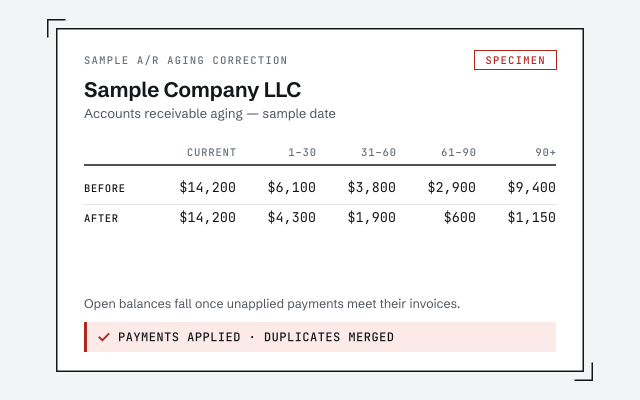
A real A/R aging correction

The exact before-and-after aging once payments are applied and duplicates merged.

Response commitment

A real specialist replies within one business day, in writing.

Remote-first, nationwide

Mon–Sat · 8am–6pm CT

We work entirely remote — secure read-only access to your file, screen-share whenever you want to watch, and every payment applied and write-off recorded in writing.

  • Texas
  • Florida
  • California
  • New York

Questions about accounts receivable cleanup

Why is my A/R aging report wrong?

Because it is showing invoices that were really paid, payments that were never applied, and duplicate customers that split one balance across two names. The aging can only be as accurate as the records behind it, so those have to be corrected first.

What are unapplied payments and why do they matter?

They are payments you received but never matched to the invoice they settled. The invoice stays open, the customer looks like they still owe you, and your revenue and A/R both overstate. Applying each payment to its invoice clears both sides.

What are undeposited funds and how do they relate to A/R?

Undeposited Funds is the holding account cash lands in when a payment is received but not yet grouped into a bank deposit. An unapplied payment often sits there too, so the same mistake leaves an invoice open in A/R and cash stranded in Undeposited Funds. Applying the payment and recording the deposit fixes both at once.

How do you decide what to write off versus collect?

We do not write anything off on our own. We surface the genuinely uncollectible or duplicate invoices with the evidence, you decide, and we record only the write-offs you approve. Everything still collectible stays open so you can pursue it.

Can duplicate customers be merged safely?

Yes. When one customer exists under two names, their invoices and payments split between them and the aging is wrong for both. We merge them carefully so history is preserved and the combined balance comes out correct.

Does cleaning up A/R change my revenue?

It can correct it. Where revenue was overstated by invoices that were really paid or duplicated, fixing the records lowers it to what you actually earned. We document each change so you and your tax preparer can see what moved.

Will you contact my customers or chase collections?

No. We correct the records so your aging is accurate and you know exactly who owes what, but we do not call or email your customers. Collections stays in your hands; we make sure the list you work from is real.

Do you clean up A/R in QuickBooks Online or Desktop?

Both. We apply payments, merge customers, and correct the aging in QuickBooks Online with read-only-based access, and in Desktop by screen-share or a hosted file. The receive-payment and merge steps work the same way; only the menus differ between the two products.

How long does an accounts receivable cleanup take?

Most A/R cleanups run about a week: a day-0 review, a few days applying payments and merging duplicates, a day or two resolving the stragglers, and a handback. Files with years of tangled payments or many duplicate customers can run one to two weeks.

What do I get when the cleanup is done?

An A/R aging that shows real balances, payments applied, duplicates merged, approved write-offs recorded, a written summary, and a call to walk it through. If the wider file also needs work, we scope that separately.