Error 6123
QuickBooks error 6123
Connection to the company file lost — a mismatch you can fix, or real damage.
QuickBooks error 6123 means the program lost its connection to your company file, often while opening it or restoring a backup. Sometimes the cause is a network, antivirus, or version mismatch you can fix yourself. Sometimes it is genuine damage to the file, which needs repair. The first job is telling the two apart.
Last reviewed October 2026 by a Certified QuickBooks ProAdvisor
What this page is based on: Intuit’s own help article for this error (checked October 2026)
- We tell you: network fix or file repair
- Steps you can try yourself
- We escalate only real damage
Who this affects
6123 is the one error that really could go either way
6123 is unusual because it sits on the line between a simple fix and a serious one. You will often see it moving a file between computers, restoring a backup, or opening a file made in a different QuickBooks version. In those cases it is a mismatch you can resolve. But 6123 is also thrown by a genuinely damaged file, so it is the one error where you should not assume it is harmless.
Start here
6123 — a mismatch you can fix, or a damaged file?
MOVING OR RESTORING A FILE
Likely a DIY fix
Version mismatch, antivirus, or hosting during a restore causes many 6123s — the steps below clear them.
THE FILE WILL NOT OPEN AT ALL
Likely file damage
If 6123 blocks the file even on the machine that made it, with matching versions, corruption is the likely cause.
See file repair
Read this as text
- MOVING OR RESTORING A FILE: Likely a DIY fix — Version mismatch, antivirus, or hosting during a restore causes many 6123s — the steps below clear them.
- THE FILE WILL NOT OPEN AT ALL: Likely file damage — If 6123 blocks the file even on the machine that made it, with matching versions, corruption is the likely cause.
Fix it yourself
The DIY fix for error 6123, step by step
Work these in Intuit's order. The first three are for an error while opening, upgrading or restoring the file; the last two are Intuit's extra steps for restores.
Open it from inside QuickBooks
Open the company file from QuickBooks, not from Windows Explorer; Intuit says opening it from Explorer may give you the error.
Check the processor
In Windows, check the processor under device specifications. Intuit says ARM-based chips such as Snapdragon or Qualcomm can't run QuickBooks Desktop and a software update won't fix it; Intel and AMD can.
Run Quick Fix my Program, then File Doctor
From the QuickBooks Tool Hub, run Quick Fix my Program and test the file, then run QuickBooks File Doctor. If the error survives File Doctor, Intuit points to its data services team.
Restore locally
Restoring a backup kept on a network or external drive? Move it to the computer's own hard drive and restore from there, not from an online storage folder or a removable drive.
Restoring on a new computer
Restoring a .qbb backup on a new computer? On the original computer, create a portable company file (.qbm) from the working company file, then restore that on the new computer.
Ruling out the mismatches, in order
Read this as text
Four stages, left to right: open or restore the file with the same QuickBooks year and edition that created it; copy the backup to the local drive and restore from there, not from a network share or USB; clear what can lock the file mid-restore — pause antivirus and switch hosting off; then the file opens and 6123 clears — the verified end state, marked with a tick. An illustrative sequence.
Intuit's own fix for 6123, in Intuit's order
Intuit's own article (updated 8/5/2026, checked November 2026) splits the fix by what you were doing. If it appeared while opening, upgrading or restoring the company file, in Intuit's order:
- Open the company file from inside QuickBooks, not from Windows Explorer — Intuit says opening it from Explorer may give you the error.
- Check the processor. Intuit says the error may come from the hardware, usually ARM-based computers such as Snapdragon or Qualcomm machines, which QuickBooks Desktop doesn't support, and a software update won't fix it; the routes are moving QuickBooks and the data to an Intel or AMD computer, cloud hosting through an authorized provider, or QuickBooks Online.
- Run Quick Fix my Program from the QuickBooks Tool Hub's Program Problems tab.
- Run QuickBooks File Doctor from the Company File Issues tab. If the error survives File Doctor, Intuit points to its data services team.
Intuit gives two more branches for restores. If it appeared while restoring a backup kept on a network or external drive, move the backup to the computer's own hard drive and restore from there; Intuit says not to open it from an online storage folder or a removable drive. If it appeared while restoring a backup (.qbb) on a new computer, create a portable company file (.qbm) from the working company file on the original computer, and restore that on the new computer instead.
When to call us
When error 6123 means the file is damaged
If 6123 still blocks the file after you have matched versions, restored locally, and cleared antivirus — especially on the computer that created the file — the cause is the file itself. Repeated restore attempts on a damaged file can overwrite your last good backup, so stop there. A file repair recovers the data structure; a rescue is for a file that will not open or has already lost data. We work on a copy, never your original file, so nothing gets worse while we diagnose — and where a Desktop repair needs admin-level access, it runs over a screen-share or a hosted copy you control. And if your symptom is slightly different, two siblings cover it: error -6189, -816 when another session or a stale transaction log holds the file, and the H202 guide when workstations cannot reach the file on its host in multi-user mode. If QuickBooks itself will not launch at all — "could not initialize license properties," before any company file is involved — that is error 3371, an activation problem on the machine rather than anything in the file.
Mismatch or damage — and when to stop
Read this as text
On the left, the file opens after matching versions, restoring locally, and clearing locks: it was a mismatch, now resolved, and no repair is needed. On the right, 6123 keeps coming back: treat the file as damaged and stop retrying the restore, because each failed attempt can overwrite the last good backup — the next step is diagnosis on a copy, then file repair or rescue. A comparison of the two outcomes.
How the 6123 diagnosis is written up
Who’s responsible for your file
A Certified QuickBooks ProAdvisor handles your file from the review through the corrections to the hand-back — the same person throughout, never a rotating pool.
About QBSpecialist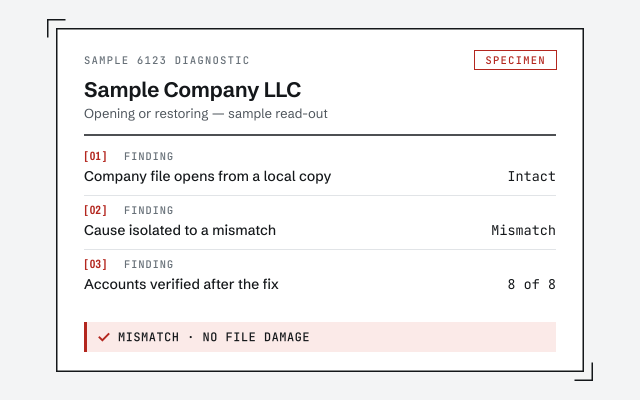 Illustrative example — not a client file.
Sample 6123 diagnostic
The written read-out that tells you whether it is a mismatch or genuine file damage.
How we work
We test on a copy first, so a damaged file is never made worse. See what repair involves.
See QuickBooks file repairResponse commitment
A written reply within one business day.
Questions about error 6123
Does 6123 always mean my file is corrupt?
No. Many 6123 messages come from a version mismatch, antivirus, or restoring over a network — all fixable without repair. But unlike most errors, 6123 is also a genuine corruption signal. If it persists after the simple steps, treat the file as damaged rather than retrying.
Why do I get 6123 when restoring a backup?
Restoring is where 6123 shows up most. Common causes are restoring a newer file into an older QuickBooks, restoring straight from a network drive or USB, or antivirus locking the file mid-restore. Restore locally, with matching versions and security paused, and it usually goes through.
Can I keep retrying the restore?
Not on a file you suspect is damaged. Each failed attempt can overwrite a good backup or write more bad data. Try the simple fixes once. If 6123 stays, stop and have the file diagnosed on a copy before you lose the last version that still opens.
Is 6123 different on multi-user setups?
It can be. In multi-user, 6123 often traces to a hosting or Database Server Manager conflict rather than a damaged file — closer to an H202 situation. Confirm hosting is set correctly on the server first. If single-user on the host still fails, then look at the file itself.
Does QuickBooks File Doctor fix error 6123?
Sometimes. File Doctor — part of Intuit's free Tool Hub — repairs the network and file-access causes of 6123, so it is worth one run after the manual steps. What it cannot reliably fix is genuine data damage. If 6123 survives File Doctor, treat the file as damaged and stop retrying restores.
What is the difference between file repair and rescue for 6123?
File repair rebuilds the data structure of a file that still opens but throws errors. Rescue is for a file that will not open at all or has already lost data. 6123 can land in either camp, which is why we diagnose first and tell you which one your file actually needs.
- Error 6000 77— a file that won't open from an external or mapped drive
- Error 6000 83— a backup, restore or server-hosted file that won't finish opening
Not sure how bad it is?
Talk to a QuickBooks specialist.
Describe the file and a specialist will tell you which of these you are dealing with — including when the answer is that you don't need us.