QuickBooks error 15271
QuickBooks error 15271
The payroll update won't finish? Here's why.
A payroll or product update that stops partway is the classic QuickBooks error 15271 symptom: a downloaded file failed validation, so QuickBooks refuses to install it. The cause is the update process — permissions, an interrupted download, or a blocked digital-signature check — not your data. Run the update as administrator and repair QuickBooks, and it clears. Your books are not affected.
Last reviewed October 2026 by a Certified QuickBooks ProAdvisor
What this page is based on: Intuit’s own help article for this error (checked October 2026)
- An update error, not a data error
- Run as admin and retry
- We escalate only real drift
Who this affects
This is about an update that would not install, not your books
You will usually see error 15271 right after QuickBooks tries to apply a payroll tax-table update or a product patch, with a message that the update did not complete because a file cannot be validated. That validation step is a safety check: QuickBooks will not install an update file it cannot confirm is intact and genuine. When the download is interrupted, or Windows blocks it partway, the file fails that check and the update stops. The data already in your company file is untouched — nothing was written to it. What failed is the installer, so that is where the fix belongs.
Start here
15271 — a blocked update, or drifted payroll figures?
THE UPDATE WILL NOT FINISH
An update fix
Run QuickBooks as administrator, reset the update, and repair the install — this clears most 15271 messages.
PAYCHECK OR LIABILITY NUMBERS LOOK WRONG
That is a payroll cleanup
Error 15271 does not change figures. If your payroll numbers have drifted, that is a bookkeeping correction, not an update.
See payroll cleanup
Read this as text
- THE UPDATE WILL NOT FINISH: An update fix — Run QuickBooks as administrator, reset the update, and repair the install — this clears most 15271 messages.
- PAYCHECK OR LIABILITY NUMBERS LOOK WRONG: That is a payroll cleanup — Error 15271 does not change figures. If your payroll numbers have drifted, that is a bookkeeping correction, not an update.
Fix it yourself
The DIY fix for error 15271, step by step
Intuit gives one route for every 15XXX update error, whether you were updating QuickBooks Desktop or downloading a payroll tax-table update; it does not split the fix by what you were doing. Work these in order and stop when the update installs.
Run QuickBooks as administrator
Close your company file and QuickBooks. Right-click the QuickBooks Desktop icon, choose Run as Administrator, select Yes at the Windows prompt, then download the product update or the payroll tax-table update again.
Reset the update
Run Quick Fix my Program from the Tool Hub's Program Problems tab and retry. If the update still fails, delete the Components folder for your QuickBooks version under ProgramData, then go to Help, Update QuickBooks Desktop, Update Now, tick Reset Update and download again.
Check the digital-signature certificate
Right-click QBW32.exe, choose Properties, then Digital Signature, and check that Intuit is selected. In the Certificate window, choose Install Certificate; then restart the computer, open QuickBooks and download the update again.
Repair the QuickBooks installation
Run the QuickBooks Install Diagnostic Tool, which Intuit says fixes or repairs common install issues.
Retry the update
Run the payroll or product update once more. If it still fails, Intuit's last step is reinstalling QuickBooks Desktop.
The update fix, in order
Read this as text
Four stages, left to right: run QuickBooks as administrator for full rights, reset the update so it re-downloads cleanly, repair the installation's program files, then the update file validates and installs — the verified end state, marked with a tick. An illustrative sequence.
Intuit's own fix for error 15271 and its siblings, in Intuit's order
Intuit's Fix error 15XXX when updating QuickBooks Desktop or QuickBooks Desktop Payroll (updated 8/5/2026, checked November 2026) covers 15271 and its siblings with one route, whether you were downloading a product update or a payroll tax-table update, and lists the causes: a misconfigured shared download, a missing payroll component, damaged Windows files, a firewall blocking the update, a disabled File Copy Service or a failed digital-signature check. It suggests setting up firewall and internet security settings first; then, in Intuit's order:
- Run QuickBooks as administrator and download the update again.
- Run Quick Fix my Program from the Tool Hub's Program Problems tab.
- Delete the Components folder for your QuickBooks version, then download the update again with Reset Update ticked (Help → Update QuickBooks Desktop → Update Now).
- Install Intuit's digital signature certificate from the properties of QBW32.exe, then download again.
- Run the Install Diagnostic Tool, and reinstall only as a last resort.
Check your version too: after May 31, 2026, QuickBooks Desktop 2023 won't automatically calculate payroll taxes or provide payroll tax forms (Intuit, updated 8/5/2026, checked November 2026).
When it is more than a retry
When error 15271 will not clear
If QuickBooks error 15271 returns after you have run as administrator, reset the update, and repaired the installation, the block is no longer inside QuickBooks. Something at the operating-system level is interrupting the download or quarantining the file before it can be validated — most often User Account Control, antivirus, or a firewall. That is an environment fix rather than a QuickBooks fix: your IT support can allow QuickBooks and its update service through the security software so the file downloads and validates cleanly. We can confirm from the error behavior whether the cause is the install or the environment, so you refer the right problem to the right hands. Two codes often travel with this one: error PS038, when a paycheck sticks in the send queue around a payroll update, and error 1603, when it is the install or repair itself that fails at the Windows level.
If the numbers moved
A stalled update is not a bookkeeping problem — unless the figures drifted
Error 15271 by itself changes nothing in your file, so a paused update does not put your payroll out of balance. But if you have been running on an out-of-date tax table, or paychecks and liabilities were entered around the failed updates and now do not reconcile, that is a genuine bookkeeping matter. Correcting drifted payroll figures is a payroll cleanup — a review of wage, tax, and liability accounts to bring them back to accurate — and it is entirely separate from getting the update to install. We are honest about which one you actually need before any work begins.
The update vs. your books
Read this as text
On the left, error 15271 lives in the installer: a downloaded file failed validation, and the fix is admin rights, a reset, and a repair — none of which opens the company file. On the right, the books themselves — paychecks, liabilities, taxes — are untouched by this error; figures that have genuinely drifted are a separate payroll cleanup. A comparison of the two.
How the 15271 fix is written up
Who’s responsible for your file
A Certified QuickBooks ProAdvisor handles your file from the review through the corrections to the hand-back — the same person throughout, never a rotating pool.
About QBSpecialist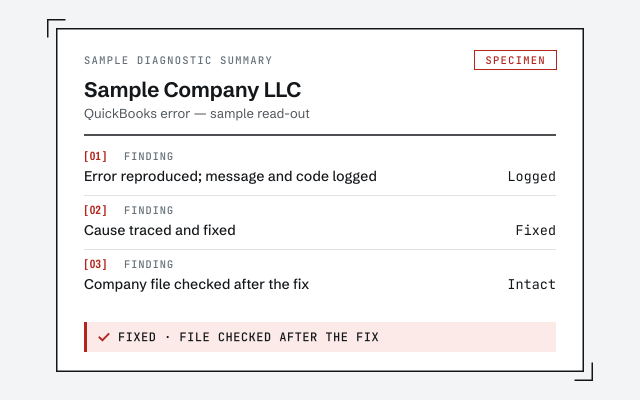 Illustrative example — not a client file.
Sample diagnostic summary
The written read-out that tells you whether it is the install, the environment, or drifted payroll figures.
How we work
We confirm the cause before touching anything, and never change your file to fix an update. See what file repair involves.
See QuickBooks file repairResponse commitment
A written reply within one business day.
Questions about error 15271
What does QuickBooks error 15271 actually mean?
It means a payroll or product update did not finish because a file it downloaded could not be validated. QuickBooks blocks the update rather than install a file it cannot confirm is genuine. The cause is almost always the update process itself — permissions, an interrupted download, or a blocked digital signature — not your company file or your books.
How do I fix error 15271 quickly?
Close QuickBooks, reopen it by right-clicking and choosing Run as administrator, then run the update again. Running with full rights lets QuickBooks replace the file it could not validate. If it still fails, reset the update so it re-downloads cleanly, then retry. That clears most 15271 cases.
Does error 15271 mean my payroll data is wrong?
No. Error 15271 is about an update that would not install, not about the numbers already in your file. Your paychecks, liabilities, and tax figures are untouched by this error. If those figures actually look wrong, that is a separate bookkeeping issue — a payroll cleanup — not something error 15271 caused.
Why does error 15271 keep coming back?
Usually because something outside QuickBooks keeps blocking the update — User Account Control, antivirus, or a firewall interrupting the download or quarantining the file. When a repair and a clean re-download do not hold, the block is typically at the operating-system level, which is where your IT support can allow QuickBooks through.
Is it safe to repair QuickBooks to fix 15271?
Yes. Repairing the QuickBooks installation reinstalls program files only — it does not open or change your company file or your data. Keep a backup as a habit, then run the repair from Windows. If the update installs cleanly afterward, the problem was the installation, not your books.
Can I keep running payroll while 15271 is unresolved?
QuickBooks still opens and works — the error blocks the update, not the program. But payroll depends on a current tax table, so paychecks created while the update is stuck are calculated on the old table. Clear the error before the next payroll run if you can, and verify checks written in the gap once the update installs.
- Error OL-301— a bank-connection error, if the update finished but the feed now fails
- Error OLSU-1013— the bank-login error that can follow a failed update
Not sure how bad it is?
Talk to a QuickBooks specialist.
Describe the file and a specialist will tell you which of these you are dealing with — including when the answer is that you don't need us.