Skip to content
QB Specialist

QuickBooks for construction

QuickBooks for construction contractors.

QuickBooks works for construction when it is built for how contractors actually run: costs tagged to each job, progress billing and retention recorded correctly, and reports that show profit by job. One senior specialist wires and keeps the file. We keep the books — your CPA sets your WIP method and files the taxes.

Last reviewed July 2026

  • Profit by job
  • Retention tracked right
  • A senior specialist, not a pool

What QuickBooks for construction really involves

QuickBooks for construction means wiring the file so it answers the question a contractor actually lives on — did this job make money? — rather than only reporting one company-wide bottom line. That takes job costing, correct handling of progress billing and retention, work-in-progress visibility, and clean subcontractor records, all built on a chart of accounts that separates direct job costs from overhead.

Construction is different from most small businesses QuickBooks is sold to. You bid fixed-price and cost-plus work, you bill in stages against a contract, your customer holds back a slice of every payment as retention, and a large share of your cost is labor and subcontractors that has to land on the right job to mean anything. A retail or service business can run happily on a plain profit and loss; a contractor cannot. Get the structure right and QuickBooks tells you which jobs earn and which quietly lose. Get it wrong and you have confident-looking numbers that hide the jobs bleeding money until it is too late to fix them. The sections below cover how each piece works, honestly, including where the software stops and your CPA begins.

Job costing is the foundation of construction bookkeeping

Job costing is the practice of tagging every cost — labor, materials, subcontractors, equipment — to the specific job it was spent on, so QuickBooks can report profit for each job instead of one lump number. For a contractor it is not an optional refinement; it is the whole point of keeping the books in the first place.

It works when three things line up. Two-sided items map each cost to a cost account and each billing to an income account, and both sides carry the job. The chart of accounts keeps direct job costs — labor, materials, subcontract — separate from overhead like rent, insurance, and office software. And every bill, check, and payroll line is tagged to a customer:job as it is entered, because a material receipt or a subcontractor bill that skips the tag drops into overhead and makes the job look more profitable than it was. This is the same discipline behind our dedicated QuickBooks job costing setup — for construction it is simply non-negotiable. Job costing also assumes clean books underneath: it belongs after a coherent chart of accounts, not before, because job costing built on a messy file just produces precise-looking wrong answers.

Cost to profit by job

How a construction job's costs and billings become profit by job Top row: three cost entries — labor, materials, and a subcontractor bill — each tagged to Job 14, flow into a profit-by-job total that shows Job 14's margin and carries the verified tick. Bottom row: a progress bill against the contract is split, with most paid now and a held-back retention posting to a retainage receivable rather than to accounts receivable. The mechanism is that every cost carries a customer:job tag and retention is tracked separately. Illustrative example, not measured figures. COST → JOB 14 PROFIT BY JOB Labor JOB 14 Materials JOB 14 Subcontract JOB 14 Job 14 MARGIN PROGRESS BILLING Progress bill Paid now → A/R Retainage held OTHER CURRENT ASSET
Every cost carries a customer:job tag so labor, materials, and subcontract roll up into profit by job — and the retention held back on a progress bill is parked in a retainage receivable, not accounts receivable, until it is billable. Figures are illustrative, not measured.

Progress billing and retention (retainage) in QuickBooks

Progress billing is billing a job in stages as the work advances rather than in one invoice at the end, and retention (retainage) is the portion of each billing — commonly 5 to 10 percent — the customer holds back until the job is finished and accepted. QuickBooks can do both, but retention specifically has to be set up because there is no built-in retainage feature.

The correct treatment matters. When you progress-bill, the amount the customer will pay now goes to accounts receivable as usual, but the withheld retention does not — the customer is not yet obligated to pay it, so it is recorded in a separate Retainage Receivable account classified as an other current asset. It sits there, visible and tracked, until the job reaches the point where you are entitled to bill the retention, at which point it moves into accounts receivable and you collect it. Skip that structure and retention either inflates your A/R with money you cannot yet collect, or disappears entirely and never gets billed — both of which we see constantly on contractor files that came from generic bookkeeping. We configure the retainage accounts and the billing workflow so every held-back dollar is tracked from the first progress bill to final collection. On the payables side, the same logic runs in reverse when you hold retention from your own subcontractors.

WIP accounting: over-billing and under-billing

Work-in-progress (WIP) accounting compares each open job's costs incurred and amounts billed against its total contract value, so you can see which jobs are overbilled — billed ahead of the work actually completed — and which are underbilled, where the work is done but not yet billed. It is how contractors and their sureties judge whether the reported profit on a job is real or borrowed from future billings.

Here is the honest boundary. QuickBooks holds the raw materials for a WIP schedule — job costs and job billings, if the file is job-costed properly — but a full WIP schedule with estimated cost-to-complete and earned revenue is usually built in a spreadsheet or a dedicated construction add-on, and the method behind it is your CPA's to set. Two revenue-recognition methods sit underneath: percentage-of-completion, which recognizes revenue as the job progresses (often on a cost-to-cost basis), and completed-contract, which defers revenue until the job is done. Which one applies to your business depends on your contract sizes, revenue, and the tax method your accountant has elected — and current revenue-recognition standards shape how it is reported. We do not choose your method, restate your revenue, or assert which one you should use; that is a decision to align with your CPA. What we do is make sure the job-level costs and billings feeding the WIP schedule are accurate and reconciled, because a WIP report built on untagged costs is worse than none at all.

Subcontractors: 1099 vs. W-2 and clean records

Whether a worker on your crew is a 1099 independent contractor or a W-2 employee is a classification question decided by the facts of the working relationship, not by which is cheaper — and getting it wrong on a subcontractor who is really an employee carries genuine payroll-tax and penalty exposure. The IRS weighs three categories: behavioral control, financial control, and the type of relationship between the parties.

We are not your tax or legal advisor on that call, and we will not make it for you — for the criteria and the official position, see the IRS guidance on independent contractor versus employee status, and confirm any specific worker with your CPA. What we own is the bookkeeping once the classification is made: collecting a W-9 before a subcontractor is paid, tagging every subcontractor bill to the right job so it lands in job cost and not overhead, tracking payments through the year, and producing clean, accurate 1099-NEC totals at year end so nobody is scrambling in January. When subcontractor payments have been miscategorized or W-9s are missing, we fold that into a QuickBooks cleanup so the records are right before the filing deadline, not after.

Class and location tracking by project

Class tracking splits your profit and loss by a dimension you choose — division, service line, or location — running alongside job costing so you can see, for example, both the profit on Job 14 and the combined profit of all your remodel work or your Austin branch. For a contractor running distinct lines of business or multiple locations, it is the lighter cut that job costing does not give you on its own.

The two are complementary, not competing. Job costing answers "did this job make money?"; class tracking answers "which part of my business makes money?" A contractor with new-construction and service divisions, or crews in two cities, gets real insight from setting both up together — costs tag to the job for job-level profit and to the class for segment-level profit. We cover the mechanics on our QuickBooks class tracking setup page; for construction we typically map classes to divisions or locations and keep the class list short so tagging stays fast and the reports stay clean.

Prevailing wage and certified payroll considerations

On public and federally funded work, prevailing-wage rules (the federal Davis-Bacon Act and state equivalents) require paying set wage rates by trade and filing weekly certified-payroll reports — federally, the WH-347 form — that document who worked, on what, and at what rate. QuickBooks Payroll can track wages and labor burden by job and class, but full certified-payroll reporting usually goes beyond what it produces on its own.

We are straight about where the line is. We set up payroll so gross wages and the burden on top — employer taxes, workers' comp, benefits — are tracked by job, so labor cost reaches job costing accurately rather than sitting in overhead. Where a job requires certified payroll, we tell you plainly that a specialized certified-payroll tool or add-on is the right instrument and help you feed it clean data, rather than pretending QuickBooks alone covers the compliance filing. We do not invent or interpret wage determinations — the applicable prevailing-wage schedule for a given job governs those rates, and compliance sits with you and your payroll or labor advisor. If payroll itself is tangled, we fix it first with a payroll cleanup so the numbers feeding job costs and any certified report are right.
Common problems construction books hit

Construction files drift in a handful of predictable ways, and almost all of them trace back to costs that never reached the right job or a structure that was never built for contracting in the first place. These are the recurring ones, and how we fix them.

  • Costs stuck in overhead. Material receipts and subcontractor bills entered without a customer:job land in overhead, so every job looks more profitable than it is and the profit-by-job report cannot be trusted.
  • Retention lost in A/R. Held-back retainage recorded as ordinary accounts receivable inflates what looks collectible and often never gets billed at job end.
  • A chart of accounts built for a generic business. Direct job costs mixed in with overhead, so the file cannot separate the cost of the work from the cost of running the company.
  • Subcontractor payments miscategorized. Missing W-9s and mis-tagged payments turn year-end 1099-NEC filing into a scramble.
  • Undeposited deposits and duplicate transactions from bank feeds that were never worked, quietly throwing the balance sheet out.

Where the file has already drifted, the fix is a scoped, fixed-fee QuickBooks cleanup: we tie every account back to its statement, then a chart-of-accounts cleanup restructures the accounts so job costing, retention, and class tracking can actually work. You get a documented, reconciled baseline, and from there the monthly work only has to keep pace with new jobs instead of chasing old mistakes.

What it costs

What construction bookkeeping in QuickBooks costs

Every engagement is a fixed scope at a fixed fee, quoted after a free read-only review of your file. The figures below are published starting floors; the review sets the real range for your contracting business.

Construction bookkeeping pricing
Engagement Typical range Timeline What's included
From $1,500 1–3 weeks Job costing, retention accounts, and a chart of accounts built for contracting.
From $1,500 2–6 weeks Reconcile the file, fix job costs and retention, restructure the accounts.
From $400/mo Ongoing Job-costed monthly close: costs tagged, accounts reconciled, reports that tie.
Get your exact quote

Construction file setup

Typical range
From $1,500
Timeline
1–3 weeks
Included
Job costing, retention accounts, and a chart of accounts built for contracting.

Cleanup + restructure

Typical range
From $1,500
Timeline
2–6 weeks
Included
Reconcile the file, fix job costs and retention, restructure the accounts.

Monthly bookkeeping

Typical range
From $400/mo
Timeline
Ongoing
Included
Job-costed monthly close: costs tagged, accounts reconciled, reports that tie.
Get your exact quote

How we work with construction contractors

One senior specialist wires your file for construction and keeps it that way — job costing tested against a real job, retention tracked from the first progress bill, subcontractor records clean for year end — not an offshore pool applying a generic template and hoping the reports mean something.

Our method is verification, not assertion: we do not hand back a structure and call it done, we run a real job through it and check that the profit-by-job report ties before you rely on it. Access stays minimal — read-only access to your file or a screen-share you control, never your banking logins — and every structural choice is documented in writing so the setup outlives the engagement. Read exactly how we work on our methodology page. We work entirely remotely, which means where you build has no bearing on whether we can help; contractors in construction-heavy states reach us the same way, whether you want a QuickBooks consultant in Texas or a QuickBooks consultant in Florida. And we hold a bright line at what we are: bookkeeping specialists. We keep the books accurate and job-costed; your CPA sets the WIP method, elects the tax treatment, and files the returns. When something can only be settled by your accountant or a construction-law advisor, we name it in the handoff rather than guessing.

How to verify our construction bookkeeping

You don't have to take our word for it. Here is the evidence you can check — the deliverable you receive, the structure the job-cost reports depend on, and our response commitment.

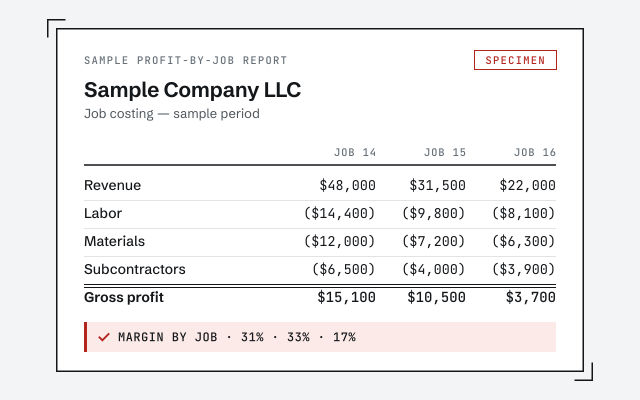
A real profit-by-job report

The exact job-cost report your file produces once it's wired and tested.

How we structure it

Construction job costing lives or dies on the account and item structure. See how we build it.

See job costing setup

Response commitment

A real specialist replies within one business day, in writing.

Remote-first, nationwide

Mon–Sat · 8am–6pm CT

We work entirely remote — read-only access to your QuickBooks file, screen-share to review the job-costing setup with you, and every structural choice documented in writing.

  • Texas
  • Florida
  • California
  • New York

Questions about QuickBooks for construction

Can QuickBooks do job costing for a construction company?

Yes. QuickBooks tracks cost by job when the file is wired for it — two-sided items that map each cost and each bill to a customer:job, a chart of accounts that keeps direct job costs separate from overhead, and the discipline of tagging every bill, check, and payroll line to the job it belongs to. Desktop and Enterprise have long-standing customer:job costing; QuickBooks Online uses Projects, which is simpler and reports differently. We set up whichever you run and test it against a real job before you rely on the profit-by-job report.

Does QuickBooks handle retainage or retention?

Not out of the box — QuickBooks has no built-in retainage feature, so it has to be set up. The standard approach is a Retainage Receivable account, classified as an other current asset rather than accounts receivable, because the customer is not yet obligated to pay the held-back amount. When you progress-bill, the withheld portion (commonly 5 to 10 percent) posts to that account instead of A/R, and it moves to A/R only when you are entitled to bill the retention at the end of the job. We configure the accounts and the billing workflow so retention never gets lost or double-counted.

Should I use percentage-of-completion or completed-contract accounting?

That is a decision for your CPA, not for us to assert — it depends on your contract sizes, your revenue, and the tax method your accountant has elected. Percentage-of-completion recognizes revenue as the job progresses; completed-contract defers it until the job is done. We keep the underlying books — costs tagged to jobs, billings recorded, retention tracked — so whichever method your CPA uses has clean, job-level data to sit on. We do not choose or change your revenue-recognition method.

What is a WIP report and can QuickBooks produce one?

A work-in-progress (WIP) schedule compares each open job's costs and billings to its contract value, so you can see which jobs are overbilled (billed ahead of the work done) and which are underbilled (work done ahead of billing). QuickBooks holds the raw pieces — job costs and job billings — but a true WIP schedule with estimated cost-to-complete is usually built in a spreadsheet or a construction add-on and reviewed with your CPA. We make sure the job-cost and billing data feeding it is accurate; the WIP method and the estimates behind it stay with your accountant.

Should my crew be 1099 subcontractors or W-2 employees?

That is a worker-classification question set by the facts of the relationship, not by preference, and the IRS weighs behavioral control, financial control, and the type of relationship. Misclassifying a worker who is really an employee as a 1099 subcontractor carries real payroll-tax exposure. We are not your tax or legal advisor on the classification decision — we point you to the IRS guidance and your CPA for the call. What we do is keep the bookkeeping clean once it is made: subcontractor bills tagged to jobs, W-9s tracked, and accurate 1099-NEC totals at year end.

Do you handle certified payroll or prevailing-wage jobs?

We handle the bookkeeping side and are honest about the limits. On public and Davis-Bacon jobs, prevailing wage and weekly certified-payroll reporting (the federal WH-347 form) often go beyond what QuickBooks Payroll produces on its own and are commonly done with a specialized add-on. We set up payroll so wages and burden are tracked by job and class, and we tell you plainly where a certified-payroll tool is needed rather than pretending QuickBooks covers it. We do not fabricate wage determinations — those come from the governing wage schedule for the job.

QuickBooks Online, Desktop, or Enterprise for a contractor?

It depends on how you run jobs. QuickBooks Desktop and Enterprise have deep, long-standing job costing and are common in construction; Enterprise adds advanced reporting and larger file capacity. QuickBooks Online uses Projects, which is lighter and reports differently. We set up whichever you run and tell you honestly where your edition is strong and where it needs a workaround before you build your job costing on it — and if a move makes sense, we scope that as a separate migration, never as a surprise.

Do you file my taxes or set my WIP method?

No. We are bookkeeping specialists, not your CPA, tax preparer, or construction-law advisor. We keep your QuickBooks accurate — job costs tagged, accounts reconciled, retention and billings recorded, 1099 totals clean — so your CPA has reliable, job-level books to file from and to set your revenue-recognition and WIP method on. The tax positions and the WIP method are theirs; the clean books underneath are ours.

Can you clean up a contractor's file that's already a mess?

Yes — that is often where we start. Construction files drift in predictable ways: costs that never got tagged to a job, retention buried in regular A/R, subcontractor payments miscategorized, a chart of accounts that mixes direct costs with overhead. We scope a fixed-fee cleanup, tie every account back to its statement, restructure the accounts so job costing can actually work, and hand you a documented baseline. From there the monthly work only has to keep pace with new jobs, not chase old errors.