Skip to content
QB Specialist

QuickBooks payroll help

Payroll help for your books, not your payroll product.

QuickBooks payroll help, as we do it, means getting payroll recorded correctly inside your books — mapped to the right accounts, categorized consistently, and reconciled to the returns you actually filed. We help the bookkeeping side; we do not run your payroll or file your taxes, and we are clear about that line.

Last reviewed July 2026

  • Payroll reconciled to filed returns
  • Miscategorized payroll fixed
  • We reconcile, we don't run payroll

What QuickBooks payroll help means here

Payroll help, the way we do it, is help with how payroll is recorded in QuickBooks — not help running payroll. We map wages, employer taxes, and provider fees to the right accounts, correct payroll that landed in the wrong place, and reconcile your wage and tax liability balances to the returns you actually filed.

Payroll touches more accounts than almost anything else in a QuickBooks file: gross wages, each tax the employer withholds and matches, the liability accounts those taxes sit in until they are deposited, and the fees your provider charges. When any of those postings drift, both the balance sheet and the profit and loss stop telling the truth. Fixing that is a bookkeeping job, and it is one of the QuickBooks services we do. It is deliberately separate from filing: we reconcile against what you filed, we do not file for you.

Who needs payroll help in QuickBooks

You need payroll help when payroll in QuickBooks stops matching reality — when liability balances never clear, wages are lumped into one account, or your CPA cannot tie the payroll totals in the file to your W-2s and 941s.

The usual signs:

  • A "Payroll Liabilities" balance that never goes to zero, even in months you deposited on time.
  • Tax deposits booked as plain expenses, so the original liability still sits open on the balance sheet.
  • Wages, employer taxes, and provider fees all lumped into one account instead of read separately.
  • Payroll recorded twice — once from a bank feed and once from a journal entry — inflating both wages and cash.
  • A year-end scramble because the payroll numbers in QuickBooks won't agree with the returns that were filed.

If your liabilities already clear each period and your totals tie to your filings, you may not need this — a point we return to below. Not sure? A free QuickBooks review reads your file and tells you plainly where payroll stands.
What payroll help covers — and the line we hold

Three things do most of the work: mapping payroll to the right accounts, correcting payroll that was miscategorized, and reconciling each liability to what you filed and paid. What we never do is run payroll or file — that stays with your payroll product and its provider.

Where our help sits

The line between running payroll and helping the books On the left, your payroll product — Gusto, ADP, or Intuit Payroll — runs pay and files the taxes. Each run is mirrored into QuickBooks on the right, where wages, taxes, and liabilities are reconciled to your filings. We help with the books, not the payroll product. Illustrative example, not a measured figure. RUNS & FILES WE HELP HERE Your payroll product Gusto · ADP · Intuit Payroll QuickBooks — your books Reconciled to your filings MIRRORED IN PAYROLL WE DON'T RUN BOOKS WE KEEP TRUE
Payroll runs and files in your payroll product; each run is mirrored into QuickBooks, where we reconcile wages, taxes, and liabilities to your filings. We help with the books, not the payroll product. The example is illustrative.

Mapping comes first: wages, each employer tax, the liability accounts they clear through, and provider fees each need a home, so your profit and loss reads correctly instead of showing one blurred "payroll" line. Correcting comes next, moving anything that posted to the wrong account and collapsing runs that recorded twice. Reconciling ties it together — we compare each liability, period by period, to the return that was filed and the deposit that was made, and clear what is genuinely paid. Nothing is guessed: we work from your filed returns and the provider's own reports, and hand you a log of every entry we touched.

What we don't do: run payroll or file taxes

We do not run payroll, file payroll tax returns, or move your money. Your payroll provider or Intuit's payroll service does that; our work is to make sure QuickBooks reflects what they filed.

We hold that line on every engagement so there is never confusion about where our work ends and your provider's begins. If what you need is product, subscription, or filing help, that is Intuit or your provider, not us — and if you searched "payroll support" trying to reach them, the difference between the product side and the books side is worth reading before you spend time in the wrong queue. Our QuickBooks payroll support page lays out exactly which problems belong where.

Third-party payroll: Gusto, ADP, and QuickBooks Payroll

When payroll runs outside QuickBooks — in Gusto, ADP, Paychex, or QuickBooks Payroll — the books only stay right if every run is mirrored back into the file with wages, taxes, and fees split into the correct accounts. Reconciling that mirror is where most third-party drift hides.

An integration usually posts a summary entry for each pay run, but summaries can land in the wrong accounts, double up against a bank-feed transaction, or skip a run when a sync fails. Manual journal entries drift the same way when they are copied from a stale template. We reconcile against the provider's own reports — the payroll register and the tax-filing summaries the system produces — because those are the record of what actually happened, not what QuickBooks assumed. Whether payroll flows in through a connector or by hand, the test is the same: does QuickBooks agree with what the provider processed and filed?

One-time cleanup or ongoing help

If payroll has drifted for months, start with a one-time cleanup to reconcile and correct the history; if it is mostly right and you want it kept right, ongoing help reconciles each period so it never drifts back out.

A QuickBooks payroll cleanup is the concentrated version of this work: several quarters or a full year of liabilities reconciled to your filed returns, miscategorized payroll corrected, and phantom liabilities cleared, closed out with a written change log you can audit. Ongoing help picks up from a clean file and keeps each period reconciled, so the liability line ties to every return as you go. Either way, the method is the same and it is public: read how we work before you decide, and start with a free review so we scope the honest smaller of the two whenever that is what your file needs.

How to verify our payroll help

You don't have to take our word for it. Here is the evidence you can check — the deliverable you receive, the method we use to prove your liabilities tie to your returns, and our response commitment.

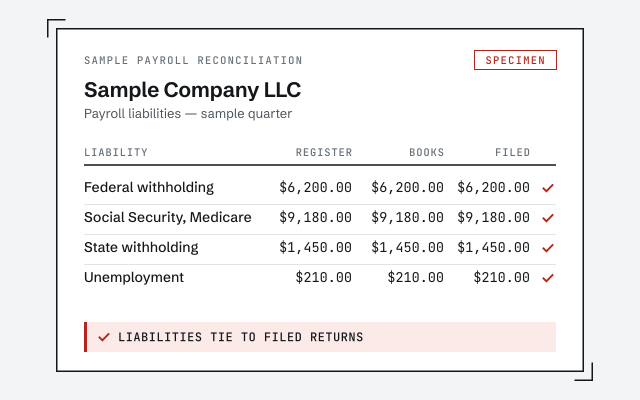
A real payroll reconciliation

The liability reconciliation and written change log you receive when the work closes.

Response commitment

A real specialist replies within one business day, in writing.

Remote-first, nationwide

Mon–Sat · 8am–6pm CT

We work entirely remote — secure read-only access to your file, screen-share whenever you want to watch, and every payroll correction documented in writing.

  • Texas
  • Florida
  • California
  • New York

Questions about payroll help

What does 'QuickBooks payroll help' include?

It is help with how payroll is recorded in your books: mapping wages, employer taxes, and provider fees to the right accounts, correcting payroll that landed in the wrong place, and reconciling your wage and tax liability balances to the returns you actually filed. It does not include running payroll or filing payroll taxes — a payroll product and its provider do that. We make sure QuickBooks reflects what they processed.

Do you run my payroll or file my payroll taxes?

No, and we are direct about that line. We reconcile and correct payroll inside QuickBooks so your books are right; we do not run payroll, file payroll tax returns, or move money. Your payroll provider or Intuit's payroll service handles the filing, and we make sure QuickBooks agrees with what they filed.

My payroll liabilities in QuickBooks don't match my filed returns. Can you help?

Yes — that is the most common reason people come to us. Liabilities drift when a deposit is booked against the wrong period or as a plain expense, so the balance never clears and the balance sheet carries a tax you already paid. We compare each balance to what you filed and paid, then correct the entries so the two agree. When the drift spans several quarters, that is a payroll cleanup.

I run payroll through Gusto or ADP. Can you still help inside QuickBooks?

Yes. When payroll runs in a third-party system, QuickBooks needs matching entries so wages, taxes, and fees land in the right accounts. We reconcile what the provider actually processed against what is recorded in QuickBooks, whether it arrives through an integration or by manual journal entry, so the books stay continuous and tie to every return filed.

Do I need a one-time cleanup or ongoing help?

It depends on how far payroll has drifted. If liabilities have been mis-recorded for months and no longer tie to your filings, start with a one-time payroll cleanup to reconcile and correct the history. If payroll is mostly right and you want it kept that way, ongoing help reconciles each period so it never drifts back out. We tell you which you need during the free review.

Not sure where payroll stands?

Get an honest read on your payroll in QuickBooks.

A senior specialist reviews your file read-only and tells you plainly whether payroll ties to your filings, what it takes to fix, and a fixed scope — or whether you don't need us at all. Prefer to talk it through first? Book a call with the same specialist.

Get your free review Book a call