A real setup summary
The structured file and written summary of how it's built that you receive when the setup closes.
QuickBooks setup
A QuickBooks setup builds your company file on a foundation that holds: a chart of accounts matched to how your business actually runs, opening balances that tie to your prior records, and bank, app, and payroll connections that feed clean data. We set it up so the books start right — not so they need a cleanup in a year.
A QuickBooks setup builds your company file end to end: the company foundation, a chart of accounts matched to your business, opening balances that tie to your prior records, and the bank, app, and payroll connections that feed it — handed back ready to use.
It is more than clicking through the new-company wizard. The wizard gives you a generic file; a proper setup gives you one shaped to how your business actually operates and reports. Every decision made at setup — how income is split, whether you track jobs or classes, how inventory posts — either makes the books legible for years or quietly builds in the confusion that a future cleanup has to unwind. Setup is the cheapest time to get those decisions right.
You need a fresh setup when you're standing up a new company file — a new business, a new entity, or a switch to QuickBooks — and the structure is complex enough that getting it wrong is expensive to fix.
The usual cases:
If your needs are genuinely simple — one account, no payroll, no inventory — the built-in wizard may be all you need, and we'll say so. That honest line is one we return to below.
A file is built in sequence, because each layer depends on the one beneath it: the company foundation first, then the chart of accounts, then opening balances, then the connections that feed it. Build them in that order and the first reconciliation comes out even.
Setup sequence
Skipping the order is where DIY files go wrong. Balances entered before the accounts exist land in a suspense bucket; feeds connected before the chart is built dump months of transactions into "Uncategorized." We build downward, verify at each layer, and only turn on the feeds once there's a real structure for them to land in.
The chart of accounts is the single decision that shapes every report you'll ever pull, so it is where a setup spends most of its care — matched to how your business earns and spends, not left as the generic default.
A default chart lumps revenue into one line and scatters expenses into categories that mean nothing for your business. Built to fit, it separates your real income streams, groups costs the way you actually manage them, and leaves the profit and loss readable at a glance. It also stays disciplined: enough detail to be useful, not so much that every transaction becomes a guessing game. If you're inheriting a file whose chart is already a sprawl, that's a chart of accounts cleanup rather than a setup — same principle, applied to an existing structure instead of a blank one.
Connections are turned on last and mapped deliberately: bank and credit-card feeds with categorization rules, the apps you actually run, and payroll wired so runs post to the right accounts — so clean data flows in instead of piling up to be sorted.
A bank feed connected without rules is just a faster way to make a mess; we set the rules so recurring transactions categorize themselves correctly from day one. Apps — invoicing, point of sale, expense tools — get mapped so their entries land in the right accounts rather than a catch-all. When the app side is involved enough to deserve its own scope, we handle it as a dedicated integration setup so every connection is verified against the accounts it feeds. Payroll is connected so wages and taxes post cleanly; we set up the structure and reflect what your provider processes — we don't file your payroll taxes.
A setup builds a fresh file from opening balances; a migration carries an existing file's real history into QuickBooks. Which one you need turns on a single question: do you have history worth keeping?
If you're genuinely starting out, or your old records are just spreadsheets, a clean setup with correct opening balances is the right, cheaper path — there's no history to preserve, only a foundation to build. But if you're moving off another accounting system that holds years of transactions you'll want to report on and compare against, that's a QuickBooks migration, where the work is carrying that history over intact rather than starting from a balance. We'll tell you plainly which one fits during the free review, because paying for the wrong one wastes your money in both directions.
Skip a paid setup when your needs are simple enough that QuickBooks' own wizard gets you there, or when you already have a working file that just needs tidying rather than rebuilding.
If you're a sole proprietor with one bank account, no inventory, and no payroll, the built-in setup will likely serve you fine — there's no structure complex enough to justify the fee, and we'll say so. And if you already have a file with real history that's merely untidy, starting over throws away work you've already done; what you want there is a cleanup or a chart of accounts cleanup, not a new file. We sort out which case you're in during the free review, even when the honest answer is "you don't need us for this." If you'd rather talk it through first, book a call.
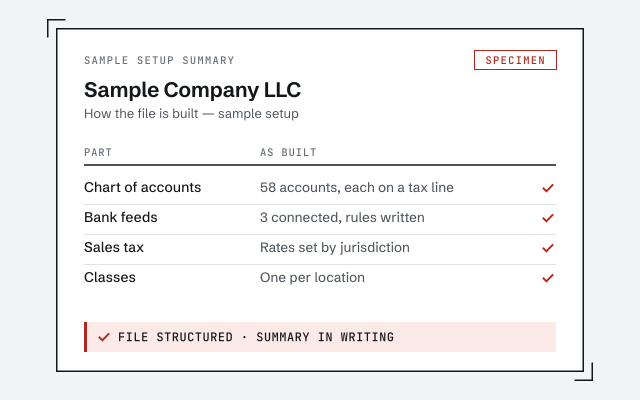
You don't have to take our word for it. Here is the evidence you can check — the deliverable you receive, the method we use to prove the file starts clean, and our response commitment.
The structured file and written summary of how it's built that you receive when the setup closes.
A real specialist replies within one business day, in writing.
Remote-first, nationwide
Mon–Sat · 8am–6pm CT
We work entirely remote — secure access to your file, screen-share whenever you want to watch, and the structure of your setup documented in writing.
You can do it yourself, and if the business is simple — one bank account, no inventory, no payroll — QuickBooks walks you through enough to get going. A setup service earns its place when the structure matters: multiple entities, inventory, jobs, classes, or opening balances that have to tie to prior records. The value is a foundation you won't have to pay to clean up later.
Yes — that is the point of building the chart of accounts to fit rather than accepting the default. We structure income, cost of goods, and expense accounts around how you already think about the business and how your reports need to read, so the profit and loss is legible from month one instead of a wall of generic categories.
That is usually a cleanup, not a setup. If the file exists and has real history in it, we reconcile and correct what's there rather than start over — starting over loses your history. Occasionally a file is damaged or mis-structured beyond repair and a fresh setup with migrated balances is the honest call; we tell you which case you're in during the free review.
Yes. We connect the bank and credit-card feeds, set up the categorization rules that keep the data clean, and wire in the apps you actually use — invoicing, point of sale, expense tools. When an integration is involved enough to warrant it, we scope it as a dedicated integration setup so each connection is mapped to the right accounts.
We set up the accounts and structure payroll needs to post cleanly, and we connect a third-party provider or QuickBooks Payroll so runs land in the right places. We do not file your payroll taxes or run payroll for you — that stays with your provider. We make sure QuickBooks reflects what they process.
A company file that's ready to use: a chart of accounts built to fit, opening balances that tie to your prior records, bank and app connections feeding clean data, and a written summary of how the file is structured so you or your bookkeeper can run it. The test is simple — the first reconciliation comes out even.
A setup is one of our QuickBooks services. It pairs naturally with a chart of accounts cleanup when a structure needs reshaping, an integration setup when apps and feeds get involved, and a migration when you're bringing history across. Not sure which you need? Start with a free review or book a call.