Skip to content
QB Specialist

QuickBooks Online support

Independent QuickBooks Online support that fixes the file.

"QuickBooks Online support" means different things. Account and billing questions belong to Intuit — but most support problems are really the file: a bank feed that won't match, transactions in the wrong place, reports that don't tie. That is independent specialist work, and it is what we do. We are not Intuit.

Last reviewed July 2026

  • Independent of Intuit
  • We fix the file, not your login
  • Reply within one business day

What "QuickBooks Online support" actually means

It means three different things wearing one name: help with your Intuit account and billing, help with a genuine software bug, and help with a file whose numbers no longer make sense. Only the last of those is bookkeeping — and it is the one we handle.

People search for "support" the moment QuickBooks Online stops behaving, but the word hides very different problems. If you cannot log in, your subscription lapsed, or you were charged wrong, that is your Intuit account and only Intuit can settle it. If a page genuinely will not load or a feature is down for everyone, that is a product bug and it is Intuit's to fix. But if the software works fine and the numbers are simply wrong — that is not a support issue at all. It is your books, and it is what independent specialist support is for.

What Intuit handles — and what an independent specialist fixes

Intuit owns the product and your account: subscriptions, logins, billing, service outages, and genuine software bugs all go to Intuit's official channels. An independent specialist owns the content of your file — the reconciliations, categorizations, and reports that Intuit will never look at.

The line is cleaner than it sounds. Intuit built QuickBooks Online and runs the account behind it, so anything about access to the software or the correctness of the software belongs to them. We work one layer in: inside the file you have already opened, on the transactions and balances that make up your books. Intuit will not tell you why your bank feed stopped matching or why your balance sheet is off by a few thousand dollars, because that is not a defect in their product — it is the state of your data. That layer is exactly where we work, and it is deliberately independent: we are not Intuit, and we do not act as Intuit's support.

What actually breaks in QuickBooks Online

The common QuickBooks Online complaints are rarely software failures — they are bank feeds that stop matching, transactions auto-categorized to the wrong account, duplicate entries from a re-synced feed, and reports that don't tie because the underlying data drifted.

In practice, the "QuickBooks Online is broken" tickets we see almost always trace back to the books, not the app:

  • A bank feed that will not reconcile, or that re-imports transactions you already matched, leaving duplicates.
  • Bank rules or auto-categorization quietly posting income and expenses to the wrong accounts for months.
  • A reconciliation that was force-closed with a difference, so every later month inherits the error.
  • Reports — profit and loss, balance sheet — that do not agree with the bank because the data behind them drifted.
  • Opening balances or transfers entered twice when a second bank connection was added.

None of those is a bug in the software. Each is a bookkeeping problem the software is faithfully displaying — and each is fixed in the file, not through a support queue. If the trouble is specifically the feed, our page on QuickBooks bank feed issues goes deeper.
What we do inside your QuickBooks Online file

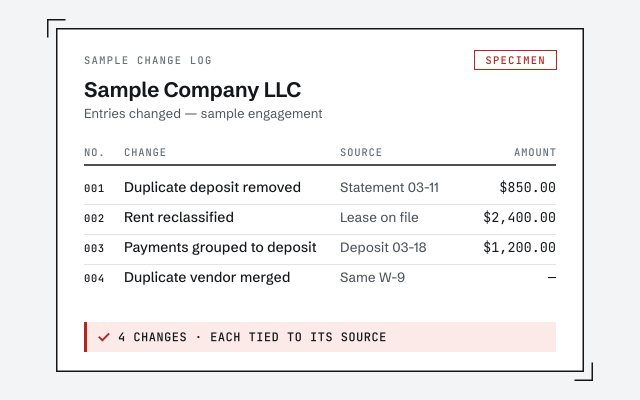
We work read-only or through a screen-share you control, and we fix the books: reconcile the accounts, move miscategorized transactions, clear duplicates, and get your reports to tie — with every change written down so you can audit it.

A senior specialist looks at the actual file, not a support script. We reconcile each account against the bank, find where the feed doubled up or dropped a transaction, and correct the categorizations that bank rules got wrong. Where a problem runs deeper than a few entries — a file that has drifted over many months — the honest answer is a structured QuickBooks cleanup rather than a quick fix, and we will tell you that up front. Access stays minimal by design: read-only entry to your file or a screen-share you watch, never your banking or Intuit login. Nothing is a black box; you receive a written record of every entry we touched and why.

When it's a bug for Intuit — and when it's your books

If the software itself is failing — a page won't load, a feature is down, a charge is wrong, you cannot get logged in — that is Intuit's to fix, and we will say so plainly. If the software works but the numbers are wrong, that is your books, and no support ticket will resolve it.

We hold that line on purpose, because it is the honest one. It would be easy to take every "QuickBooks Online problem" and bill for it, but half of them are not ours to solve. When the real issue is your Intuit account or a genuine product defect, we point you straight to Intuit's official channels rather than pretend otherwise — and we never invent an Intuit phone number for you to call; that belongs to Intuit and should come from Intuit's own site. When the issue is the file, we can show — not just claim — where it went wrong and how we fix it.

How support works when you bring us a QuickBooks Online file

It starts with a free, read-only review of the file. A senior specialist replies within one business day, in writing, tells you whether the problem is Intuit's or the books', and scopes the fix. There is no call-center queue and no offshore pool.

You do not sit on hold, and you do not get bounced between agents reading a script. One specialist reads your file, names the real problem, and — if it is ours to fix — quotes a fixed scope before any work begins. If it turns out to be an Intuit account or product matter, we say so in that same first reply and send you to the right place, at no cost. Written-first means every diagnosis and every change is documented, so you and your CPA can check the work against the file rather than take our word for it.

How to verify our QuickBooks Online support

You don't have to take our word for it. Here is the evidence you can check — the record you receive, the method we use to prove the file ties out, and our response commitment.

A written change record

The documented log of every correction you receive when we work in your QuickBooks Online file.

Response commitment

A real specialist replies within one business day, in writing.

Remote-first, nationwide

Mon–Sat · 8am–6pm CT

We work entirely remote and independent of Intuit — secure read-only access to your QuickBooks Online file, screen-share whenever you want to watch, and every correction documented in writing.

  • Texas
  • Florida
  • California
  • New York

Questions about QuickBooks Online support

Are you Intuit's QuickBooks Online support?

No. We are an independent firm of QuickBooks specialists — not Intuit, and not affiliated with or endorsed by Intuit. For your subscription, login, billing, or a genuine product bug, Intuit's official channels are the right door. What we do is independent specialist work inside your QuickBooks Online file.

My bank feed won't match and I can't reconcile in QuickBooks Online. Can you fix that?

Yes — and that is exactly the kind of problem no support ticket resolves. A feed that stops matching, duplicates from a re-sync, or transactions auto-posted to the wrong account are bookkeeping issues in your file, not software failures. That is our work; if it has become a broader mess, see our page on bank-feed issues and QuickBooks cleanup.

Is a login, subscription, or billing problem something you handle?

No. Access to QuickBooks Online — your account, password, subscription, and billing — is Intuit's to manage, and you should use Intuit's official channels for it. We work inside the file once you are already in, so we are not who to call to get logged in or to change a charge.

Do you offer a phone support line or a support number?

Our number reaches a real, senior specialist — not a call-center queue — and we work written-first, replying within one business day so there is a record you can refer back to. We do not run a 24/7 phone line and we will not pretend to. If you need Intuit's product support line, get that number from Intuit's official site, never from us.

My QuickBooks Online file is a mess after months of DIY. Is that support or cleanup?

That is cleanup, not a support call. When months of entries have drifted — unreconciled accounts, miscategorized transactions, a balance sheet that no longer ties — the fix is a structured QuickBooks cleanup that reconciles the file back to reality, then optionally keeps it clean each month.