QuickBooks Enterprise migration
QuickBooks Enterprise migration
Enterprise to Online, only when it fits.
A QuickBooks Enterprise migration moves your file to QuickBooks Online Advanced — accounts, names, history, and balances convert, but advanced inventory, combined reports, and heavy user counts need rethinking, and some Enterprise workloads genuinely belong on Enterprise. We check what your file relies on first, move it only when Online can carry it, then prove the converted file reconciles to Enterprise.
Last reviewed October 2026 by a Certified QuickBooks ProAdvisor
What this page is based on: Intuit’s own help on moving to QuickBooks Online and Intuit Enterprise Suite and upgrading to Enterprise (checked October 2026)
The migration flow
Read this as text
Four stages left to right. Stage 1, Source: the QuickBooks Enterprise file, the source of truth. Stage 2, Mapping: lists, balances, and history are mapped and converted to QuickBooks Online Advanced. Stage 3, Validation: the converted file is reconciled to the Enterprise file and proven to tie — the stage marked with a verified tick. Stage 4, Cutover: you go live in QuickBooks Online Advanced. The flow runs from a reconciled Enterprise source of truth to a reconciled, live Online file.
- Fit checked before the move
- Reconciled to the Enterprise file
- Honest when Enterprise should stay
What a QuickBooks Enterprise migration involves
A QuickBooks Enterprise migration moves an Enterprise (Desktop) company file into QuickBooks Online, almost always the Advanced tier — because Advanced carries the highest list capacity and reporting depth of the Online products, and Enterprise files tend to be the largest ones. The mechanics are the same four stages as any migration: read the Enterprise file as the source, map its accounts and lists to Online, validate the converted result against the original, then cut over.
What makes Enterprise different is not the process — it is the workloads. Businesses choose Enterprise for a reason: more simultaneous users, higher list limits, the Advanced Inventory and Advanced Reporting add-ons, combined reports across several companies, or an industry-specific edition — the full picture of the product is on our QuickBooks Enterprise page. Those are exactly the features that do not always have a like-for-like home in QuickBooks Online. So the honest first question is not "how do we move it," but "should it move at all" — and we answer that before touching the file. Our specialty is QuickBooks bookkeeping with a reconciliation-first method, so we frame an Enterprise move the same disciplined way: confirm Online can carry the workload, move the data, then prove the converted file reconciles to the Enterprise file it came from.
Which Enterprise move you mean — three routes, Intuit's own rules
"Enterprise migration" covers three different jobs, and the search results mix them. Each has its own Intuit procedure (all checked October 2026):
- Enterprise to QuickBooks Online Advanced. Intuit's move-your-file article applies: press Ctrl + B + Q to open the export window, for files from 2011 or later, with a Total Targets count below 4,000,000; the US import window is 90 days from creating the Online company (180 if your accountant created it). Advanced allows 25 billed users and 3 accountant users (Intuit's usage limits).
- Enterprise (or Pro and Premier) to Intuit Enterprise Suite. Intuit's Intuit Enterprise Suite move runs from inside Desktop: each file on 2023 Release 17 or later, or 2024 Release 16 or later; Intuit Enterprise Suite → Initiate upgrade process; match each company file to the right parent or child entity; work the cleanup checklist (the tool backs the file up first); then Intuit's experts move the data and email you when it's done, normally within 2–5 days.
- Pro or Premier up to Enterprise. Intuit's upgrade article: back up, install Enterprise, open the file and choose Update Now. It lifts the 14,500 combined names-and-items limit of Pro and Premier and supports up to 30 simultaneous users — and Intuit says the upgraded file can't be opened in Pro or Premier again.
Whichever route, the work that decides whether the move is safe is the same: a file reconciled before it moves, and the result reconciled back to the original after. That is what our fixed fee covers, from $1,500, quoted after the free review.
What carries over vs. what changes moving to Online Advanced
In an Enterprise move to Online Advanced, the structural data carries over and the Enterprise-specific machinery changes. Your chart of accounts, customers and vendors, open invoices and bills, transaction history, and account balances convert into QuickBooks Online Advanced. What changes are the pieces that only exist in Enterprise's world — the way inventory is valued and located, how reports are combined and customized, and how users and roles are structured.
The reports are the clearest example of "the number stays, the object is rebuilt." Enterprise's Advanced Reporting and its combined reports across companies do not travel as files, but the transaction history that feeds them converts — so the figures still tie, and we recreate the report views you actually use on the other side. We list which of your reports have a direct equivalent, which get rebuilt, and which have no home in Online, before the move rather than after it. The full technical detail of how lists and history map lives on the QuickBooks data conversion page.
Advanced inventory, user counts, and the workloads to check first
The fit check
Read this as text
Three workloads are checked before any Enterprise move is committed to — advanced inventory, concurrent users, and combined reporting. Together they feed one fit decision with two honest outcomes: move to QuickBooks Online Advanced, or stay on Enterprise. Neither outcome is marked as the winner, because the right answer depends on the file. Illustrative decision structure, not a recommendation for a specific file.
The three things that decide most Enterprise moves are advanced inventory, concurrent users, and combined reporting — check all three before you commit. These are the features people buy Enterprise for, and they are precisely where QuickBooks Online behaves differently, so a move made without checking them is a move that surprises you after cutover.
Advanced inventory
Enterprise's Advanced Inventory handles multiple warehouse locations, serial and lot tracking, and certain costing methods that QuickBooks Online treats differently or does not offer. Item lists and quantities can convert, but warehouse structure and item-level history often need rebuilding or rethinking. If your operation runs on lot tracking across several sites, this is the workload that most often means Enterprise should stay.
Concurrent users
Intuit says Enterprise supports up to 30 simultaneous users; QuickBooks Online Advanced allows 25 billed users plus 3 accountant users. If more people than that need to be in the file at once, we confirm your real concurrent-user need against what Online Advanced allows before recommending the move — rather than discovering the ceiling after you have paid to migrate.
Combined and multi-entity reporting
Enterprise can produce combined reports across several company files. QuickBooks Online handles multi-entity reporting differently, so if consolidated reporting across entities is central to how you close the month, we map exactly what it would look like in Online — and tell you honestly if there is no clean equivalent.
Stay or move?
When Enterprise should stay vs. move to Online Advanced
Enterprise should stay when the workload exceeds what Online can carry; it should move when the reasons you chose Enterprise no longer apply. Here is the honest split — the same one a review sets out in writing, before any work is quoted.
| Enterprise should stay | Move to Online Advanced | |
|---|---|---|
| Advanced inventory (warehouses, lot/serial) | ||
| Combined reporting across many entities | It depends | |
| Very high concurrent-user count | ||
| Needs anywhere, browser-based access | limited | |
| Standard lists, history, and reporting | works, but heavier | |
| Best when | Workload exceeds what Online carries | Enterprise features are no longer load-bearing |
| Verdict | Stay — a move would downgrade how you work | Move — Online carries the workload |
There is no universally right answer, and we will say which side your file lands on plainly. Staying on Enterprise is a legitimate outcome of a review — we would rather tell you that than sell a migration that quietly downgrades how you work. If the reasons you bought Enterprise have faded and you mainly need browser access and standard reporting, the move to Online Advanced is straightforward, and it follows the same path as any Desktop to Online migration.
How we validate a QuickBooks Enterprise migration
We prove an Enterprise migration by reconciling the converted Online Advanced file back to the Enterprise file — same trial balance, same balance sheet, same key reports, to the penny — before you rely on it. Validation is not a courtesy step at the end; with a file this size and this much history, it is the entire reason to hire a specialist.
Anyone can push data through a conversion. The hard, valuable part is confirming the converted result matches what went in, and accounting for every difference until it does. We save Enterprise's trial balance and key statements before the move, re-run them in Online Advanced, and resolve each discrepancy to zero — the same reconciliation-first discipline that runs through everything we do. You can read exactly how the checking works in our methodology. If the converted file will not reconcile, we do not cut over and hope; we find the cause first. Access works the same disciplined way: the free review runs on view-only access, and the migration itself uses QuickBooks' accountant access in Online Advanced to make and log every change — never your bank logins — with the Enterprise file reached by screen-share or a hosted copy.
What an Enterprise migration documents
You do not have to take our word for it. Here is the evidence you can check — the deliverable you receive, the method we use to prove the converted file reconciles, and our response commitment.
Who’s responsible for your file
A Certified QuickBooks ProAdvisor handles your file from the review through the corrections to the hand-back — the same person throughout, never a rotating pool.
About QBSpecialist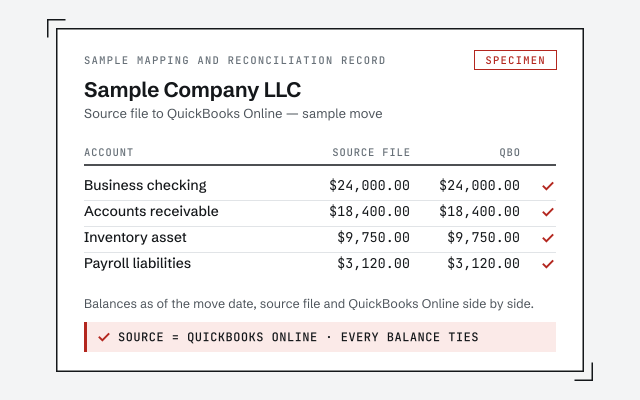 Illustrative example — not a client file.
Sample mapping and reconciliation record
The written map of what moved, what was rebuilt, and the before-and-after reconciliation you receive when an Enterprise migration closes.
Our methodology
How we prove the converted Online Advanced file reconciles to the Enterprise file. Read exactly how.
Read the full methodResponse commitment
A written reply within one business day.
Remote-first, nationwide
Mon–Sat · 8am–6pm CT
We migrate entirely remote — view-only access for the free review, QuickBooks' accountant access for the work in Online Advanced, your Enterprise file reached by screen-share or a hosted copy, and every mapping decision documented in writing.
- All 50 states
- Remote-first
- View-only review
Questions about QuickBooks Enterprise migration
Can QuickBooks Enterprise move to QuickBooks Online Advanced?
Usually, yes — QuickBooks Online Advanced is the tier most Enterprise files move to, because it carries the highest list capacity and reporting depth of the Online products. Your accounts, names, open items, history, and balances convert; the question worth answering first is whether the workloads that made you choose Enterprise — advanced inventory, combined reporting, or many simultaneous users — are ones Online Advanced can carry. We check that before we move anything.
Does advanced inventory carry over from Enterprise?
Not like-for-like, and this is the edge case that decides many Enterprise moves. Enterprise's Advanced Inventory handles things — multiple warehouse locations, serial and lot tracking, certain costing methods — that QuickBooks Online handles differently or not at all. Item lists and quantities can convert, but the item-level history and warehouse structure often need rebuilding or rethinking. We map exactly what your inventory relies on before deciding the file should move.
What happens to my custom and combined reports?
The figures behind them convert; the saved report objects are rebuilt. Enterprise's Advanced Reporting and its combined reports across multiple companies do not carry across as files — but the underlying transaction history that feeds them does, so the numbers still tie. In Online Advanced we recreate the reports you actually use, and where a combined multi-entity report has no direct equivalent, we tell you plainly rather than after cutover.
We have a lot of users in Enterprise. Will they all fit in Online?
That is a real thing to check first, not after. Intuit says Enterprise supports up to 30 simultaneous users, while QuickBooks Online Advanced allows 25 billed users plus 3 accountant users (Intuit, checked October 2026), so a file with a large concurrent-user count is one of the cases where Online may not fit. We confirm your actual user needs against what Online Advanced allows before recommending the move — and if the counts do not fit, we say so instead of shoehorning you in.
When should QuickBooks Enterprise stay put?
When the workload genuinely exceeds what Online can carry — very high transaction volume, advanced inventory with warehouses or lot tracking, combined reporting across many entities, an industry-specific Enterprise edition you depend on, or a concurrent-user count Online does not support. Staying on Enterprise is a legitimate answer, and we will give it honestly rather than sell a migration that would downgrade how you work.
How long does a QuickBooks Enterprise migration take?
Usually longer than a standard Desktop move, because Enterprise files tend to be the largest QuickBooks files and the fit check comes first. A file with plain lists and history is usually planned at a couple of weeks; heavy inventory, several entities, or years of dense history add real mapping and validation work. We scope the actual timeline during the free review, before any work starts.
What does an Enterprise migration cost?
It is a fixed fee quoted after a free review, from $1,500 — never hourly, and never quoted blind. Enterprise files are usually the largest QuickBooks files, so data volume, advanced inventory, the user structure, and multi-entity reporting all move the number. The review sets a fixed figure for your file before any work starts, and the quote states exactly what is included.
Can I move Enterprise to Intuit Enterprise Suite instead of QuickBooks Online?
Yes — Intuit now offers that route from inside Desktop. Its help says each file must be on 2023 Release 17 or later, or 2024 Release 16 or later; you start from the Intuit Enterprise Suite menu with Initiate upgrade process, match each company file to a parent or child entity, work a cleanup checklist, and Intuit's experts move the data, normally within 2–5 days (Intuit, checked October 2026). We prepare and reconcile the files on either side of that move.
Can I go back to Pro or Premier after upgrading to Enterprise?
Not with the same file. Intuit says that once a file moves to Enterprise, you can't open it in QuickBooks Pro or Premier, so back up before the update — the only way back is the backup. The upgrade lifts the Pro and Premier limit of 14,500 combined names and list items and supports up to 30 simultaneous users.
How do you prove the converted Enterprise file is accurate?
We reconcile the converted Online file back to the Enterprise file. Before cutover we save Enterprise's trial balance and key statements, then confirm QuickBooks Online Advanced produces the same balances to the penny and account for every difference. Migration without that proof is hoping the numbers matched; the validation stage is where we show they did.
Where to go next
- QuickBooks Desktop to Online migration— Move the file and prove the result ties.
- Migrate to QuickBooks— all the routes into QuickBooks, Enterprise among them
- Xero to QuickBooks— a move from Xero into QuickBooks instead
Not sure how bad it is?
Talk to a QuickBooks specialist.
Describe the file and a specialist will tell you which of these you are dealing with — including when the answer is that you don't need us.