Skip to content
QB Specialist

QuickBooks help

QuickBooks help, sorted by the kind you actually need.

"QuickBooks help" means three different things: an Intuit account, billing, or product problem; a software error or how-to; or books that are simply wrong. Each one goes to a different place — Intuit, a DIY fix or specialist, or a bookkeeper. This page sorts which you have and points you to whoever can actually fix it.

Last reviewed July 2026

  • Independent — not Intuit
  • We fix the books, not billing
  • A written reply in one business day

What "QuickBooks help" actually means

"QuickBooks help" is a single search that hides three very different problems, and the fastest way to a fix is to name which one you have before you ask anyone. The three are: an Intuit account or product problem, a software error or how-to, and a bookkeeping problem where the data itself is wrong.

The reason the distinction matters is that no single place solves all three. Intuit owns the software, your subscription, and your login, so anything about the product or your account is theirs. A software error or a "how do I record this" question is frequently something you can fix yourself, and occasionally something a specialist should touch. But when the file opens fine and the software works — yet the reports don't reflect reality — no support desk can help, because nothing is broken except the bookkeeping. That last case is ours. The three sections below take each kind in turn, and then we help you tell which one you're in.

Help with an Intuit account, subscription, or product — that's Intuit

If you can't log in, your subscription renewed unexpectedly, you were charged for something you don't recognize, or you need to change the plan on your account, that is Intuit's job and only Intuit can do it. We have no access to your Intuit account, your billing, or your subscription, and we would never ask for those credentials.

The same is true of the product itself: whether a feature exists, when Desktop is being retired, how a payroll add-on is priced, or an outage on Intuit's side. Those are questions for Intuit's official support and account channels, linked in the notice above. We're independent specialists — being clear about where Intuit's responsibility begins and ours ends is the whole point of this page.
Help with a software error or "how do I" — DIY or a specialist

A specific error code, a screen that won't behave, or a "how do I record this correctly" question is usually the most fixable kind of help, and often you can do it yourself. Many error codes have a documented fix, and many how-to questions have a standard, correct answer.

Where a genuine QuickBooks expert earns their fee is the narrow band where self-service runs out: a company file that is damaged, an error that keeps returning, or a "how do I" question whose real answer is that the transaction was set up wrong in the first place. That last version is the tell that you don't have a software problem at all — you have a bookkeeping one wearing an error message. Our library of common QuickBooks problems walks the frequent ones and shows plainly which are a quick self-fix and which need hands on the file.

Help because the numbers are wrong — that's a bookkeeper

When QuickBooks runs perfectly but the reports are wrong — a balance sheet that won't balance, accounts that won't reconcile, income that looks invented, months that were never closed — no support ticket will help you, because the software isn't broken. The bookkeeping is, and that needs a bookkeeper.

This is the kind of help we exist for. A file whose numbers can't be trusted doesn't need a patch or a phone script; it needs someone to reconcile it back to reality, correct the miscategorized transactions, and tie the balances to real statements. That's a QuickBooks cleanup — a defined engagement, not a support call. If your version of "I need QuickBooks help" is really "I can't trust what QuickBooks is telling me," you've found the right place, and the cleanup page is your next step.

How to tell which kind of help you need

Sort by what's actually failing, not by the word "help." Three quick questions place almost every case: Is it your account or the product? Is it an on-screen error or a how-to? Or is it the numbers themselves?

  • Can't log in, a billing charge, a subscription or plan change, a product outage? That's Intuit — use their official channels.
  • An error code, a feature that won't cooperate, or how to record one transaction? Usually a DIY fix; a specialist when the file is damaged or the error keeps coming back.
  • Reports look wrong, balances won't reconcile, the file is behind or a mess? That's bookkeeping — cleanup is the fix, and we do it.

If two of these feel true at once — an error and numbers that look off — start with the numbers, because a file that's been mishandled often throws errors as a symptom. When you're not sure, our free review sorts it for you, and the wider QuickBooks support hub routes every one of these to the right page.

The three lanes

Three kinds of QuickBooks help, three different destinations Three lanes map symptoms to whoever can actually fix them: account, billing, or product symptoms go to Intuit's official channels; an error code or how-to question is a DIY fix or a specialist's job; books that won't reconcile go to a bookkeeper — the only lane that is ours. An illustrative routing aid, not a measured statistic. ACCOUNT / PRODUCT Can't log in, billing, a subscription or an outage. Intuit's official channels SOFTWARE ERROR / HOW-TO An error code, a how-to, a screen that won't behave. A DIY fix — or a specialist THE NUMBERS ARE WRONG Won't reconcile, reports wrong, months behind. A bookkeeper — that's us ONLY THE LAST LANE IS OURS — AND WE'LL SAY SO
Sort by the symptom and the destination follows: account and product problems are Intuit's, an error or how-to is a DIY fix or a specialist's job, and wrong numbers need a bookkeeper — the only lane we take. An illustrative routing aid, not a measured statistic.

What QBSpecialist actually helps with — and what we don't

We help with exactly one of the three kinds above: the books. We reconcile, correct, and clean up QuickBooks files so the reports tell the truth — and we're just as clear about what we don't do, so you never wait on us for something we can't provide.

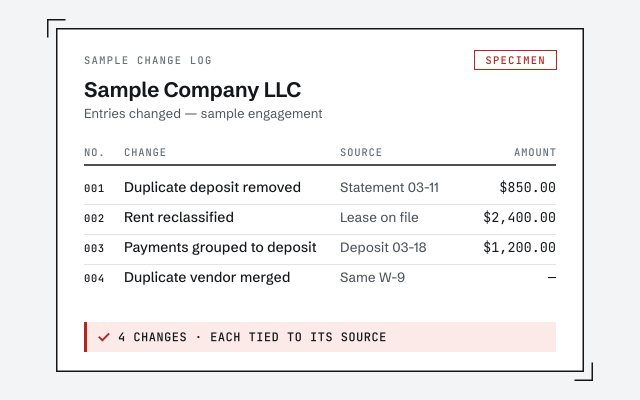
What we do: diagnose why a file's numbers are wrong, then reconcile accounts, fix miscategorized transactions, catch a file up, and tie balances to real statements — all documented in a change log you can audit. What we don't: touch your Intuit account, change your subscription, take your banking or payroll logins, or file your taxes. We're not Intuit customer support and we don't pretend to be. Our method is verification, not assertion; you can read exactly how we work before you decide. And when you'd rather start by talking it through, our phone support page explains what happens when you call — one real number, a specialist, written-first.

How to get help from us

Start with a free, view-only review. You tell us what's wrong, we look at the file without touching your logins, and we tell you which of the three kinds of help you need — even when the honest answer is "this one's for Intuit" or "you can fix this yourself." That works the same wherever you are: if what you actually searched was QuickBooks help near me, we've written out why the good version of this work is remote.

If it's a bookkeeping problem, we scope the work and quote a fixed fee before anything begins; nothing is a black box. Prefer to talk it through first? You can book a call with a specialist. Either way you reach a real person — our line at (850) 842-6767 is a specialist, not a queue — and a specialist replies within one business day, in writing. When the problem genuinely can't wait — a deadline bearing down, a file that won't open — start from urgent QuickBooks help, which covers how we handle file emergencies.

How it starts

The free review sorts your problem — two of the three outcomes cost nothing An engagement flow from telling us what's wrong, through a free view-only review, to three honest outcomes: it's Intuit's and we point you there at no charge; it's a fix you can run yourself and we say how at no charge; or it's the books, and you get a fixed-fee scope in writing before work begins. An illustrative decision aid, not a measured statistic. Tell us what's wrong A free, view-only review no logins, no obligation INTUIT'S A DIY FIX THE BOOKS We point you to Intuit's channels. No charge. We tell you the fix to run yourself. No charge. A fixed-fee scope, quoted in writing, before work begins. TWO OF THE THREE OUTCOMES COST YOU NOTHING
Getting help here starts with a free, view-only review that ends in one of three honest outcomes — Intuit's problem, a fix you can run yourself, or a fixed-fee bookkeeping scope — and two of the three cost you nothing. An illustrative decision aid, not a measured statistic.

How to verify what we help with

You don't have to take our word for what we do. Here is what you can check before you engage — the deliverable, the method, and our response commitment.

Sample diagnostic summary — an illustrative document format with generic findings for Sample Company LLC. Watermarked example, not a real client document. Sample workflow — not a specific client’s data

The change log you receive

Every correction we make to your file, documented so you or your CPA can audit it.

Our methodology

How we diagnose and reconcile a file, step by step. Read it before you decide.

Read the full method

Response commitment

A written reply within one business day.

Remote-first, nationwide

Mon–Sat · 8am–6pm CT

We work entirely remote — view-only access for the free review, QuickBooks' accountant access for the work itself, screen-share whenever you want to watch, and every correction documented in writing. We are not Intuit; we're independent specialists on your books.

  • Texas
  • Florida
  • California
  • New York

Questions about QuickBooks help

Is QBSpecialist QuickBooks' official help line?

No. We are an independent firm of QuickBooks specialists — not Intuit, and not affiliated with or endorsed by Intuit. For product support, billing, subscriptions, or account access you use Intuit's official channels. What we do is independent specialist work inside your QuickBooks file.

I have a QuickBooks error code. Can you help?

Sometimes. Many error codes have a documented fix you can follow yourself, and some genuinely need a specialist — especially when the company file itself is damaged. But if the real problem is that your numbers don't add up rather than a code on screen, that's a bookkeeping issue, not a support ticket, and cleanup is the right path.

How do I know whether I need Intuit, a specialist, or a bookkeeper?

Sort by the symptom. Can't log in, or a billing or subscription question? That's Intuit. The software throws an error or you can't get it to do something? That's often a quick DIY fix, sometimes a specialist. Reports look wrong, balances won't reconcile, or the file is a mess? That's a bookkeeping problem, and it's what we do.

Do you charge for QuickBooks help?

We start with a free, view-only review that tells you which kind of help you actually need. If the fix is a bookkeeping engagement, we scope it and quote a fixed fee before any work begins. If you don't need us — because the answer is Intuit, or a fix you can do yourself — we tell you that plainly and there's no charge.

Can I get help right now, on the phone?

Our number reaches a specialist, not a call queue, and a specialist replies within one business day, in writing, so the record is clear. We are not a 24/7 hotline and we don't promise instant fixes. If your file is genuinely urgent, tell us in the review request and we'll say honestly what turnaround is possible.