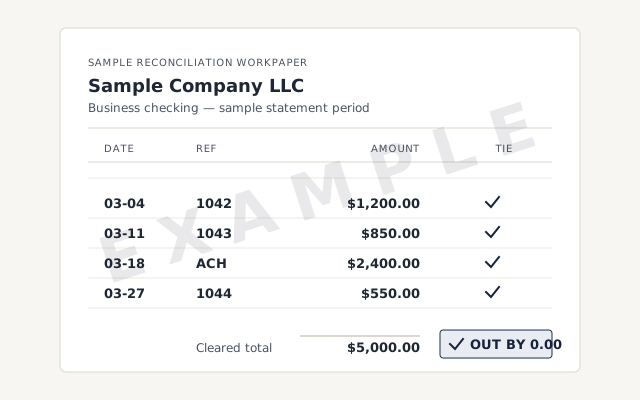
A real reconciliation report
The exact report you receive for each account, with the difference driven to zero.
QuickBooks bank reconciliation
We reconcile every bank and credit-card account in QuickBooks to the statement — clearing un-cleared items, fixing duplicates, and driving each account's difference to zero — so your reports rest on real cash, not a guess. Every account is tied back month by month, remote, at a fixed scope.
In QuickBooks, bank reconciliation is the check that every transaction in an account matches the bank's own record for the period — so the ending balance in your books ties exactly to the statement, with nothing missing, doubled, or invented.
The mechanics are an identity: your book balance, less the items still in transit — checks written but not yet cashed, deposits not yet posted — equals the statement balance. Reconciliation lists those outstanding items, applies them, and confirms the two sides agree. When the difference is zero, the account is reconciled for that month.
This is not the same as a matched bank feed. The feed imports transactions and pairs them with entries, but a fully matched feed can still hide a duplicate, a deleted transaction, or a wrong date. Reconciliation is the deliberate proof a feed can't give on its own — the concept is set out in full in what bank reconciliation is.
The reconciliation identity
Owners whose reports no longer match the bank, whose accountant wants reconciled books before a return, or who have let months of un-cleared transactions pile up — anyone who needs the numbers proven rather than assumed.
In practice, the files that land on our desk tend to look like one of these:
We reconcile the way an accountant does: one account at a time, one statement at a time. We clear what has cleared, chase what hasn't, correct duplicates and wrong dates at the source, and drive each period's difference to zero.
For each account we pull the real statement, match every cleared item, then isolate whatever is left over. A stubborn difference is almost always one of three things — a duplicate, a deleted or altered transaction, or a wrong opening balance — and we find which, rather than forcing the books to balance with a plug. Every correction is traced to its source and written down, so the reconciliation holds up if anyone looks. The full method is documented in the reconciliation reference.
We work only from read-only access — accountant access in QuickBooks Online, or a screen-share or a hosted copy for Desktop — and we never store your banking credentials. Nothing in the file changes until you approve a scope in writing.
How it goes
Most reconciliations run about a week to two: a free review to scope every account, statements gathered, each account tied to its statement until the difference is zero, then a documented hand-back.
Day 0
Read-only look at the file; we list every bank, card, and loan account and quote a fixed fee.
Days 1–2
Collect a monthly statement for every account in scope, and flag any month that's missing one.
Days 3–8
Clear items, fix duplicates, and tie each account to the statement until the difference is zero.
Day 9
A reconciliation report for every account, a written summary, and a call to walk it through.
You get a reconciliation report for every account, each period's difference at zero, a written summary of what we found and fixed, and a call to walk it through — books you can hand to a tax preparer without a caveat.
What it costs
Bank reconciliation is priced by the number of accounts and the number of months in scope, fixed after a free read-only review — never billed by the hour. The starting floors below become exact numbers before any work starts.
| Engagement | Typical range | Timeline | What's included |
|---|---|---|---|
| Per-account reconciliation | From $1,500 | 2–5 days | One bank or credit-card account tied to the statement, back through the months you name. |
| Full multi-account | From $1,500 | 1–2 weeks | Every bank, card, and loan account in the file reconciled and documented. |
| Reconcile + monthly | From $400/mo | Ongoing | Clear the backlog, then keep every account reconciled each month. |
| Get your exact quote | |||
Per-account reconciliation
Full multi-account
Reconcile + monthly
Reconciliation is rarely tidy. Missing statements, years of backlog, credit cards and loans, PayPal and Stripe, foreign-currency accounts, and a beginning balance that won't agree are the usual complications — each has a defined way through.
Reconciled vs. un-reconciled
Why it matters
A reconciled account proves every report that touches cash; an un-reconciled one leaves the balance sheet, the cash-flow statement, and the P&L unverified. The gap shows the moment a lender or a preparer looks.
| Reconciled | Un-reconciled | |
|---|---|---|
| Reports tie to the bank | — | |
| Duplicates and doubled entries caught | — | |
| Ready to hand to a tax preparer | — | |
| Audit trail you can defend | — | |
| Verdict | Reports rest on real cash | Reports rest on a guess |
How we're different
A bank feed matches transactions but never proves the balance; a big firm hands your file to a rotating pool. We reconcile every account to the statement, and the senior specialist who scopes your file does the work.
| Our service | DIY in QuickBooks | Bank feed only | |
|---|---|---|---|
| Every account tied to the statement | It depends | — | |
| Duplicates and missing items caught | It depends | — | |
| Difference driven to 0.00 and documented | It depends | — | |
| Credit cards, loans, PayPal, and Stripe included | It depends | — | |
| Reconciliation report for a tax preparer | It depends | — | |
| A senior specialist does the work | — | — | |
| Verdict | Proven to the statement | Right if you have the time | Matched, never reconciled |
The honest line is the one on the table: a matched feed and a reconciled account are not the same thing, and no amount of automatic matching closes the gap. If you'd rather see where your file stands first, a free review will tell you which accounts are actually reconciled and which only look it.
The exact report you receive for each account, with the difference driven to zero.
Every account tied to the statement, and every correction shown. Read exactly how it works.
Read the full methodRead-only access to your file, no banking credentials stored, and nothing changed until you approve a scope.
If you have a single account, you're only a month or two behind, and every statement is already in hand, you probably don't need us — QuickBooks' built-in reconcile tool will get you there in an afternoon.
Reconciliation is a skill, not a secret. If the scope is small and the statements are handy, follow how reconciliation works and do it yourself — that's the right call, and we'll say so. Where we earn a fee is the harder cases: several accounts, a real backlog, credit cards and loans that were never touched, or a difference that simply won't resolve. Not sure which you are? The bookkeeping health score takes a few minutes and tells you whether this is a DIY afternoon or a job worth handing over.
Remote-first, nationwide
Mon–Sat · 8am–6pm CT
We work entirely remote — secure read-only access to your file, screen-share whenever you want to watch, and every account documented in writing.
As many as you need — a single month or several years. We scope the number of months and accounts after a free read-only review, then commit to a fixed fee and a timeline before any work starts.
No. The bank feed imports and matches transactions, but a matched feed can still hide duplicates, missing items, or wrong dates. Reconciliation proves the account against the actual statement and drives the difference to zero — the feed cannot do that on its own.
We tell you exactly which months and accounts are missing statements, and most banks let you download them in a few minutes. Where a statement truly can't be found, we reconcile to a closing balance you can verify and note it in writing.
Yes. Credit-card, line-of-credit, and loan accounts reconcile to their statements the same way bank accounts do. Loans also get their interest and principal split checked, so the balance sheet matches what you actually owe.
That every transaction in QuickBooks for that account matches the bank's record for the period, with nothing missing, doubled, or invented. The ending balance ties to the statement, so any report built on that account rests on real cash.
You get a reconciliation report for every account, a written summary, and a call to walk through it. If you want it kept that way, we can reconcile every account each month as part of a monthly close.
Yes. Payment processors reconcile to their own payout and balance reports the same way a bank does. We untangle the fees, refunds, and holdbacks the processor nets out, so the deposits recorded in QuickBooks match what actually hit your bank.
Yes, and it's one of the most common reasons a file lands here. A beginning-balance mismatch means a prior period was changed, a transaction was deleted, or the opening balance was entered wrong. We find the break and correct it at the source, rather than forcing it with a plug.
We work from read-only access — accountant access in QuickBooks Online, or a screen-share or hosted copy for Desktop. We never store your banking credentials, and nothing in the file changes until you approve a written scope.
Both. Online through read-only accountant access; Desktop through screen-share or a hosted copy of the file. If you're moving from Desktop to Online, we can reconcile first and migrate a clean file after.
Related fixes that surface during reconciliation: the Opening Balance Equity fix, accounts receivable cleanup, audit-ready books, and year-end cleanup.