Skip to content
QB Specialist

QuickBooks inventory cleanup

QuickBooks inventory cleanup that ties out.

A QuickBooks inventory cleanup corrects quantities, item costs, and the inventory-asset account so your balance sheet and COGS reflect what's actually on the shelf. We reconcile your physical count to the value in QuickBooks — adjusting cost and quantity — without rewriting the sales history behind it.

Last reviewed July 2026

  • Counts tied to value
  • Fixed scope, fixed fee
  • A senior specialist, not a pool

What a QuickBooks inventory cleanup is

A QuickBooks inventory cleanup is the work of reconciling on-hand quantities and item costs to a physical count, then correcting the inventory-asset account so the value on your balance sheet matches what is actually on the shelf.

Inventory is the one part of QuickBooks that gets checked against the physical world. Every other account reconciles to a statement; inventory reconciles to a shelf. When the quantity QuickBooks carries drifts from what you can count, or the moving-average cost drifts from what you paid, two numbers go wrong at once — the inventory asset on the balance sheet and the cost of goods sold on the profit and loss. A cleanup fixes the item records and the asset value, not the sales you have already recorded. It is one piece of a full QuickBooks cleanup, and it never rewrites the invoices and sales receipts that ran the quantities down.

Who needs an inventory cleanup

You need an inventory cleanup when the value QuickBooks reports no longer matches a physical count, or when your cost of goods sold moves in ways your sales don't explain.

The usual signs:

  • The inventory-asset figure on your balance sheet doesn't match a recent count.
  • Item costs vary wildly for the same product, or some items carry a cost of $0.
  • Quantities have gone negative on products you know were in stock.
  • Cost of goods sold jumps around month to month with no real change in sales.
  • Inventory-adjustment or purchase entries you can no longer explain.
  • A new CPA or a lender asking you to prove the inventory number.

If your reports already tie to a recent count and your margins read the way you expect, you may not need this at all — a point we return to below. Not sure? A free bookkeeping health score flags a drifted inventory-asset balance in a few minutes.

How an inventory cleanup works: recount, recost, retie

Three operations do most of the work: reconciling on-hand quantities to a physical count, correcting the item costs that feed valuation, and retying the inventory-asset account to the corrected value. The count is the anchor everything else is measured against.

Inventory cleanup

A physical count reconciled to the inventory-asset value Three items compared: QuickBooks on-hand versus a physical count. Widget is out by 4, Bracket matches, Fitting is out by 5. Once the counts are corrected, the inventory-asset value moves from drifted to tied to the count. Quantities are illustrative, not a measured example. QUICKBOOKS ON HAND PHYSICAL COUNT Widget A 120 Widget A 116 OUT BY 4 Bracket 40 Bracket 40 MATCHES Fitting, 3/4in 8 Fitting, 3/4in 3 OUT BY 5 Asset value — drifted Asset value — tied RECONCILED TO THE COUNT
A cleanup lines every item's on-hand quantity up to a physical count, then lets the corrected counts pull the inventory-asset value back to what is really on the shelf. Quantities are illustrative.

We start from the count you already take, or one we help you structure. Item by item, we list every quantity difference, then decide what caused it — a miscount, an unreceived purchase, a return that never posted, or an item sold before it was in the system. Where quantities went below zero, that is a distinct pattern with its own focused negative inventory fix. Once quantities are right, we correct the item costs so valuation is honest, and adjust the inventory-asset account to the reconciled total. Cost of goods sold falls out of that correctly, rather than being plugged on its own.

Timeline

How long an inventory cleanup takes

Most inventory cleanups run one to three weeks: a day-0 review, a few days comparing count to file, a stretch of correcting cost and quantity, and a handback. More items and more locations move it toward the longer end.

  1. Free review

    Day 0

    Read-only look at your item list and inventory value; we scope the work and quote a fixed fee.

  2. Count vs. QuickBooks

    Days 1–4

    We compare your physical count to on-hand quantities and flag every gap.

  3. Correct cost and value

    Days 5–10

    Quantities and item costs adjusted, the inventory-asset account tied to the corrected value.

  4. Hand back

    Day 11

    Accurate inventory, a summary of every adjustment, and a call to walk it through.

Average-cost drift and why it distorts COGS

QuickBooks values most inventory at a moving average cost, and when receipts, returns, or manual edits post at odd costs, that average drifts away from what you actually paid — quietly misstating cost of goods sold on every sale afterward.

The mechanism is simple and easy to miss. Each time you receive an item, QuickBooks recalculates its average cost across the units on hand. Receive a bill at the wrong unit cost, enter a $0 receipt, or edit an old transaction, and the average shifts. From then on, every invoice that sells that item relieves inventory at the drifted average, so COGS — and therefore your gross margin — is wrong even though sales are fine. This is why a cleanup rechecks cost, not just quantity. Correcting counts alone leaves a valuation error in place; correcting cost as well is what makes the inventory-asset account and COGS both land right.

What you get when the cleanup is finished

You get accurate quantities and value, a written adjustment log listing every change with its reason and the account it posted to, and a call to walk the whole thing through.

Adjustment audit trail

A documented inventory adjustment log Three adjustment lines showing each item, its was and now value, and the reason: Widget A from 120 to 116 miscounted, Fitting from 8 to 3 damaged and written off, and a Bracket average cost corrected from an old value. Every line posts to one Inventory Adjustment account, dated and documented. Values are illustrative. ITEM WAS NOW REASON WHY, NOT JUST WHAT Widget A 120 116 Miscounted Fitting, 3/4in 8 3 Damaged, written off Bracket — avg cost $5.10 $4.80 Cost corrected All posted to one Inventory Adjustment account, dated
The deliverable is an audit trail, not a black box: every quantity and cost change is logged with a reason and posted to one named adjustment account, so you or your CPA can trace it. Values are illustrative.

Nothing is a mystery afterward. The adjustment log lets you tie the balance-sheet movement to specific items and reasons, which matters when a lender or preparer asks how the number changed. From there you can keep inventory current yourself, or we can reconcile it with you each month as part of ongoing cleanup and upkeep so it doesn't drift again.

Which do you need?

Inventory cleanup vs. the alternatives

A full inventory cleanup reconciles counts and cost across the item list; a negative-inventory fix targets one symptom; an item rebuild starts the list over. Here is how the three compare.

Inventory cleanup vs. negative-inventory fix vs. item rebuild
Inventory cleanup Negative-inventory fix Item rebuild
Reconciles counts to a physical count partly
Fixes average-cost drift
Corrects the inventory-asset account It depends
Keeps your existing item history
Rewrites recorded sales
Typical timeline 1–3 weeks Days 3–6 weeks
Best when Counts and value are off Quantities went negative The list is beyond repair
Verdict Off, not broken One symptom Start over

What it costs

What an inventory cleanup costs

Every inventory cleanup is a fixed scope with a fixed fee, quoted after a free read-only review. The figures below are published starting floors; the review sets the real range for your file.

Inventory cleanup pricing
Engagement Typical range Timeline What's included
From $1,500 1–3 weeks One location, item costs and quantities reconciled to a physical count.
From $1,500 3–6 weeks Multiple locations or large item lists, with average-cost correction.
From $400/mo Ongoing Reset the inventory, then we keep it reconciled every month.
Estimate your range

Standard inventory cleanup

Typical range
From $1,500
Timeline
1–3 weeks
Included
One location, item costs and quantities reconciled to a physical count.

Multi-location or high-SKU

Typical range
From $1,500
Timeline
3–6 weeks
Included
Multiple locations or large item lists, with average-cost correction.

Cleanup + monthly

Typical range
From $400/mo
Timeline
Ongoing
Included
Reset the inventory, then we keep it reconciled every month.
Estimate your range

Edge cases: assemblies, locations, valuation method, negatives, and tax timing

The details that make or break an inventory cleanup: valuing assemblies as well as parts, reconciling across multiple locations, respecting the valuation method your QuickBooks uses, handling quantities that went negative, and timing adjustments around your tax year.

Assemblies, kits, and bundles

Assembled items carry the cost of their components, so one wrong component cost or quantity flows into every build you make. We reconcile the components and the finished assembly together, so the built item's value ties rather than just the raw parts underneath it.

Multiple locations or warehouses

When inventory is split across locations, a company-wide count can look right while individual sites are wrong. We reconcile per location, so each site's on-hand and the combined total both tie — which is what multi-location reporting and transfers depend on.

Average cost vs. FIFO

QuickBooks Online and standard Desktop value inventory at a moving average cost; Enterprise and QuickBooks Online Advanced can use FIFO. The reconcile is the same idea, but the arithmetic differs, so we confirm which method your file uses before correcting cost, rather than assuming average everywhere.

Quantities that went negative

Negative on-hand usually means an item was sold before its purchase was received, and it distorts cost the moment it happens. If that is the whole problem, the focused negative inventory fix is the smaller, right engagement; a full cleanup is for when the drift is broader than one item.

Timing adjustments around your tax year

Inventory value and COGS feed the return, so when a correction lands can matter as much as the correction itself. We document every adjustment and coordinate timing with your tax preparer — we make the books accurate; your preparer decides how the corrected numbers land on the return.
How QBSpecialist's inventory cleanup is different

One senior specialist does the work, from a reconcile you can watch and an adjustment log you can audit — not an offshore pool guessing at your item list. Every change is documented with a reason and the account it hits, so the balance-sheet movement is always traceable.

Our methodology is verification, not assertion: the physical count is the anchor, and we show each item's difference against it before we adjust, so you see why a number moved rather than being handed a new total. Access stays minimal — read-only access to your file or a screen-share you control, never your banking logins — and you can watch the count reconcile live if you want to. If an adjustment would move a number on a filed period, we flag it and ask first, because an inventory cleanup should never be why a prior return no longer matches your books.

When NOT to hire us for an inventory cleanup

Skip us when the fix is small, premature, or the wrong shape for your problem. A handful of items you can recount and adjust in an afternoon doesn't need a paid engagement, and neither does a file that doesn't really track inventory in QuickBooks.

If you can name the few items that are off and you're comfortable making the adjustments, our QuickBooks cleanup checklist walks you through it for free. If your only problem is a single item that went negative, that is the focused negative inventory fix, not a full cleanup. And if you don't carry inventory items in QuickBooks at all — you expense purchases and count once a year for the return — there may be nothing here to reconcile. We'll tell you which case you're in during the free review, even when the answer is "you don't need us."

How to verify our inventory cleanup

You don't have to take our word for it. Here is the evidence you can check — the deliverable you receive, the method we use to prove the count ties to value, and our response commitment.

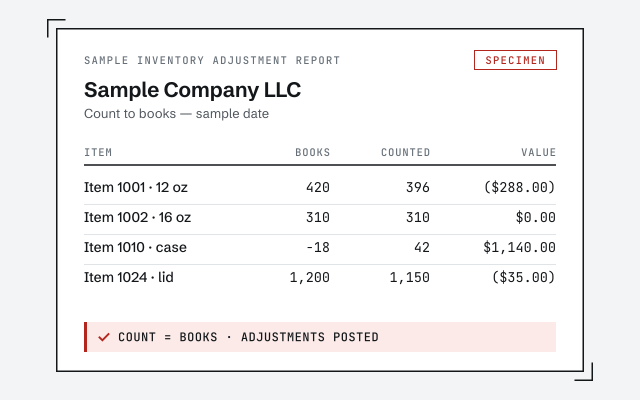
A real inventory adjustment report

The exact quantity and value adjustment report you receive at hand-back.

Response commitment

A real specialist replies within one business day, in writing.

Remote-first, nationwide

Mon–Sat · 8am–6pm CT

We work entirely remote — read-only access to your QuickBooks file, screen-share whenever you want to watch the count reconcile, and every adjustment documented in writing.

  • Texas
  • Florida
  • California
  • New York

Questions about QuickBooks inventory cleanup

Why is my inventory value wrong in QuickBooks?

Usually because on-hand quantities drifted from the shelf, item costs were entered inconsistently, or adjustments hit the wrong account. Any one of those pushes the inventory-asset balance and COGS off. A cleanup finds which of them applies and corrects it.

How does a physical count compare to QuickBooks?

The physical count is the truth; QuickBooks is what the file believes. We line the two up item by item, list every difference, and adjust QuickBooks to match the count — so the number on your balance sheet is the number on your shelf.

What is average-cost drift and why does it matter?

QuickBooks values most inventory at a moving average cost. When receipts, returns, or manual edits post at odd costs, that average drifts away from what you actually paid. Drift quietly distorts COGS on every sale, so we recheck it as part of the cleanup.

What is the difference between the inventory-asset account and COGS?

Inventory asset is what you still hold; cost of goods sold is what left when you sold it. A wrong quantity or cost misstates both at once. We correct the asset value and let COGS fall out correctly, rather than plugging one and ignoring the other.

Do inventory adjustments affect my taxes?

They can, because inventory value and COGS feed the return. That is why we document every adjustment and its reason, and coordinate the timing with your tax preparer. We do the books accurately; your preparer decides how the corrected numbers land on the return.

Do I have to stop selling while you clean up inventory?

No. We work from a count taken at a known moment and reconcile to that point, so you keep selling. Where new transactions land after the count date, we account for them rather than freeze your operation — the goal is accurate books, not a shutdown.

Can you clean up assemblies, kits, and bundled items?

Yes. Assemblies and bundles are where inventory errors hide, because a wrong component cost or quantity flows into every build. We check the components and the finished item together, so the assembly value ties instead of just the raw parts.

What if my inventory quantities have gone negative?

Negative quantities are a specific symptom — usually selling an item before its purchase was received. If that is the main problem, the focused negative inventory fix is often the right, smaller engagement; a full cleanup is for when counts and value are broadly off.

Do you clean up inventory in QuickBooks Online or Desktop?

Both. The valuation math and the reconcile are the same; the menus and the available valuation methods differ. Desktop and Enterprise expose more inventory tooling, while Online carries inventory on the higher-tier plans. We work in either, remote.

What happens after the inventory cleanup?

You get accurate quantities and value, a written summary of every adjustment, and a call to walk through it. From there you can keep it current yourself, or we can reconcile inventory with you each month so it does not drift again.