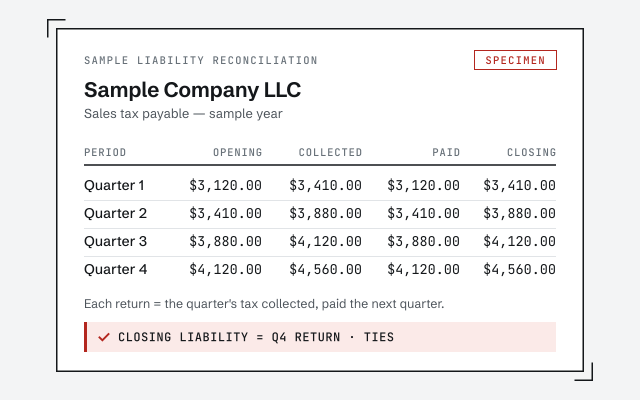
A real liability reconciliation
The exact worksheet tying the sales-tax liability to the returns you filed.
QuickBooks sales tax cleanup
Sales-tax cleanup reconciles what QuickBooks collected against what you actually filed and remitted, fixes items that were miscoded as taxable or non-taxable, and clears the sales-tax liability account — so your filed returns tie back to the books and the balance you owe is real.
A sales-tax cleanup is the work of reconciling your sales-tax liability account to the returns you actually filed and remitted, correcting the item and customer coding that feeds those returns, and clearing the account so its balance is the tax you truly owe.
Sales tax moves through QuickBooks as a liability. Every taxable sale posts tax to a sales-tax payable account, and every remittance to a state agency should draw that balance back down. When payments are recorded the wrong way, items are coded wrong, or rates and agencies drift, the liability stops matching the returns — and the number on your balance sheet becomes one nobody can explain. A cleanup fixes the mechanics and the history, not your filing obligation. It is one piece of a full QuickBooks cleanup, and it does not include preparing or filing returns — it hands your preparer numbers that already tie.
You need a sales-tax cleanup when the sales-tax payable on your balance sheet no longer matches the returns you have filed — the number is too high, too low, or simply one you cannot explain.
The usual signs:
If none of these sound familiar and your payable already ties to your filings, you may not need this at all — a point we return to below. Not sure? A free bookkeeping health score flags a drifting liability in a few minutes.
The core of the work is reconciling the sales-tax liability to your filed and remitted returns one period at a time, so every quarter or month in QuickBooks ties to the return that was actually filed for it.
Sales tax cleanup
The single most common cause of a runaway liability is the way remittances get recorded. When a sales-tax payment is entered as an ordinary check or expense instead of through Desktop's Pay Sales Tax function or the Sales Tax Center in QuickBooks Online, the cash leaves the bank but the sales-tax payable account is never reduced — so the liability climbs even though the state has been paid in full. We find those payments, re-tie them to the periods they belong to, and reconcile the balance forward so it lands on what you actually owe. Where a period's books already matched its return, we confirm it and move on; where it drifted, we document exactly what moved and why, so nothing changes on a filed period without a paper trail.
Returns are only as right as the coding underneath them: every item and customer in QuickBooks carries a tax code, and a single item marked wrong quietly throws off the taxable-sales total on every return it appears on.
Item tax coding
Beyond items, two more layers drift: rates and agencies. A rate that was never updated after the state changed it, or a duplicate agency that splits one jurisdiction's tax across two payable lines, both push the liability away from the real return. We consolidate duplicate agencies, correct the rate items and the agencies they point to, and check that customers flagged exempt actually have a reason to be. Because item and customer tax codes ride on top of the account structure, a chart that is itself a mess makes this harder — if your accounts need work too, a chart of accounts cleanup is the natural companion fix. Correcting the coding is the part that pays off every period afterward: the return pulls the right taxable total on its own, with no manual override.
How it goes
Most single-agency cleanups take about a week: a day-0 review, a few days recoding items, rates, and agencies, a couple of days reconciling the liability to your filed returns, and a handback. Multi-state or multi-period files run longer.
Day 0
Read-only look at the file; we compare the liability to your filed returns and quote a fixed fee.
Days 1–4
Taxable and non-taxable items, rates, and agencies are corrected across the file.
Days 4–6
The sales-tax liability is tied to what you filed and remitted, period by period.
Day 6
A liability that matches your returns, a written summary, and a call to walk it through.
You get a sales-tax liability that matches your filed returns period by period, item and customer coding corrected so future returns pull the right totals, and a written summary of every change we made and why.
Nothing is a black box: the summary lists the periods reconciled, the payments re-tied, the items and rates corrected, and any spot where a correction touches a return you already filed — flagged for you and your preparer, never quietly changed. A clean sales-tax liability is often the last loose end in a wider tidy-up, and it sits naturally alongside a payroll cleanup or a year-end cleanup when the whole file is being made ready for a preparer.
What changes
A cleaned-up file has a liability that ties to your returns, coding that pulls the right totals, and a paper trail if a state ever asks; left as-is, the payable is a number you cannot defend. Here is the difference line by line.
| Cleaned up | Left as-is | |
|---|---|---|
| Liability matches filed returns | — | |
| Payments recorded so the liability clears | — | |
| Taxable vs. non-taxable coded right | — | |
| Customer exemptions applied correctly | — | |
| Rates and agencies correct | — | |
| Returns tie to the books | — | |
| Ready if a state asks | — | |
| Verdict | Returns you can defend | A liability you cannot explain |
What it costs
Real ranges are set after a free review. The floors shown are published starting points, not a quote for your file.
| Engagement | Typical range | Timeline | What's included |
|---|---|---|---|
| Sales tax cleanup | From $1,500 | 1–2 weeks | Reconcile the liability to filed returns and correct item tax coding, one agency. |
| Multi-agency cleanup | From $1,500 | 2–4 weeks | Multiple states or agencies, or several periods that each need reconciling. |
| Part of a full cleanup | From $1,500 | 2–4 weeks | Rolled into a complete cleanup when the wider file also needs work. |
| Get your range after a free review | |||
Sales tax cleanup
Multi-agency cleanup
Part of a full cleanup
The details that make or break a sales-tax cleanup: how far back to correct, how many agencies are really in play, whether the file uses automated or manual rates, and how adjustments and rounding are handled without rewriting a filed return.
Yes, but carefully. We can correct the data for a period you have already filed, and we document every change so it is defensible. Where a correction would change the tax a filed return reported, we do not touch it silently — we flag it so you and your preparer can decide whether an amended return is warranted. A cleanup shows the truth; the filing decision stays yours.
Economic-nexus rules mean you can owe sales tax in a state you have never physically set foot in, and QuickBooks only tracks the agencies you have actually set up. A cleanup checks that the agencies in the file match where you are collecting and reconciles each one to its own filings separately, because rates, periods, and rules differ. Whether you have a new obligation somewhere is a question for you and your tax preparer — we reconcile the data you have, we do not render a nexus opinion.
QuickBooks Online's automated sales tax calculates rates by address, while Desktop relies on the sales-tax items and rates you maintain by hand. Each drifts differently: automated tax can post to jurisdictions you didn't expect, and manual rates go stale when a state changes them. We reconcile both to the returns actually filed, working with the Sales Tax Center in Online and the Pay Sales Tax function in Desktop.
Small differences between what QuickBooks calculates and what a return shows are normal — rounding, a discount timing difference, a credit applied mid-period. A liability that will not tie is often a symptom of a wider issue, and a payable stuck off by an amount you cannot place sometimes traces to a file whose balance sheet is out of balance or an account that has never been reconciled. We record legitimate adjustments the way the agency expects them and trace the rest to its source rather than plugging the difference.
One senior specialist does the work, reconciling your liability to your filed returns from a documented plan — not an offshore pool guessing at which sales were taxable. Every correction is written down, tied to the period it affects, and checked against the returns you actually filed.
Our discipline is verification, not assertion: we reconcile each period to the return filed for it and show you the worksheet, so you can see — not just be told — that the liability now ties. Access stays minimal: read-only access to your file or a screen-share you control, never your banking logins or your state-agency credentials. And we stay in our lane. We reconcile and correct the sales-tax data in QuickBooks; we do not prepare or file returns, and if a correction touches a filed period we flag it for your preparer rather than deciding for you. A cleanup should never be the reason a prior return stops matching your books.
Skip us when the fix is small or the file is fine. If your sales-tax payable already ties to the returns you have filed and your items are coded right, there is nothing here to clean up.
If a single mis-recorded payment is the whole problem and you are comfortable re-entering it through the Pay Sales Tax function, our QuickBooks cleanup checklist walks you through it for free. If what you actually need is a return prepared and filed, that is a tax-preparer's job, not ours — we hand off numbers, we do not file. And if your books already read cleanly and your liability reconciles on its own, leave it alone; there is no prize for paying to reconcile a number that already ties. We will tell you which case you are in during the free review, even when the honest answer is "you don't need us."
You don't have to take our word for it. Here is the evidence you can check — the deliverable you receive, the method we use to prove the liability ties, and our response commitment.
The exact worksheet tying the sales-tax liability to the returns you filed.
The liability reconciled to filed returns, period by period. Read the discipline we apply.
Read the full methodA real specialist replies within one business day, in writing.
Remote-first, nationwide
Mon–Sat · 8am–6pm CT
We work entirely remote — secure read-only access to your file, screen-share whenever you want to watch, and every rate and coding correction documented in writing.
Usually because payments, adjustments, or miscoded sales pushed the liability account away from the returns you actually filed. Cleanup reconciles the account to your filed and remitted amounts, period by period, so the balance reflects what you truly owe.
Almost always because the payments were recorded with a regular check or expense instead of the sales-tax payment function. A regular check moves the cash but never draws down the sales-tax payable account, so the liability climbs even though the state has been paid. Recording remittances correctly, and cleaning up the ones already booked wrong, is what stops the balance from ballooning.
Yes. We correct the rate items, the agencies they point to, and how they are applied going forward, then reconcile the periods already affected. Wrong rates and duplicate agencies are a common reason a liability drifts from the returns.
We review how items and customers are coded and correct the ones marked wrong — taxable items sold as exempt, or exempt items charged tax. Correcting the coding is what makes future returns pull the right numbers without hand edits.
Yes, and we document every change so it is defensible. We do not alter periods silently. If a correction affects a return you already filed, we flag it clearly so you and your tax preparer can decide how to handle it.
No. We reconcile and clean up the sales-tax data in QuickBooks so your books and returns agree — we do not prepare or file returns. If you need filing, we hand you numbers you and your preparer can rely on.
We handle multi-state and multi-agency files. Each agency is reconciled to its own filings separately, because rates, rules, and periods differ. The scope and fee reflect how many agencies and periods are involved, set after the free review.
Reconciling the data does not, by itself, change your legal liability — you owe what the law says you owe. What it changes is whether QuickBooks tells the truth about it. If the cleanup surfaces that a past return understated or overstated tax, we flag it so you and your preparer can decide whether to amend; we never quietly move a number on a filed period.
Both. In QuickBooks Online we work with the automated sales-tax engine and the Sales Tax Center; in Desktop we work with the sales-tax items, Sales Tax Payable, and the Pay Sales Tax function. The reconciliation logic is the same in either — only the menus and how rates are applied differ.
Most single-agency cleanups take about a week: a day-0 review, a few days to recode items and rates, and a couple of days to reconcile the liability to your filed returns. Multi-state or multi-period files run longer, and the free review sets the timeline before any work starts.
Sales tax is one thread of a tidy file. It sits alongside accounts receivable cleanup, a chart of accounts cleanup, and the full QuickBooks cleanup it can be part of.