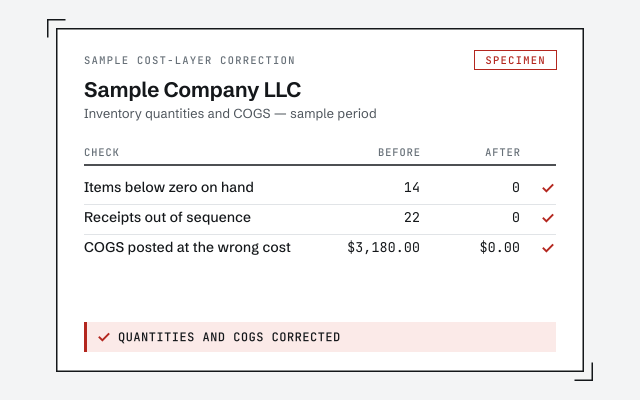
A real cost-layer correction
The exact before-and-after showing quantities and COGS once the receipts are sequenced.
QuickBooks negative inventory fix
Negative inventory in QuickBooks means you recorded sales of items before the receipts that stocked them, which distorts COGS and margins. The fix re-sequences the receipts and sales and corrects the cost layers, so your inventory quantities and COGS read true.
Negative inventory is what QuickBooks shows when an item's quantity on hand drops below zero — you sold more of it than the file says you ever received. It is not a warning that you are physically out of stock; it is the bookkeeping telling you the receipts and the sales are out of order.
QuickBooks tracks inventory as a running quantity and a running cost. Every receipt adds units at a known cost; every sale removes units and posts that cost to cost of goods sold. When a sale removes units that were never received, the quantity goes negative and QuickBooks has no real purchase cost to draw from — so it invents one, then corrects it later. That single fault ripples into your margins, your inventory value on the balance sheet, and any period that touched the affected item. Fixing negative inventory is a structural correction to the order and cost of those transactions, and one piece of a broader inventory cleanup.
Negative inventory almost always comes from one habit: invoicing an item before its receipt is entered. The sale posts today, the bill for the same goods lands next week, and for the days in between the file shows you selling stock you never recorded receiving.
The usual sources:
If any of these sound familiar, the item is likely already negative on your reports. A free bookkeeping health score flags below-zero quantities in a few minutes; the fix below is what closes them.
The fix is two moves in order: put the receipts and sales back into the sequence they truly happened, then rebuild the cost layers so each sale posts the real cost of the units it consumed. Sequence first, cost second — because the cost is only correct once the order is.
Negative inventory fix
Re-sequencing means placing each item receipt on the date the goods truly arrived — evidenced by a bill, a bank or card charge, or a packing slip — so that stock exists before it sells. Where a receipt is genuinely missing, we enter it from that real evidence; we never move a date to a day nothing happened. Rebuilding the cost layers then follows: once the receipts sit ahead of the sales, QuickBooks can recost each sale from the actual purchase it consumed, replacing the estimate it posted while the item was negative. We work item by item, because a file can be clean everywhere except the three SKUs that ever went below zero.
When quantity is below zero, QuickBooks still has to post a cost against the sale, so it uses an estimate — then reverses and corrects that estimate once a receipt finally appears. The result is COGS overstated in one period and understated in another, and margins that read wrong in both.
Cost distortion
Two things follow from that swing. First, you cannot trust a gross-margin line built on the affected items — a product can look wildly profitable in the month it sold and a loss-maker in the month its cost caught up. Second, your inventory asset on the balance sheet drifts from what you actually hold, because the value can't tie to a quantity that is nonsensically below zero. Both distortions clear the moment the receipts sit ahead of the sales and the cost layers are rebuilt from real purchases.
The method your file uses to value inventory decides how it recovers once the sequence is corrected, so the fix is shaped to it. QuickBooks Online and Desktop Pro use a running average cost; Desktop Enterprise can use FIFO, which tracks specific cost layers in the order they arrived.
Under average cost, a negative quantity poisons the running average for every later transaction on that item — one bad estimate pulls the average off, and it stays off until the receipts are re-sequenced and the average recomputes cleanly. Under FIFO, the damage is more contained but more literal: the sale consumes a cost layer that didn't exist yet, so once the missing layer is placed in the right order, the specific costs re-flow through the sales that follow. Knowing which regime you are in tells us whether we are repairing one drifting average or restacking a set of dated layers — and it is the first thing we confirm in the review. If your file is Enterprise on FIFO, we also check that the layers reconcile after the fix, the way we would in any inventory cleanup.
Timeline
Most negative inventory fixes take three to seven days: a day-0 review to find the below-zero items, a few days to re-sequence and recost them, and a handback with a written summary. A file where the whole inventory needs work runs longer and is scoped as a full cleanup.
Day 0
Read-only look at the file; we find the items showing negative quantities and quote a fixed fee.
Days 1–4
Receipts and sales are put back in the right order, so items are stocked before they sell.
Days 4–7
Cost layers are rebuilt so COGS posts from real purchase costs instead of an estimate.
Day 7
True quantities, corrected COGS, a written summary, and a call to walk it through.
You get item quantities that never sit below zero, COGS posted from real purchase costs, a written summary of every receipt we re-sequenced and every cost layer we rebuilt, and a call to walk it through. Nothing is a black box.
The summary lists each affected item, what its sequence looked like before, the evidence we used to date each receipt, and how its cost and quantity read after — so you, or your tax preparer, can audit the correction. Because closing negative inventory can move prior-period COGS, that document is also what your preparer needs when a corrected P&L doesn't match a return that was filed on the old numbers. If the fix surfaces wider problems — unreconciled purchases, a messy chart underneath the items — we point them out and, if you want, roll the work into a year-end cleanup rather than leaving you to find them later.
Which do you need?
Fixing negative inventory now stops the distortion the moment it is done; rolling it into a year-end cleanup corrects it at close; leaving it does nothing, because negative inventory never self-heals. Here is how the three compare.
| Fix now | Roll into year-end | Leave it | |
|---|---|---|---|
| Stops the COGS distortion | — | ||
| Corrects the prior periods | — | ||
| Item quantities read true | Now | At close | — |
| Typical timeline | 3–7 days | At year-end | No change |
| Best when | You price and decide from the books now | Books only need to be right at tax time | — |
| Verdict | Stop the distortion now | Fold into the bigger job | It won't fix itself |
What it costs
Every negative inventory fix is a fixed scope with a fixed fee, quoted after a free read-only review. The figures below are published starting floors; the review sets the real range for your file.
| Engagement | Typical range | Timeline | What's included |
|---|---|---|---|
| Negative inventory fix | From $1,500 | 3–7 days | Re-sequence receipts and sales and correct cost layers for the affected items. |
| Fix + inventory review | From $1,500 | 1–2 weeks | Correct negative inventory and review item setup so it stops recurring. |
| Part of a full cleanup | From $1,500 | 2–4 weeks | Rolled into a complete cleanup when the wider file also needs work. |
| Get your range after a free review | |||
Negative inventory fix
Fix + inventory review
Part of a full cleanup
The details that make or break a negative inventory fix: what to do when a receipt is genuinely gone, how assemblies and builds go negative, and how the work differs between QuickBooks Online and Desktop.
We work from whatever real evidence exists — the bank or card charge, an order confirmation, a packing slip — to date the receipt on the day the goods actually arrived. If nothing supports an earlier date, we correct the quantity with a dated inventory adjustment and note it, rather than invent a receipt. Honesty over a tidy-looking date, every time.
An assembly can only be built from components that exist. Sell or build the finished item before its parts are received, and the components — or the assembly itself — drop below zero. We re-sequence the component receipts and the builds together, so the whole assembly chain stocks before it sells.
Both products go negative and both are fixable remotely. Online uses average cost and shows negative quantities on the valuation report; Desktop Pro is average cost too, while Enterprise can run FIFO and carries a dedicated negative-item report. The moves are the same — re-sequence, recost — but the menus and the costing math differ, so we confirm the product and edition in the review.
Items that went negative often sit next to purchases that were never fully entered, which can also throw off sales-tax and accounts-receivable figures. We flag those in the review so you can decide whether to fix the inventory alone or scope the wider work.
One senior specialist does the work, from real purchase evidence you can see, and documents every re-dated receipt and rebuilt cost layer — not an offshore pool guessing at dates to make a report look clean. Every correction is traced to a source before it is made.
Our method is verification, not assertion: we save the inventory valuation and the affected items' history before we touch anything, then show the same reports after, so you can see the quantities close and the costs re-flow. We never move a receipt to a date nothing happened — where evidence runs out, we say so and use a dated adjustment instead. And because correcting negative inventory can shift a prior period's COGS, we flag any change that touches a filed period and ask before we make it, so a fix is never the reason a return no longer matches your books. It is the same reconciliation discipline we bring to a full QuickBooks cleanup.
Skip us when the fix is small or the tracking isn't worth keeping. A single item that dipped below zero because one receipt was entered a day late is something you can re-date yourself in a few minutes — you don't need a paid engagement for that.
If you can name the one or two items and you're comfortable moving a receipt date ahead of the sale, our QuickBooks cleanup checklist walks you through it for free. If you track only a handful of low-value items and the detail isn't earning its keep, the honest answer may be to stop tracking those as inventory rather than pay to untangle them. And if you are about to rebuild the item list from scratch anyway, fixing the old layers first is wasted effort. We'll tell you which case you're in during the free review — even when the answer is "you don't need us." When a fix is worth it, the cleanup cost calculator gives you a rough range before the review sets the real one.
You don't have to take our word for it. Here is the evidence you can check — the deliverable you receive, the method we use to prove quantities and costs read true, and our response commitment.
The exact before-and-after showing quantities and COGS once the receipts are sequenced.
Every correction traced to source and documented — the reconciliation discipline we apply to every account.
Read the full methodA real specialist replies within one business day, in writing.
Remote-first, nationwide
Mon–Sat · 8am–6pm CT
We work entirely remote — secure read-only access to your file, screen-share whenever you want to watch the re-sequencing, and every cost correction documented in writing.
Selling an item before its purchase is recorded. If an invoice or sales receipt takes quantity below zero because the matching bill or item receipt was never entered — or was dated later — QuickBooks shows negative inventory and has no real cost to post.
Run the Inventory Valuation Summary and look for any item with a quantity on hand below zero, or use the negative-item report in Desktop. If a line shows a minus quantity, or a value that doesn't move with the count, that item has sold ahead of its receipts and needs re-sequencing.
With no purchase on hand, QuickBooks estimates a cost to post against the sale, then adjusts it later when the receipt appears. That guess-and-correct leaves cost of goods sold overstated in one period and understated in another, so your margins read wrong.
Yes. QuickBooks Online and Desktop Pro use average cost; Enterprise can use FIFO. Both distort when quantity goes negative, but they recover differently once receipts are sequenced correctly, so the fix is tailored to the costing method your file uses.
Only when a purchase genuinely happened earlier and you have the document to support the date. We never invent dates. Where a receipt is missing, we work from the real paperwork so the correction holds up if anyone reviews it later.
We work from whatever real evidence exists — the vendor bill, a bank or card charge, a packing slip, or an order confirmation — to place the receipt on the date it truly happened. If nothing supports an earlier date, we correct the quantity with a dated adjustment rather than fabricate a receipt, and note it in the summary.
It can, because correcting the cost layers moves COGS into the periods it actually belongs to. That is the point — the prior P&L was wrong. We document every change so you and your tax preparer can see exactly what shifted and when.
It can, if the habit that caused it continues — invoicing before receipts are entered. As part of the fix we point out where the process let items sell ahead of stock, so you or your bookkeeper can enter receipts in order going forward and keep quantities from dropping below zero again.
Item quantities that never sit below zero, COGS posted from real costs, a written summary of the re-sequencing, and a call to walk it through. If the wider file also needs cleanup, we scope that separately after the review.
Negative inventory rarely travels alone: inventory cleanup, sales-tax cleanup, accounts receivable cleanup, and a clean chart of accounts underneath them all.