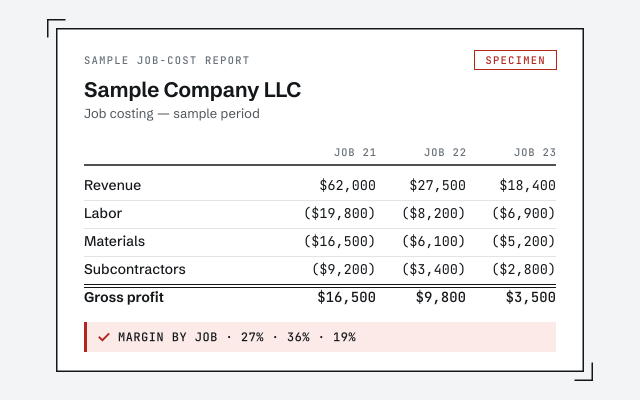
A real job-cost report
The exact profit-by-job report your setup produces once it's live.
QuickBooks job costing setup
A QuickBooks job-costing setup structures your items, accounts, and cost tracking so the software reports profit by job or project. We assign labor, materials, and overhead to the work that earned them — so at any point you can see which jobs actually make money and which quietly lose it.
A QuickBooks job costing setup structures your items, accounts, and cost tracking so the software reports profit by job — assigning labor, materials, subcontract, and overhead to the specific work that earned them.
Job costing is not a single button in QuickBooks; it is a way of wiring the file so every dollar you spend and bill can be traced to a job. Items carry the job detail on each line, the chart of accounts keeps job costs separate from overhead, and every transaction is tagged to a customer:job as it is entered. Get those three working together and a profit-and-loss-by-job report becomes trustworthy. Job costing sits on top of clean books, so it belongs after a QuickBooks cleanup and a coherent chart of accounts, not before — a shaky foundation just produces confident-looking wrong numbers.
You need job costing when you bill or buy by the project and your profit and loss only shows one company-wide number — so you can't tell which jobs make money and which quietly lose it.
The usual signs:
If you run departments, locations, or lines of business rather than discrete jobs, class tracking is usually the lighter, better fit — we cover the difference below. Not sure which you have? A free bookkeeping health score flags whether your file is even ready to carry job costing yet.
Three things have to line up: two-sided items that map each cost and each invoice line to a job, a chart of accounts that keeps job costs separate from overhead, and the discipline of tagging every transaction to a customer:job as it's entered.
Cost flow to jobs
Items are the machine that makes this run. A two-sided item records what a cost was (mapped to a cost account) and what you billed for it (mapped to an income account), and both sides carry the job. Accounts keep the categories honest — labor, materials, and subcontract stay separate from rent and software — while items do the per-job tracing. The one habit that ties it together is the customer:job field on every bill, check, and invoice line. Skip it on a stack of material receipts and those costs vanish into overhead, and the job reads more profitable than it was. That is why the setup pairs a clean structure with written steps for whoever enters the data.
Timeline
Most job-costing setups take one to two weeks: a day-0 review, two to three days designing the item and account structure, several days building and testing against a real job, and a handback with training on the final day.
Timeline
Day 0
Read-only look at how you bill and buy; we scope the setup and quote a fixed fee.
Days 1–3
We map items, accounts, and cost categories to how your jobs actually run.
Days 4–8
Configured in QuickBooks and tested against a real job so the reports tie out.
Day 9
Working job-cost reports, written steps, and a call to train whoever enters the data.
Which tool?
Job costing tracks profit for each individual job; class tracking splits the profit and loss by department or location; a plain profit and loss gives you one bottom line. Here is how the three compare.
| Job costing | Class tracking | Plain P&L | |
|---|---|---|---|
| Profit by individual job | — | — | |
| Profit by department or location | It depends | — | |
| Assigns labor and materials to work | — | — | |
| Allocates labor burden to jobs | — | — | |
| Needs items set up | — | — | |
| Needs every transaction tagged | Yes | Yes | — |
| Typical setup time | 1–2 weeks | 3–5 days | None |
| Best when | You bill by job or project | You run departments or lines | One simple business |
| Verdict | Profit per job | Profit per segment | One bottom line |
What it costs
Every job-costing setup is a fixed scope with a fixed fee, quoted after a free read-only review. The figures below are published starting floors; the review sets the real range for your file.
| Engagement | Typical range | Timeline | What's included |
|---|---|---|---|
| Job-costing setup | From $1,500 | 1–2 weeks | Items, accounts, and cost tracking structured for profit by job. |
| Setup + labor burden | From $1,500 | 2–4 weeks | Adds payroll burden and overhead allocation to each job. |
| Setup + monthly | From $400/mo | Ongoing | We set it up, then run job-cost reporting with you each month. |
| Estimate your range | |||
Job-costing setup
Setup + labor burden
Setup + monthly
You get a working profit-by-job report, a documented item and account structure, written steps for whoever enters transactions, and a training call so the discipline actually holds after we hand it back.
Nothing is a black box: the structure is written down — which items map to which accounts, how the customer:job field is used, and where labor burden and overhead land — so you or a future bookkeeper can follow and maintain it. Job costing is only as good as the entry habit behind it, which is why the handback includes a walkthrough for whoever keys the data. If you'd rather not carry that discipline in-house, we can produce and review the reporting with you as part of ongoing monthly bookkeeping, and pair it with class tracking when you want profit cut by segment as well as by job.
The details that make or break a job-costing setup: getting labor burden onto jobs, respecting the differences between QuickBooks Online Projects and Desktop, carrying open jobs into the new structure, and deciding where overhead belongs.
Yes, with deliberate setup. Base wages flow through payroll and can be tagged to a job, but the burden — employer taxes, workers' comp, benefits — has to be allocated onto jobs on purpose, or it sits in overhead and understates every job's real labor cost. We configure that allocation, and when payroll itself is tangled we fix it first with a payroll cleanup so the numbers feeding job costs are right.
They are not the same tool. Desktop has long-standing job costing with customer:job hierarchies and detailed reports; Online uses Projects, which is simpler and reports differently. We set up whichever you run, and we tell you plainly where your edition is strong and where it needs a workaround before you rely on the numbers.
We keep them. Open jobs are mapped into the new structure so their costs and income carry forward, and where historical data is too thin to restate cleanly, we say so rather than invent a starting point. You get a consistent method going forward without losing the work already underway.
Overhead — rent, software, general admin — stays out of direct job costs and reports at the company level, unless you deliberately choose to allocate a share to jobs. We keep the direct-cost picture clean first, because a job's true margin is clearest when overhead isn't smeared across it by guesswork.
One senior specialist designs the structure and tests it against a real job before you rely on it — not an offshore pool wiring up a generic template and hoping the reports mean something.
Our method is verification, not assertion: we don't hand back a structure and call it done, we run a real job through it and check that the profit-by-job report actually ties before you trust it. Access stays minimal — read-only access to your file or a screen-share you control, never your banking logins. And we're honest about your edition's limits: if QuickBooks Online Projects can't do something your business needs the way Desktop can, we tell you at the review, not after you've paid. Every structural choice — item mappings, burden allocation, overhead treatment — is documented in writing so the setup outlives the engagement.
Skip us when job costing would cost more attention than it returns. A simple business with one line of work and a clean bottom line doesn't need profit split by job, and a team that won't tag transactions consistently won't get accurate reports no matter how well the file is built.
If you run departments or locations rather than discrete jobs, class tracking is the lighter setup that fits — don't pay for job costing you won't use. If your books aren't clean yet, fix that first: our free QuickBooks cleanup checklist walks the groundwork, because job costing on messy books just produces confident wrong numbers. And if nobody entering data will reliably pick a job on every line, be honest with yourself before you invest — the discipline is the product. We'll tell you which case you're in at the free review, even when the answer is "you don't need this."
You don't have to take our word for it. Here is the evidence you can check — the deliverable you receive, the structure the reports depend on, and our response commitment.
The exact profit-by-job report your setup produces once it's live.
Job costing lives or dies on the account and item structure. See how we build it.
See chart-of-accounts cleanupA real specialist replies within one business day, in writing.
Remote-first, nationwide
Mon–Sat · 8am–6pm CT
We work entirely remote — read-only access to your QuickBooks file, screen-share to review the setup with you, and every structural choice documented in writing.
Three things lined up: items that map cost and income to the right accounts, a chart of accounts that separates job costs from overhead, and a habit of tagging every transaction to a job. Miss any one and the profit-by-job report will not tie out.
Both, for different jobs. Accounts tell you the type of cost — labor, materials, subcontract. Items tie each cost and each invoice line to a specific job. Job costing works when items carry the job detail and accounts keep the categories clean; we set both up together.
It can, with setup. Base wages flow through payroll, but the burden — taxes, insurance, benefits — has to be allocated onto jobs deliberately, not left in overhead. We configure that allocation so a job's labor cost reflects what the labor truly cost, not just the gross pay.
Yes. Desktop has long-standing job-costing and Online uses Projects, and the mechanics and reports differ between them. We set up whichever you run and tell you honestly where each one is strong and where it needs a workaround, before you rely on the numbers.
We keep them. Open jobs are mapped into the new structure so their costs and income carry forward, and we note where historical data is too thin to restate. You end up with a consistent method going forward, without losing the jobs already in progress.
You get a working profit-by-job report, written steps for whoever enters transactions, and a call to train them. From there you can run it yourself, or we can produce and review job-cost reporting with you each month so the discipline holds.
You run a profit-and-loss-by-job report. Once items carry the job and every cost is tagged to the right customer:job, QuickBooks totals income and cost per job and shows the margin on each. We build that report during setup and test it against a real job so it ties before you rely on it.
A little, and only at data entry: whoever enters bills, checks, and invoices has to pick the job each line belongs to. That one extra field is the whole discipline. We write the steps down and keep the item list short so tagging is fast, not a chore — and that small habit is what keeps every report accurate.
Yes — every direct cost does. Subcontractor bills, material purchases, and equipment costs each carry the customer:job they were bought for, the same way labor does. If any category skips the tag, that cost drops into overhead and the job looks more profitable than it really was.
Job costing sits on clean books: start with a QuickBooks cleanup, get the chart of accounts right, sort out payroll so labor is accurate, then add class tracking if you also report by segment.