Skip to content
QB Specialist

QuickBooks month-end close

A month-end close that stays closed.

Month-end close reconciles every account, reviews the P&L and balance sheet for errors, and produces a documented month-end package — so each month closes to numbers you can trust and doesn't quietly re-open later. We run it remotely, at a fixed monthly fee, with a senior specialist signing off.

Last reviewed July 2026

  • Every account reconciled
  • A documented month-end package
  • A senior specialist, not a pool

The concept

What a QuickBooks month-end close is

A month-end close is the monthly routine that finalizes one period's books — every account reconciled to its statement, the profit-and-loss and balance sheet reviewed for errors, adjusting entries booked, and the period locked with a closing date.

Recording transactions and closing the books are different jobs. A file with a live bank feed can look current all month and still never be closed — nothing checked against a statement, nothing locked. Closing resolves timing differences, catches miscodings, fixes odd balances, then freezes the result so months stay comparable.

The close, in order

How a month-end close runs, in four stages Four stages, left to right: reconcile every account, review the profit-and-loss and balance sheet, book adjusting entries, then lock the period — the verified end state, marked with a tick. Illustrative. Reconcile EVERY ACCOUNT Review P&L + BS Adjust BOOK ENTRIES Lock PERIOD LOCKED
A close runs one direction — reconcile, review, adjust, then lock. Setting the closing date is the verified step that keeps a closed month from re-opening. An illustrative sequence.

The work runs in one direction: reconcile first (you can't review what you haven't proven), then review, then lock. Bank reconciliation is the check it's built on.

Who it's for

Who needs a managed month-end close

You need a managed monthly close once your numbers drive decisions — when a lender, investor, or partner reads your statements, when you carry inventory or payroll, or when more than one account has to tie out every month.

A close earns its keep the moment someone relies on the numbers between tax filings — a bank covenant, a credit line, an investor update, a partner's draw, a pricing call that can't wait for April.

The businesses that need it most have moving parts that drift quietly — inventory, payroll, deferred revenue, or accrual reporting. You'd likely benefit from a managed close if:

  • you can't trust this month's profit-and-loss;
  • balances look wrong but you can't say where;
  • errors only surface at tax time, when they're expensive to fix;
  • you're raising money, seeking credit, or reporting to partners;
  • you run more than one entity, or carry inventory or payroll.

If none of that fits — a solo service business, one account, no inventory — a lighter routine may do. We say so in monthly bookkeeping below.

How it goes

How a month-end close works: the close checklist

A month-end close works as a fixed checklist: reconcile every bank, card, and loan account to its statement; review the profit-and-loss and balance sheet for errors; book adjusting entries; then set the closing date and assemble the package.

  1. Reconcile

    Days 1–3

    Every bank, card, and loan account tied to the statement for the month just ended.

  2. Review

    Day 4

    Scan the profit-and-loss and balance sheet for miscodings, missing entries, and odd balances, and fix them.

  3. Close & lock

    Day 5

    Book adjusting entries, set the closing date, and lock the period so it can't drift.

  4. Deliver

    Day 6

    You get the month-end package and a short note on anything worth watching next month.

Behind those four steps is a longer list, worked the same way every month. Reconciliation covers every account that issues a statement — checking, savings, credit cards, loans — and clears the holding accounts that hide errors, like undeposited funds.

The review is where a close pays for itself: we read the balance sheet account by account, where mistakes hide, then scan the profit-and-loss against prior months. Adjusting entries go in with a reason, payroll and sales-tax liabilities are checked, and only then is the date set. Full sequence: our cleanup checklist.

How long

The month-end close timeline: days after month-end

Most closes finish within the first week of the following month, but the timeline starts when your bank and card statements post — not on the first. Once statements are available, a standard close usually takes a few business days.

Statements govern the start. Some banks post on the first; others take days, and a card with a mid-month cycle pushes part of the work later. So when it's done is measured from when the data arrives, not the calendar.

Days after month-end

A month-end close timeline, first six days The first six days of the following month: reconcile on days one to three once statements post, review on day four, lock on day five, deliver the package on day six. An illustrative timeline. STARTS WHEN STATEMENTS POST PERIOD LOCKED Reconcile Review Close & lock Deliver DAYS 1–3 DAY 4 DAY 5 DAY 6
Most closes land inside the first week, but the clock starts when your statements post, not on the first. Setting the closing date on day five locks the period. An illustrative timeline.

We commit to a specific turnaround in your engagement, so each month has a date you can count on. When a month is heavy — year-end, an audit, a new entity — we tell you before it starts.

Our method

Every account is tied to its statement before a number is trusted; every entry is logged with a reason; a senior specialist signs off; the closing date is set so the month stays closed. Read how reconciliation works.

The deliverable

What you get: the month-end package

After each close you get a month-end package: reconciliation reports for every account, the finished profit-and-loss and balance sheet, a log of any adjusting entries, and a short written note on anything worth watching.

The package is the same shape every month, so you can lay two side by side and compare: a reconciliation report for each account tied to the statement, the profit-and-loss for the month and year to date, the balance sheet at month-end, and every adjusting entry with its reason.

The close note is what owners read first — anything unusual, any follow-up, anything worth a decision. At year-end, it's what your tax preparer wants. Missing months first? That's catch-up bookkeeping, not a close.

How you can verify us

Everything about the close is verifiable — the package you receive, the method behind it, the person who signs off. No badges, no testimonials, just evidence.

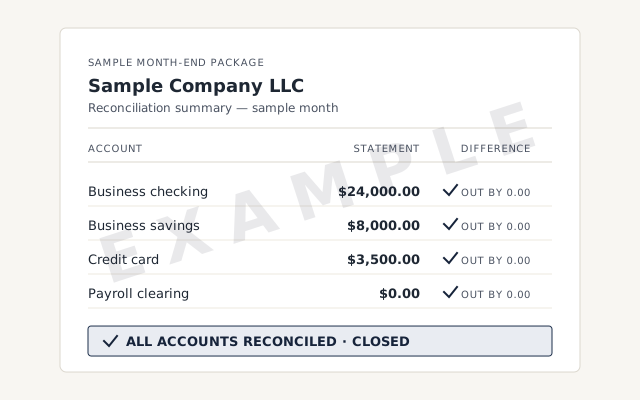
A real month-end package

The exact reconciliation reports and statement pack you receive each month.

Response commitment

A real specialist replies within one business day, in writing.

Why it matters

Closed vs. open monthly books

The difference between closed and open books is verification and permanence. A closed month has been reconciled, reviewed, documented, and locked. An open month is data no one has proven — and nothing stops a later edit from changing it.

Closed vs. open monthly books
Closed Open
Every account reconciled
P&L and balance sheet reviewed
Period locked with a closing date
Documented month-end package
Verdict Closes and stays closed Quietly re-opens

Online vs. Desktop

QuickBooks Desktop vs. QuickBooks Online at month-end

Month-end close works in both QuickBooks Online and Desktop, and the accounting is identical. What differs is the logistics — how we reach the file and how many people can work in it at once — not whether the month closes.

QuickBooks Online vs. Desktop at month-end
QuickBooks Online QuickBooks Desktop
How we reach your file Accountant access (read-only) Screen-share or hosted copy
Close from any location It depends
Several people in the file at once It depends
Closing date locks the period
Edits after close are flagged
Verdict Same close, easier to reach Same close, access varies

What it costs

What a QuickBooks month-end close costs

A monthly close is a fixed monthly fee, set after a free review of your file — the price tracks the work, not your revenue. The floor shown is the published starting point; the review sets the real fee for your file.

Month-end close pricing
Engagement Typical range Timeline What's included
From $400/mo Ongoing Every account reconciled, statements reviewed, and a documented package each month.
From $1,500 2–4 weeks Catch up and reconcile the open months first, then start a monthly close.
From $400/mo Ongoing Monthly close plus a standing call to walk the numbers with you.
Get your exact quote

Monthly close

Typical range
From $400/mo
Timeline
Ongoing
Included
Every account reconciled, statements reviewed, and a documented package each month.

Close + catch-up

Typical range
From $1,500
Timeline
2–4 weeks
Included
Catch up and reconcile the open months first, then start a monthly close.

Close + review call

Typical range
From $400/mo
Timeline
Ongoing
Included
Monthly close plus a standing call to walk the numbers with you.
Get your exact quote

The hard parts

Month-end close edge cases

Most months are routine, but a few situations change the work: cash versus accrual basis, inventory and cost of goods sold, multiple entities, the closing-date lock itself, and deferred revenue. Each is handled explicitly, never glossed over.

Cash vs. accrual basis

We close on whichever basis matches your books and return, consistently. Accrual closes carry more adjusting entries — accrued expenses, prepaids, deferred revenue — because income and cost are recognized when earned, not when cash moves.

Inventory and cost of goods sold

If you carry inventory, the close ties the inventory-asset account to a count so cost of goods sold falls out correctly. Average-cost drift and negative quantities distort the balance sheet and margin. Badly off means an inventory cleanup first.

Multiple entities

Related companies close separately, then intercompany balances are reconciled so a transfer isn't counted twice. Each keeps its own file and package; nothing is merged to save time.

The closing date and the lock

Setting a closing date is what makes a closed month stay closed. If someone edits a locked period, QuickBooks flags it, and we review that exception rather than let a prior number change silently. A password adds a guard.

Deferred revenue and prepaids

Money taken before it's earned — retainers, annual plans, deposits — is a liability until you deliver; a prepaid is an asset until used. The close recognizes the right slice each month, so profit isn't flattered by cash that isn't yet yours.

Why us

How our month-end close is different

Our close is senior-led, fixed-fee, and documented: a named specialist reconciles and signs off every month, you get the same package each time, and the period is locked — not an automated rule or an anonymous offshore pool.

A named senior specialist does the work and signs off on it. Ask why an entry was made and you get a real answer from the person who made it — not a ticket in a queue. The fee is fixed, set after a free review — no hourly surprises.

The way we work is safe by default: read-only accountant access, never your banking passwords. Screen-share to watch any step. Your file stays in your account, every change in the audit trail — nothing asks you to trust us blind. To see it on your file, start with a free review.

The honest limit

When NOT to hire us for a monthly close

If you're a single-owner service business with one bank account, no inventory, and no payroll, you probably don't need a formal monthly close — light monthly bookkeeping, or even a solid quarterly and year-end tidy, is usually enough.

A monthly close is a real, recurring cost, and not every business needs one. If no one outside the company reads your statements between filings, and your file is simple, it can be more rigor than your decisions require. We'd rather point you to monthly bookkeeping than sell you a close you won't use.

There's also a sequencing limit: a close finalizes a month, but not months never recorded or recorded wrong. Far behind? You need catch-up first. Books full of errors? A cleanup first. We'll say which at the free review — and if a close isn't worth it yet, we'll say so.

Remote-first, nationwide

Mon–Sat · 8am–6pm CT

We work entirely remote — secure read-only access, screen-share whenever you want to watch, every month documented in writing.

  • Texas
  • Florida
  • California
  • New York

Questions about month-end close

What does a QuickBooks month-end close include?

Every bank, card, and loan account reconciled to its statement, a review of the P&L and balance sheet for errors, adjusting entries booked with a reason, and the period locked with a closing date.

How soon after month-end are the numbers ready?

Usually within the first week — but the clock starts when your statements post, not on the first. We commit to a specific turnaround in your engagement.

Do you close on a cash or accrual basis?

Either — we match your books and tax return. Accrual closes carry more adjusting entries, like prepaids and deferred revenue. If you're unsure which you're on, we confirm it at the free review.

Do I actually need a monthly close, or is quarterly enough?

Not every business does. A single-owner service business with one account and no inventory or payroll may be fine with light monthly bookkeeping or a quarterly tidy. We'll tell you honestly.

Who reviews and signs off on each close?

A senior specialist reviews and signs off every close — not an automated rule or an anonymous pool. You get a named person who can explain any entry in plain language.

Do you set a closing date and lock the period?

Yes. Once a month is reviewed, we set the closing date so prior numbers can't change by accident. If someone edits a locked period, QuickBooks flags it and we review it.

Can you handle accruals — deferred revenue, prepaid expenses, and depreciation?

Yes. We recognize deferred revenue as it's earned, expense prepaids as they're used, and record depreciation and accrued liabilities — so each month's profit isn't distorted by timing.

What do I get after each close?

A month-end package — reconciliation reports for every account, the finished P&L and balance sheet, a log of adjusting entries, and a short note on anything worth watching. We can walk through it on a call.