Skip to content
QB Specialist

QuickBooks Opening Balance Equity fix

Clear Opening Balance Equity to zero.

An Opening Balance Equity balance means setup or an import left value parked in a temporary account. The fix traces each entry back to its real account — bank, loan, or retained earnings — and clears Opening Balance Equity to zero without distorting your historical equity.

Last reviewed July 2026

  • Every entry traced to its account
  • Fixed scope, fixed fee
  • A senior specialist, not a pool

What a QuickBooks Opening Balance Equity balance is

Opening Balance Equity is a temporary holding account QuickBooks creates during setup — a leftover balance in it means value was parked there and never moved to the real account it belongs in.

When you give a new account an opening balance — a bank account, a loan, a credit card — QuickBooks has to balance the entry, so it posts the other side to Opening Balance Equity. The same thing happens when transactions are converted or imported. That offset is meant to be temporary: as each opening balance is reconciled and each entry assigned to its real account, the account drains back to zero. When that final step is skipped, the balance simply sits there, quietly overstating or understating your equity. If your balance sheet is out of balance or your equity section looks wrong, an uncleared Opening Balance Equity line is one of the first things to check. Our Opening Balance Equity reference explains the mechanics in full.

Who needs an Opening Balance Equity fix

You need this fix when Opening Balance Equity still carries a balance months after setup or a migration — a sign that opening balances or imported entries were never reclassified to the accounts they belong in.

The usual signs:

  • An Opening Balance Equity line on the balance sheet that never cleared after the file was set up.
  • A balance sheet that does not tie, or an equity section you cannot explain.
  • A recent migration from Desktop, Xero, Sage, or a spreadsheet, after which the number appeared.
  • A new bookkeeper or CPA who flags the account and asks what is in it.
  • Opening balances that were entered but never reconciled against a real statement.

If your equity section already reads cleanly and Opening Balance Equity sits at zero, you may not need this at all — a point we return to below. Not sure? A free bookkeeping health score flags an uncleared Opening Balance Equity line in a few minutes.

Where an Opening Balance Equity balance comes from

Almost every Opening Balance Equity balance traces to one of three sources: an opening balance typed into a new account, transactions converted during setup, or entries migrated from another system. Each posts its offset to Opening Balance Equity and waits to be reclassified.

Opening Balance Equity fix

Where Opening Balance Equity value comes from and where it belongs Three sources — a bank opening balance, a loan opening balance, and imported entries — post their offset into Opening Balance Equity, a temporary holding account. The fix traces each amount out to its real account: a bank account, a loan liability, or retained earnings. Once every entry is reclassified, Opening Balance Equity clears to zero. Illustrative example, not a measured split. SETUP & IMPORT PARKED TRACED TO Bank opening bal. Loan opening bal. Imported entries Opening Balance Equity Bank account Loan liability Retained earnings OPENING BALANCE EQUITY → $0.00
Opening Balance Equity is where setup and imports park their offset; the fix traces each amount to its real account — bank, loan, or retained earnings — until the holding account nets to zero. Names are illustrative.

Knowing the source matters, because it tells us where each amount should land. A bank opening balance belongs against the reconciled bank account; a loan opening balance belongs in the loan liability; the residue of a conversion often belongs in retained earnings. When the balance appeared right after a move, it is worth reading our notes on QuickBooks data conversion and QuickBooks migration — migrations are the single most common way a large Opening Balance Equity balance is created.

How it goes

Four steps, parked value to zero

  1. Free review

    Day 0

    Read-only look at the file; we find every entry sitting in Opening Balance Equity and quote a fixed fee.

  2. Trace each entry

    Days 1–3

    Every parked amount is followed to the account it belongs in — bank, loan, or retained earnings.

  3. Reclassify and clear

    Days 3–5

    Each entry is reclassified so Opening Balance Equity nets to zero, with real equity left intact.

  4. Hand back

    Day 5

    A balance sheet that ties, a written record of every reclassification, and a call to walk it through.

How tracing and clearing Opening Balance Equity actually works

The fix is tracing, not erasing: we follow each amount sitting in Opening Balance Equity to the account it should have reached, reclassify it there, and let the holding account fall to zero on its own. No blind journal entry, no deleted account.

The reason the tracing matters is that the two shortcuts people reach for both cause damage. Deleting the Opening Balance Equity account does not remove the value — QuickBooks will not let you delete an account with a balance, and forcing the file into an inconsistent state is worse than the original problem. Zeroing it with a single "plug" journal entry to retained earnings is faster, but it buries real detail: the loan that should have been a liability, the bank balance that was never reconciled, the duplicate that should have been removed. Once the amount is plugged, the story of where it came from is gone. So we open each parked entry, identify its true home, and move it deliberately — and where an amount genuinely does belong in retained earnings, it lands there for a documented reason, not as a catch-all. A clean Opening Balance Equity is also easier to keep clean once the accounts underneath it are reconciled and the chart of accounts is tidy.

What you get when the fix is done

You get Opening Balance Equity at zero, a written record of every entry we reclassified and where it went, a balance sheet that ties, and a call to walk the whole thing through.

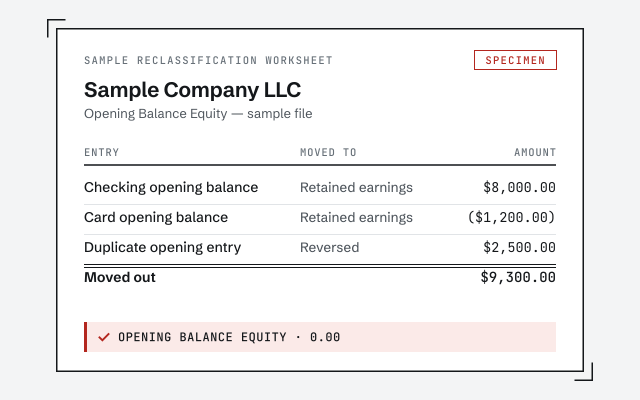
Nothing is a black box: the reclassification worksheet lists each amount that was parked, the account it moved to, and the reason, so you — or your CPA — can audit the work and see that your real equity was revealed, not rewritten. If the tracing surfaces accounts that also need attention — an unreconciled bank account, a loan that was never set up properly — we flag those in the handback and scope them separately rather than quietly expanding the job.

Which do you need?

Fix Opening Balance Equity now vs. leaving it

Clearing Opening Balance Equity now gives you a correct balance sheet and equity you can hand to a preparer; leaving it means the number keeps distorting your reports until someone deals with it. Here is how the two compare, and what actually changes.

Fix Opening Balance Equity now vs. leave it lingering
Fix it now Leave it
Balance sheet is correct
Equity reflects reality
Reports tie out for a preparer
Opening Balance Equity account Cleared to zero Still carries a balance
Risk at tax time None from OBE Preparer questions the equity
Ready to hand to a preparer
Verdict Books you can file Numbers you cannot trust yet

What changes

An equity section before and after the Opening Balance Equity fix Before, the equity section carries an Opening Balance Equity line that still holds a balance alongside retained earnings and owner equity. After, Opening Balance Equity reads zero and its amount now sits in retained earnings, where it belonged; total equity is unchanged. Illustrative example, not measured figures. BEFORE · EQUITY AFTER · EQUITY Opening Bal. Equity PARKED Retained Earnings Owner Equity Op. Bal. Equity $0.00 Retained earn. Owner equity TOTAL EQUITY UNCHANGED
Clearing Opening Balance Equity moves its balance into the account it belonged in — here, retained earnings — so the line reads zero while total equity stays exactly the same. Names and amounts are illustrative.

Edge cases: retained earnings, journal entries, migrations, and QBO vs. Desktop

The details that decide an Opening Balance Equity fix: when the balance really does belong in retained earnings, why a single journal entry is the wrong tool, how migrations create the problem, and how the work differs between Online and Desktop.

When does the balance genuinely belong in retained earnings?

Sometimes it does. If the file was set up mid-life with a trial balance, the accumulated prior-year profit legitimately rolls into retained earnings, and Opening Balance Equity is the way-station it passes through. The difference between that and a plug is documentation: we move it because we can show it is prior-period equity, not because it is a convenient place to make a number disappear.

Why not just book one journal entry?

A single journal entry to zero the account is fast and almost always wrong. It collapses several different amounts — a bank balance, a loan, a conversion residue — into one line, destroying the detail a preparer needs. We reclassify entry by entry so each amount ends up in a real account with a real reason.

How do migrations create an Opening Balance Equity balance?

When a file is converted or rebuilt, opening balances and carried-over transactions post their offset to Opening Balance Equity all at once, which is why the number is often large right after a move. Our data conversion notes cover how to keep it small in the first place.

Is it different in QuickBooks Online vs. Desktop?

The account behaves identically in both — a temporary offset waiting to be reclassified — so the tracing is the same. Only access differs: read-only-based access in Online, a screen-share or hosted file in Desktop.

How QBSpecialist's Opening Balance Equity fix is different

One senior specialist traces every parked amount by hand and hands you a worksheet you can audit — not a pool that plugs the account and moves on. Every reclassification is documented, and your real equity is shown to be unchanged, not asserted to be.

Our method is verification, not a plug: we save your equity section and balance sheet before touching the file and compare them after, so we can show that total equity held while Opening Balance Equity fell to zero. Access stays minimal — read-only access to your file or a screen-share you control, never your banking logins. If clearing an entry would move a number on a period you have already filed, we flag it and ask first. An Opening Balance Equity fix should reveal your books, never quietly rewrite a return.

When NOT to hire us for an Opening Balance Equity fix

Skip us when the fix is small or premature. A single opening balance you can reconcile yourself does not need a paid engagement, and a brand-new file needs careful setup, not cleanup.

If the balance is one line you can trace — an opening bank balance that just needs reconciling against a statement — our QuickBooks cleanup checklist walks you through it for free. If your file is brand-new, the right move is entering opening balances correctly from the start so Opening Balance Equity never lingers, not paying to untangle a mess that does not exist yet. And if Opening Balance Equity already sits at zero and your equity section reads cleanly, leave it alone — there is nothing to fix. We will tell you which case you are in during the free review, even when the answer is "you don't need us."

What it costs

What an Opening Balance Equity fix costs

Every Opening Balance Equity fix is a fixed scope with a fixed fee, quoted after a free read-only review. The figures below are published starting floors; the review sets the real range for your file.

Opening Balance Equity fix pricing
Engagement Typical range Timeline What's included
From $1,500 3–5 days Trace and clear every entry parked in Opening Balance Equity, one company file.
From $1,500 1–2 weeks Clear Opening Balance Equity and reconcile the accounts the entries touched.
From $1,500 2–4 weeks Rolled into a complete cleanup when the wider file also needs work.
Estimate your cost with the calculator

Opening Balance Equity fix

Typical range
From $1,500
Timeline
3–5 days
Included
Trace and clear every entry parked in Opening Balance Equity, one company file.

Fix + reconciliation

Typical range
From $1,500
Timeline
1–2 weeks
Included
Clear Opening Balance Equity and reconcile the accounts the entries touched.

Part of a full cleanup

Typical range
From $1,500
Timeline
2–4 weeks
Included
Rolled into a complete cleanup when the wider file also needs work.
Estimate your cost with the calculator

How to verify our Opening Balance Equity fix

You don't have to take our word for it. Here is the evidence you can check — the deliverable you receive, the account reference that explains our method, and our response commitment.

A real reclassification worksheet

The exact before-and-after showing each entry moved out of Opening Balance Equity.

Response commitment

A real specialist replies within one business day, in writing.

Remote-first, nationwide

Mon–Sat · 8am–6pm CT

We work entirely remote — secure read-only access to your file, screen-share whenever you want to watch us trace an entry, and every reclassification documented in writing.

  • Texas
  • Florida
  • California
  • New York

Questions about the Opening Balance Equity fix

What is Opening Balance Equity?

It is a temporary holding account QuickBooks creates during setup. When you enter an opening balance for a bank account, loan, or other item, the offsetting amount lands in Opening Balance Equity until it is moved to the account it truly belongs in.

Why does an Opening Balance Equity balance appear?

Usually from setup or a data import — opening balances, converted transactions, and migrated items post their offset to Opening Balance Equity. It is meant to be cleared as each entry is assigned to its real account, but that final step often gets skipped.

Where does the Opening Balance Equity balance actually come from?

Almost always one of three places: an opening balance typed into a new bank, loan, or credit-card account; transactions converted when the file was set up; or entries brought over during a migration from another system. Each posts its offset to Opening Balance Equity and waits to be reclassified.

Is a balance in Opening Balance Equity bad?

A leftover balance is a signal, not a catastrophe. It means value is still parked in a temporary account, so your equity section — and often the balance sheet — does not yet reflect reality. It should be traced and cleared, not ignored.

Can I just delete the Opening Balance Equity account?

No. Deleting it or zeroing it with a blind journal entry hides the problem instead of fixing it, and it can throw the balance sheet out. Each amount has to be traced to its real account first; then the balance clears on its own.

Does clearing Opening Balance Equity change my equity?

Done correctly, it does not change real equity. It moves amounts out of a temporary account into the accounts they belonged in all along, such as retained earnings or a loan. Your true equity is revealed by the fix, not altered by it.

How long does it take to clear Opening Balance Equity?

A focused Opening Balance Equity fix is usually three to five days: day 0 to scope it, a couple of days to trace every parked entry, then reclassify and hand back. Files with many migrated entries, or where the balance is tangled with a wider mess, take longer and are quoted after the free review.

Do you clear Opening Balance Equity in QuickBooks Online or Desktop?

Both. The account behaves the same in Online and Desktop — a temporary offset that waits to be reclassified — so the tracing work is identical. Only the menus and the type of access differ: read-only-based access in Online, a screen-share or hosted file in Desktop.

Will clearing Opening Balance Equity affect my tax return?

Reclassifying parked amounts moves them between accounts; it does not change what you earned or spent, so it does not change your tax liability by itself. What it changes is whether your equity and balance sheet are correct enough for a preparer to rely on.

What do I get when the fix is done?

Opening Balance Equity at zero, every reclassified entry documented in writing, a balance sheet that ties, and a call to walk through what moved and why. If other accounts also need work, we scope that separately after the review.