QuickBooks class tracking setup
QuickBooks class tracking setup
One P&L, split by segment.
A QuickBooks class tracking setup adds a reporting dimension so the software splits your profit and loss by location, department, or line of business — without duplicating your chart of accounts. Once it's in place, each part of the business shows its own profit on one report, side by side.
Last reviewed October 2026 by a Certified QuickBooks ProAdvisor
What this page is based on: Intuit’s own QuickBooks Online and Desktop class-tracking help and usage limits (checked October 2026)
- P&L by segment
- Fixed scope, fixed fee
- One specialist — never a rotating pool
What a QuickBooks class tracking setup is
A QuickBooks class tracking setup turns on a single reporting dimension — the class — so the software can split your profit and loss by location, department, or line of business, without adding a duplicate account for each part of the company.
A class is a tag you put on each line of a transaction. It sits alongside the account, not inside it, so the same chart of accounts you already use keeps filing every entry — the class just says which slice of the business the entry belongs to. That is the whole idea: instead of building "Rent — West," "Rent — East," and a dozen more duplicate accounts, you keep one Rent account and let classes report the split. Class tracking is a reporting layer, not a rebuild of your books, and it works best on a coherent chart — which is why it pairs naturally with a chart of accounts cleanup and sits inside the wider picture of a QuickBooks cleanup.
Who needs class tracking
You need class tracking when one company has parts you want to see separately on the profit and loss — divisions, product lines, branches, or programs — but they share one bank account, one chart of accounts, and one tax return.
The usual signs:
- Two or more divisions, product lines, or branches run through a single QuickBooks file.
- You keep exporting the P&L to a spreadsheet to work out which segment actually made money.
- A board, funder, or partner wants profit reported by program, fund, or line of business.
- Several DBAs or storefronts sit under one legal entity and one set of books.
- You cannot answer "which part of the business carries the rest" from the reports you have now.
If instead you need cost and profit for a specific customer engagement, that is job costing, not classes. If you need a full separate balance sheet for each part, that is a separate company file, not a class. And if the segments you track are funds and programs rather than divisions, classes are the same mechanism our QuickBooks for nonprofits work is built on — fund accounting and functional-expense reporting both run on them. Not sure which you are looking at? A free bookkeeping health score is a quick way to see whether your file is ready to segment.
How class tracking works: one dimension on top of your accounts
Class tracking
Read this as text
Before: one profit-and-loss report with a single total column. After: the same report split into per-class columns — here West and East — that add across to the same total. Illustrative example, not measured figures.
Three moves do the work: enable class tracking, design a short class list on one dimension, and set classes to apply as transactions are entered — so the P&L can report a column for each class beside the total.
Every transaction line carries a class the same way it carries an account, and QuickBooks totals a P&L column for each one. Anything left blank falls into an "Unspecified" bucket, which is exactly how a class report stops tying — so the setup's real job is making the class part of normal entry, not an afterthought. We set the class field to show on the forms you use, apply header-level classes where a whole transaction belongs to one slice, and split at the line level where it does not. Class tracking is available in QuickBooks Online's Plus and Advanced plans and in Desktop; we confirm your plan first so the setup fits what the file can actually do.
Turning class tracking on: Intuit's own steps
In QuickBooks Online (Plus or Advanced), per Intuit's Turn on class tracking article (updated August 2026, checked October 2026):
- Go to Settings → Account and settings → Advanced → Categories.
- Turn on Track classes.
- Under assigned classes, choose One to entire transaction if a whole sale or bill belongs to one slice, or One to each row in transaction if lines split across classes.
- Tick Warn me when a transaction isn't assigned a class — it is the cheapest guard against an "Unspecified" column.
- Save, then build the class list under Settings → All lists → Classes.
In QuickBooks Desktop for Windows, per Intuit's Set up and use class tracking article (updated August 2026): Edit → Preferences → Accounting → Company Preferences, check Use class tracking for transactions and, optionally, Prompt to assign classes; then add classes and subclasses under Lists → Class List. Intuit's own rule matches ours: use classes for one category only — departments or locations, not both.
Two limits catch people out. Payroll is separate: QuickBooks Online payroll has its own Class Tracking setting (the same class for every employee, or different classes by employee), and Intuit says it applies only to new and future payroll transactions. And Plus caps the list: classes and locations together are limited to 40 on QuickBooks Online Plus, with only active ones counting, while Advanced has no cap (Intuit's usage limits, checked October 2026). A design that needs more than 40 slices on Plus is usually two dimensions mixed together — or a reason to look at QuickBooks Online Advanced.
Timeline
How long a class-tracking setup takes
The setup moves through review, class-list design, configuration, testing and written hand-back. The agreed scope sets the schedule after the current file and reporting requirements are reviewed.
Free review
Review
View-only look at how you want the business split; we scope the setup and quote a fixed fee.
Design the class list
Design
We design a short, clean class list — one dimension, no overlap with your accounts.
Configure and test
Configure and test
Classes turned on, defaults set, and a P&L by class tested so it splits cleanly.
Hand back
Hand back
A segmented P&L and a written note of the setup and how to keep it.
Which dimension?
Classes vs. locations vs. jobs
Use a class to split the P&L by line of business or department, a location to split it by physical site or region, and a job to track a specific piece of customer work — three different ways to slice one chart of accounts.
Reporting dimensions
Read this as text
Three reporting dimensions over one chart of accounts: a class slices the profit and loss by line of business or department, a location slices it by site or region, and a job slices it by a specific piece of customer work. Illustrative examples.
| Classes | Locations | Jobs / projects | |
|---|---|---|---|
| Splits the P&L | It depends | ||
| Reports as extra P&L columns | |||
| Best for departments or lines | |||
| Best for sites or regions | It depends | ||
| Best for per-customer work | |||
| Duplicates the chart of accounts | |||
| Best when | Lines overlap sites | Each site stands alone | You bill by customer |
| Verdict | One flexible dimension | Physical splits | Per-customer profit |
What you get when the setup is finished
You get a profit and loss split into a column per class, a written coding guide for whoever enters transactions, and sensible defaults configured on your forms. The hand-back includes a written note of the setup and how to keep it.
Nothing is left implicit: the coding guide names each class, says what belongs in it, and tells your bookkeeper how to handle a transaction that spans two. Where the history supports it, we can back-class prior periods as part of the setup so your first year-over-year comparison already runs clean — and where the records are too thin to class honestly, we say so rather than assign a class the detail cannot justify. From there you can run it yourself, or hand the monthly coding back to us so every transaction stays classed and your segmented reports keep tying. A class setup also sits naturally beside job costing when you later need profit by customer engagement as well.
Common class-tracking mistakes and how we avoid them
The four ways class tracking goes wrong are mixing two ideas into one list, leaving transactions unclassed, over-splitting into noise, and confusing a class with an account — and each has a plain fix built into the setup.
Mixing two dimensions into one class list
A list that reads "West, East, Retail, Wholesale" is really two dimensions crammed into one, and every report it produces double-counts or leaves gaps. We keep the list to a single dimension and, where you genuinely need two, use classes for one and locations for the other rather than blending them.
Leaving transactions unclassed
Any line without a class lands in "Unspecified," and one stray entry is enough to stop a class P&L from tying to the company total. We make the class field visible on the forms you use, set defaults where a form always belongs to one class, and give your team a rule for the rest.
Creating so many classes the report becomes noise
Dozens of classes feel thorough and read as clutter — a P&L that runs for pages tells you less, not more. We aim for the fewest classes that still answer the question you actually ask of the reports.
Treating a class like an account
Classes report on top of the chart of accounts; they do not replace it. If the chart underneath is bloated or mis-typed, the class columns inherit that mess — which is why a chart of accounts cleanup sometimes comes first.
What it costs
What a class-tracking setup costs
Every class-tracking setup is a fixed scope with a fixed fee, quoted after a free view-only review. The figures below are published starting floors; the review sets the real range for your file.
| Engagement | Starting price | Planned timeline | What's included |
|---|---|---|---|
| Class-tracking setup | From $1,500 | Set in your written scope | Class list designed, defaults set, P&L split by segment. |
| Setup + retroactive classing | Custom fixed quote | 1–3 weeks | Back-classing prior periods so comparisons run clean. |
| Setup + monthly | From $400/mo | Ongoing | We set it up, then keep every transaction classed each month. |
How QBSpecialist's class-tracking setup is different
One specialist designs the class list with you and documents every default — the same hands start to finish — rather than an outsourced pool bolting a generic list onto your file and leaving you to work out why the reports do not tie.
Our method is verification, not assertion: before we hand back, we run the class P&L against the company total and show you they agree, so you can see — not just take our word — that no transaction slipped into "Unspecified." Access stays minimal — the free review runs on view-only access, and the setup itself uses QuickBooks' accountant access to make and log every change, never your bank logins — and every class, default, and coding rule is written down so your team or your CPA can follow it without us. You can read exactly how we work in our methodology.
When not to hire us for class tracking
Skip us when a single obvious split is all you need, when your books are not clean enough yet for classes to mean anything, or when what you actually want is a different tool entirely.
If you run two divisions, you are comfortable in QuickBooks, and you just need the class field switched on and a two-item list, our QuickBooks cleanup checklist and the built-in help will get you there for free. If the books underneath are messy — unreconciled accounts, a bloated chart, balances no one recognizes — class columns will only inherit that mess, so a cleanup comes first and class tracking after. And if you need cost and profit for one customer's project rather than a standing segment of the business, that is job costing, not classes. We will tell you which case you are in during the free review, even when the honest answer is that you do not need us.
How to verify our class-tracking setup
You don't have to take our word for it. Here is what you can check — the deliverable you receive, the structure the setup depends on, and our response commitment.
Who’s responsible for your file
A Certified QuickBooks ProAdvisor handles your file from the review through the corrections to the hand-back — the same person throughout, never a rotating pool.
About QBSpecialist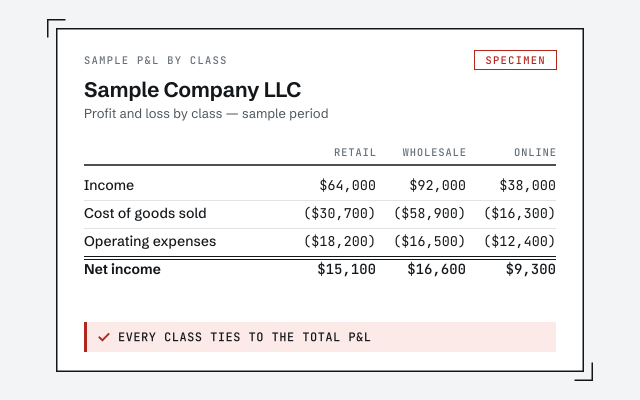 Illustrative example — not a client file.
Sample P&L by class
The exact segmented profit and loss your setup produces once it's live.
How we structure it
Classes work because the chart of accounts stays clean, not duplicated. See how.
See chart-of-accounts cleanupResponse commitment
A written reply within one business day.
Remote-first, nationwide
Mon–Sat · 8am–6pm CT
We work entirely remote — view-only access for the free review, QuickBooks' accountant access for the setup itself, screen-share to review the class list with you, and every setup choice documented in writing.
- All 50 states
- Remote-first
- View-only review
Questions about QuickBooks class tracking setup
What is the difference between a class, a location, and a job?
A class is a reporting slice you choose — a department or line of business. A location ties reporting to a physical site or region. A job tracks a specific piece of customer work. Classes are the most flexible; the right choice depends on how you want the P&L to break down.
When should I use classes?
When one company has parts you want to see separately — divisions, product lines, funds, or branches — but they share one chart of accounts. If instead you need cost by customer engagement, that is job costing; if you need a full separate balance sheet, that is a separate file.
Will class tracking change my chart of accounts?
No, and that is the point. Class tracking adds a second dimension alongside your existing accounts, so you avoid duplicating accounts for each division. The chart of accounts stays as it is; classes do the splitting on top of it.
Can I apply classes to past transactions?
Yes, within reason. Back-classing prior periods makes comparisons run clean, and we can do it as part of the setup where the history supports it. Where records are too thin to class reliably, we say so rather than assign a class that the underlying detail cannot justify.
What are the common class-tracking mistakes?
Mixing two ideas into one class list, leaving transactions unclassed so totals do not tie, and creating so many classes that reports become noise. We keep the list to a single dimension, set sensible defaults, and make classing part of normal entry so it stays consistent.
What happens after the class-tracking setup?
You get a profit and loss split by class and written steps for whoever codes transactions. The hand-back includes a written note of the setup and how to keep it. From there you can run it yourself, or we can keep every transaction classed each month so your segmented reports stay accurate.
Which QuickBooks version do I need for class tracking?
In QuickBooks Online, Plus or Advanced — Simple Start and Essentials have no classes. Plus caps classes and locations at 40 combined; Advanced has no cap (Intuit's usage limits, checked October 2026). In Desktop, Intuit's class-tracking steps cover Pro Plus, Premier Plus and Mac Plus, and Enterprise supports classes too. We confirm your plan in the free review, so the setup is scoped to what your file can actually do.
How do I turn on class tracking?
In QuickBooks Online: Settings, Account and settings, Advanced, Categories, then turn on Track classes and Save. You choose whether a class applies to the whole transaction or to each row, and can tick Warn me when a transaction isn't assigned a class. In QuickBooks Desktop for Windows: Edit, Preferences, Accounting, Company Preferences, then check Use class tracking for transactions and, optionally, Prompt to assign classes.
Does class tracking apply to payroll?
Only if you turn it on separately. In QuickBooks Online payroll it's a setting of its own under Payroll settings, Accounting, Class Tracking: the same class for every employee, or different classes for different employees. Intuit says it applies only to new and future payroll transactions, so past paychecks keep no class unless they are reclassed.
How many classes should I have?
As few as give you a report you will actually read. A handful of clean classes on one dimension beats dozens that overlap. When a list grows past what fits on a single P&L page, that is usually a sign two ideas have been mixed into one dimension and it needs splitting apart.
Do I need a clean chart of accounts before class tracking?
It helps, because classes report on top of the accounts they slice. If the chart is bloated or mis-typed, class columns just inherit that mess. We check the chart in the review and, where it is in the way, suggest a chart cleanup first so the class reports come out readable.
- 1099 cleanup— classes and vendors are separate questions; this one is due in January
- Audit-ready books— a profit and loss by class is one of the reports a reviewer may ask for
- Trust account cleanup— for a firm that tracks client money as well as departments
Not sure how bad it is?
Talk to a QuickBooks specialist.
Describe the file and a specialist will tell you which of these you are dealing with — including when the answer is that you don't need us.