A real mapping and reconciliation record
The written map of what converted, what was rebuilt, and the before-and-after reconciliation you receive when a conversion closes.
QuickBooks data conversion
QuickBooks data conversion is the mapping-and-validation core of a migration: your lists, balances, and transaction history are translated from the old system's structure into QuickBooks', then reconciled back to the source to prove nothing was lost or shifted. The moving is the easy part — the conversion is the part where the numbers have to still tie, to the penny, before you go live.
QuickBooks data conversion is the mapping-and-validation core of a migration — the step where the data inside an accounting file is translated from one system's structure into QuickBooks' structure, then proven to reconcile. A migration is the whole project of moving from one product to another; the conversion is the technical heart of it, where your chart of accounts, names, open items, transaction history, and balances are actually carried across and made to tie.
It helps to separate the two ideas. Moving a file — exporting it, running it through a tool, importing the result — is mechanical, and on its own it proves nothing. Conversion is the discipline of mapping each source record to the right destination record and then confirming the converted file reproduces the same books it came from. Our real specialty is QuickBooks bookkeeping with a reconciliation-first method, so we treat conversion the honest way: we map the data deliberately, convert it, and then reconcile the result to the system it came from. If you want the full picture of the project around it, the QuickBooks migration hub lays out all four stages; this page is the one that goes deep on the two that matter most — mapping and validation.
Structural data converts — chart of accounts, customers and vendors, open accounts receivable and payable, transaction history, and balances — while software-specific items are rebuilt in the new file. The parts that determine whether your reports are correct come across; the parts that are conveniences you set up once are recreated on the other side.
That split matters because conversion is never "everything or nothing." The figures behind your prior-period profit and loss and balance sheet convert with the history, so those reports still add up after the move. What does not carry cleanly is the layer that lives only inside the old program's settings: memorized reports, recurring templates, custom form layouts, reconciliation report history, and some payroll detail. Those are rebuilt in QuickBooks rather than moved — the numbers they display convert, but the saved views that display them are set up again. We list exactly which of your items fall in that bucket before we start, so nothing you rely on quietly disappears at cutover.
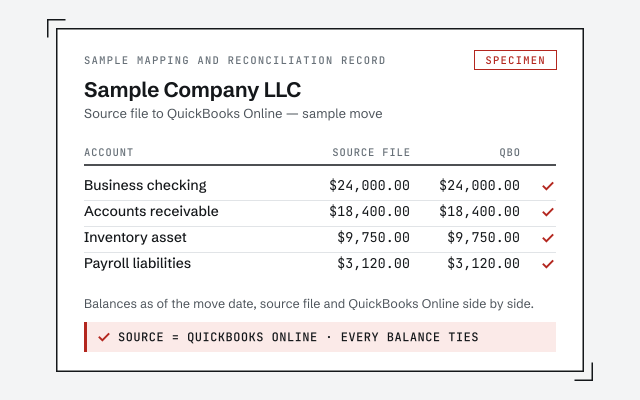
Conversion maps every source record to its QuickBooks equivalent — each account to an account type, each name to a customer or vendor, each transaction to its posting — so the destination reproduces the same books rather than a rough copy. Mapping is where the real judgment lives, and it is why a black-box tool run alone so often lands a file that looks migrated but no longer ties.
The work is mostly in the edges. Over years, a chart of accounts collects duplicate accounts, names that mean the same customer, and list items that drifted apart; mapping is where those get resolved to a single destination record, so the new chart of accounts comes out cleaner than the old one without changing what any historical transaction actually posted to. Account types have to line up so the balance sheet and profit and loss classify the same way after the move. Opening balances have to hand off cleanly to the history behind them. We map all of that deliberately and write down every decision, because a mapping you can read is the difference between a conversion you can trust and one you have to take on faith.
The conversion flow
We validate a conversion by reconciling the converted file back to the source — same trial balance, same key reports, to the penny — before anyone relies on it. Validation is not a courtesy step at the end; it is the whole reason to convert with a specialist instead of running a wizard and hoping.
The conversion flow
Anyone can push data through a conversion tool; the hard, valuable part is confirming that what came out matches what went in. We save the source system's trial balance and key statements before the move, then re-run them in QuickBooks and account for every difference until the two tie — the same "difference resolves to zero" idea the bank reconciliation reference explains, applied to the whole file rather than a single account. You can read exactly how that checking works in our methodology. If the converted file will not reconcile, we do not cut over — we find out why first.
Which approach?
Converting maps and moves the data with its history intact; re-keying rebuilds only opening balances and loses the detail behind them — conversion wins whenever prior-period history matters.
| Data conversion | Re-enter by hand | |
|---|---|---|
| Keeps posted transaction history | — | |
| Prior-period reports still tie | — | |
| Carries open A/R and A/P | manual entry | |
| Reconciled to the source | opening balances only | |
| Best when | You need continuity of history | The file is tiny or starting fresh |
| Verdict | History preserved, proven to tie | Clean slate, history stays behind |
There is no universally right answer. A tiny file with a handful of transactions is often faster to type in than to convert; a file whose prior-period reporting you actually rely on should be converted, not rebuilt. If you are coming to QuickBooks from another product, the migrate to QuickBooks page walks the general path, and a Desktop move is covered end to end on the Desktop to Online migration page.
One senior specialist maps the file, converts it, and proves it reconciles — with a written record of every mapping decision, not a black-box tool and a shrug. The difference is where the effort goes: a tool can push data across in an afternoon, but the value is in the mapping that gets the structure right and the validation that proves it landed correctly.
We take the least access a job needs — read-only where the software allows, screen-share you control where it does not — and never your banking logins. If your file would convert better after a cleanup, we say so, because converting a mess just relocates it. And every conversion ends the same way: the converted file reconciled to the source, and a document you can read that says what moved, what was rebuilt, and how the numbers tie.
You do not have to take our word for it. Here is the evidence you can check — the deliverable you receive, the method we use to prove the converted file reconciles, and our response commitment.
The written map of what converted, what was rebuilt, and the before-and-after reconciliation you receive when a conversion closes.
How we prove the converted file reconciles to the source. Read exactly how.
Read the full methodA real specialist replies within one business day, in writing.
Remote-first, nationwide
Mon–Sat · 8am–6pm CT
We convert entirely remote — secure read-only or screen-share access to your files, and every mapping decision documented in writing before cutover.
It is the mapping-and-validation core of a migration — the step where your chart of accounts, names, balances, and transaction history are translated from the old system's structure into QuickBooks' structure, then reconciled to prove nothing was dropped or shifted. Moving a file is easy; converting it so the numbers still tie is the part that takes a specialist.
It depends on the source and how far back you need. A full conversion carries posted transaction history, not only opening balances, so your prior-period profit and loss and balance sheet still add up in the new file. Where a source cannot export clean detail beyond a certain point, we convert history to that horizon and bring the rest across as reconciled opening balances — and we tell you which before we start.
Mapping is where that gets resolved. During conversion we see duplicate accounts, near-identical vendor names, and list items that drifted apart over the years, and we map them to a single destination record so the new chart of accounts is cleaner than the old one — without changing what any historical transaction actually posted to.
We reconcile it back to the source. Before conversion we save the old system's trial balance and key reports, then confirm the converted file produces the same balances to the penny and account for every difference until it resolves to zero. Conversion without that reconciliation is just hoping the numbers matched.
Software-specific items — memorized reports, recurring templates, custom form layouts, reconciliation report history, and some payroll detail — are rebuilt in the new file rather than carried across. The figures behind your reports convert; the saved views that display them are recreated. We list exactly which of yours fall in that bucket before the move.
Yes. The framework is the same for any source: map the source structure to QuickBooks, convert what carries, and reconcile the result to the old reports. Coming from another system, start with migrate to QuickBooks; coming from Desktop, start with the Desktop-to-Online path. Either way the conversion ends with proof, not a promise.