QuickBooks undeposited funds fix
QuickBooks Undeposited Funds fix
Stuck balance? Here's how it clears.
The QuickBooks undeposited funds fix is grouping each recorded customer payment into the bank deposit that actually hit your statement. A stuck balance means that deposit step never happened, so the books show cash the bank can't confirm — small, recent balances you can clear yourself; months of tangled entries need cleanup.
Last reviewed October 2026 by a Certified QuickBooks ProAdvisor
- Free, view-only review first
- Every deposit tied to the bank
- One specialist — never a rotating pool
Which do you need?
Start with how stuck the Undeposited Funds balance is
Start here
How stuck is your Undeposited Funds balance?
SMALL, RECENT BALANCE
Fix it yourself
A handful of recent payments group into their real deposits in an afternoon — no specialist needed.
Read the undeposited funds guideMONTHS ACROSS MANY CUSTOMERS
Cleanup
When payments and deposits no longer line up across months, the balance has to be untangled entry by entry.
See QuickBooks cleanupBALANCE THROWS OFF THE BANK
Cleanup + reconciliation
If the account also breaks reconciliation, the deposits and statements have to be tied back together.
See bank reconciliation
Read this as text
- SMALL, RECENT BALANCE: Fix it yourself — A handful of recent payments group into their real deposits in an afternoon — no specialist needed.
- MONTHS ACROSS MANY CUSTOMERS: Cleanup — When payments and deposits no longer line up across months, the balance has to be untangled entry by entry.
- BALANCE THROWS OFF THE BANK: Cleanup + reconciliation — If the account also breaks reconciliation, the deposits and statements have to be tied back together.
Honest answer
Who this affects
Not every Undeposited Funds balance is a problem. If you use QuickBooks the way it's designed — recording each customer payment, then grouping payments into a deposit that matches what your bank received — the account is supposed to hold a balance briefly between those two steps. A balance at month-end only matters when it never clears, or when it's made of payments that were deposited long ago.
The businesses that get stuck here tend to record payments and deposits in two disconnected habits: they mark invoices paid inside QuickBooks, then separately accept a lump-sum deposit from the bank feed. The customer payments pile up in Undeposited Funds while the feed deposits post straight to checking, so the same money is counted twice and the holding account never drains. If that sounds like your file, the size of the tangle — not the account itself — decides whether this is a quick fix or a cleanup.
The fix in each product
QuickBooks Online. Each received payment and sales receipt has a Deposit to field; payments meant to land together go to Undeposited Funds and are then grouped on one bank deposit that matches the statement (Intuit). A single stray payment is fixed by changing its Deposit to field. When the bank feed has added a deposit instead of matching it, the same money exists twice: undo the feed transaction from the Categorized tab, then match it to the recorded deposit — the duplicate pattern in Intuit's bank-feed duplicates help.
QuickBooks Desktop. Payments wait in Undeposited Funds when the preference Use Undeposited Funds as a default deposit to account is on (Edit → Preferences → Payments → Company Preferences), and sales receipts go there by default; they leave through Banking → Make Deposits, where you tick the payments on each deposit slip (Intuit, checked October 2026). The same rule applies in both: one recorded deposit per bank deposit, dated the day the money reached the bank. The account itself is explained in our Undeposited Funds reference.
Do-it-yourself
When you can fix Undeposited Funds yourself
The grouping fix
Read this as text
Three customer payments of $850.00, $1,200.00, and $450.00 sit in Undeposited Funds. Grouped with Record Deposits into one $2,500.00 bank deposit, they match the $2,500.00 statement line exactly, and the holding account clears. A worked, illustrative example.
If your Undeposited Funds balance is small and recent — a few payments from this month or last — this is a do-it-yourself fix, and you don't need us for it. Open Undeposited Funds, find the payments that make up each real bank deposit, and use Record Deposits (Bank Deposit in QuickBooks Online) to group them into a single deposit that matches the statement line. When the grouped total equals what the bank actually received, that deposit clears out of the holding account.
Work one deposit at a time and check each grouped total against the bank before you save. The undeposited funds reference walks through the grouping step by step. Where it stops being a do-it-yourself job is when the balance spans months, the same payments were also entered from the bank feed, or you can no longer tell which payments belong to which deposit — that's duplication to unwind, and it's what cleanup is for.
How the Undeposited Funds fix is documented
Who’s responsible for your file
A Certified QuickBooks ProAdvisor handles your file from the review through the corrections to the hand-back — the same person throughout, never a rotating pool.
About QBSpecialist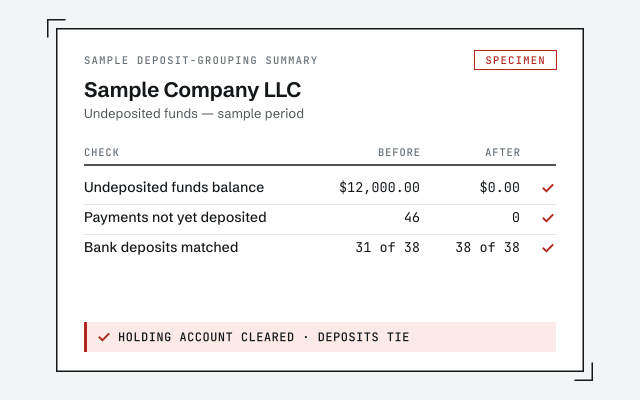 Illustrative example — not a client file.
Sample deposit-grouping summary
The before-and-after you receive once the holding account is cleared and every deposit ties to the bank.
How we work
Every grouped deposit tied back to the statement line it clears. Read the method.
Read the undeposited funds referenceResponse commitment
A written reply within one business day.
Remote-first, nationwide
Mon–Sat · 8am–6pm CT
We work entirely remote — view-only access for the free review, QuickBooks' accountant access if you hire us to untangle it, every change visible to you in the audit log, and every deposit documented in writing.
- All 50 states
- Remote-first
- View-only review
Questions about Undeposited Funds
What is Undeposited Funds for?
It's a temporary holding account. When you receive a customer payment, QuickBooks parks it in Undeposited Funds until you record the bank deposit that groups those payments together — so the deposit in your books matches the one on your statement.
Why won't my Undeposited Funds balance clear?
Usually because the deposit step never happened. Payments were marked received but never grouped into a Record Deposits (Bank Deposit) entry, so they sit in the holding account while the actual money shows up elsewhere, often from the bank feed.
Can I just delete the Undeposited Funds balance?
No — deleting it or zeroing it with a journal entry hides the problem and usually breaks reconciliation. Each payment has to be grouped into the real deposit it belongs to, or removed as a genuine duplicate. That's bookkeeping, not a one-click fix.
Is this a QuickBooks bug or a data problem?
A data problem, not a bug. Undeposited Funds works as designed; the balance builds up from how payments and deposits were recorded. That's why the fix is in the entries, and why a tangled one is a cleanup rather than a software repair.
Will fixing this change my bank balance?
Your real bank balance doesn't change — the statement is the statement. What changes is the QuickBooks cash figure, which stops double-counting deposits once the holding account clears. Reports and reconciliation line up with the bank again.
How do I keep Undeposited Funds from building up again?
Record deposits the way the bank receives them. When a lump-sum deposit arrives in the bank feed, match it to the customer payments already waiting in Undeposited Funds instead of adding it as new income. That one habit — group payments, then match the feed — keeps the account draining to zero.
How do I fix one payment that went to the wrong place?
Open the payment and look at its Deposit to field. If it names the bank account but the money arrived on a deposit with other payments, change it to Undeposited Funds and group it on that bank deposit. If the bank feed then added the deposit a second time instead of matching it, undo the feed transaction from the Categorized tab and match it to the deposit you recorded.
Why does QuickBooks Desktop keep sending payments to Undeposited Funds?
Because of a preference. In QuickBooks Desktop, the Payments preferences under Company Preferences include Use Undeposited Funds as a default deposit to account; with it on, every received payment waits there until you record a deposit through Banking, Make Deposits. Sales receipts go there by default too.
Where to go next
- QuickBooks reconciliation services— Tie every account to its statement, difference to zero.
- QuickBooks cleanup service— Fix a file that exists but cannot be trusted.
- Bank feed issues— when the feed matched deposits to the wrong payments
- File repair— when the Undeposited Funds list won't load or save
- Second opinion— a check of the fix before you rely on it
Not sure how bad it is?
Talk to a QuickBooks specialist.
Describe the file and a specialist will tell you which of these you are dealing with — including when the answer is that you don't need us.