Xero to QuickBooks migration
Xero to QuickBooks migration
Proven to reconcile back to Xero.
Moving from Xero to QuickBooks Online carries your structural data across — chart of accounts, contacts, open invoices and bills, transaction history — while Xero-specific settings like bank rules and saved reports are rebuilt in QuickBooks. Of the four stages we run, validation matters most: we reconcile the converted file back to Xero and prove the balances tie before go-live.
Last reviewed October 2026 by a Certified QuickBooks ProAdvisor
What this page is based on: Intuit’s own Xero conversion help (checked October 2026) and our methodology
What converts, what is rebuilt
Read this as text
A Xero organization splits two ways at migration: the structural data converts — chart of accounts, contacts, open invoices and bills, history, and balances — while Xero-only settings are rebuilt fresh in QuickBooks: bank rules, repeating invoices, tracking categories which become classes, and saved report layouts. Structural split; we list which of your items fall in each bucket before anything moves.
- Data mapped, not retyped
- Reconciled back to Xero
- No Xero-bashing, just fit
What moves from Xero to QuickBooks Online
Moving from Xero carries your structural data into QuickBooks Online — the chart of accounts, contacts, outstanding invoices and bills, transaction history, and the balances behind your reports — while settings that live only inside Xero are rebuilt on the other side.
The dividing line is the same as any migration: the data that determines whether your books are correct comes across, and the conveniences you configured once get recreated. Your account balances, your open receivables and payables, and your posted history convert, so prior-period reporting still adds up in QuickBooks. Xero's bank rules, repeating-invoice templates, tracking categories, and saved report layouts do not carry over one-for-one — they are Xero constructs with QuickBooks equivalents you set up fresh, such as classes and locations in place of tracking categories. We list exactly which of yours fall in each bucket before the move, so nothing you rely on quietly disappears at cutover. If you are coming to QuickBooks from any source, the general framework lives on the migrate to QuickBooks overview; this page is the Xero-specific path.
The four stages
What to expect: source, mapping, validation, cutover
A Xero move runs the same four stages as any migration — read the source, map it to QuickBooks, validate the converted result against Xero, then cut over — and nothing goes live until it has been proven to reconcile.
The Xero migration flow
Read this as text
Four stages left to right. Stage 1, Source: your Xero organization, the source of truth. Stage 2, Mapping: chart of accounts, contacts, tax, balances, and history are mapped and converted to QuickBooks Online. Stage 3, Validation: the converted file is reconciled back to Xero and proven to tie — the stage marked with a verified tick. Stage 4, Cutover: you go live in QuickBooks. The flow runs from a reconciled Xero source of truth to a reconciled, live QuickBooks file.
Source
Stage 1
We read your Xero organization as the source of truth — its chart of accounts, contacts, open items, tax, history, and balances — and save the reports we will later reconcile against.
Mapping
Stage 2
Every account, contact, and tax code is mapped to its QuickBooks Online equivalent, and we flag exactly what converts and what has to be rebuilt.
Validation
Stage 3
The converted file is reconciled back to Xero: same trial balance, same key reports, to the penny — the proof stage that ties to our method.
Cutover
Stage 4
Only once the file reconciles do you go live, with rebuilt bank rules and reports in place and a written record of every mapping decision.
Intuit's own Xero route, and what it leaves behind
Intuit's Convert from Xero to QuickBooks Online article (updated August 2026, checked October 2026) sets the terms:
- The tool: Intuit partners with Dataswitcher. The base conversion is free for up to two fiscal years; anything older becomes one automatically calculated starting balance unless you buy extra years. Extra years, inventory items, tracking categories and company info can cost extra, and the wizard quotes them first.
- What it needs: a US Xero account, a paid US QuickBooks Online plan and admin rights — Advanced if the Xero chart has more than 250 accounts, Plus or Advanced for classes (Advanced above 40) and inventory, Essentials or above for bills — and a blank QuickBooks Online company, because existing data can be overwritten.
- What moves: starting balances, receivable and payable invoices, bills and credits, bank transactions, matched payments, the chart of accounts, customers and vendors, items, tracking categories, journal entries and sales-tax payments.
- What doesn't: payroll and the employee list, attachments, templates, the terms list, budgets, memorized and deleted transactions, draft journals, bank reconciliation history, closed estimates and purchase orders, project details, fixed assets and assembly builds — and Sales Tax must be turned on again in QuickBooks Online.
- What to keep: Intuit advises exporting Xero's Account Transactions, Trial Balance and Sales Tax reports for audits, and the Income Statement, Balance Sheet, Trial Balance and Aged Receivables and Payables at the conversion date for validation — and keeping them after the move.
Two steps sit outside the tool. Lock the Xero period at the cutover date so nothing changes after the export, and plan payroll separately: because Xero payroll history doesn't move, year-to-date figures are set up deliberately in QuickBooks or your payroll provider. Our fee for the work around the conversion — preparing the source, checking the result, rebuilding what doesn't move and reconciling — is project work, quoted as one fixed fee after a free review (from $1,500).
How the chart of accounts changes moving from Xero
Your accounts and their balances come across, but the way they are organized gets remapped, because Xero and QuickBooks Online structure the chart of accounts differently.
Xero builds its chart of accounts around numeric account codes and its own set of account types. QuickBooks Online uses account types and detail types to group accounts, and does not require account numbers unless you switch them on. That difference is not a problem — it is a mapping step. We match each Xero account to the right QuickBooks type and detail type so your profit and loss and balance sheet still group the way you expect, decide with you whether to keep numbered accounts, and then reconcile the converted balances so every account ties to what it held in Xero. The mechanics of how lists and history map across, for any source, are covered in depth on the QuickBooks data conversion page.
How sales tax differs between Xero and QuickBooks
Sales tax is set up fresh in QuickBooks rather than copied over from Xero, because the two products track tax through different mechanisms.
In Xero, tax is handled through tax rates and their components. QuickBooks Online drives tax through its own sales-tax engine, tied to the tax agencies you owe. The two do not map one-to-one, so we do not pretend a conversion tool can simply carry rates across. Instead we configure the equivalent tax setup in QuickBooks, map each Xero tax rate to the QuickBooks treatment that produces the same result, and then check that tax on converted transactions and on your open invoices and bills lands correctly. Because tax touches both your reporting and your filings, this is one of the areas we validate most carefully before cutover — a rate mapped wrong is the kind of quiet error that only surfaces at quarter end.
How we validate the converted file against Xero
We prove the move by reconciling QuickBooks Online back to Xero — same trial balance, same balance sheet, same key reports, to the penny — before you rely on it. Validation is not a courtesy step at the end; it is the reason to hire a specialist at all.
Anyone can push data through a conversion. The hard, valuable part is confirming that what came out matches what went in. Our method is verification, not assertion: we capture Xero's trial balance and key statements before the move, re-run them in QuickBooks after conversion, and account for every difference until the two tie. That reconciliation-first discipline is what turns a migration into proof rather than a promise — you can read exactly how the checking works in our methodology. If the converted file will not reconcile, we do not cut over and hope; we find the cause first.
Why move from Xero to QuickBooks — and when to stay
The honest reason to move off Xero is fit, not failure: both Xero and QuickBooks are capable platforms, and the right one is the one that suits your accountant, your app stack, and your reporting. If Xero already does all of that, there is no reason to move at all.
Teams switch to QuickBooks Online for concrete reasons — a bookkeeper or CPA who works in QuickBooks, a set of integrations that run better on it, or reporting their advisor prefers. Those are good reasons. "Xero is worse" is not one, and you will not read it here, because it is not true. If you are still weighing the two platforms, our Xero vs QuickBooks comparison names where each one wins — without pretending there is a universal answer. A move also carries real cost and disruption, so it should clear a bar: the gain in fit has to be worth the work of converting and re-learning a new interface. During the free review we will say plainly whether a move clears that bar for your situation, and if the honest answer is that Xero is serving you fine, we will tell you to stay rather than sell you a migration you do not need. If you are weighing QuickBooks Online against QuickBooks Desktop as your destination, the Online vs. Desktop comparison is the place to settle that before you move — and the wider set of paths lives on the QuickBooks migration hub.
What a Xero-to-QuickBooks move leaves on record
You do not have to take our word for it. Here is the evidence you can check — the deliverable you receive, the method we use to prove the converted file reconciles to Xero, and our response commitment.
Who’s responsible for your file
A Certified QuickBooks ProAdvisor handles your file from the review through the corrections to the hand-back — the same person throughout, never a rotating pool.
About QBSpecialist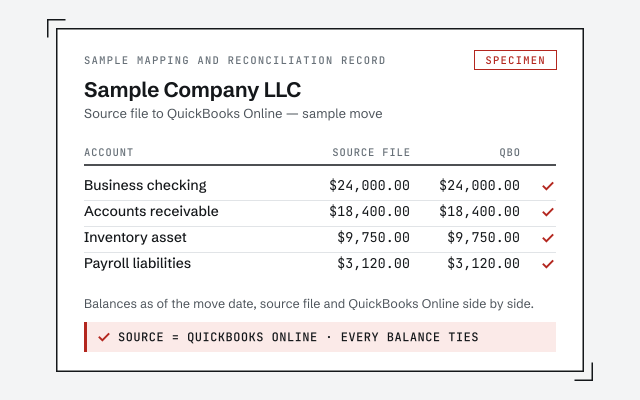 Illustrative example — not a client file.
Sample mapping and reconciliation record
The written map of what moved from Xero, what was rebuilt in QuickBooks, and the before-and-after reconciliation you receive when the migration closes.
Our methodology
How we prove the converted file reconciles back to Xero. Read exactly how.
Read the full methodResponse commitment
A written reply within one business day.
Remote-first, nationwide
Mon–Sat · 8am–6pm CT
We migrate entirely remote — view or export access to your Xero organization, QuickBooks' accountant access on the new file, and every mapping decision documented in writing before cutover.
- All 50 states
- Remote-first
- View-only review
Questions about Xero to QuickBooks migration
What actually moves from Xero to QuickBooks Online?
The structural data moves: your chart of accounts, contacts, outstanding invoices and bills, and transaction history, plus the account balances behind your reports. Software-specific items — Xero's bank rules, repeating invoice templates, and saved report layouts — do not carry across and are rebuilt in QuickBooks Online instead. We list exactly which of yours fall in each bucket before we move.
Is Xero worse than QuickBooks? Is that why I should switch?
No. Both are capable accounting platforms, and plenty of businesses run happily on Xero. The move is about fit, not one product being broken — teams switch because their accountant, their app stack, or their reporting works better on QuickBooks, not because Xero failed them. We will tell you honestly if a move is not worth it for your situation.
Will my chart of accounts survive the move from Xero?
The accounts and their balances come across; the structure gets remapped. Xero organizes accounts around numeric codes and its own account types, while QuickBooks Online uses account types and detail types and does not require account numbers. We map each Xero account to the right QuickBooks type so your reports still group correctly, and reconcile the result so the balances match.
What happens to sales tax when I move from Xero to QuickBooks?
Tax gets set up fresh in QuickBooks rather than copied over. Xero and QuickBooks Online track tax differently — Xero uses tax rates and components, while QuickBooks Online drives tax through its own sales-tax engine tied to your agencies. We configure the equivalent tax setup in QuickBooks and check that tax on converted transactions and open balances lands correctly.
How do you prove the converted file is accurate?
We reconcile it back to Xero. Before cutover we save Xero's trial balance and key reports, then confirm QuickBooks Online produces the same balances to the penny and account for any difference until the two tie. Migration without that proof is just hoping the numbers matched — the validation stage is where we show they did.
Is there a free way to move from Xero to QuickBooks Online?
Yes. Intuit partners with Dataswitcher, and Intuit's help says the base conversion is free for up to two fiscal years; older activity becomes one calculated starting balance unless you buy extra years. Extra years, inventory items, tracking categories and company info can cost extra, quoted by the wizard first. It needs a US Xero account, a paid US QuickBooks Online plan and a blank QuickBooks Online company.
What doesn't move from Xero?
Intuit lists payroll data and the employee list, file attachments, invoice templates, the terms list, budgets, memorized and deleted transactions, draft journals, bank reconciliation history, closed estimates and purchase orders, project details, fixed assets and assembly builds. Default sales-tax codes don't convert, and Sales Tax has to be turned on in QuickBooks Online afterwards.
How long does a Xero to QuickBooks migration take?
It depends on how much history you carry and whether the file needs cleanup first. A migration is usually planned at one to three weeks; your written scope sets the finish date. A larger organization with years of history, inventory, or multi-currency can take longer. We scope the real timeline during the free review, before any work starts, so you are not guessing.
Where to go next
- QuickBooks Desktop to Online migration— Move the file and prove the result ties.
- Sage to QuickBooks— the same move, when the source is Sage
- Desktop migration cost— what a migration fee covers
Not sure how bad it is?
Talk to a QuickBooks specialist.
Describe the file and a specialist will tell you which of these you are dealing with — including when the answer is that you don't need us.