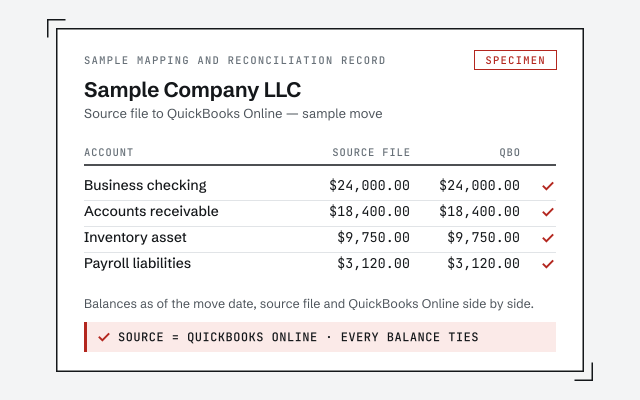
A real mapping and reconciliation record
The written map of which Sage nominal codes moved where, what was rebuilt, and the before-and-after reconciliation you receive when the migration closes.
Sage to QuickBooks migration
Moving from Sage to QuickBooks Online means remapping your Sage nominal codes to a QuickBooks chart of accounts, then converting your names, open items, history, and balances into the new file. We do it in four stages — source, mapping, validation, cutover — and the stage that matters most is validation, where we reconcile the converted QuickBooks file back to Sage and prove the numbers tie before you go live.
The structural data moves; Sage-specific conveniences are rebuilt in QuickBooks. Your chart of accounts, customers and vendors, open invoices and bills, transaction history, and account balances convert into the new file, while saved report layouts, recurring templates, and reconciliation report history are recreated on the QuickBooks side.
This is not a Sage problem — it is true of any migration between two accounting systems. The data that defines whether your reports are correct, your balances and posted history, comes across. The parts that live only inside Sage's own settings are quick to set up again in QuickBooks, and we list exactly which of yours fall in that bucket before we move, so nothing you rely on quietly disappears after cutover. Sage is a capable ledger; the reason to move is usually that your team, your accountant, or your reporting has settled on QuickBooks Online, not that anything was wrong with the file you are leaving.
Sage organizes accounts by numeric nominal code; QuickBooks organizes them by name and account type — so the core of a Sage migration is a mapping that pairs each nominal code to the QuickBooks account it belongs in. We build that mapping account by account, set the correct account type so the profit and loss and balance sheet behave, and resolve the places where your nominal list had grown untidy over the years.
In practice that means deciding, with you, where each Sage code lands: which nominal ranges become income, which become cost of goods sold, which are overheads, and which were really the same account entered twice and should merge. Where a single Sage code was doing the work of several, we split it; where several codes tracked one thing, we consolidate. This is the moment to fix a chart of accounts that had drifted, rather than faithfully copying the mess into a new system — and if the remapping turns into a larger tidy-up, the chart of accounts cleanup covers that work in full. You approve the finished mapping before a single transaction moves.
The four stages
Every migration runs the same four stages in order: read the Sage source, map its nominal codes and balances to QuickBooks, validate the converted result against Sage, then cut over. The order is deliberate — nothing goes live until it has been proven to reconcile.
The migration flow · source: Sage
Stage 1
We read the Sage file as the source of truth — its nominal codes, lists, open items, history, and balances — and save the Sage reports we will later reconcile against.
Stage 2
Every Sage nominal code, name, and balance is mapped to where it belongs in QuickBooks, with the right account type set and exactly what converts versus what is rebuilt flagged for you.
Stage 3
The converted QuickBooks file is reconciled back to Sage: same trial balance, same key reports, to the penny — the proof stage that ties to our method.
Stage 4
Only once the file reconciles do you go live in QuickBooks, with rebuilt reports and templates in place and a written record of every mapping decision.
The mechanics of that middle work — how lists and posted history convert, and how the result is checked — are the same across every source system, and the QuickBooks data conversion page covers them in technical detail. Coming from a different system than Sage? Start at migrate to QuickBooks for the general path.
Expect the reporting to feel familiar and the plumbing underneath to be different. QuickBooks Online reaches the same profit and loss and balance sheet you had in Sage, but it gets there by named account and account type rather than by nominal number, so the way you find and group accounts changes even though the totals do not.
A few honest expectations set the move up well. Your muscle memory for Sage nominal numbers will not carry over — you will navigate by account name in QuickBooks, which most teams find quicker within a week. Any Sage add-ons or integrations need their QuickBooks equivalents identified and reconnected rather than assumed to follow the data. And the exact export path depends on which Sage product and version you run, whether that is Sage 50 or Sage Business Cloud Accounting, which we confirm before we start. None of this is a reason to hesitate; it is simply the set of decisions we make on purpose during mapping, rather than discovering them after cutover.
We prove the migration by reconciling the QuickBooks file back to Sage — same trial balance, same balance sheet, same key reports, to the penny — before you rely on it. Validation is not a courtesy step at the end; it is the reason to hire a specialist rather than run an export and hope.
Anyone can push data through a conversion. The hard, valuable part is confirming that what landed in QuickBooks matches what left Sage. Our method is verification, not assertion: we save Sage's trial balance and key statements before the move, re-run them in QuickBooks after, and account for every difference until the two tie. If the converted file will not reconcile to Sage, we do not cut over — we find out why first. You can read exactly how that checking works in our methodology, which lays out the reconciliation-first discipline every migration in this cluster depends on.
You do not have to take our word for it. Here is the evidence you can check — the deliverable you receive, the method we use to prove the QuickBooks file reconciles to Sage, and our response commitment.
The written map of which Sage nominal codes moved where, what was rebuilt, and the before-and-after reconciliation you receive when the migration closes.
How we prove the converted QuickBooks file reconciles to Sage. Read exactly how.
Read the full methodA real specialist replies within one business day, in writing.
Remote-first, nationwide
Mon–Sat · 8am–6pm CT
We migrate entirely remote — secure read-only or screen-share access to your Sage file, and every mapping decision documented in writing before cutover.
The structural data moves: your chart of accounts, customers and vendors, open invoices and bills, transaction history, and account balances. Sage-specific conveniences — saved report layouts, recurring templates, and reconciliation report history — are rebuilt in QuickBooks rather than carried across. We map exactly which of yours fall in each bucket before we move anything.
Sage organizes accounts by numeric nominal code; QuickBooks organizes them by name and account type. We build a mapping that pairs each Sage nominal code to the QuickBooks account it belongs in, set the correct account type so the reports behave, and merge or split codes where your Sage list had grown untidy. You approve that mapping before any data moves.
The numbers behind them do. Because we carry the transaction history and balances across, your profit and loss and balance sheet for prior periods still add up in QuickBooks. Some saved report layouts are rebuilt on the QuickBooks side, but the underlying figures they draw on come with the data.
We work from Sage 50, Sage Business Cloud Accounting, and similar Sage ledgers. The exact export path differs by product and version, but the method is the same: read the source, map the nominal codes and balances to QuickBooks, convert what carries, and reconcile the result. We confirm your specific product and version during the free review.
We reconcile the QuickBooks file back to Sage. Before cutover we save Sage's trial balance and key reports, then confirm QuickBooks produces the same balances to the penny and account for every difference until the two tie. Migration without that proof is just hoping the numbers matched; validation is where we show they did.