Skip to content
QB Specialist

QuickBooks Square reconciliation

QuickBooks Square reconciliation, tied to the payout the way Square actually pays.

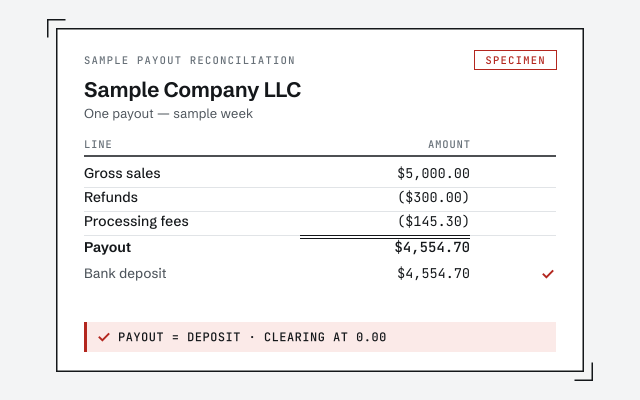
A Square payout is never your gross sales — Square nets its processing fee out before it transfers, and tips and refunds sit in between too. Square reconciliation splits each payout back into gross sales, fees, tips, and refunds through a clearing account, so every deposit ties to the bank and your revenue is stated at full value instead of quietly understated by the fee.

Last reviewed July 2026

  • Every payout tied to the deposit
  • Gross sales stated in full, fees shown as a cost
  • A senior specialist, not a pool

What QuickBooks Square reconciliation really means

QuickBooks Square reconciliation means tying each Square payout back to the sales that produced it — because the money Square deposits into your bank is never the same figure as what you rang up. Square nets its processing fee out of the total before it transfers, so a batch of card sales arrives in your account already reduced. Add tips that belong to staff and refunds returned to customers, and the gap between gross sales and the deposit is real, structural, and there every single batch.

Most Square files we see are not wrong because the owner did anything careless — they are wrong because the natural thing to do, booking the deposit as "sales," quietly understates revenue by the amount Square kept and buries the fee where nobody can see it. Do that for a year and the profit-and-loss reports sales that are too low and a cost of doing business that is invisible. The fix is a specific piece of bookkeeping, not a matter of opinion, and this page walks through the mechanics we actually apply. It is one integration lens on a full QuickBooks cleanup — the same reconciliation discipline, pointed at how Square pays.

Why your Square payout never equals your gross sales

Your Square payout is smaller than your gross sales because Square deducts its processing fee before it sends you the money. That is the single fact that drives the whole reconciliation: the fee is netted out at the source, so it never shows up as a separate withdrawal on your bank statement — it is simply missing from the deposit. If you book the deposit as your sales figure, you have understated revenue by exactly the fee, and you have no expense line recording what that fee cost you.

The fee is not the only thing sitting between the two numbers. Tips a customer adds on the card reader arrive inside the payout but are owed back to staff, so they are not your income. Refunds you issued reduce the payout, because Square hands the money back to the customer and takes it out of what it transfers to you. And timing pulls the dates apart: a sale rung up on one date can settle into your bank on another, depending on your transfer settings. Each of those is a specific, recordable piece — and when all of them are broken out, the deposit and the sales finally agree. We never quote what Square charges, because Square sets its own pricing and it varies by card type and plan; we read the actual fee Square reported on each batch and record that.
How the clearing account method reconciles each Square payout

The clean way to reconcile a net payout against gross activity is a clearing account: a holding account in QuickBooks that gross sales flow into and the net Square deposit flows out of, so the difference between them is captured as the fees, tips, and refunds that explain the gap. When the clearing account nets to zero for a batch, that batch is fully reconciled — the account balancing to zero is the proof.

Square payout reconciliation

One Square batch reconciled through a clearing account so the net payout ties to the bank Left: one Square batch broken into gross sales, tips collected, processing fee, and refunds, netting to the payout Square transfers. Right: each piece routed to its account in QuickBooks through a clearing account — gross sales to income, tips to a payroll liability, the fee to merchant-fee expense, refunds as contra-revenue — with the net deposit clearing the account to zero, marked with a verified tick. Amounts are illustrative, not a measured statistic. SQUARE · ONE BATCH IN QUICKBOOKS CLEARING ACCOUNT Gross sales RANG UP Tips added OWED OUT Processing fee NETTED Refunds RETURNED Net payout TO BANK Sales income INCOME Tips payable LIABILITY Merchant-fee expense EXPENSE Sales returns CONTRA Bank deposit CLEARS TO 0
One Square batch is not one number: gross sales, tips, the netted fee, and refunds each route to their own account through a clearing account, and the net deposit clears it to zero — which booking the payout as a lump "sales" entry never does. Amounts and line names are illustrative.

In practice the entries are consistent from batch to batch. Gross sales post to income, so revenue is stated at full value. Tips post to a liability, because they are owed back out. Square's processing fee — the exact figure Square reported, never a rate we assumed — posts to a merchant-fee expense, so the cost is visible. Refunds post as a reduction of sales. Each of those runs through the clearing account, and then the real bank deposit clears it. If the account does not land on zero, the batch does not tie, and the difference points straight at what is missing. That verification loop — the account must clear — is the whole reason the method beats booking the deposit as sales. It is the same core discipline you can read in our bank reconciliation guide.

How Square processing fees are recorded without a fabricated rate

Square's processing fee is recorded as its own expense line for the exact amount Square reported on the batch — never a rate we printed on a page. Because Square deducts the fee before it transfers, the fee is not a withdrawal you will ever see on the bank statement; it is simply the reason the deposit is smaller than the sales. If it is not recorded deliberately, it disappears, and your revenue silently absorbs it.

We do not quote what Square charges, and we are deliberate about why. Square sets and changes its own pricing, and the effective fee differs by card type, by plan, and by whether a payment was tapped, dipped, or keyed — so any single number we asserted could be wrong for your account and would be exactly the kind of fabricated figure this practice refuses to print. What we do instead is read the fee Square itself reports for each batch and record that real figure. Your gross sales end up stated in full and your true cost of accepting cards ends up visible as an expense — which is what lets you actually see what Square is costing you, rather than guessing.

How tips, refunds, and chargebacks move through the reconciliation

Tips, refunds, and chargebacks are each recorded to their own place rather than left inside the sales figure, because each one means something different about whose money it is. A tip is owed to staff, a refund is money returned to a customer, and a chargeback is a disputed sale reversed — and lumping any of them into "sales" makes the books lie about all three.

Tips taken on the Square reader arrive in the payout but belong to staff, so they post as a liability until they are paid out — the same rule that governs card tips in restaurant payroll, which is why Square reconciliation and restaurant books so often travel together. Refunds post as a reduction of sales, a contra-revenue entry, so net sales reflect what you actually kept rather than the gross before returns. Chargebacks and disputes move the same way as refunds but on their own timing — a disputed charge can be pulled back in a later batch than the original sale, landing days after the fact. That timing mismatch is precisely what a clearing-account reconciliation is built to surface: the batch that will not clear to zero is the one carrying a reversal you have not yet accounted for.

How same-day and next-day payout timing creates the deposit gap

Payout timing creates a gap because the date a sale is rung up and the date its money lands in your bank are often not the same. Whether your Square transfers arrive the same day or the next business day depends on the transfer settings on your account, and either way a batch of sales from one date can settle into the bank on another. That is normal, not a problem — but only if the books are built to handle it.

The clearing account is what absorbs the timing. The sale posts to the clearing account on the date it happens; the deposit clears the account on the date it actually arrives; and the account only nets to zero once both sides are present. So a batch that straddles a month-end — sales on the last day, deposit on the first of the next — still reconciles cleanly, sitting in the clearing account as an in-transit amount until the deposit catches up. Books that post sales directly against the deposit have no way to represent that in-transit state, which is why month-end is where lump-sum Square bookkeeping breaks down first. This is the same in-transit logic covered in the bank reconciliation guide, applied to how Square pays.

How it goes

How a Square reconciliation engagement starts

Whether you need a one-time catch-up of unreconciled months or ongoing monthly work, the shape is the same: a free review, a pass to set up the clearing-account method, reconciliation to the bank, and a handback. Accounts that are months behind start with a catch-up; accounts that are current move straight to a clean monthly rhythm.

  1. Free review

    Day 0

    Read-only look at the file: how Square payouts are posting today, and how many batches are unreconciled.

  2. Set the method

    Week 1

    Clearing account built; gross sales, fees, tips, and refunds mapped so each batch splits the same way.

  3. Reconcile

    Weeks 1–2

    Each payout tied to its deposit, the clearing account cleared to zero, fees recorded from Square's own figures.

  4. Hand back or run it

    Ongoing

    A file that ties, a written summary of what changed, and either a handback or ongoing monthly bookkeeping.

What changes

Square books reconciled right vs. booked as a lump deposit

A file that reconciles Square through a clearing account states revenue in full, shows the fee, and ties every payout; a lump-deposit file hides all three. Here is the difference line by line.

Reconciled Square books vs. lump-deposit setup
Reconciled through a clearing account Booked as a lump deposit
Every payout ties to the bank deposit
Gross sales stated in full
Processing fee visible as an expense
Tips held as a liability, not income
Refunds reduce sales as contra-revenue
In-transit timing gaps handled at month-end
Fee recorded from Square's real figures
Verdict A file you and your CPA can trust Revenue understated, cost invisible

What it costs

What Square reconciliation costs

Real ranges depend on sales volume, how many months are unreconciled, and whether you need a one-time cleanup or ongoing work. The floors shown are published starting points; a free review sets your scope.

Square reconciliation pricing
Engagement Typical range Timeline What's included
From $1,500 2–4 weeks Build the clearing-account method, re-split back payouts into sales, fees, tips, and refunds, tie every batch.
From $400/mo Ongoing Each payout reconciled, fees and tips kept current, a monthly file that ties, one entity.
From $1,500 Scoped Several Square locations or channels consolidated, class or location tracking, one reconciled file.
Get your range after a free review

Square catch-up / cleanup

Typical range
From $1,500
Timeline
2–4 weeks
Included
Build the clearing-account method, re-split back payouts into sales, fees, tips, and refunds, tie every batch.

Monthly bookkeeping

Typical range
From $400/mo
Timeline
Ongoing
Included
Each payout reconciled, fees and tips kept current, a monthly file that ties, one entity.

Multi-location / multi-channel

Typical range
From $1,500
Timeline
Scoped
Included
Several Square locations or channels consolidated, class or location tracking, one reconciled file.
Get your range after a free review

How QBSpecialist's Square reconciliation is different

One senior specialist sets up the clearing account and reconciles your payouts from a documented plan — not an offshore pool learning how Square nets its fees on your books. Every Square file we take on gets the same mechanics applied deliberately: gross sales in full, the real fee recorded as a cost, tips as a liability, refunds as contra-revenue, and each batch tied to the deposit.

Our discipline is verification, not assertion. The clearing account has to clear to zero, and we show you the tie rather than telling you it balances. We record the fee Square actually reported, never a rate we made up, and we keep access minimal — read-only access to your file or a screen-share you control, never your banking logins or your Square admin credentials. And we stay in our lane: we keep the books accurately and hand your CPA a file that already ties, but we do not file returns or give tax advice. That honesty about where our job ends is part of doing it well. You can read the full method on our methodology page, or see how the same craft applies across the other industries we work in.

When NOT to hire us for Square reconciliation

Skip us when your file already works. If every Square payout already ties to its deposit, your gross sales are already stated in full with the fee shown as a cost, and your tips already sit as a liability, there is nothing here for us to fix — and no reason to pay someone to reconcile a file that already clears to zero.

Skip us, too, when what you actually need is a different professional. If you need a tax return prepared or advice on a tax position, that is your CPA's work, not ours. And if you run a low volume of Square sales and you are comfortable in QuickBooks, you may be able to set up the clearing-account method yourself in an afternoon with a cleanup checklist and no invoice from anyone. We will tell you which case you are in during the free review, even when the honest answer is that you do not need us.

How to verify our Square reconciliation

You don't have to take our word for it. Here is the evidence you can check — the deliverable you receive, the method we use to prove a payout ties, and our response commitment.

A real payout reconciliation

The exact worksheet tying one Square batch — gross sales, fee, tips, refunds — to the deposit and the clearing account cleared to zero.

Our methodology

Each payout reconciled to its deposit, the clearing account cleared to zero, the fee taken from Square's own figures. Read the discipline we apply.

Read the full method

Response commitment

A real specialist replies within one business day, in writing.

Remote-first, nationwide

Mon–Sat · 8am–6pm CT

We work entirely remote — secure read-only access to your file, screen-share whenever you want to watch, and every reconciliation and correction documented in writing.

  • Texas
  • Florida
  • California
  • New York

Questions about QuickBooks Square reconciliation

Why doesn't my Square deposit match my sales in QuickBooks?

Because a Square payout is a net figure, not gross sales. Square nets its processing fee out of the money before it transfers, and tips owed to staff and refunds issued to customers also sit between what you rang up and what landed in the bank. When those pieces are not broken out, the deposit and the sales can never tie. Square reconciliation splits each payout back into its parts so the two agree to the penny.

What is a Square clearing account and why use one?

A clearing account is a holding account in QuickBooks that gross sales flow into and the net Square payout flows out of. You record the full gross sale, tips, and refunds into the clearing account, post Square's processing fee as an expense out of it, and then the actual bank deposit clears the account back toward zero. When the clearing account nets to zero for a batch, that batch is fully reconciled. It is the cleanest way to reconcile a net payout against gross activity.

How are Square processing fees recorded in QuickBooks?

Square deducts its processing fee before it sends the payout, so the fee never appears as a separate withdrawal on your bank statement — it is already netted out. That means the fee has to be recorded as its own expense line inside the reconciliation, not ignored. We post gross sales as income and the fee as a merchant-fee expense, so your revenue is stated at full value and the fee is visible as a cost, rather than sales being silently understated by the amount Square kept.

Do you name a specific Square fee rate?

No. Square sets and changes its own pricing, and rates differ by card type, plan, and whether a payment was tapped, dipped, or keyed. We do not quote a rate on this page because any number we printed could be wrong for your account. What we do is read the actual fee Square reported on each batch and record that exact figure, so the reconciliation uses your real cost rather than an assumed one.

How do tips taken on Square flow through QuickBooks?

Tips a customer adds on Square arrive inside the payout along with sales, but they are money owed back to staff, not restaurant or shop income. So a tip is recorded as a liability until it is paid out, not as revenue. Keeping tips separated in the reconciliation is what stops your sales from being overstated and your payroll from being short — and it is the same discipline restaurants need, which is why Square reconciliation and restaurant books overlap so often.

How are Square refunds and chargebacks reconciled?

A refund reduces a payout: Square returns money to the customer and takes it back out of what it transfers to you. In QuickBooks the refund is recorded as a reduction of sales — a contra-revenue entry — so your net sales reflect what you actually kept. Chargebacks and disputes move the same way but on their own timing, sometimes hitting a later batch than the original sale, which is exactly the kind of gap a clearing-account reconciliation is built to catch.

Do same-day and next-day Square payouts change the reconciliation?

They change the timing, not the method. Whether a payout arrives the same day or the next business day depends on the transfer settings on your Square account, and that timing is why a sale rung up on one date can land in the bank on another. The clearing account absorbs that gap: the sale posts when it happens, the deposit clears when it arrives, and the account only nets to zero once both sides are in. So the reconciliation still ties even when the dates do not line up.

Is Square reconciliation only for restaurants?

No. Square is common in restaurants, but it is just as common in retail shops, salons, markets, and service businesses that take cards in person or online — anywhere a card reader or Square Online store sits between the customer and the bank. The reconciliation mechanics are the same for all of them: gross sales in, fees and refunds out, tips held as a liability, and the net payout tied to the deposit. Only the sales mix differs.

We've never reconciled our Square account — can you catch it up?

Yes, and unreconciled Square accounts are one of the most common catch-ups we see, because the net-payout gap quietly understates revenue month after month. A catch-up means rebuilding the clearing-account method, going back through the payouts, and re-splitting each batch into gross sales, fees, tips, and refunds so the file finally ties. Once the method is in place, keeping it current each period is light work. The free review tells you how far off the books currently are.

How much does Square reconciliation cost?

It depends on your sales volume, how many months are unreconciled, and whether you need a one-time cleanup or ongoing monthly work. We set a fixed scope and a fixed fee after a free review rather than quoting a number that has to change later. The floors on this page are published starting points; the review sets your real range.