Skip to content
QB Specialist

QuickBooks Amazon reconciliation

QuickBooks Amazon reconciliation, done at the settlement level.

Amazon does not pay you per order — it disburses a net settlement, and that deposit hides your real sales behind referral fees, FBA fees, refunds, and reserves. Reconciliation means decomposing each settlement back into its parts in QuickBooks so the payout ties to gross sales, every fee is visible, and nothing is a mystery. We set that up, tie every settlement to the deposit, and keep it current.

Last reviewed July 2026

  • Every settlement decomposed and tied to the deposit
  • Amazon fees made visible, not buried
  • A senior specialist, not a pool

What QuickBooks Amazon reconciliation really means

QuickBooks Amazon reconciliation means taking each net payout Amazon deposits into your bank and breaking it back into the real transactions behind it — product sales, the fees Amazon deducted, the refunds it returned to buyers, and any reserve it held — so the deposit ties to what you actually sold. It is a specific discipline because Amazon pays differently from a normal customer: not one order at a time, but a lump settlement that already has everything netted out of it.

Most Amazon seller files we see are not broken because the owner did anything foolish — they are broken because a settlement deposit is easy to post as a single line and impossible to trust once you do. Book the payout as "sales" and your revenue reads far too low, because every fee Amazon took vanished into that one number, and none of your selling costs are anywhere in the books. This is the ecommerce version of a discipline that applies to every payment processor, and it is one channel of a full QuickBooks for ecommerce setup. When months of settlements have already been posted as lumps, untangling them is a focused QuickBooks cleanup — the same craft, pointed at Amazon's books.

What's inside an Amazon settlement report

An Amazon settlement report is the itemized statement behind each disbursement — the detailed record of every transaction Amazon rolled into the money it sent you. Amazon disburses on a recurring settlement cycle rather than per order, so each report covers a closed period and nets to exactly one deposit. That report, not the bank line, is where the reconciliation starts.

The reason reconciliation takes real work is the number of distinct line types packed into one settlement. A single report typically carries product sales (what buyers paid for your items), referral fees (Amazon's per-sale commission, which varies by category), FBA fulfillment fees (the per-unit charge to pick, pack, and ship, which varies by size and weight), FBA storage fees (the ongoing charge to warehouse inventory), refunds returned to buyers, reimbursements Amazon credits back for lost or damaged units, and a reserve Amazon may hold or release. We name these categories factually and do not quote fee rates, because they differ by product and change over time — what is constant is that each type has to land in its own account. The deposit is simply the arithmetic of all of them: sales, minus every fee and refund, plus or minus the reserve movement, equals the net Amazon wired.
Why your Amazon deposit never equals your sales

The gap between what you sold and what Amazon deposited is the whole reason this reconciliation exists — the deposit is a net figure with fees and refunds already subtracted and a reserve possibly withheld, so it is structurally smaller than gross sales and never equal to it. The job is to account for every dollar of that gap rather than let it disappear into a lump entry.

Settlement decomposition

One Amazon settlement decomposed into its parts so the net payout ties to the bank Left: one Amazon settlement broken into product sales, referral fees, FBA fees, refunds, and a held reserve, netting to the payout. Right: each line routed to its account in QuickBooks — sales to income, referral fees to selling-fee expense, FBA fees to fulfillment expense, refunds to a contra-revenue account, the reserve to a receivable — and the net payout reconciled to the bank, marked with a verified tick. Amounts are illustrative, not a measured statistic. ONE SETTLEMENT IN QUICKBOOKS DECOMPOSE & TIE Product sales GROSS Referral fees DEDUCTED FBA fees DEDUCTED Refunds RETURNED Reserve WITHHELD Net payout TO BANK Sales income INCOME Selling fees EXPENSE Fulfillment fees EXPENSE Refunds & allowances CONTRA Amazon reserve RECEIVABLE Bank deposit TIED ONE NET DEPOSIT EVERY LINE LANDS SOMEWHERE
A settlement is not one number: split into sales, each fee type, refunds, and the reserve, every piece routes to its own account and the net payout finally ties to the bank — which a single lump "sales" entry never does. Amounts and line names are illustrative.

Reconciled properly, that gap stops being a mystery and becomes a set of readable costs. You can see what referral fees are taking out of each dollar, what fulfillment is really costing, how much came back as refunds, and how much is temporarily held in reserve. None of it requires trusting a number — the settlement report is the evidence, and the reconciliation is the arithmetic that proves the deposit. It is the same principle as a bank reconciliation, where every item on the statement must be accounted for before the balance ties; here the settlement report plays the role of the statement.

How referral fees and FBA fees are recorded in QuickBooks

Amazon's fees are recorded as expenses in their own accounts, not netted invisibly against sales, so you can actually read what selling on Amazon costs you. The two families of fee behave differently and belong in different places: the referral fee is a commission on the sale, while FBA fees are the cost of fulfillment and storage.

The referral fee is what Amazon charges for the sale itself — a percentage that varies by product category — and it belongs in a selling-fee expense account so your commission cost is visible on the profit-and-loss. FBA fulfillment fees are the per-unit charges to pick, pack, and ship an order, and FBA storage fees are the recurring cost of keeping inventory in Amazon's warehouses; both are fulfillment costs and belong grouped as such, separate from the referral commission. Keeping these apart is what turns the payout gap into management information: a seller who can see fulfillment cost as its own line can decide what to send to FBA and what to fulfill another way. We do not quote the rates — they differ by item and change — but we make sure each fee type Amazon reports lands in the account that makes it readable.

How refunds, reimbursements, and reserves reconcile

Refunds, reimbursements, and reserves are the three items sellers most often lose track of, and each has a correct place in the reconciliation. A refund reduces revenue, a reimbursement adds it back, and a reserve is money held rather than lost — get those three straight and the settlement ties.

A refund is money Amazon returned to a buyer, and it belongs as a contra-revenue reduction against sales, not as an expense and never ignored — booked correctly, your net sales tell the truth about what you kept. A reimbursement is the opposite: a credit Amazon issues when a unit is lost or damaged in its network, and it has to be recorded so it is not mistaken for a sale. The reserve is the one that confuses most sellers, because it makes a deposit smaller for a reason that has nothing to do with sales: Amazon holds an amount back as a buffer and releases it in a later settlement. Recorded as a receivable — money Amazon owes you — the reserve explains the shortfall in one period and clears when the next settlement releases it, so both periods reconcile instead of leaving a permanent unexplained gap. When those movements have gone unrecorded for months, straightening them is exactly the kind of focused work a QuickBooks cleanup exists to do.

How a settlement ties back to gross sales

A settlement ties back to gross sales when every component on the report is posted and the arithmetic closes: sales, minus referral fees, minus FBA fees, minus refunds, plus or minus the reserve movement, equals the net deposit on the bank statement. That equation is the proof — when it balances to the penny, the reconciliation is done and the deposit is trustworthy.

In practice we build one summarized entry per settlement that carries each line type to its account, then confirm the net matches the deposit that actually cleared the bank. Gross sales sit in income at full value; the fees sit as expenses; refunds reduce revenue; the reserve sits as a receivable until released. Because the entry is built from the settlement report, it reconciles against the bank the same way every period — the first one takes the setup, and each one after follows the same shape. This is the identical discipline behind every payout reconciliation, whether the money comes from Amazon, a card processor, or another marketplace; the line names change, the method does not. You can read the standard we hold every reconciliation to on our methodology page.

How it goes

How an Amazon reconciliation engagement starts

Whether you need a one-time catch-up or ongoing monthly work, the shape is the same: a free review, a pass to set up the settlement decomposition, reconciliation of each payout to the bank, and a handback. Sellers who are months behind start with a catch-up; sellers who are current move straight to a clean monthly rhythm.

  1. Free review

    Day 0

    Read-only look at the file: how settlements are posting today, which fees are missing, and how far behind the books are.

  2. Set the mapping

    Week 1

    Accounts built for sales, referral fees, FBA fees, refunds, and reserves; the settlement entry structured once.

  3. Reconcile

    Weeks 1–2

    Each settlement decomposed and tied to its deposit; reserves recorded as receivables; refunds and reimbursements sorted.

  4. Hand back or run it

    Ongoing

    A file that ties, a written summary of what changed, and either a handback or ongoing monthly bookkeeping.

What changes

Settlement decomposed vs. posted as a lump

A file that decomposes each settlement tells the truth about sales, fees, and reserves; a file that posts the net deposit as one line hides all three. Here is the difference line by line.

Decomposed settlements vs. lump-sum deposits
Settlement decomposed Posted as a lump
Gross sales recorded at full value
Referral fees visible as an expense
FBA fulfillment and storage fees separated
Refunds reduce revenue correctly
Reserves recorded as a receivable
Marketplace-facilitator tax kept as pass-through
Net payout ties to the bank deposit
Verdict A file you and your CPA can trust Understated revenue nobody can act on

What it costs

What Amazon reconciliation costs

Real ranges depend on settlement volume, channels, and how far behind the books are. The floors shown are published starting points; a free review sets your scope.

Amazon reconciliation pricing
Engagement Typical range Timeline What's included
From $1,500 2–4 weeks Decompose past settlements, restore missing fees and refunds, rebuild the accounts, reconcile to the bank.
From $400/mo Ongoing Each settlement decomposed and tied, reserves tracked, fees and refunds kept current, one marketplace.
From $1,500 Scoped Amazon plus other marketplaces or a storefront consolidated into one reconciled file.
Get your range after a free review

Amazon catch-up / cleanup

Typical range
From $1,500
Timeline
2–4 weeks
Included
Decompose past settlements, restore missing fees and refunds, rebuild the accounts, reconcile to the bank.

Monthly bookkeeping

Typical range
From $400/mo
Timeline
Ongoing
Included
Each settlement decomposed and tied, reserves tracked, fees and refunds kept current, one marketplace.

Multi-channel

Typical range
From $1,500
Timeline
Scoped
Included
Amazon plus other marketplaces or a storefront consolidated into one reconciled file.
Get your range after a free review

How QBSpecialist's Amazon reconciliation is different

One senior specialist sets up and reconciles your file from a documented plan — not an offshore pool learning what a settlement report is on your books. Every Amazon seller we take on gets the same mechanics applied deliberately: settlements decomposed, fees made visible, reserves tracked, net payouts tied to the deposit.

Our discipline is verification, not assertion. We tie each settlement to the deposit and show you the arithmetic, rather than telling you it balances. Access stays minimal — read-only access to your file or reports you export, or a screen-share you control, never your Amazon Seller Central admin credentials or your banking logins. And we stay in our lane: we keep the books accurately and consistently and hand your CPA a file that already ties, but we do not file returns, set positions on marketplace-facilitator or income tax, or give tax advice. That line is deliberate, and being honest about where our job ends is part of doing it well. You can read the full method on our methodology page.

When NOT to hire us for Amazon reconciliation

Skip us when your file already works. If each settlement already decomposes into sales, fees, refunds, and reserves, your net payouts already tie to the bank, and your profit-and-loss already shows full gross sales with fulfillment cost visible, there is nothing here for us to fix — and no reason to pay someone to reconcile a file that already ties.

Skip us, too, when what you actually need is a different professional. If you need last year's return prepared, a position on where you owe sales tax, or advice on nexus, that is your CPA's work, not ours. If your volume is low enough that a single monthly summary entry keeps you square and you are comfortable in QuickBooks, you may be able to maintain it yourself with a cleanup checklist and no invoice from anyone. We will tell you which case you are in during the free review, even when the honest answer is that you do not need us.

How to verify our Amazon reconciliation

You don't have to take our word for it. Here is the evidence you can check — the deliverable you receive, the method we use to prove a settlement ties, and our response commitment.

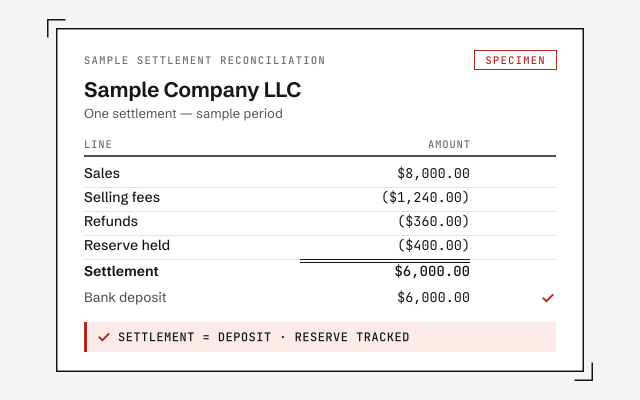
A real settlement reconciliation

The exact worksheet decomposing one Amazon settlement into sales, fees, refunds, and reserve, tied to the deposit.

Our methodology

Each settlement decomposed and reconciled to the deposit, every fee traced to its account. Read the discipline we apply.

Read the full method

Response commitment

A real specialist replies within one business day, in writing.

Remote-first, nationwide

Mon–Sat · 8am–6pm CT

We work entirely remote — secure read-only access to your file or exported reports, screen-share whenever you want to watch, and every reconciliation documented in writing.

  • Texas
  • Florida
  • California
  • New York

Questions about QuickBooks Amazon reconciliation

Why doesn't my Amazon payout match my sales in QuickBooks?

Because a payout is never the same number as your sales. Amazon takes referral fees, FBA fulfillment and storage fees, refunds it returned to buyers, and any reserve it holds back — all before it wires you the net. If you post the deposit as a single lump of income, your books show far less revenue than you actually made and none of the fees you actually paid. Reconciliation splits the settlement into those parts so the net payout ties back to gross sales.

What is an Amazon settlement report?

It is the itemized statement Amazon produces for each disbursement — the detail behind the money that lands in your bank. It lists the transactions in that period as line types: product sales, referral fees, FBA fees, refunds and reimbursements, and any reserve adjustment, netting to the amount deposited. The settlement report is the source document for the reconciliation the way a bank statement is for a bank reconciliation: everything on it has to be accounted for before the deposit ties.

How often does Amazon pay out?

Amazon disburses on a recurring settlement cycle rather than per order — for many sellers that is roughly every two weeks, though the cadence and any reserve terms are set by Amazon and can differ by account. The reconciliation does not depend on the exact schedule: whatever the cycle, each settlement is a closed period with its own report, and we tie that period's activity to that period's deposit. We describe the mechanics structurally and do not assert a fixed schedule for your specific account.

Do you record every Amazon order individually?

Usually no, and usually you should not want to. For most sellers the right unit of reconciliation is the settlement, not the order: one summarized entry per settlement period that captures sales, each fee type, refunds, and the reserve, tying to the one deposit. Order-level detail belongs in Amazon's reports and can be summarized in; duplicating thousands of individual orders into QuickBooks bloats the file without making the deposit tie any better. We map to the level that reconciles cleanly for your volume.

How do FBA fees show up in QuickBooks?

As expenses, not as a reduction hidden inside sales. FBA fulfillment fees and monthly storage fees are costs Amazon charges you to pick, pack, ship, and warehouse — so they belong in fee or fulfillment expense accounts where you can actually see what fulfillment costs you. Referral fees, the commission Amazon takes per sale, are a separate selling-fee expense. Grouping them by type is what lets you read what Amazon really costs your business, instead of a mystery gap between sales and payout.

What about the sales tax Amazon collects?

In most U.S. states Amazon collects and remits sales tax on your behalf as a marketplace facilitator, which changes how it should appear in your books — it is a pass-through Amazon handles, not revenue you keep and not a liability you remit for those sales. Recording it as income overstates your revenue. We keep marketplace-facilitator tax coded as the pass-through it is, and where your filing obligations are in question, that position is set with your CPA. We make QuickBooks reflect it; we do not decide the tax position.

Do you handle FBA inventory and COGS?

We structure the books so your product costs post to cost-of-goods-sold rather than being buried in general expenses, so gross margin is readable against sales. How precise inventory tracking gets depends on your operation and your systems — perpetual inventory through an integration, or periodic cost adjustments layered on purchases. The reconciliation focus of this page is the settlement-to-deposit tie; the inventory and COGS structure is part of the broader ecommerce bookkeeping we set up alongside it.

What is an Amazon reserve, and how does it affect the tie?

A reserve is money Amazon holds back from a payout — an amount it keeps as a buffer against refunds and chargebacks and releases in a later settlement. It matters for reconciliation because it explains part of the gap between what you sold and what was deposited: the missing amount is not lost, it is held. Recorded correctly, a reserve sits as a receivable — money owed to you by Amazon — and clears when the later settlement releases it, so both periods still tie.

We're way behind on Amazon books — can you catch up first?

Yes, and with Amazon that is often where we start. Sellers fall behind because the settlement detail is relentless and a lump deposit is easy to post and impossible to trust, so months of payouts pile up unreconciled. A catch-up decomposes each of those past settlements, restores the fees and refunds that were never recorded, and rebuilds the accounts so the picture is real. Once the file is current, keeping each new settlement tied is light, repeatable work. The free review tells you how far behind you actually are.

Do you replace our CPA or file our returns?

No. We keep the books — decomposing settlements, recording fees and refunds, reconciling payouts to deposits — so the file is accurate and current. Your CPA sets tax positions, handles sales-tax and income-tax filings, and gives tax advice. Clean, reconciled Amazon books make their work faster and cheaper; they do not replace it. We work alongside your CPA, not instead of them.

How much does Amazon reconciliation cost?

It depends on your settlement volume, how many marketplaces or channels you sell across, how far behind the books are, and whether you need a one-time catch-up or ongoing monthly work. We set a fixed scope and a fixed fee after a free review rather than quoting a number that has to change later. The floors on this page are published starting points; the review sets your real range.