Taken one at a time: data volume is the number of accounts, names, items, and years of history to carry and reconcile — more of it is more to map and prove. Version age matters because a very old Desktop file can need an extra conversion step to reach a format the destination reads, and older files tend to carry more accumulated quirks. Add-ons — inventory with its costing method, payroll history, multi-currency, job costing — each convert differently and each need their balances tied back to the old file, which is where the data conversion work concentrates. And cleanup first is the swing item: if the file is already wrong, moving it just relocates the mess, so a file that needs a cleanup before it moves is a larger job than one that is already tidy.
QuickBooks Desktop migration cost
QuickBooks Desktop migration cost
What a QuickBooks Desktop migration costs.
The cost of a QuickBooks Desktop migration is a fixed fee starting from $1,500 — no per-hour meter, no sticker price sight-unseen. The number is set by your file: how much data it holds, the Desktop version's age, its add-ons, and whether it needs cleanup first. Every figure here is a starting point until a free review sets your real range.
Last reviewed October 2026 by a Certified QuickBooks ProAdvisor
What this page is based on: our published floor and Intuit’s own move-your-file, what-transfers and pricing pages (checked October 2026)
Migration · what drives the cost
Read this as text
Four cost drivers shown on a low-to-high scale, from a lower floor on the left to a higher floor on the right: data volume raises the price moderately, an older version age raises it a little, add-ons like inventory and payroll raise it substantially, and whether the file needs cleanup first is the largest swing. The bar lengths are an illustrative qualitative scale, not measured amounts, and every price starts from the published floor.
- Fixed fee, quoted first
- Priced from your file
- Validation always included
What a QuickBooks Desktop migration costs
A QuickBooks Desktop migration is priced as a fixed fee, quoted after a free review, starting from $1,500. It is not billed by the hour, and it is not a number we can read off a menu, because the cost is a property of your file rather than a fixed rate for a fixed thing.
The move itself — reading the Desktop file, mapping it to QuickBooks Online, converting the data, and reconciling the result — is the same discipline every time. What changes the price is how much there is to move and how clean it is when it arrives. That is why we quote after a short, view-only look rather than before it: we would rather set a number we can stand behind than pad a guess to cover what we cannot see.
The three parts of the total cost
- The conversion. Intuit's own tool is built into QuickBooks Desktop — Company → Migrate this company file to QuickBooks Online for files from 2011 or later (Intuit, checked October 2026) — and running it is not a separate purchase. That is the baseline any fee should be compared against.
- The work around it. This is what a migration fee buys: preparing the file, deciding what converts differently, rebuilding what Intuit says does not move, and proving the result reconciles. Ours starts from $1,500, fixed after the review.
- The destination. QuickBooks Online is a monthly subscription billed by Intuit: Simple Start $38, Essentials $85, Plus $140, Advanced $340 on Intuit's US pricing page (checked October 2026), each company file its own subscription, payroll extra. The dated table and a year of each plan are on our QuickBooks cost page.
The costs a quote should name
Intuit's what-transfers article lists what does not move from Desktop, and each item is a small cost someone has to carry — you or the person you hire. Ask any quote whether it covers: memorized reports rebuilt as saved reports; bank connections set up again and matched against the converted history; every user re-invited with a role; price levels, budgets and memorized transaction groups re-created; current-year payroll, which arrives as lump sums, set up so year-to-date figures are right; and the apps connected to Desktop, re-connected to Online. A quote that covers the conversion but not these is a cheaper number for less work.
Timing is part of the cost too. Intuit discontinued QuickBooks Desktop 2023 after May 31, 2026 (Intuit's policy), so a 2023 file is already running without payroll, bank feeds or security updates — but Intuit says Desktop 2024 has no sunset date (Intuit, both checked October 2026). On 2024 or Enterprise, you can schedule the move for a quiet month rather than pay for a rush.
What moves the number
What drives the cost of a Desktop migration
Four things move the price of a Desktop migration: how much data the file holds, how old the Desktop version is, which add-ons it carries — inventory, payroll, multi-currency — and whether it needs a cleanup before it can move. The last one is usually the biggest swing.
Why the price is a fixed scope, set after a free review
We quote a fixed scope after a free, view-only review because a migration's cost is knowable only once we have seen the file — its size, its age, and its health. A fixed fee protects you from the open-ended meter that makes hourly migration billing so unpredictable.
The review is short and costs nothing: we look at the Desktop file on view-only access, note what will convert and what has to be rebuilt, flag any cleanup the file needs first, and then quote a single number for the scope we have described. Once that number is set, it does not move unless the scope does — and if we find something mid-job that changes it, we stop and tell you before doing the work, not after. If you hire us, the work itself uses QuickBooks' accountant access to make and log every change — never your bank logins — with your Desktop file reached by screen-share or a hosted copy. That discipline is the same one our methodology applies to the books themselves: no surprises, everything documented, the number you approve is the number you pay.
Two separate figures
Migration cost vs. cleanup cost
Migration cost and cleanup cost are two different figures for two different jobs: migration moves and reconciles the data you have, while cleanup fixes data that was wrong before it moves. Here is how they differ.
| Migration | Cleanup | |
|---|---|---|
| Moves data to the new file | ||
| Reconciles converted file to the old one | ||
| Fixes wrong or unreconciled entries | ||
| Priced from | Data volume, version age, add-ons | How much is wrong to fix |
| Best when | The file is tidy and just needs to move | The file is wrong before it moves |
| Verdict | Move it and prove it ties | Fix it, then move it |
Many files need both, and when they do we quote them as separate line items rather than one blended number, so you can see exactly what each buys. As a rule it is cheaper to clean a file before you move it than to untangle the same mess twice — once in each system — so where a cleanup is warranted, cleaning first and migrating second is usually the lower total cost.
Clean first, or move the mess
Read this as text
Two sequences compared. Path A, clean first: the Desktop file is cleaned, then migrated once, ending in one clean file — the mess is fixed once. Path B, move as-is: the file migrates with its errors, the same mess is relocated, and it ends up untangled twice, once in each system. Illustrative sequence comparison, not priced amounts.
What it costs
What a migration engagement costs
Every migration is a fixed engagement, quoted after the free review. The figures below are published starting floors; the review sets the real range for your file — a floor is a starting point, not a quote.
| Engagement | Starting price | Planned timeline | What's included |
|---|---|---|---|
| Standard migration | From $1,500 | Scoped at review | Move a tidy Desktop file — chart of accounts, names, open items, history, and balances — and reconcile the result to the old system. |
| Complex or large file | Custom fixed quote | Scoped at review | Large history, older versions, inventory, payroll, or multi-currency that need extra mapping and validation. |
| Cleanup + migration | Custom fixed quote | Scoped at review | Clean the Desktop file first, then migrate — quoted as two line items so each cost is visible. |
The figures above are floors, not quotes — a free view-only review sets the fixed price for your file. For the wider picture of how any QuickBooks move is scoped and reconciled, see the QuickBooks migration hub.
When a migration costs less, and when it costs more
A small, tidy, recent Desktop file costs the least to move; a large, old file that carries inventory or payroll and needs a cleanup first costs the most. Many files fall in between, and the review tells you where yours sits.
The cheapest migrations are files that are already clean and current: a handful of years of straightforward history, no inventory or payroll tangle, and a version recent enough to convert in one step. The most expensive share the opposite traits — many years of data, older versions needing an extra conversion pass, add-ons that each convert differently, and enough accumulated error that a cleanup has to come first. You can lower your own cost by tidying obvious problems before the review, or by having us clean and move in one planned sequence rather than fixing the same mess twice. Either way, you will know the number before any work starts, because the whole point of a fixed quote after a free review is that the price is settled before the migration begins.
How the price stays honest
You do not have to take a number on faith. Here is the evidence behind the quote — the deliverable you receive, the method that proves the converted file reconciles, and our response commitment.
Who’s responsible for your file
A Certified QuickBooks ProAdvisor handles your file from the review through the corrections to the hand-back — the same person throughout, never a rotating pool.
About QBSpecialist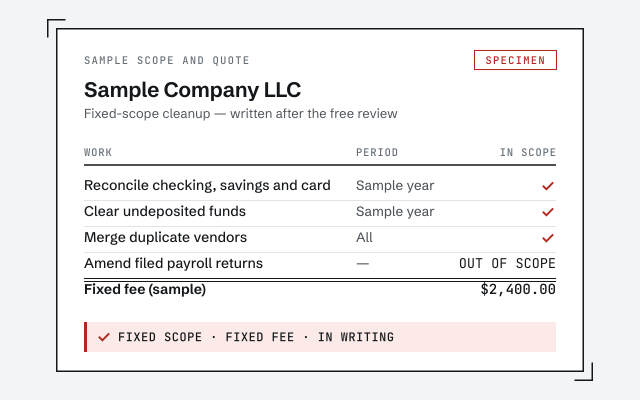 Illustrative example — not a client file.
Sample fixed-fee scope
The written scope and reconciliation record you receive — what moves, what is rebuilt, and the fixed fee it was quoted at.
Our methodology
How we prove the converted file reconciles to the old one. Read exactly how.
Read the full methodResponse commitment
A written reply within one business day.
Remote-first, nationwide
Mon–Sat · 8am–6pm CT
We migrate entirely remote — view-only access for the free review, QuickBooks' accountant access for the work, your Desktop file reached by screen-share or a hosted copy, a fixed fee quoted first, and every mapping decision documented in writing.
- All 50 states
- Remote-first
- View-only review
Questions about QuickBooks Desktop migration cost
How much does a QuickBooks Desktop migration cost?
It is a fixed fee, quoted after a free review, starting from $1,500. We do not bill by the hour or quote a price before seeing the file, because the number depends on your data volume, how old the Desktop version is, the add-ons it carries, and whether it needs a cleanup first. The review sets a real range for your file; the floor is the published starting point, not a quote.
Can I migrate QuickBooks Desktop to Online for free?
The conversion itself, yes: Intuit's tool is built into QuickBooks Desktop (Company, then Migrate this company file to QuickBooks Online), and running it is not a separate purchase. What you pay for with a specialist is everything around the button — preparing the file, mapping what converts differently, rebuilding what doesn't move, and proving the Online file reconciles to Desktop before you rely on it.
What does QuickBooks Online cost after the move?
The subscription is a separate bill you pay Intuit. On Intuit's US pricing page (checked October 2026), Simple Start is $38 a month, Essentials $85, Plus $140 and Advanced $340 — and inventory needs Plus or Advanced. Each company file you move becomes its own subscription, and payroll is an add-on.
Why can't you give me a price over the phone?
Because an honest migration price depends on the file, and we have not seen yours yet. A small, tidy file and a large file with years of inventory and payroll history are very different jobs, and quoting either blind would mean padding the number to cover what we cannot see. The free, view-only review is short, and it is how we quote a fixed fee we can stand behind.
Is the cleanup included in the migration price?
No — they are two separate figures, and we keep them separate on purpose. Migration moves and reconciles the data you have; cleanup fixes data that was wrong before it moves. If your file needs both, we quote them as distinct line items so you can see exactly what you are paying for, and decide whether to clean first or move as-is.
Does an older Desktop version cost more to migrate?
Often, yes. A very old version can require an extra conversion step or two to reach a format the destination reads, and older files tend to carry more accumulated history and more quirks to map. It is not a penalty we invent — it is real extra work, and we tell you during the review whether your version adds any.
Will the migration reconcile to my old file for that price?
Yes — validation is part of every migration we quote, not an add-on. The price includes reconciling the converted file back to the old system's trial balance and key reports, so you can see the numbers tie before you go live. Proving it reconciles is the reason to hire a specialist rather than run the wizard yourself, so we never leave it out.
Where to go next
- QuickBooks Desktop to Online migration— Move the file and prove the result ties.
- Desktop end of life— the dates that decide when the move has to happen
- Enterprise migration— what an Enterprise file adds to the work, and the fee
Not sure how bad it is?
Talk to a QuickBooks specialist.
Describe the file and a specialist will tell you which of these you are dealing with — including when the answer is that you don't need us.