Skip to content
QB Specialist

QuickBooks PayPal reconciliation

Reconcile PayPal in QuickBooks by treating PayPal as its own account.

PayPal is not your bank account — it is a separate place money sits before it transfers out. A payment lands in your PayPal balance, a fee comes out, refunds and disputes move it again, and only later does a transfer reach the bank for a different amount. Reconcile it by making PayPal its own account in QuickBooks, splitting the fee from every sale, and tying the transfers to the bank.

Last reviewed July 2026

  • PayPal set up as its own clearing account
  • Fees split from gross sales, not hidden
  • Transfers tied to the bank to the penny

What QuickBooks PayPal reconciliation really means

QuickBooks PayPal reconciliation means treating PayPal as a real account with its own running balance and tying every movement in and out of it — payments received, fees taken, refunds issued, disputes, and transfers to the bank — to what PayPal's own records show. It is not the same as reconciling your checking account, because PayPal is a stop the money makes on the way to the bank, not the bank itself.

Most PayPal problems we see come from one wrong assumption: that the money PayPal sends to your bank is your sales figure. It is not. By the time a transfer reaches your checking account, PayPal has already taken fees, possibly netted out refunds, and held or released disputed transactions — so the number that arrives is a mix of many things, and posting it as a single "PayPal income" deposit erases every detail behind it. Reconciling PayPal properly puts each of those pieces back where it belongs, so your income is true, your fees are visible, and the PayPal balance in QuickBooks matches the balance PayPal reports. This is one connector's view of the same discipline as a full QuickBooks cleanup and standard bank reconciliation — pointed at the way PayPal actually moves money.

Why your PayPal balance never matches your bank account

Your PayPal balance and your bank balance disagree because they are two separate accounts holding money at two different moments, and money moves between them on PayPal's schedule, not yours. A customer payment settles into your PayPal balance right away; that same money only reaches your bank when a transfer runs, which may be days later — and by then the amount has changed.

This is the timing gap, and it is the single most common source of PayPal confusion. On the day a sale happens, the money is in PayPal, not the bank. While it waits there, PayPal takes its fee, a customer refund might go out, and a dispute might freeze part of the balance. When a transfer finally sweeps to your bank, it carries whatever net is left at that instant — which is why a bank deposit almost never equals the sales that produced it. If you only ever record the bank side, you are recording the end of a story whose middle you never wrote down. Reconciling PayPal means capturing that middle: the balance that genuinely sits in PayPal between the sale and the payout has to live somewhere in QuickBooks, and that somewhere is a PayPal account of its own.
Why PayPal should be its own account in QuickBooks

PayPal should be set up as its own account in QuickBooks — a bank or clearing account, separate from your checking account — because money really does sit in PayPal with a running balance, and only an account can track a running balance. Folding PayPal into your bank account, or skipping it entirely and booking only the transfers, is what makes PayPal impossible to reconcile.

PayPal as a clearing account

One PayPal sale routed through a PayPal clearing account and swept to the bank Left: a single PayPal transaction broken into the gross sale received, the PayPal fee taken out, and a customer refund. Center: each piece posts to the PayPal clearing account in QuickBooks — gross sale up, fee and refund down — leaving a running PayPal balance. Right: a transfer sweeps the net to the bank, reconciled and marked with a verified tick. Amounts are illustrative, not a measured statistic. PAYPAL ACTIVITY PAYPAL CLEARING BANK Gross sale in INCOME PayPal fee OUT Refund OUT PayPal balance RUNS ON ITS OWN SWEEP Bank transfer TIED EVERY MOVEMENT RECORDED NET IS WHAT THE BANK SEES The transfer is smaller than the sale — the fee and refund stayed behind in PayPal. Amounts illustrative.
PayPal is a clearing account: the gross sale posts as income, the fee and refund post out, a running balance sits in PayPal, and only the net sweeps to the bank — which a single lump "PayPal deposit" never shows. Amounts and lines are illustrative.

Once PayPal is its own account, reconciliation becomes ordinary. A gross sale increases the PayPal balance, a fee decreases it, a refund decreases it, a dispute moves it, and a transfer moves the net to the bank — and the PayPal account is reconciled against PayPal's own statement exactly the way a checking account is reconciled against the bank's. The transfer between PayPal and the bank then appears once in each account, so nothing is double-counted and nothing is lost. This is the structural fix behind almost every PayPal problem: give the money the account it actually lives in.

How PayPal fees should post to QuickBooks

PayPal fees should post as an expense, split out from the gross sale, because PayPal takes its cut out of each payment before the money reaches your balance. The customer paid the full price; PayPal kept a fee; you received the rest. Recording only the rest — the net — quietly understates your revenue and makes your processing cost disappear.

The correct pattern records both sides: the full sale as income and the PayPal fee as a merchant-fee or processing expense, with the net being what actually lands in the PayPal balance. Do that on every transaction and two things become true that were false before — your income equals what customers actually paid, and your fees become a visible, trackable cost you can see adding up over a month. We do not assert what PayPal charges, because the fee is a percentage of the sale plus a fixed per-transaction amount and the exact rate depends on your PayPal plan, the payment type, and whether the sale crossed a border. What we assert is the discipline: whatever PayPal deducted on a given transaction is a real number on the PayPal record, and it belongs in a fee account, not swallowed into a smaller "sales" figure. When months of fees have already been buried in net deposits, pulling them back out is a standard part of a PayPal cleanup.

How refunds, disputes, and chargebacks reconcile

Refunds and disputes reconcile by recording each of them as the real, separate movement it is on the PayPal balance, rather than netting them silently against sales. A refund sends money back to a customer and reduces your PayPal balance; a dispute or chargeback can hold or pull money out while a case is open and then release or forfeit it when the case closes. Each of those is a line PayPal shows, and each has to be a line in QuickBooks.

A refund reverses a prior sale, so it posts against income — as a contra-sale or a refund line — and PayPal's treatment of the original fee is handled alongside it, because a processor may return part of a fee, keep it, or add nothing back. Disputes and chargebacks are messier by nature: money can leave your balance the moment a case opens, a separate dispute or chargeback fee may apply, and weeks later the balance moves again when the case resolves in your favor or against you. If those movements are not recorded as they happen, the PayPal balance in QuickBooks drifts away from the real one and the reconciliation breaks. Recording each event — the hold, the fee, the resolution — is exactly what keeps a disputed transaction from throwing off the whole month. Nothing here is guesswork: every one of these amounts is on the PayPal statement, and reconciliation is simply the practice of not leaving any of them out.

How multi-currency PayPal transactions reconcile

Multi-currency PayPal reconciles by tracking each currency balance separately and recording conversions as what they actually are — a transfer between currency balances at a rate that carries a conversion cost — instead of pretending every foreign sale arrived in your home currency. PayPal can hold balances in more than one currency and convert between them, and every conversion moves money at a rate with a spread, so the converted amount is never a clean textbook exchange.

The failure mode is treating a foreign sale as if it were domestic, which distorts both the revenue and the balance the moment currencies are involved. The honest approach keeps the foreign-currency activity visible: a sale received in another currency sits in that currency's PayPal balance, a conversion to your home currency is recorded with the conversion cost recognized, and the resulting home-currency amount is what flows onward. QuickBooks supports multi-currency for exactly this, and when it is set up deliberately, a business that sells across borders can still reconcile PayPal cleanly rather than watching foreign transactions quietly corrupt the numbers. Whether every business needs multi-currency turned on is a scoping question we settle in the review — many do not, and turning it on when it is not needed only adds complexity.

How to reconcile the PayPal account each month

You reconcile PayPal each month the same way you reconcile a bank account: take PayPal's own record of activity and its ending balance, match every payment, fee, refund, dispute, and transfer in QuickBooks against it, and confirm the QuickBooks PayPal balance equals PayPal's balance on the closing date. The difference from a bank reconciliation is only in what you are matching — many small movements instead of a handful of checks and card charges.

In practice the month closes in a sequence. Gross sales are confirmed against PayPal's activity so income is complete. Fees are checked to make sure each one was split out rather than netted. Refunds and disputes are matched to their PayPal events. Transfers to the bank are tied on both sides — once in the PayPal account and once in the bank account — so the sweep is not double-counted. Then the ending PayPal balance in QuickBooks is compared to the balance PayPal reports, and if they agree to the penny, the month is reconciled; if they do not, the gap points straight at whatever movement was missed. That closing discipline is the same one we describe for any account in our bank reconciliation guide — PayPal simply has more moving parts, which is exactly why it rewards doing it properly.

How it goes

How a PayPal reconciliation engagement starts

Whether you need a one-time cleanup or ongoing monthly work, the shape is the same: a free review, a pass to set PayPal up as its own account and fix how activity posts, reconciliation to PayPal's records and the bank, and a handback. Accounts that are months behind start with a catch-up; accounts that are current move straight to a clean monthly rhythm.

  1. Free review

    Day 0

    Read-only look at how PayPal is posting today — lump deposits, buried fees, unreconciled months — and how far behind it is.

  2. Set the account

    Week 1

    PayPal set up as its own clearing account; fee, refund, and transfer mapping fixed; multi-currency scoped if needed.

  3. Reconcile

    Weeks 1–2

    Gross sales, fees, refunds, disputes, and transfers matched to PayPal's records and the bank, month by month.

  4. Hand back or run it

    Ongoing

    A PayPal account that ties, a written summary of what changed, and either a handback or ongoing monthly reconciliation.

What changes

PayPal reconciled right vs. booked as a lump

A PayPal account set up properly ties to PayPal's records, shows true income, and makes fees visible; a lump-deposit setup hides all three. Here is the difference line by line.

PayPal reconciled properly vs. booked as a lump deposit
PayPal as its own account Lump deposit
PayPal balance reconciles to PayPal's records
Gross sales recorded as full income
Fees split out and visible
Refunds and disputes tracked
Transfers tied on both sides, not double-counted
Multi-currency handled honestly
The payout-vs-sales gap explained
Verdict A file you and your CPA can trust A number nobody can trace

What it costs

What PayPal reconciliation costs

Real ranges depend on transaction volume, how many months are unreconciled, and whether multiple currencies are involved. The floors shown are published starting points; a free review sets your scope.

PayPal reconciliation pricing
Engagement Typical range Timeline What's included
From $1,500 2–4 weeks Set PayPal up as its own account, split buried fees, reconstruct refunds and disputes, reconcile back months.
From $400/mo Ongoing PayPal reconciled to its records and the bank each month, fees and refunds kept current, one account.
From $1,500 Scoped Multiple currency balances tracked, conversions recorded honestly, one reconciled PayPal account.
Get your range after a free review

PayPal cleanup / catch-up

Typical range
From $1,500
Timeline
2–4 weeks
Included
Set PayPal up as its own account, split buried fees, reconstruct refunds and disputes, reconcile back months.

Monthly reconciliation

Typical range
From $400/mo
Timeline
Ongoing
Included
PayPal reconciled to its records and the bank each month, fees and refunds kept current, one account.

Multi-currency

Typical range
From $1,500
Timeline
Scoped
Included
Multiple currency balances tracked, conversions recorded honestly, one reconciled PayPal account.
Get your range after a free review

How QBSpecialist's PayPal reconciliation is different

One senior specialist sets up and reconciles your PayPal account from a documented plan — not an offshore pool guessing at which line is a fee and which is a refund. Every account we take on gets the same mechanics applied deliberately: PayPal as its own account, fees split from sales, refunds and disputes recorded, transfers tied to the bank.

Our discipline is verification, not assertion. We reconcile the PayPal balance to PayPal's own records and show you the tie, rather than telling you it balances. Access stays minimal — the PayPal activity you export and read-only or screen-share access to your QuickBooks file, never your PayPal login or the ability to move your money. And we stay in our lane: we keep the books accurate and consistent and hand your CPA a file that already ties, but we do not file returns, set tax positions, or give tax advice. You can read the full method behind that on our methodology page, and see the other reconciliations and industries we handle on the industries hub.

When NOT to hire us for PayPal reconciliation

Skip us when your PayPal already reconciles. If PayPal is already its own account, your fees are already split out, your refunds and disputes are already recorded, and the PayPal balance in QuickBooks already ties to PayPal's records each month, there is nothing here for us to fix — and no reason to pay someone to reconcile an account that already balances.

Skip us, too, when the volume is small enough to do yourself. If you take only a handful of PayPal payments a month and you are comfortable in QuickBooks, setting PayPal up as its own account and splitting the fees is something you can learn in an afternoon with a cleanup checklist and no invoice from anyone. And if what you actually need is a tax return prepared or a tax position set, that is your CPA's work, not ours. We will tell you which case you are in during the free review, even when the honest answer is that you do not need us.

How to verify our PayPal reconciliation

You don't have to take our word for it. Here is the evidence you can check — the deliverable you receive, the method we use to prove the account ties, and our response commitment.

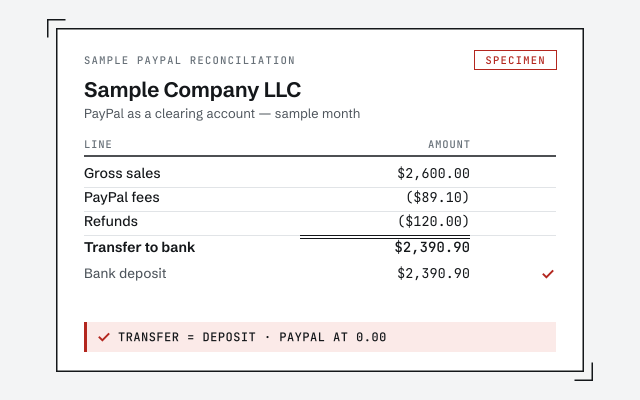
A real PayPal reconciliation

The exact worksheet tying gross sales, fees, refunds, and transfers to PayPal's own records and the bank.

Our methodology

Every movement recorded, the PayPal balance reconciled to PayPal's records. Read the discipline we apply.

Read the full method

Response commitment

A real specialist replies within one business day, in writing.

Remote-first, nationwide

Mon–Sat · 8am–6pm CT

We work entirely remote — secure read-only access to your file, screen-share whenever you want to watch, and every reconciliation and correction documented in writing.

  • Texas
  • Florida
  • California
  • New York

Questions about QuickBooks PayPal reconciliation

Why doesn't my PayPal balance match my bank account?

Because they are two different accounts holding money at two different times. A customer payment lands in your PayPal balance first, and it only reaches your bank when a transfer runs — which can be days later and is almost never the same amount, because fees came out and other transactions moved in between. Treating PayPal as its own account in QuickBooks, separate from the bank, is what makes both balances reconcile instead of fighting each other.

Should PayPal be set up as a bank account in QuickBooks?

Yes — PayPal should be its own account in QuickBooks, most often set up as a bank or clearing account, not folded into your checking account. Money genuinely sits in PayPal before it transfers out, so PayPal has a real running balance that has to be tracked on its own. When PayPal is treated as an account, a gross sale, the fee, a refund, and the eventual transfer to the bank each post as their own line, and the account reconciles to your PayPal statement.

How do PayPal fees get recorded in QuickBooks?

PayPal takes a fee out of each payment before the money reaches your balance, so the fee has to be split from the gross sale and posted to a merchant-fee expense account. If you only record the net amount that landed, your income is understated and your fees are invisible. Recording the full sale as income and the fee as an expense keeps both true. We do not assert PayPal's exact fee rate — it depends on your plan and the transaction type — but whatever PayPal charged, every fee should be captured, not buried.

How are PayPal refunds and disputes handled in QuickBooks?

A refund reverses the original sale and reduces the PayPal balance, so it posts against income or as a contra-sale, and any fee PayPal returns or retains is handled alongside it. Disputes and chargebacks are different: money can be held or pulled back out of your balance while the case is open, sometimes with a separate dispute fee, and then released or lost when it resolves. Each of those movements is a real line on the PayPal statement, so each gets recorded — that is how a disputed transaction stops throwing the reconciliation off.

Can you reconcile PayPal transactions in multiple currencies?

Yes. PayPal can hold balances in more than one currency and convert between them, and each conversion moves money at a rate with a spread built in. The clean approach is to track each currency balance and record conversions as what they are — a transfer between currency balances plus any conversion cost — rather than pretending every sale arrived in your home currency. That way the multi-currency PayPal balance still reconciles and foreign sales are not silently distorted by conversion.

My PayPal has been lumped into one 'sales' number for months — can you fix it?

Yes, that is one of the most common PayPal cleanups we do. When months of PayPal activity were booked as a single net transfer, the gross sales, the fees, the refunds, and the disputes are all compressed into one figure that hides every one of them. We rebuild it: PayPal set up as its own account, each payment, fee, refund, and transfer reconstructed from the PayPal records, and the account reconciled forward so it ties. It is a focused piece of a full QuickBooks cleanup.

Do you log in to my PayPal account?

No. We work from the PayPal activity you export or share and from read-only or screen-share access to your QuickBooks file — never your PayPal login or the ability to move your money. Reconciliation is a records exercise: it needs the transaction history, not the keys to the account. Keeping access minimal is deliberate, and it is the same way we work with every file.

How much does PayPal reconciliation cost?

It depends on your transaction volume, how many months are unreconciled, whether multiple currencies are involved, and whether it is a one-time cleanup or ongoing monthly work. We set a fixed scope and a fixed fee after a free review rather than quoting a number that has to change later. The floors on this page are published starting points; the review sets your real range.